
1. Introduction
This manual provides essential information for the installation, operation, and maintenance of your Varstrom 36V 250W E-Bike Conversion Kit. This kit is designed to transform a standard bicycle into an electric bicycle, offering enhanced riding capabilities with a powerful rear hub motor and an intuitive LCD display. Please read this manual thoroughly before installation and use to ensure safe and optimal performance.
2. Safety Information
Always prioritize safety when operating an electric bicycle. Failure to follow safety guidelines can result in serious injury or damage to the product.
- Wear a Helmet: Always wear an approved bicycle helmet while riding.
- Pre-Ride Checks: Before each ride, check the brakes, tire pressure, and ensure all connections are secure.
- Obey Traffic Laws: Follow all local traffic laws and regulations for bicycles and electric bicycles.
- Weather Conditions: Exercise caution when riding in wet or adverse weather conditions.
- Water Exposure: Avoid submerging the motor or electrical components in water.
- Professional Installation: If you are unsure about any installation steps, seek assistance from a qualified bicycle mechanic.
3. Package Contents
Verify that all components are present and undamaged upon opening the package.
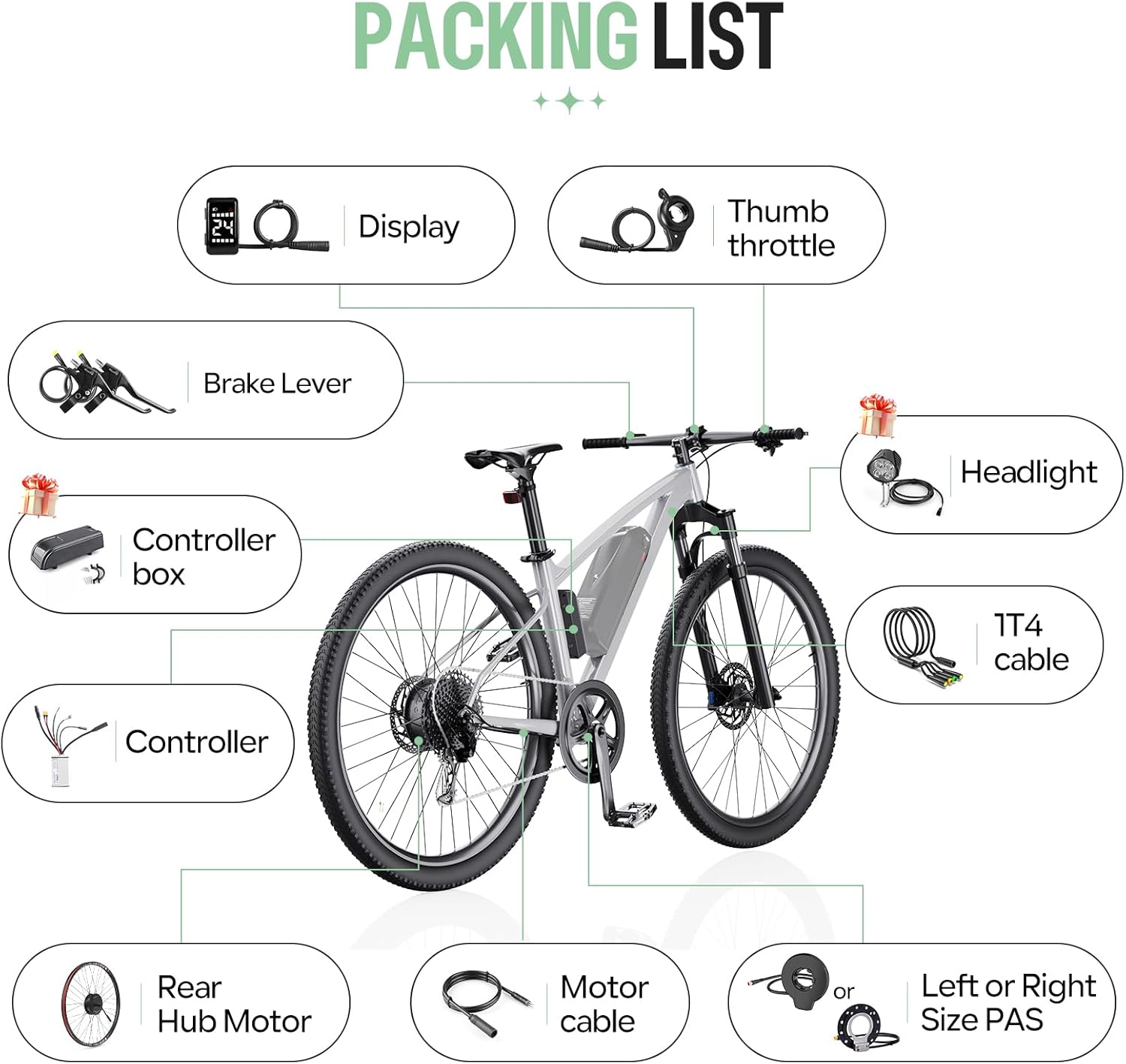
- 1 x 36V 250W Rear Hub Motor
- 1 x Controller
- 1 x DZ40 LCD Display
- 1 x Pair of Hydraulic Brake Sensors (or Mechanical Brake Levers, depending on selection)
- 1 x Thumb Throttle
- 1 x 1T4 Cable
- 1 x PAS Sensor (Left or Right side)
- Necessary mounting accessories
4. Specifications
4.1. Motor Specifications
- Voltage: 36V
- Power: 250W
- Maximum Torque: 35 Nm
- Motor Type: Brushless Geared Hub Motor
- Efficiency: ≥78%
- Maximum Speed: Up to 30 km/h (470 rpm)
- Wheel Size Compatibility: 26", 27.5", 28"/29"/700C
4.2. Controller Specifications
- Voltage: 36V
- Power: 250W
- Maximum Current: 14A
4.3. DZ40 LCD Display Specifications
- Screen Size: 1.3-inch LCD
- Visibility: Clear visibility even in sunlight
- Functions: Displays speed, battery status, headlight indicators, PAS level (0-5)
- Handlebar Diameter: 22.2 mm


5. Installation Guide
5.1. Compatibility Requirements
- Rear Dropout (OLD): Your bicycle's rear dropout must be between 135-138 mm.
- Brake Type: Compatible with bicycles equipped with disc brakes.
- Wheel Size: Ensure you select the correct wheel size (26", 27.5", 28"/29"/700C) for your bicycle.

5.2. Installation Steps
The conversion kit is designed for straightforward installation. Follow these general steps:
- Prepare Your Bicycle: Remove the existing rear wheel and any associated components that will be replaced.
- Install the Hub Motor: Mount the new rear hub motor wheel into the bicycle's rear dropout, ensuring it is securely fastened.
- Mount the Controller: Find a suitable location on your bike frame for the controller. Secure it using the provided mounting accessories.
- Install the DZ40 Display: Attach the DZ40 LCD display to your handlebar (22.2mm diameter).
- Install Brake Sensors/Levers: Replace your existing brake levers with the provided brake sensors or mechanical brake levers. Ensure they are properly aligned and functional.
- Install Thumb Throttle: Mount the thumb throttle on the handlebar in a comfortable position.
- Install PAS Sensor: Attach the Pedal Assist Sensor (PAS) to the crank arm area, ensuring proper alignment with the magnet disc.
- Connect Wiring: Use the 1T4 cable to connect the display, throttle, and brake sensors to the controller. Connect the motor cable to the controller. Ensure all connections are firm and waterproof.
- Secure Cables: Route and secure all cables neatly along the bicycle frame to prevent snagging or damage.

6. Operating Instructions
6.1. Powering On/Off
To power on the system, press and hold the power button on the DZ40 display. To power off, press and hold the power button again.
6.2. DZ40 Display Functions
The DZ40 display provides real-time information about your ride:
- Speed: Current riding speed.
- Battery Status: Indicates the remaining battery charge.
- Headlight Indicators: Shows if the headlights are on (if connected).
- PAS Level: Displays the current level of pedal assistance (0-5). Use the '+' and '-' buttons to adjust the PAS level.
6.3. Riding Modes
The Varstrom E-Bike Conversion Kit offers three flexible riding modes:
- Pure Electric Mode: Engage the thumb throttle to propel the bicycle without pedaling.
- Pedal Assisted Mode (PAS): The motor provides assistance as you pedal. The level of assistance can be adjusted via the DZ40 display.
- Physical Riding Mode: The motor is off, and the bicycle operates as a standard pedal bike.

7. Maintenance
Regular maintenance ensures the longevity and safe operation of your e-bike conversion kit.
- Motor: The brushless motor design requires low maintenance, contributing to its durability. Keep the motor free from excessive dirt and debris.
- Connections: Periodically check all electrical connections for tightness and signs of wear or corrosion.
- Brakes: Regularly inspect brake pads and cables (or hydraulic fluid) for wear and proper function. Adjust or replace as necessary.
- Tires: Maintain correct tire pressure as specified on your tire sidewall. Inspect tires for cuts or punctures.
- Cleaning: Clean the e-bike with a damp cloth. Avoid using high-pressure washers directly on electrical components.
- Storage: When storing the e-bike for extended periods, ensure the battery is charged to approximately 50-70% and stored in a cool, dry place.
8. Troubleshooting
If you encounter issues with your e-bike conversion kit, refer to the following common problems and solutions:
| Problem | Possible Cause | Solution |
|---|---|---|
| Motor not engaging | Loose electrical connection, low battery, PAS sensor issue, brake sensor engaged | Check all cable connections. Charge the battery. Ensure PAS sensor is correctly installed and not obstructed. Verify brake levers are fully released. |
| Display not turning on | Loose display cable, no power from battery, faulty display | Check display cable connection to controller. Ensure battery is connected and charged. If problem persists, contact support. |
| Inconsistent pedal assist | PAS sensor misalignment, dirty PAS sensor, incorrect PAS level setting | Check PAS sensor alignment and clean it. Adjust PAS level on the display. |
| Brakes not working effectively | Worn brake pads, loose cables, air in hydraulic system (for hydraulic brakes) | Inspect and replace worn brake pads. Adjust brake cable tension. For hydraulic brakes, bleeding may be required by a professional. |
If you cannot resolve an issue using this guide, please contact Varstrom customer support for further assistance.
9. Warranty and Support
For warranty information and customer support, please refer to the documentation provided with your purchase or contact your retailer. Keep your proof of purchase for warranty claims.
Manufacturer: Shenzhen Yihang Cross-border E-commerce Co., Ltd.


