
Introduction
This manual provides comprehensive instructions for the Shot Navi Evolve α Golf GPS Watch. Please read this manual thoroughly before use to ensure proper operation and to maximize the device's features. Keep this manual for future reference.

Image: Shot Navi Evolve α Golf GPS Watch banner, showcasing the device and its branding.
Product Overview
The Shot Navi Evolve α is a golf GPS watch designed to provide accurate distance measurements and course information. It features a large color display, multi-satellite positioning, and various functions to assist golfers.
Key Features:
- Multi-Positioning Support: Equipped with the latest U-blox M10 GPS chip, supporting Michibiki, GLONASS, and Galileo satellites for enhanced accuracy.
- 1.4-inch MIP Color LCD: Features a SHARP 1.4-inch MIP LCD for improved visibility and a larger display area.
- Dynamic Green Eye: Displays green undulations as a heatmap, automatically rotating the green shape in real-time to show distances to various points.
- Auto Measure: Automatically detects swings and records shot distances.
- Elevation Difference Guide: Provides distances adjusted for elevation changes.
- USB Type-C: Utilizes a versatile USB Type-C port for charging and data transfer.
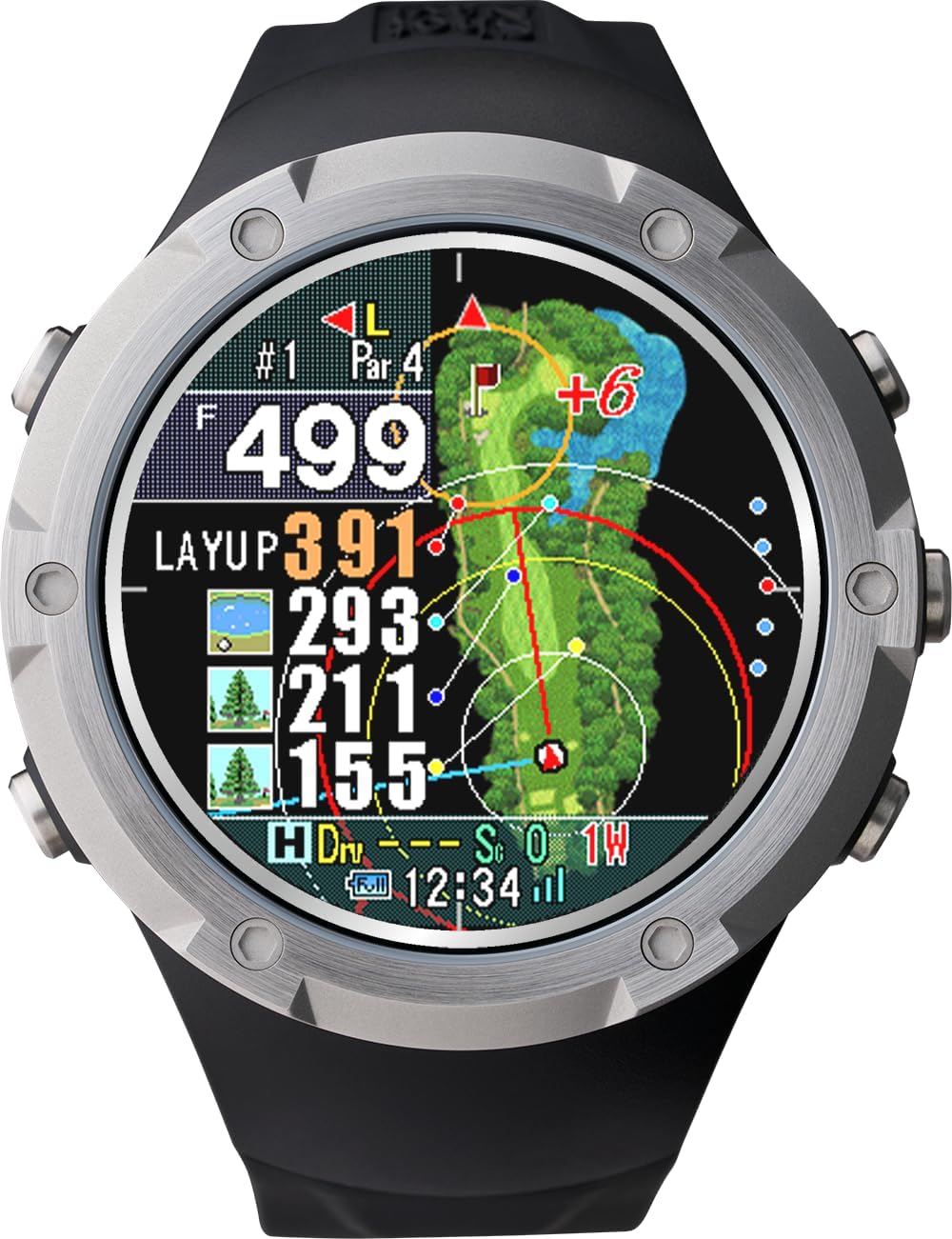
Image: Front view of the Shot Navi Evolve α Golf GPS Watch displaying a detailed golf course map with distances.
Setup
1. Charging the Device
Before initial use, fully charge the Shot Navi Evolve α. Connect the included USB Type-C cable to the device and a USB power adapter (not included) or a computer's USB port.
- A full charge typically takes approximately 3-4 hours.
- The battery life is approximately 9 hours in GPS mode.
2. Initial Power On and Satellite Acquisition
Press and hold the power button to turn on the device. For accurate GPS positioning, ensure you are in an open outdoor area with a clear view of the sky. The device will automatically search for and acquire satellite signals.

Image: Diagram illustrating the multi-satellite positioning system, including Michibiki, GLONASS, Galileo, and standard GPS satellites, enhancing measurement accuracy.
3. Course Data
The device comes pre-loaded with course data. For updates or to check supported courses, visit the Shot Navi official website.
- Approximately 5,409 domestic courses are supported.
- Approximately 59,331 overseas courses across 122 countries are supported.
For detailed course information, please visit the Shot Navi homepage.

Image: A world map indicating the extensive golf course coverage provided by Shot Navi, both domestically and internationally.
Operating Instructions
1. Basic Navigation
Once GPS signals are acquired, the device will automatically display the current hole and distances to the green. Use the side buttons to navigate through different screens and functions.

Image: Side view of the Shot Navi Evolve α Golf GPS Watch, highlighting the physical buttons used for navigation and function selection.
2. Dynamic Green Eye
This feature provides a visual representation of the green's undulations. The display automatically rotates to show the green's shape from your current position, along with distances to the front, center, and back of the green.

Image: A screen capture demonstrating the Dynamic Green Eye feature, which uses a heatmap to visualize green undulations and provides real-time rotation based on the user's position.
3. Auto Measure Function
The Auto Measure function automatically detects your swing and records the distance of your shot. This eliminates the need for manual input after each shot.

Image: The Auto Measure feature in action, showing automatically detected shot distances on the watch display.
4. Auto View Change
The device automatically switches views depending on your location on the course (e.g., near the tee ground, near the second shot, or around the green) to provide the most relevant information.

Image: Illustration of the Auto View Change function, displaying how the watch screen adapts to show different perspectives (tee ground, second shot, green area) as the user progresses through a hole.
5. Large Character View
For quick and easy distance checks, the device offers a large character view, displaying only the essential distance information in an enlarged font.

Image: The Large Character View on the Shot Navi Evolve α, showing distances prominently for enhanced readability.
Maintenance
1. Cleaning
Wipe the device with a soft, dry cloth. For stubborn dirt, use a slightly damp cloth and then dry thoroughly. Avoid using abrasive cleaners or solvents.
2. Storage
Store the device in a cool, dry place away from direct sunlight and extreme temperatures. When not in use for extended periods, ensure the battery is partially charged (around 50%) to prolong its lifespan.
3. Watch Case
An exclusive watch case is included to protect your device from impacts and scratches during transport and storage.

Image: The dedicated watch cases for the Shot Navi Evolve α, available in black and white, designed for protection and portability.
Troubleshooting
- Device does not power on: Ensure the device is fully charged. If the issue persists, try connecting it to a different USB power source.
- GPS signal not acquired: Move to an open outdoor area with a clear view of the sky. Avoid areas with tall buildings or dense foliage. Ensure the device's GPS function is enabled.
- Inaccurate distances: Ensure the device has a strong GPS signal. Course data may need to be updated.
- Screen not responding: Try restarting the device by holding down the power button. If unresponsive, allow the battery to fully discharge and then recharge.
If you encounter issues not covered here, please refer to the official Shot Navi support resources.
Specifications
| Feature | Specification |
|---|---|
| Product Model Number | Evolve α |
| Color | Black |
| Screen Size | 1.4 inch |
| Product Type | Golf GPS Watch |
| Battery Included/Built-in | Yes |
| Package Dimensions | 11.7 x 11.6 x 6.7 cm; 63 g |
| Brand | Shot Navi |
| Connectivity Technology | Bluetooth |
| Map Type | Worldwide |
| Included Components | Evolve α main unit, USB Type-C cable, Quick Guide/Warranty, Dedicated Watch Case |
| Battery Life | 9 Hours (GPS mode) |
| Mounting Type | Wrist Mount |
Warranty and Support
The Shot Navi Evolve α comes with a warranty. Please refer to the included Quick Guide/Warranty card for details regarding warranty coverage and terms. For technical support, product inquiries, or service, please contact Shot Navi customer service or visit their official website.
Shot Navi products are designed, developed, and manufactured consistently in Japan, ensuring high quality.

Image: "Made in Japan" logo, emphasizing the domestic design, development, and manufacturing of Shot Navi GPS products.