
TEMEIKE DL2
TEMEIKE Evaporative Air Cooler User Manual
Model: DL2
Introduction
Thank you for choosing the TEMEIKE Evaporative Air Cooler. This 4-in-1 unit combines the functions of an air cooler, humidifier, and fan, designed to provide efficient and comfortable cooling for your indoor spaces. Its portable, windowless design and user-friendly controls make it an ideal solution for various rooms. Please read this manual thoroughly before operation to ensure proper use, maintenance, and safety.
Important Safety Information
- Always place the unit on a stable, level surface to prevent tipping.
- Do not immerse the unit, power cord, or plug in water or other liquids.
- Unplug the appliance from the power outlet before cleaning, filling, or performing any maintenance.
- Keep the unit out of reach of children and pets.
- Do not block the air inlets or outlets.
- Use only clean water in the water tank. Do not add any chemicals or additives other than recommended by the manufacturer.
- Ensure the power cord is not damaged or pinched.
- This appliance is for indoor use only.
Package Contents
- TEMEIKE Evaporative Air Cooler Unit (Model: DL2)
- Remote Control
- Ice Packs (x6)
- User Manual
Product Overview
Familiarize yourself with the components of your TEMEIKE Evaporative Air Cooler.

Figure 1: TEMEIKE Evaporative Air Cooler with included remote and ice packs.

Figure 2: Touch Control Panel and Remote Control for easy operation.
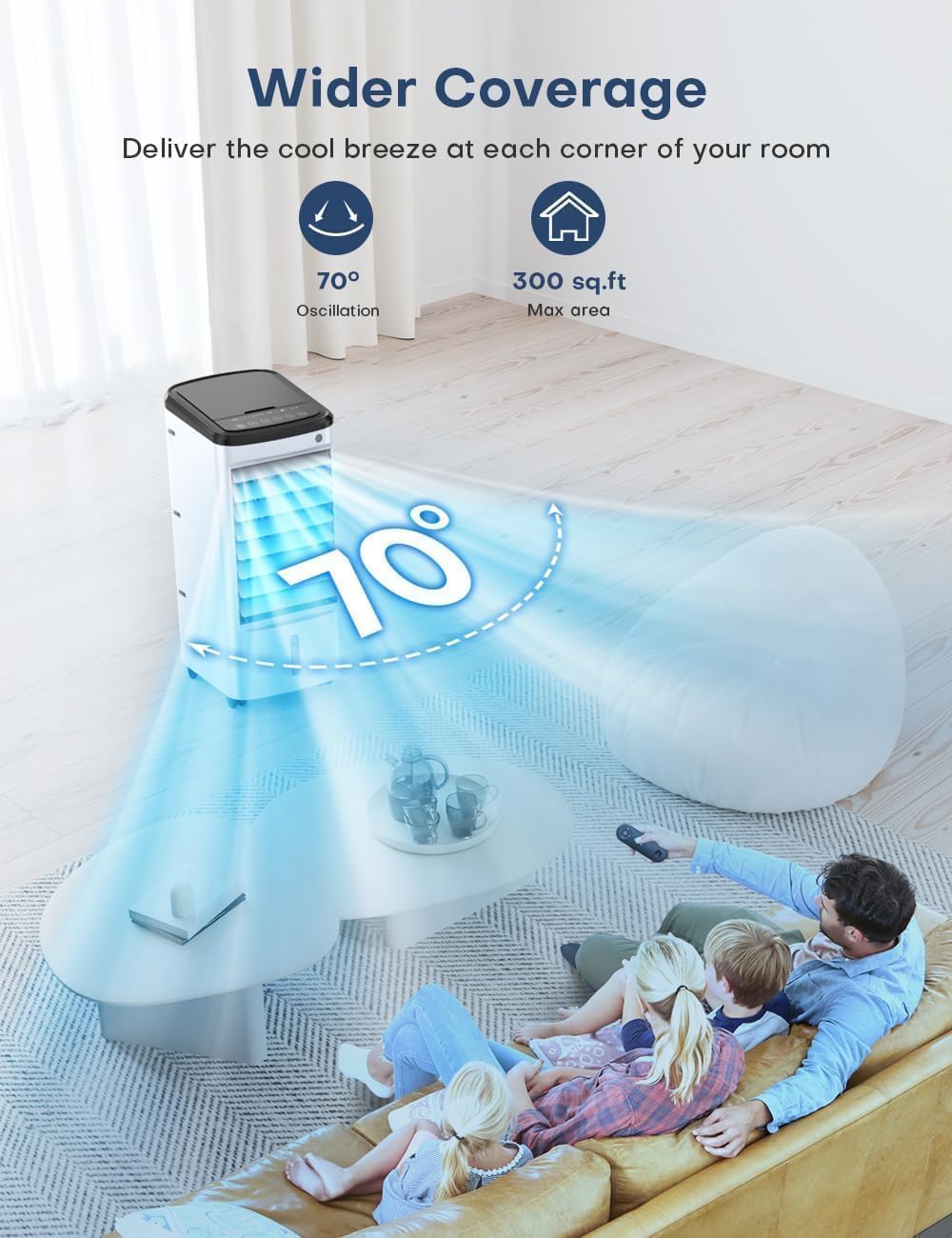
Figure 3: Dual water tanks provide extended cooling, with a 1-gallon detachable water tank.
Setup
- Unpack the Unit: Carefully remove the air cooler and all accessories from the packaging.
- Positioning: Place the air cooler on a firm, level surface. Ensure there is adequate space around the unit for proper airflow. This unit does not require hoses or window installation.
- Fill the Water Tank:
- Open the top cover of the water tank.
- Pour clean, cool water into the tank. Do not exceed the 'MAX' fill line. The unit features a dual water tank design for convenient top filling.
- For enhanced cooling, place the provided ice packs in a freezer until completely frozen. Once frozen, add them to the water tank.
Video: Instructions on how to add ice packs for an extra boost of coolness.

Figure 4: Components for easy cleaning, including the cooling pad and water tank.
- Connect Power: Plug the power cord into a standard electrical outlet.
Operating Instructions
The TEMEIKE Air Cooler can be operated using the touch control panel on top of the unit or the included remote control.
Control Panel & Remote Functions:
- Power Button: Press to turn the unit ON or OFF.
- Speed Button: Cycles through 3 fan speeds: Low, Medium, and High.
- Timer Button: Sets the auto-off timer from 1 to 12 hours.
- Mode Button: Selects operating modes: Normal, Sleep, or Cooling.
- Cool Button: Activates or deactivates the evaporative cooling function.
- Swing Button: Activates or deactivates the 70° automatic oscillation for wider air distribution.
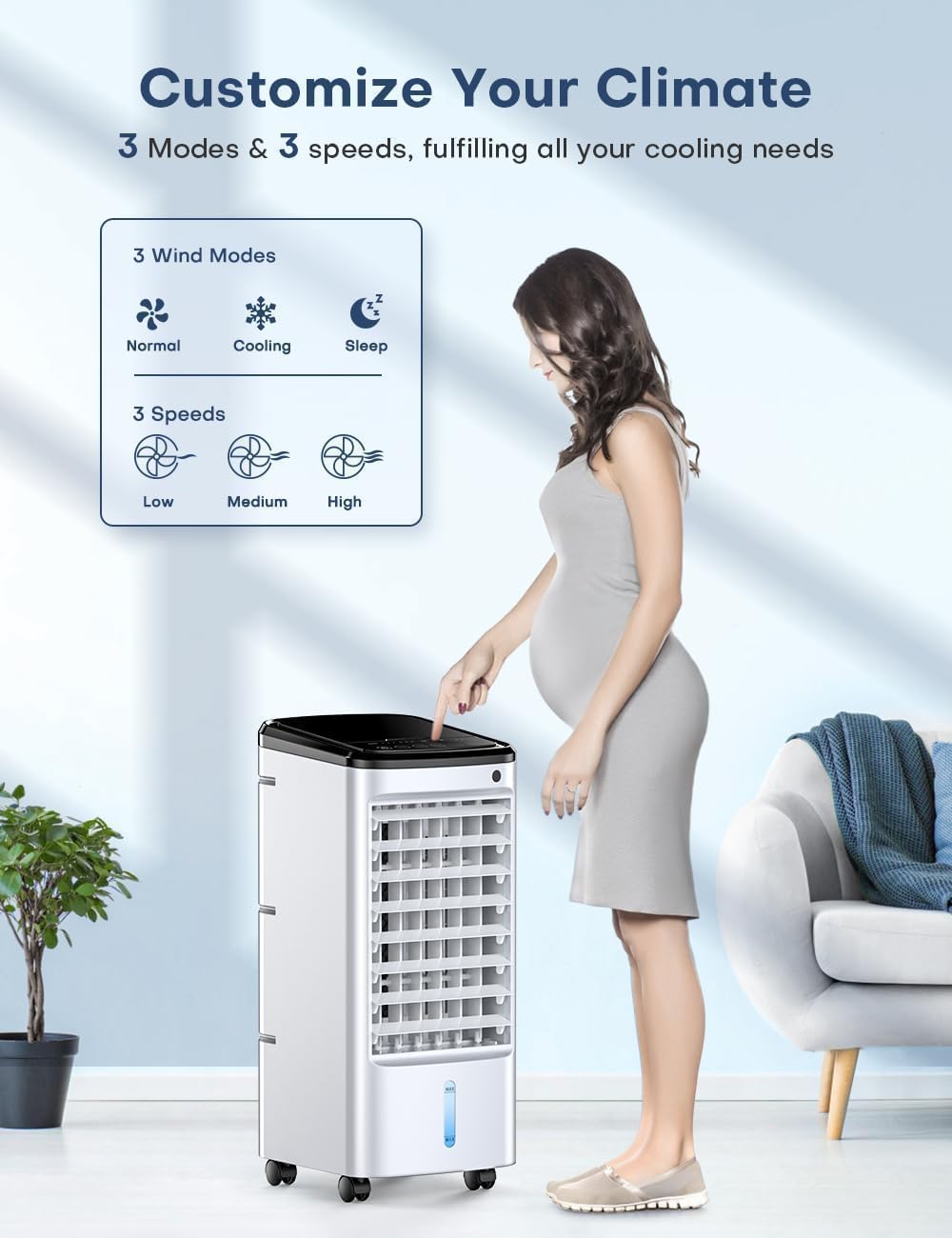
Figure 5: Customize your climate with 3 modes and 3 speeds.
Detailed Operation:
- Turning On/Off: Press the Power button once to turn the unit on. Press it again to turn it off.
- Adjusting Fan Speed: Press the Speed button repeatedly to cycle through Low, Medium, and High fan speeds. The current speed will be indicated on the control panel.
- Selecting Operating Mode: Press the Mode button to switch between Normal, Sleep, and Cooling modes.
- Activating Cooling Function: Press the Cool button to enable the evaporative cooling. This function requires water in the tank.
- Setting the Timer: Press the Timer button to set the auto-off timer in increments from 1 to 12 hours. The unit will automatically turn off after the set time.
- Activating Oscillation: Press the Swing button to activate the 70° automatic oscillation, distributing cool air across a wider area.
Video: Demonstrating the three adjustable wind speeds (Low, Medium, High).

Figure 6: The 4-IN-1 Portable Air Conditioner meets various cooling needs.
Video: Experience cooling comfort on hot days with the air cooler.

Figure 7: The air cooler is a reliable bedtime companion with its sleep mode and 12-hour timer.

Figure 8: Wider coverage with 70° oscillation, delivering cool breeze to every corner.
Video: Demonstrating the air cooler's ability to cool every corner with its oscillation feature.
Maintenance
Regular cleaning and maintenance will ensure optimal performance and extend the lifespan of your air cooler.
- Cleaning the Water Tank:
- Unplug the unit from the power outlet.
- Remove the detachable water tank.
- Empty any remaining water.
- Clean the tank with a soft cloth and mild detergent. Rinse thoroughly with clean water.
- Allow the tank to air dry completely before reattaching.
- Cleaning the Cooling Pad and Grill:
- Unplug the unit.
- Remove the rear grill and the cooling pad.
- Rinse the cooling pad under running water to remove dust and mineral deposits. For stubborn dirt, use a soft brush.
- Clean the grill with a damp cloth.
- Ensure both the cooling pad and grill are completely dry before reassembling.
- Exterior Cleaning: Wipe the exterior of the unit with a soft, damp cloth. Do not use abrasive cleaners or solvents.
- Storage: If storing the unit for an extended period, ensure all parts are clean and dry. Store in a cool, dry place. Close the air outlet to prevent dust accumulation.
Troubleshooting
| Problem | Possible Cause | Solution |
|---|---|---|
| Unit does not turn on | No power supply; Power cord not properly plugged in; Power button not pressed. | Check power outlet; Ensure power cord is securely plugged in; Press the Power button. |
| Weak or no airflow | Fan speed too low; Air inlets/outlets blocked; Cooling pad dirty. | Increase fan speed; Clear any obstructions; Clean the cooling pad and grill. |
| No cooling effect | Water tank empty; Cool function not activated; Cooling pad dry. | Fill water tank; Press the Cool button; Ensure cooling pad is wet. |
| Unusual noise | Unit not on a level surface; Foreign object inside; Water pump issue. | Place on a level surface; Check for and remove foreign objects; Contact customer support if noise persists. |
| Remote control not working | Batteries dead or incorrectly inserted; Obstruction between remote and unit. | Replace batteries; Ensure clear line of sight to the unit's sensor. |
Specifications
- Model: DL2
- Brand: TEMEIKE
- Wattage: 65W
- Fan Speeds: 3 (Low, Medium, High)
- Functions: Air Cooler, Humidifier, Fan (Normal/Sleep/Cooling Modes)
- Max Humidifier Usage Time (Max Water Level): 8 Hours
- Cord Length: 4FT (50-Inch Extension Cord)
- Product Dimensions: 27.94 x 25.4 x 55.88 cm (11 x 10 x 22 inches)
- Weight: 4.08 kg (9 lbs)
- Material: Plastic
- Mounting Type: Freestanding
- Special Features: Portable (4x360° Wheels), Lightweight, Built-In Handle, Removable Cooling Pad & Detachable Water Tank, Remote Control (20FT Range) & Touch Control, Silent Operation (40dB Low Noise), No Screws Needed, 1-12H Timer, UL Listed, Safe Bladeless Design, Closable Air Outlet, 2024 Upgraded Efficient Motor, Max Air Flow: 1440 CFM, 2S Fast Powerful Cooling, Includes 6 Upgraded Ice Packs, 70° Oscillation, Covers Area: Up to 300 sq.ft.
- Color: White
Warranty and Support
TEMEIKE products are manufactured to the highest quality standards. For warranty information, technical support, or any questions regarding your product, please contact TEMEIKE customer service. Details can typically be found on the product packaging or the official TEMEIKE website.
Please retain your proof of purchase for warranty claims.
Ask a question about this manual
Ask about setup, troubleshooting, compatibility, parts, safety, or missing instructions. Manuals+ will review the question and use this page’s manual context to help answer it.