
Viglaschill LTSR-1
Viglaschill Dueling Lightsaber Toy Instruction Manual (Model LTSR-1)
Comprehensive guide for setup, operation, and maintenance of your Viglaschill Dueling Lightsaber Toy.
Product Overview
The Viglaschill Dueling Lightsaber Toy offers an interactive experience with its versatile features. This product includes two individual lightsabers that can be combined into a single double-bladed unit. It features 20 distinct light colors, 4 sound modes, and realistic handle vibrations for an immersive play experience. The lightsabers are equipped with a Type-C rechargeable battery for extended use.
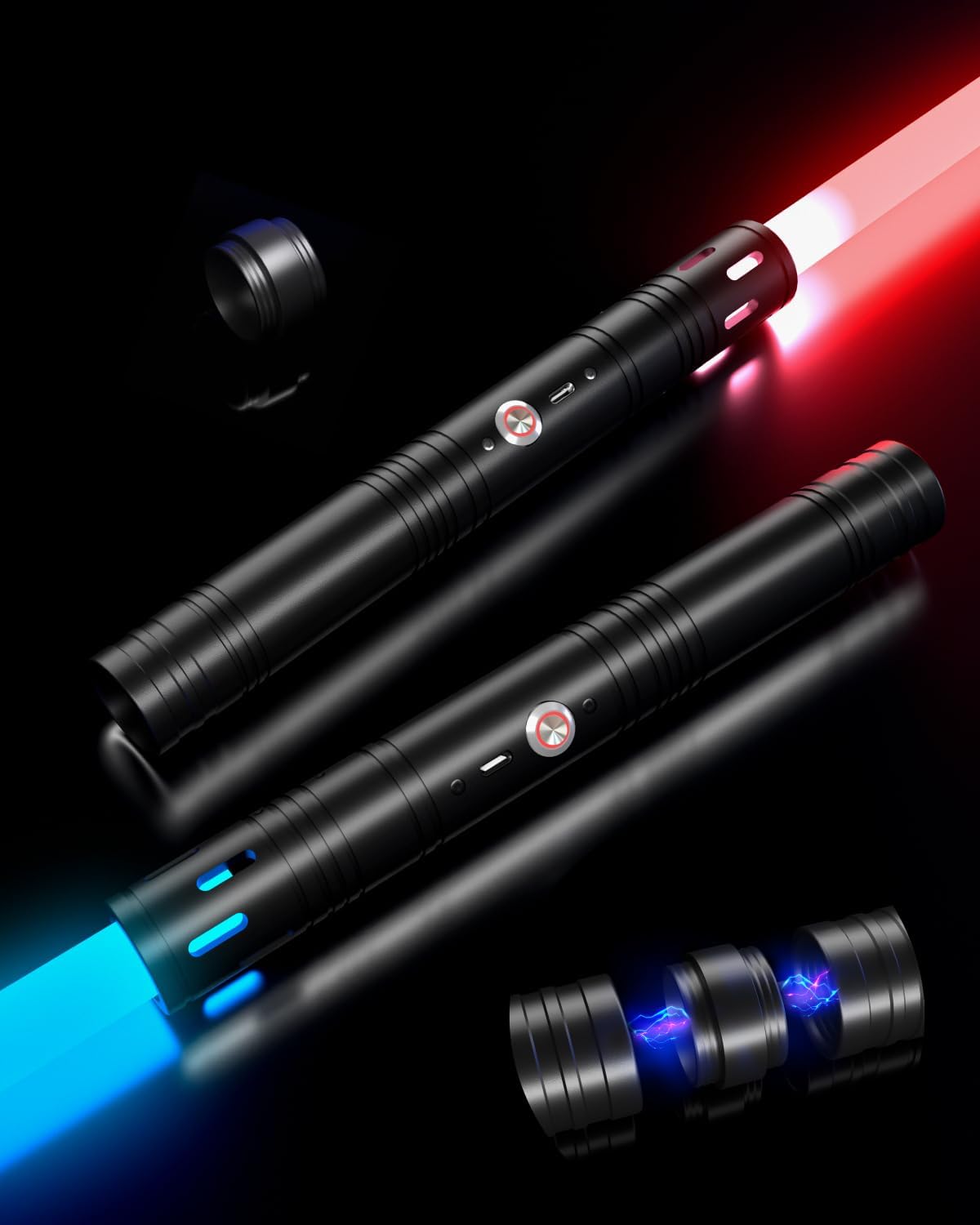
Image: Two Viglaschill lightsabers, one emitting red light and the other blue light, are displayed on a dark surface. A separate connector piece is visible, indicating the 2-in-1 functionality.
What's in the Box
- 2 x Lightsaber Blades
- 2 x Lightsaber Handles
- 1 x Connector for double-bladed assembly
- 1 x Double Type-C Charging Cable
- 1 x Hexagonal Screwdriver
- Connection Screws (spare included)
- English + German Manual
Safety Information
Warning:
- Children should use this product only under adult supervision.
- Avoid direct eye contact with the light source.
- Do not attempt to disassemble or modify the internal components beyond specified maintenance.
Setup
1. Assembly (Single Lightsaber)
- Carefully insert the lightsaber blade into the handle opening.
- Secure the blade by tightening the small screws on the handle using the provided hexagonal screwdriver. Ensure it is firm but do not overtighten.
2. Assembly (Double-Bladed Lightsaber)
- Assemble two individual lightsabers as described above.
- Remove the end caps from the bottom of both lightsaber handles.
- Connect the two handles using the provided connector piece. Twist until securely fastened.

Image: A visual guide illustrating the process of connecting two individual lightsaber handles with a central connector to create a double-bladed lightsaber.
3. Charging the Battery
The lightsabers are equipped with an 1800mAh rechargeable battery. Use the included double Type-C charging cable to charge both lightsabers simultaneously. Connect the Type-C ends to the charging ports on the lightsaber handles and the USB-A end to a compatible USB power adapter (not included).
- A full charge takes approximately 3 hours.
- A full charge provides approximately 6 hours of continuous use.
- The lightsaber features a continuous power indicator to show battery status.

Image: A detailed view of the lightsaber's internal components, highlighting the circuit board and a graphic representation of the 1800mAh battery with a charging indicator.
Operating Instructions
1. Power On/Off
- To power on: Press and hold the power button on the handle. The blade will illuminate and emit a power-on sound.
- To power off: Press and hold the power button again. The blade will dim and emit a power-off sound.
2. Changing Light Colors
The lightsaber features 20 different light colors. While the lightsaber is on, short press the power button to cycle through the available colors. The lightsaber will remember the last selected color when powered off and on again.

Image: A visual chart showcasing 20 distinct light colors available for the lightsaber, alongside two lightsabers illuminated in teal and pink, demonstrating the color variety.
3. Sound Modes and Effects
The lightsaber includes 6 sound effects and 4 sound modes (mute, battle, strobe, toggle). Specific instructions for cycling through sound modes are typically found in the included printed manual. The lightsaber also features realistic sound and vibration sensations that respond to movement and impact during dueling.

Image: A close-up of the lightsaber handle, with icons indicating features such as realistic sound effects, a mute option, and handle vibration, along with a memory function and alloy material.
4. Dueling and Interaction
The lightsabers are designed for dueling. They feature motion sensors that trigger sound effects and handle vibrations upon impact, enhancing the immersive experience. Engage in safe and imaginative play.
5. Video Demonstrations
Video: Two individuals demonstrate dueling with the Viglaschill lightsabers, showcasing color changes and sound effects during combat.
Video: A close-up demonstration of a single Viglaschill lightsaber, showing its power-on sequence, various color changes, and activation of sound effects.
Maintenance
1. Cleaning
To clean the lightsaber handle and blade, use a soft, dry cloth. For stubborn marks, a slightly damp cloth can be used, followed by immediate drying. Avoid abrasive cleaners or solvents, as these may damage the finish or electronic components.
2. Blade Care and Replacement
The blade is made of high-quality acrylic, designed to be sturdy and wear-resistant. In case of damage, the blade is removable and replaceable. Refer to the assembly instructions for detaching and attaching blades. Ensure replacement blades are compatible with the Viglaschill LTSR-1 model.
3. Battery Care
To prolong battery life, avoid fully discharging the lightsaber frequently. Charge the battery regularly, even if not in use for extended periods (e.g., once every 3 months). Store the lightsaber in a cool, dry place away from direct sunlight and extreme temperatures.
Troubleshooting
- Lightsaber does not turn on:
- Ensure the battery is fully charged. Connect to the charger and wait for the indicator to show full charge.
- Verify the power button is pressed and held for the required duration.
- No sound or distorted sound:
- Check if the lightsaber is in mute mode. Refer to the included manual for specific instructions on cycling sound modes.
- Ensure the battery is sufficiently charged, as low power can affect sound performance.
- Blade is loose or rattling:
- Use the hexagonal screwdriver to gently tighten the small screws securing the blade to the handle. Do not overtighten.
- Ensure the blade is fully inserted into the handle.
- Lightsaber does not charge:
- Verify the Type-C charging cable is securely connected to both the lightsaber and the power adapter.
- Try a different USB power adapter or charging port.
- Inspect the charging cable for any visible damage.
Specifications
| Brand | Viglaschill |
| Model Number | LTSR-1 |
| Product Dimensions | 31.89 x 1.18 x 1.18 inches (single lightsaber) |
| Combined Length (2-in-1) | Approximately 66 inches (168 cm) |
| Item Weight | 1.76 pounds |
| Battery | 1800mAh Lithium Ion (included) |
| Charging Time | Approx. 3 hours |
| Continuous Use Time | Approx. 6 hours |
| Light Colors | 20 switchable colors |
| Sound Effects | 6 effects, 4 modes (mute, battle, strobe, toggle) |
| Recommended Age | 6 years and up |
Warranty and Support
For warranty information and customer support, please refer to the contact details provided in the original product packaging or visit the official Viglaschill website. Keep your purchase receipt for warranty claims.
Ask a question about this manual
Ask about setup, troubleshooting, compatibility, parts, safety, or missing instructions. Manuals+ will review the question and use this page’s manual context to help answer it.