
LNRYY LED Headlamp
LNRYY High Lumen Rechargeable Headlamp User Manual
Model: LED Headlamp
Introduction
This manual provides comprehensive instructions for the safe and effective use of your LNRYY High Lumen Rechargeable Headlamp. Please read this manual thoroughly before operating the device and retain it for future reference.

Image: Two LNRYY High Lumen Rechargeable Headlamps, showing the main units, USB-C charging cables, and helmet clips. These headlamps are designed for various outdoor and work activities, providing hands-free illumination.
Product Features
- Super Bright & 4 Lighting Modes: Equipped with an upgraded chip for high-power lighting. Features High, Low, SOS, and Strobe modes to suit different illumination needs.
- Adjustable Focus & Dual Purpose: The focusing system allows adjustment of the light beam. Zoom in for a wide-beam floodlight to illuminate large areas, or zoom out for a long-beam spotlight to focus on distant objects.
- 90° Angle Adjust & Solid Material: The head of the LED headlamp can be adjusted from 0-90° to direct light precisely where needed. Constructed from high-grade aluminum alloy for durability and reliability in various conditions.
- Rechargeable & Long Endurance: Powered by high-capacity rechargeable Lithium Ion batteries, providing extended operational time. Features a Type-C connector for efficient and convenient charging.
- Comfortable Wear & Outdoor Tool: Includes 8 helmet clips for secure attachment to hard hats and an adjustable headband for comfortable wear during prolonged use. Suitable for camping, hiking, fishing, repairing, and other outdoor activities.
What's in the Box
Upon opening the package, please verify that all components are present and undamaged:
- Bright Headlamp (2 units)
- Rechargeable Battery (4 units)
- Helmet Clip (8 units)
- USB-Type C Charging Cable (2 units)
Setup
- Battery Installation: Ensure the rechargeable Lithium Ion batteries are correctly inserted into the battery compartment of each headlamp. Observe polarity markings (+/-).
- Initial Charge: Before first use, fully charge the headlamp using the provided USB-Type C charging cable. Refer to the "Charging Instructions" section for details.
- Adjusting the Headband: Place the headlamp on your head. Adjust the elastic headband to achieve a comfortable and secure fit. The headband should be snug but not overly tight.
- Attaching Helmet Clips (Optional): If using with a hard hat, attach the provided helmet clips to the edges of your hard hat, securing the headband in place. Distribute the clips evenly for stability.

Image: A person wearing the headlamp, demonstrating its comfortable fit. Insets show the helmet clips and how they secure the headlamp to a hard hat, ensuring stability during use.
Operating Instructions
Power On/Off and Mode Selection
The headlamp features a single button for power control and mode cycling.
- Power On: Press the power button once to turn on the headlamp. It will typically start in High mode.
- Cycle Modes: With the headlamp on, press the power button repeatedly to cycle through the 4 lighting modes: High Mode → Low Mode → SOS Mode → Strobe Mode.
- Power Off: Press the power button after cycling through all modes, or hold the button down for approximately 2 seconds to turn off the headlamp from any mode.

Image: Visual representation of the four distinct lighting modes: High Mode for maximum brightness, Low Mode for energy efficiency, SOS Mode for emergency signaling, and Strobe Mode for attention-grabbing flashes.
Adjustable Focus
The headlamp's beam can be adjusted to suit your needs by extending or retracting the front part of the light unit.
- Zoom In (Floodlight): Push the front part of the light unit inwards to widen the beam, creating a broad floodlight suitable for illuminating a large area at close range.
- Zoom Out (Spotlight): Pull the front part of the light unit outwards to narrow the beam, creating a focused spotlight for long-distance illumination.
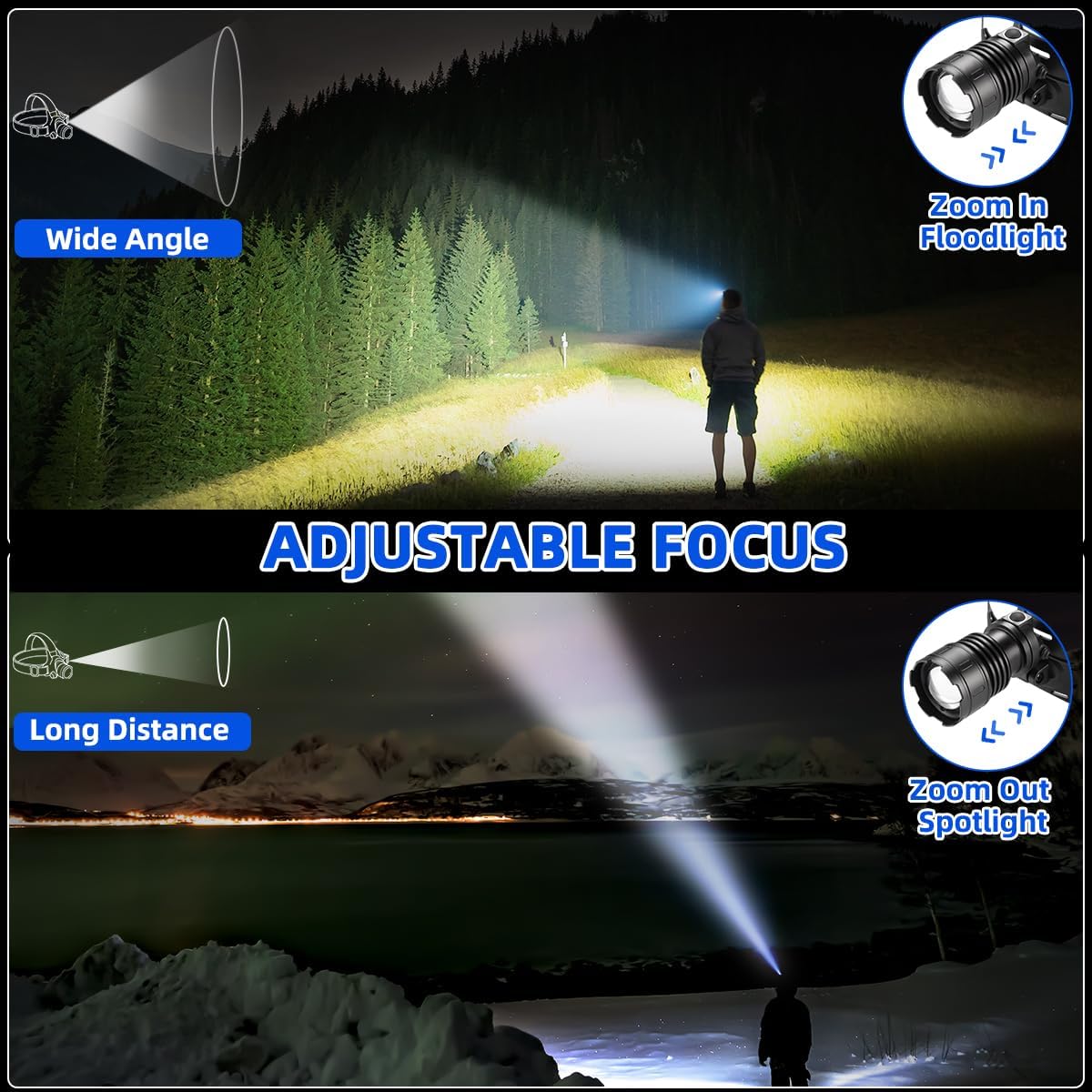
Image: Demonstrates the adjustable focus feature. The top panel shows "Zoom In" for a wide-angle floodlight, ideal for broad area illumination. The bottom panel shows "Zoom Out" for a long-distance spotlight, concentrating light for focused visibility.
90° Angle Adjustment
The headlamp's light unit can be tilted vertically to direct the beam up or down, providing optimal illumination for your line of sight.
- Gently pivot the light unit on its hinge to adjust the angle from 0° (straight ahead) to 90° (pointing downwards).

Image: Illustrates the 90° angle adjustment capability of the headlamp, allowing users to direct the light beam precisely where needed for various tasks and environments.
Charging Instructions
Your LNRYY headlamp is equipped with a Type-C charging port for convenient recharging.
- Connect the Cable: Insert the Type-C end of the provided USB charging cable into the headlamp's charging port.
- Connect to Power: Plug the USB-A end of the cable into a compatible USB power source (e.g., wall adapter, computer USB port, power bank).
- Charging Indicator: The indicator light on the headlamp will show its charging status.
- Red Light: Indicates the headlamp is currently charging or working.
- Green Light: Indicates the headlamp is fully charged.
- Charging Time: Charging time may vary depending on the power source and remaining battery level. Disconnect the cable once fully charged to preserve battery life.

Image: Illustrates the Type-C fast charging process for the headlamp. It shows the charging port, the cable connection, and the LED indicators for "Charging/Working" (red) and "Fully Charged" (green), along with large capacity batteries.
Maintenance & Care
- Cleaning: Wipe the headlamp with a soft, damp cloth to remove dirt and debris. Do not use abrasive cleaners or solvents.
- Storage: Store the headlamp in a cool, dry place away from direct sunlight and extreme temperatures. If storing for extended periods, charge the battery every 3-6 months to maintain its health.
- Water Resistance: The headlamp is designed to be waterproof. However, avoid prolonged submersion in water. Ensure the charging port cover is securely closed when not charging to maintain water resistance.
- Impact Resistance: While made of durable aluminum alloy, avoid dropping the headlamp from significant heights to prevent internal damage.
Troubleshooting
| Problem | Possible Cause | Solution |
|---|---|---|
| Headlamp does not turn on. | Battery is depleted or incorrectly installed. | Charge the headlamp fully. Check battery polarity and ensure it is properly seated. |
| Light is dim or flickers. | Low battery. | Recharge the headlamp. |
| Headlamp does not charge. | Charging cable or power source issue; charging port obstruction. | Ensure the USB-Type C cable is securely connected. Try a different USB port or power adapter. Check the charging port for debris. |
| Beam focus is not smooth. | Dust or debris in the focusing mechanism. | Gently clean the exterior of the light unit. Avoid forcing the mechanism. |
Specifications
| Feature | Detail |
|---|---|
| Brand | LNRYY |
| Model Number | LED Headlamp |
| Light Source Type | LED |
| Brightness | 750 Lumens (White Brightness) |
| Power Source | Battery Powered |
| Battery Type | Lithium Ion (4 batteries included) |
| Runtime | Up to 8 hours |
| Material | Aluminum |
| Water Resistance Level | Waterproof |
| Special Features | Adjustable Focus, Adjustable Light Modes, High Power, Impact Resistant, Rechargeable |
| Product Dimensions | 4.88"D x 3.74"W x 3.89"H |
| Item Weight | 1.46 pounds |
Warranty and Support
LNRYY products are manufactured to high-quality standards. For information regarding warranty coverage, technical support, or service inquiries, please refer to the contact information provided with your product packaging or visit the official LNRYY website. Please retain your proof of purchase for warranty claims.
Ask a question about this manual
Ask about setup, troubleshooting, compatibility, parts, safety, or missing instructions. Manuals+ will review the question and use this page’s manual context to help answer it.