
Introduction
Thank you for choosing the Diyeeni Smart Ring. This smart ring is designed to provide comprehensive health tracking and support various multisport modes, all within a durable, waterproof design. This manual will guide you through the setup, operation, maintenance, and troubleshooting of your new device.

Image: The Diyeeni Smart Ring in black, showcasing its sleek design.
1. Setup
1.1 Package Contents
- 1 x Smart Ring
- 1 x Instruction Manual
- 1 x Charging Cable

Image: The smart ring alongside its dedicated USB charging cable.
1.2 Initial Charging
Before first use, fully charge your smart ring. Connect the provided charging cable to the ring and a USB power source. The ring's battery life is approximately 7 days on a full charge, with a charging time of about 60 minutes.
1.3 App Installation and Pairing
To utilize all features, download the Lefun Health app on your Android or iOS device. Search for "Lefun Health" in your device's app store. Once installed:
- Open the Lefun Health app.
- Follow the on-screen instructions to create an account or log in.
- Navigate to the device pairing section within the app.
- Ensure your smart ring is charged and near your device. The app will detect the ring for pairing.
- Confirm the pairing request on both the app and, if prompted, the ring.
Note: Some users have reported initial pairing difficulties. If you encounter issues, try restarting both the app and your smart ring, and ensure Bluetooth is enabled on your phone.
1.4 Sizing and Fit
For accurate health tracking, ensure the ring fits snugly but comfortably on your finger. Refer to the size chart below for inner diameter measurements:
| Size | Inner Diameter |
|---|---|
| 8 | 18.2mm / 0.7in |
| 9 | 19mm / 0.7in |
| 10 | 19.9mm / 0.8in |
| 11 | 20.7mm / 0.8in |
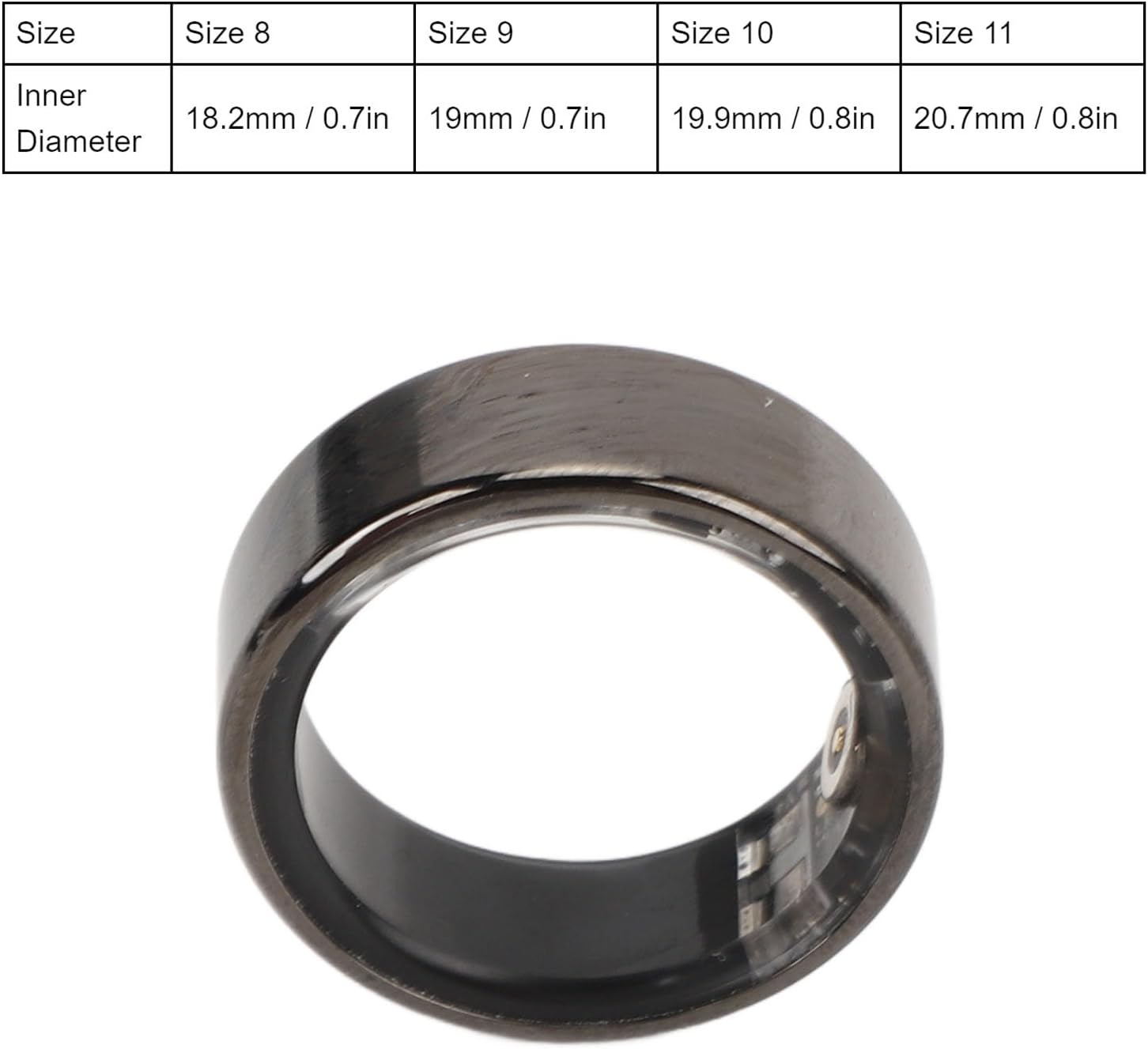
Image: A detailed size chart for the smart ring, indicating inner diameters for various sizes.
2. Operating Instructions
2.1 Health Tracking
The Diyeeni Smart Ring continuously monitors key health data using advanced sensors. This includes motion monitoring, which contributes to overall health insights. All collected data can be viewed in real-time through the connected Lefun Health app.
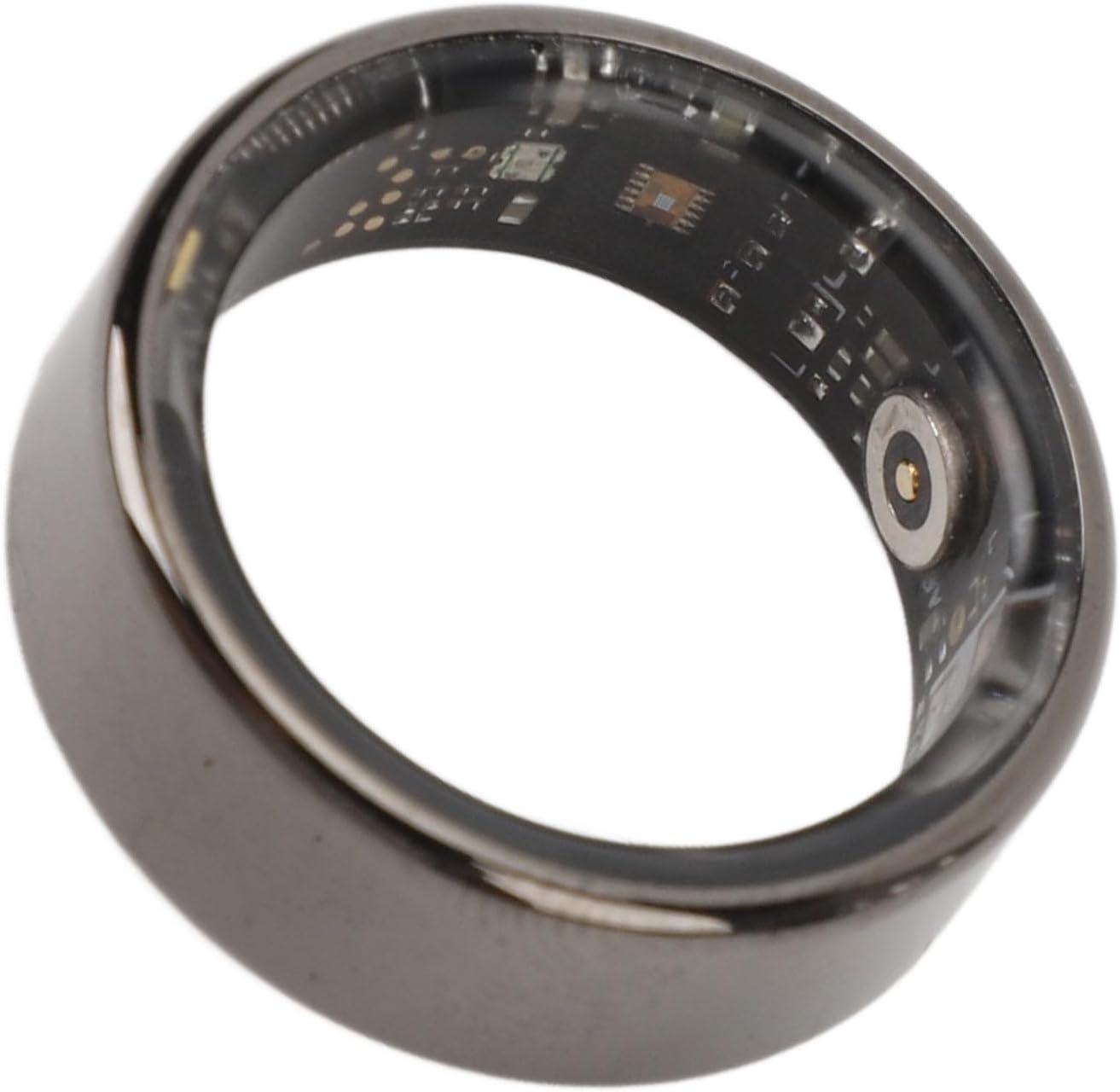
Image: A close-up of the smart ring's interior, revealing the advanced sensors responsible for health tracking.
2.2 Multisport Modes
The smart ring supports various exercise modes, including walking, running, and cycling. When engaged in these activities, the ring collects detailed exercise data, which can be analyzed in the app to help enhance your fitness level.

Image: The smart ring positioned with a runner in the background, symbolizing its running mode tracking capabilities.

Image: The smart ring with a cyclist in the background, demonstrating its ability to track cycling activities.

Image: The smart ring shown with two individuals walking or running in the background, highlighting its general motion tracking.
2.3 Waterproof Functionality (IP68)
The Diyeeni Smart Ring features IP68 waterproof technology, meaning it has a totally enclosed structure capable of withstanding submersion up to 1000 meters. This makes it suitable for various water activities such as swimming, diving, and snorkeling.

Image: The smart ring displayed with a swimmer in the background, emphasizing its IP68 waterproof rating and suitability for water sports.
3. Maintenance
3.1 Cleaning Your Smart Ring
To maintain the ring's appearance and sensor accuracy, clean it regularly. Use a soft, damp cloth to wipe the exterior. For the sensor area on the inside of the ring, gently wipe with a cotton swab moistened with rubbing alcohol if necessary. Avoid harsh chemicals or abrasive materials.
3.2 Battery Care
To prolong battery life, avoid extreme temperatures. Charge the ring fully when the battery is low, but avoid leaving it discharged for extended periods. While the battery lasts about 7 days, actual usage may vary.
3.3 Water Resistance Best Practices
Although the ring is IP68 waterproof, it is recommended to rinse it with fresh water after exposure to saltwater or chlorinated water to prevent residue buildup and potential long-term damage to materials.
4. Troubleshooting
- Difficulty Pairing: Ensure Bluetooth is enabled on your phone and the ring is charged. Try restarting both the ring and the Lefun Health app. Move the ring closer to your phone during pairing.
- Inaccurate Data: Ensure the ring fits snugly on your finger. Clean the sensors regularly. Verify that the app is updated to the latest version.
- Short Battery Life: While rated for 7 days, heavy usage or frequent data syncing can reduce battery life. Ensure the ring is fully charged. If issues persist, contact customer support.
- App Connectivity Issues: Check your phone's internet connection. Ensure the Lefun Health app has all necessary permissions enabled in your phone's settings.
For further assistance, refer to the "How To Use" section in the included instruction manual or contact Diyeeni customer support.
5. Specifications
| Feature | Specification |
|---|---|
| Product Material | Ceramic, Stainless Steel |
| Ring Battery Type | 18mAh Lithium Battery (Built-in) |
| Ring Battery Life | About 7 Days |
| Ring Charging Time | 60 Minutes |
| Waterproof Rating | IP68 (up to 1000 meters) |
| Compatible App | for Lefun Health |
| Compatibility | Android, iOS |
Note: All data are measured manually, and there are certain errors in the measurement results.
6. Warranty and Support
For warranty information and customer support, please refer to the documentation included with your purchase or visit the official Diyeeni website. Keep your proof of purchase for any warranty claims.