1. Introduction
Thank you for choosing the Unocho 14.6V LiFePO4 Battery Charger, Model EP6012F4. This smart battery charger is designed to efficiently and safely charge 12.8V to 14.6V LiFePO4 batteries, extending their lifespan through advanced 4-stage charging technology. Please read this manual thoroughly before use to ensure proper operation and safety.
2. Safety Instructions
WARNING: Read all safety warnings and instructions before using this product. Failure to follow the warnings and instructions may result in electric shock, fire, and/or serious injury.
- This charger is designed exclusively for 12.8V to 14.6V LiFePO4 batteries. Do not use it for other battery types (e.g., lead-acid, Ni-Cd, Ni-MH) as this may cause damage, fire, or explosion.
- Ensure the charger is connected to a grounded power outlet.
- Do not expose the charger to rain, moisture, or extreme temperatures. Use in a well-ventilated, dry area.
- Avoid short-circuiting the output terminals.
- Do not attempt to open, modify, or repair the charger. Refer all servicing to qualified personnel.
- Always disconnect the charger from the power outlet before making or breaking connections to the battery.
- Wear eye protection and gloves when working with batteries.
- Keep out of reach of children.
3. Product Features
- Smart Charging Technology: Microprocessor-controlled 4-stage charging process (Pre-Charge, Bulk, Constant Voltage, Cut-Off) automatically detects battery status and adjusts charging rate.
- Battery Management: Activates dormant battery BMS, automatically cuts off output when fully charged, and automatically recharges when battery level drops, ensuring optimal battery health.
- Multi-Protection: Safeguards against overcharging, short-circuiting, overheating, and reverse polarity.
- Automated Battery Maintenance: Extends battery lifespan by preventing overcharge and ensuring optimal charge levels.
- Wide Compatibility: Suitable for 12.8V to 14.6V LiFePO4 batteries in cars, motorcycles, ATVs, UTVs, trucks, boats, RVs, lawn tractors, electric sports equipment, lawn mowers, snowmobiles, golf carts, and more.
- User-Friendly Indicators: 4 LED indicators display battery status (25%-100%) and fault alerts.
- Versatile Connections: Includes alligator clip cables, tuning fork plug cables, and ring terminal cables for diverse needs.
4. Package Contents
Verify that all items are present in your package:
- Unocho 14.6V LiFePO4 Battery Charger (Model EP6012F4)
- AC Power Cord
- Alligator Clip Cable
- Ring Terminal Cable
- Tuning Fork Plug Cable (if applicable)
- User Manual

Image: Unocho LiFePO4 Battery Charger with included alligator clip cables, ring terminal cables, and AC power cord.
5. Setup and Connection
Follow these steps to connect the charger to your battery:
- Ensure Safety: Verify that the charger is unplugged from the AC power outlet.
- Select Cable: Choose the appropriate battery connection cable (alligator clips or ring terminals) for your battery type.
- Connect to Battery:
- Connect the RED (+) positive connector from the charger to the positive (+) terminal of the battery.
- Connect the BLACK (-) negative connector from the charger to the negative (-) terminal of the battery.
Ensure a secure and correct polarity connection. Incorrect polarity can damage the battery and charger.
- Connect AC Power: Plug the charger's AC power cord into a standard 100-240V AC wall outlet. The charger will automatically begin the charging process.

Image: Unocho LiFePO4 Battery Charger with the AC power cable connected.
6. Operating Instructions: 4-Stage Charging Process
The Unocho charger utilizes an intelligent 4-stage charging process to optimize battery performance and longevity:

Image: Visual representation of the 4-stage charging process and LED indicators.
- Stage 1: Pre-Charge
In this initial stage, the battery charger applies a small current to the battery if it detects a deeply discharged state. This process helps to safely recover the battery and extend its cycle life. (LED Indicators: LED 1 ON, LEDs 2-4 OFF)
- Stage 2: Bulk Charge
The charger delivers its maximum rated current to the battery until it reaches approximately 80% of its capacity. This is the fastest charging stage. (LED Indicators: LEDs 1-4 Blinking Sequentially)
- Stage 3: Constant Voltage (Absorption)
During this stage, the battery charger limits the output voltage to 3.6V per cell (for a 4-cell LiFePO4 battery, this is 14.4V). The current gradually decreases as the battery continues to charge to its full capacity, preventing overheating and overcharging. (LED Indicators: LEDs 1-3 ON, LED 4 Blinking)
- Stage 4: Cut-Off (Float/Maintenance)
Once the battery is fully charged, the charger automatically cuts off the output. This allows the charger to remain connected to the battery indefinitely without risk of overcharging, providing a maintenance charge to keep the battery at optimal levels. (LED Indicators: LEDs 1-4 ON)
7. LED Indicators
The charger features LED indicators to display the charging status and any potential faults:
- Power LED (Red): Illuminates when the charger is connected to AC power.
- Charge Status LEDs (Green, 4 indicators): Represent battery charge levels (25%, 50%, 75%, 100%).
- LED 1 ON, LEDs 2-4 OFF: Pre-Charge stage.
- LEDs 1-4 Blinking Sequentially: Bulk Charge stage.
- LEDs 1-3 ON, LED 4 Blinking: Constant Voltage (Absorption) stage.
- LEDs 1-4 ON (Solid): Battery fully charged, Cut-Off/Maintenance stage.
- Fault Indication: If all LEDs are flashing simultaneously, check for reversed polarity or other connection issues. Disconnect and reconnect the charger.

Image: Top view of the Unocho charger displaying the power and charge status LED indicators.
8. Application Scope
The Unocho EP6012F4 charger is compatible with 12.8V to 14.6V LiFePO4 batteries used in a wide range of applications, including but not limited to:
- Cars
- Motorcycles
- Race Cars
- ATVs & UTVs
- Trucks
- Fishing Boats & RVs
- Lawn Tractors & Mowers
- Electric Sports Equipment
- Snowmobiles
- Golf Carts
- Mobility Scooters
- Electric Bicycles
- Balance Cars
- Toy Cars
- UAVs (Unmanned Aerial Vehicles)

Image: The Unocho charger shown alongside examples of compatible vehicles and devices.
9. Maintenance
To ensure the longevity and optimal performance of your Unocho battery charger:
- Cleaning: Disconnect the charger from power and the battery before cleaning. Use a soft, dry cloth to wipe the exterior. Do not use harsh chemicals or abrasive cleaners.
- Storage: Store the charger in a cool, dry place away from direct sunlight and moisture when not in use.
- Cable Inspection: Regularly inspect the power cord and battery connection cables for any signs of damage, fraying, or corrosion. Replace damaged cables immediately.
- Ventilation: Ensure the charger's ventilation openings are clear and unobstructed during operation to prevent overheating.
10. Troubleshooting
If you encounter issues with your charger, refer to the following common problems and solutions:
| Problem | Possible Cause | Solution |
|---|---|---|
| Charger not turning on (No Power LED) | No AC power; Faulty power cord; Charger malfunction. | Check AC outlet and power cord connection. Try a different outlet. If still no power, contact support. |
| All charge LEDs flashing simultaneously | Reversed polarity; Short circuit; Damaged battery. | Disconnect from AC power. Check battery connections for correct polarity (+ to +, - to -). Inspect cables for damage. If the issue persists, the battery may be faulty. |
| Battery not charging or charging slowly | Poor connection; Battery deeply discharged (BMS protection); Battery fault. | Ensure all connections are secure. The charger may be in Pre-Charge stage for deeply discharged batteries. If the battery has a BMS, ensure it's not in protection mode. Consult battery manufacturer specifications. |
| Charger feels hot | Normal operation; Poor ventilation; Overload. | Some warmth is normal during charging. Ensure adequate ventilation around the charger. If it's excessively hot, disconnect immediately and contact support. |
11. Specifications
Technical specifications for the Unocho 14.6V LiFePO4 Battery Charger (Model EP6012F4):
| Specification | Value |
|---|---|
| Model Number | EP6012F4 |
| Input Voltage | 100-240V AC, 50/60Hz |
| Output Voltage | 14.6V DC |
| Output Current | 4A |
| Battery Type | LiFePO4 (Lithium Iron Phosphate) |
| Battery Voltage Compatibility | 12.8V - 14.6V |
| Charging Stages | 4-Stage (Pre-Charge, Bulk, Constant Voltage, Cut-Off) |
| Protection Features | Overcharge, Short-Circuit, Overheat, Reverse Polarity |
| Product Dimensions | 4.72 x 1.26 x 2.64 inches (12 x 3.2 x 6.7 cm) |
| Item Weight | 1.32 pounds (0.6 kg) |
| Color | Black |
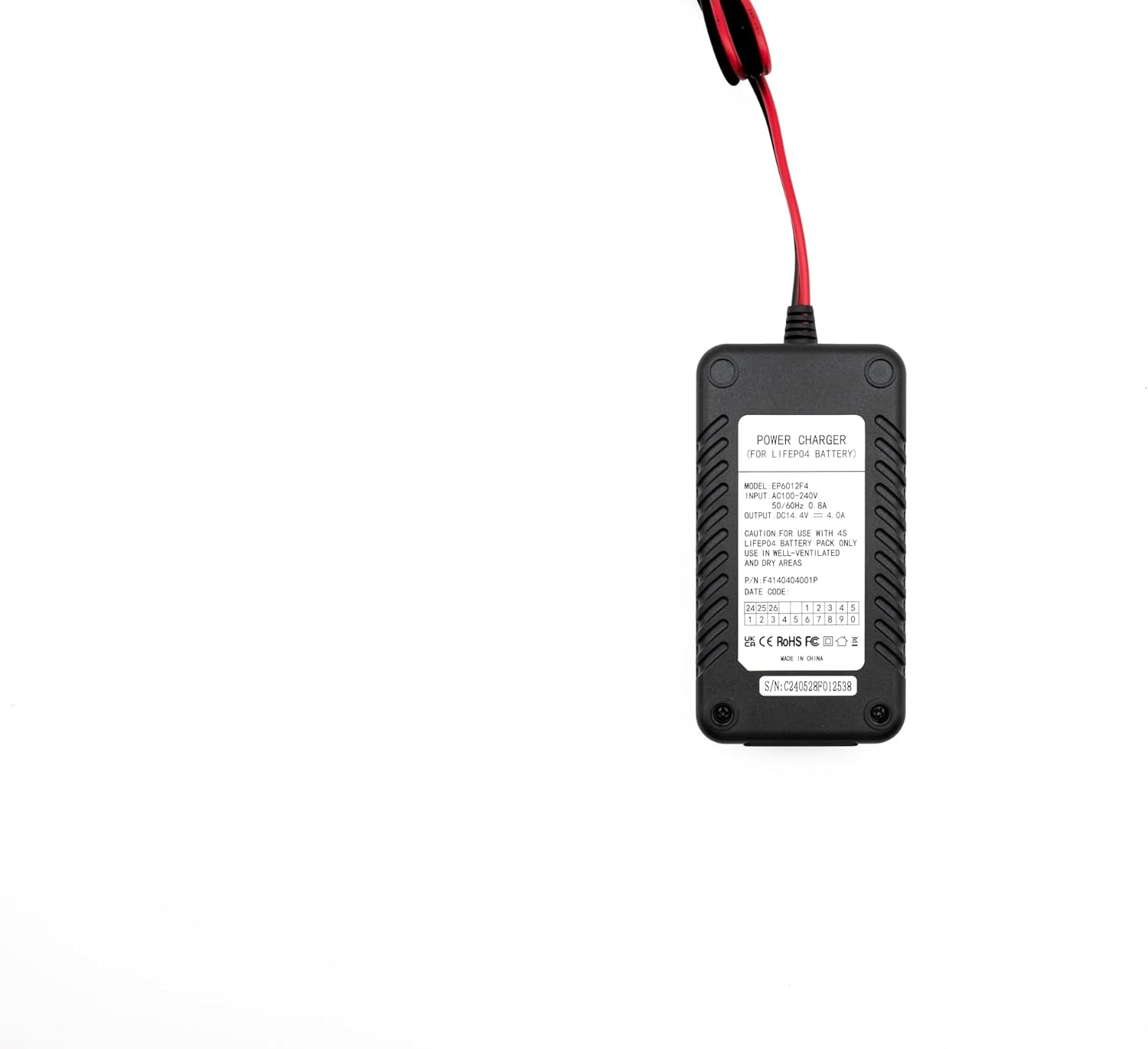
Image: The back label of the charger displaying model number, input/output specifications, and certifications.
12. Warranty and Support
Unocho products are manufactured to high-quality standards. For warranty information or technical support, please refer to the warranty card included with your product or contact Unocho customer service through the retailer where the product was purchased. Please have your model number (EP6012F4) and purchase date ready when contacting support.