
1. Introduction
Welcome to the Youin Texas Electric Bicycle user manual. This guide provides essential information for the safe and efficient operation, maintenance, and care of your new Youin Texas electric bicycle. Designed for both urban commuting and off-road adventures, the Youin Texas combines a powerful 250W motor with a convenient foldable design and robust 20-inch fat tires. Please read this manual thoroughly before your first ride to ensure optimal performance and safety.

This image shows the Youin Texas electric bicycle, emphasizing its suitability for both city and off-road environments, with its distinctive fat tires and foldable frame.
2. Safety Information
Your safety is paramount. Always adhere to the following safety guidelines:
- Helmet Use: Always wear a certified bicycle helmet when riding.
- Traffic Laws: Obey all local traffic laws, regulations, and road signs.
- Pre-Ride Check: Before each ride, check tire pressure, brake functionality, battery charge, and ensure all quick releases and fasteners are secure.
- Weather Conditions: Exercise caution when riding in wet conditions. Braking distance increases significantly on wet surfaces.
- Night Riding: Use front and rear lights when riding at night or in low-light conditions. Wear reflective clothing.
- Battery Safety: Do not attempt to open or modify the battery pack. Use only the provided charger. Keep the battery away from extreme temperatures and direct sunlight.
- Weight Limit: Do not exceed the maximum weight capacity specified for the bicycle.
3. Package Contents
Upon unpacking, ensure all items are present and undamaged:
- Youin Texas Electric Bicycle (main unit)
- Removable Battery Pack
- Battery Charger
- User Manual
- Horn (included component)
- Basic Tool Kit (may vary)
4. Product Overview
Familiarize yourself with the main components of your Youin Texas electric bicycle:
- Frame: Foldable alloy steel frame for portability and durability.
- Motor: 250W electric motor, providing pedal assistance up to 25 km/h.
- Battery: Removable 36V 10Ah Samsung battery, offering up to 45 km range.
- Display: Multifunction full-color display showing speed, battery level, and assistance mode.
- Wheels: 20-inch FAT tires for stability and traction on various terrains.
- Brakes: Front and rear disc brakes for reliable stopping power.
- Gears: 7-speed gear system for versatile riding.
- Suspension: Front suspension fork for a smoother ride.

This image illustrates the multifunction display, highlighting key features such as battery capacity, range up to 45km, and a charging time of 4-6 hours. The battery is also shown as removable for convenient charging.
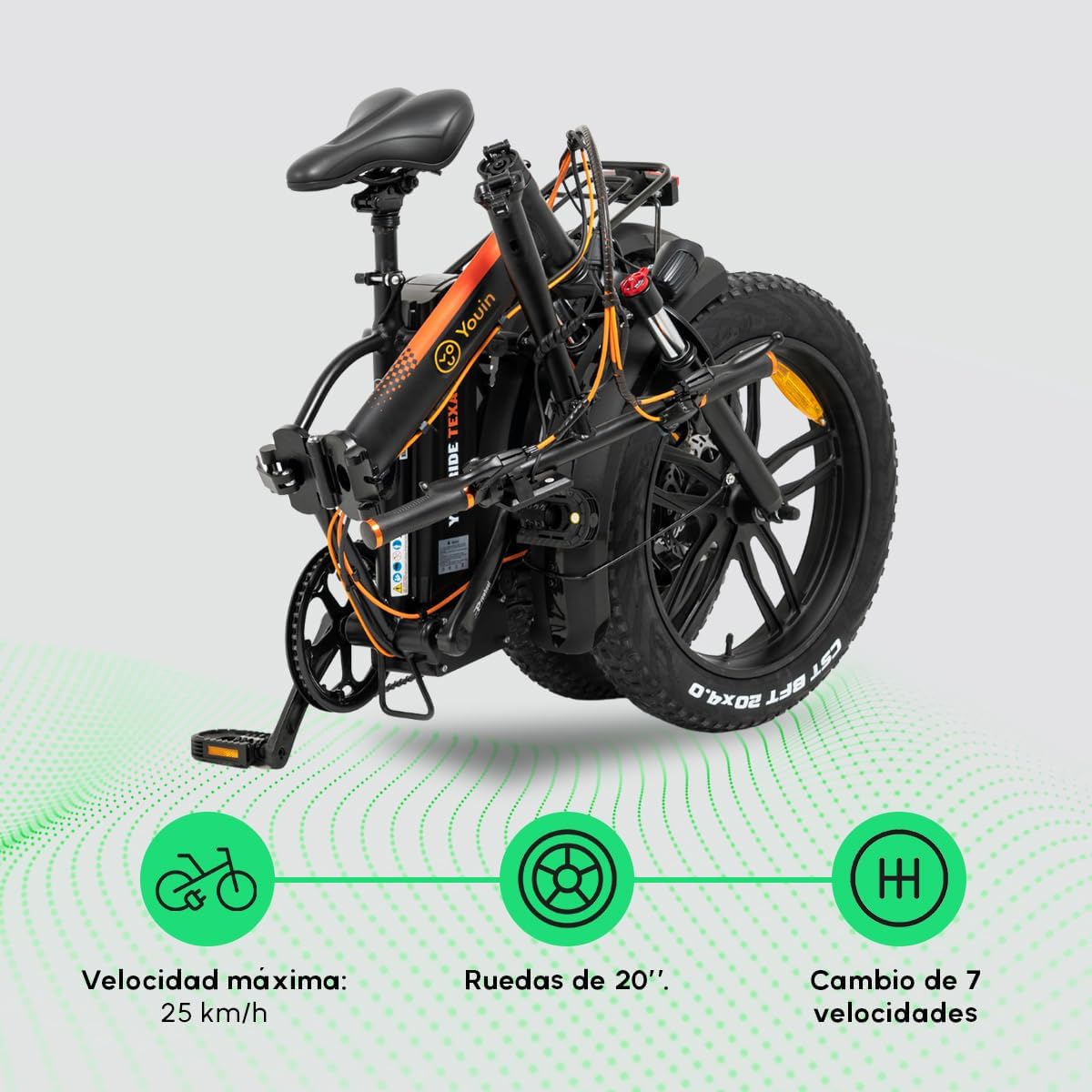
This image displays the folded bicycle, emphasizing its compact form. It also highlights the maximum speed of 25 km/h, the 20-inch wheel size, and the 7-speed gear system.
5. Setup
Follow these steps for initial setup:
- Unfolding the Bicycle:
- Place the bicycle on a flat surface.
- Release the frame folding latch and carefully unfold the main frame until it locks into place.
- Adjust the handlebar stem and seat post to your desired height and secure them with their respective quick releases.
- Unfold the pedals if they are in the folded position.
- Battery Installation:
- Ensure the battery is fully charged before first use.
- Insert the battery into its compartment on the frame and secure it. Use the key to lock the battery in place if applicable.
- Tire Inflation: Inflate tires to the recommended pressure (check sidewall of tires for PSI range).
- Brake Adjustment: Test brakes and adjust if necessary to ensure proper function.

This image shows the Youin Texas electric bicycle being carried in its folded state, illustrating its ease of transport and storage.
6. Operating Instructions
Operating your Youin Texas electric bicycle is intuitive:
- Power On/Off: Press and hold the power button on the display to turn the bicycle on or off.
- Pedal Assist Modes: Use the '+' and '-' buttons on the display to cycle through the five levels of pedal assistance. Higher levels provide more motor assistance.
- Riding: Begin pedaling, and the motor will engage to provide assistance based on the selected mode. You can also ride without assistance like a regular bicycle.
- Shifting Gears: Use the gear shifter on the handlebar to change between the 7 speeds, adapting to different terrains and inclines.
- Braking: Apply both front and rear disc brakes smoothly and simultaneously for effective stopping.
- Charging the Battery: Connect the charger to the battery charging port (either on the bike or directly to the removed battery) and then to a power outlet. The indicator light on the charger will show charging status. Charging typically takes 4-6 hours.

This image shows a person riding the Youin Texas electric bicycle, illustrating its practical application for urban travel.
7. Maintenance
Regular maintenance ensures the longevity and safety of your electric bicycle:
- Cleaning: Clean the bicycle regularly with a damp cloth. Avoid high-pressure washing directly on electrical components.
- Tires: Check tire pressure weekly and inflate as needed. Inspect tires for wear and tear.
- Brakes: Regularly check brake pads for wear and ensure brake levers are responsive. Adjust brake cables if necessary.
- Chain: Keep the chain clean and lubricated to ensure smooth gear changes and prevent rust.
- Battery Care: Store the battery in a cool, dry place. If storing for extended periods, charge the battery to 50-70% every 2-3 months.
- Fasteners: Periodically check all bolts, nuts, and quick releases to ensure they are tight and secure.
8. Troubleshooting
Here are solutions to common issues you might encounter:
| Problem | Possible Cause | Solution |
|---|---|---|
| Bicycle does not power on | Battery not charged or not properly installed. | Ensure battery is fully charged and securely seated in its compartment. Check connections. |
| Motor not assisting | Low battery, pedal assist level too low, or sensor issue. | Charge battery. Increase pedal assist level. Check for any obstructions around the pedal sensor. |
| Brakes feel weak | Worn brake pads, loose cables, or air in hydraulic system (if applicable). | Inspect and replace brake pads if worn. Adjust brake cable tension. If hydraulic, seek professional service. |
| Unusual noises | Loose components, dry chain, or misaligned gears. | Check all fasteners. Lubricate chain. Adjust gear derailleur if shifting is rough. |
If you encounter issues not listed here or if solutions do not resolve the problem, please contact Youin customer support.
9. Specifications
| Feature | Specification |
|---|---|
| Model Number | BK1201 |
| Dimensions (Product) | 109.79 x 54.72 x 58.88 cm |
| Weight | 27 kg |
| Motor Power | 250W |
| Max Speed | 25 km/h |
| Battery | 36V 10Ah (Samsung) |
| Autonomy (Range) | Up to 45 km |
| Wheel Size | 20 Inches (Fat Tires) |
| Frame Material | Alloy Steel |
| Brake Style | Disc |
| Suspension Type | Front |
| Color | Black |
| Country of Origin | Spain |
10. Warranty and Support
Youin is committed to providing quality products and excellent customer service. Your Youin Texas electric bicycle comes with a manufacturer's warranty covering defects in materials and workmanship under normal use. Please refer to the warranty card included with your purchase for specific terms and conditions.
For technical support, warranty claims, or service inquiries, please contact Youin customer service through the official website or the contact information provided in your product packaging. Youin also offers a network of authorized service centers.

This image highlights Youin's extensive service network, indicating over 100 Youin Service workshops available for support and maintenance, including a free initial revision within 30 days of purchase.
For more information, visit the official Youin website: Youin Official Store

