
Introduction
Thank you for choosing the ErgoHide Adjustable Height Solid Wood Desk. This manual provides essential information for the safe and efficient use of your new desk. Please read these instructions carefully before assembly and operation, and retain them for future reference.
Your ErgoHide desk features FSC-certified solid wood construction, an advanced cable management system, and a robust height-adjustable frame designed for ergonomic comfort and a clutter-free workspace.
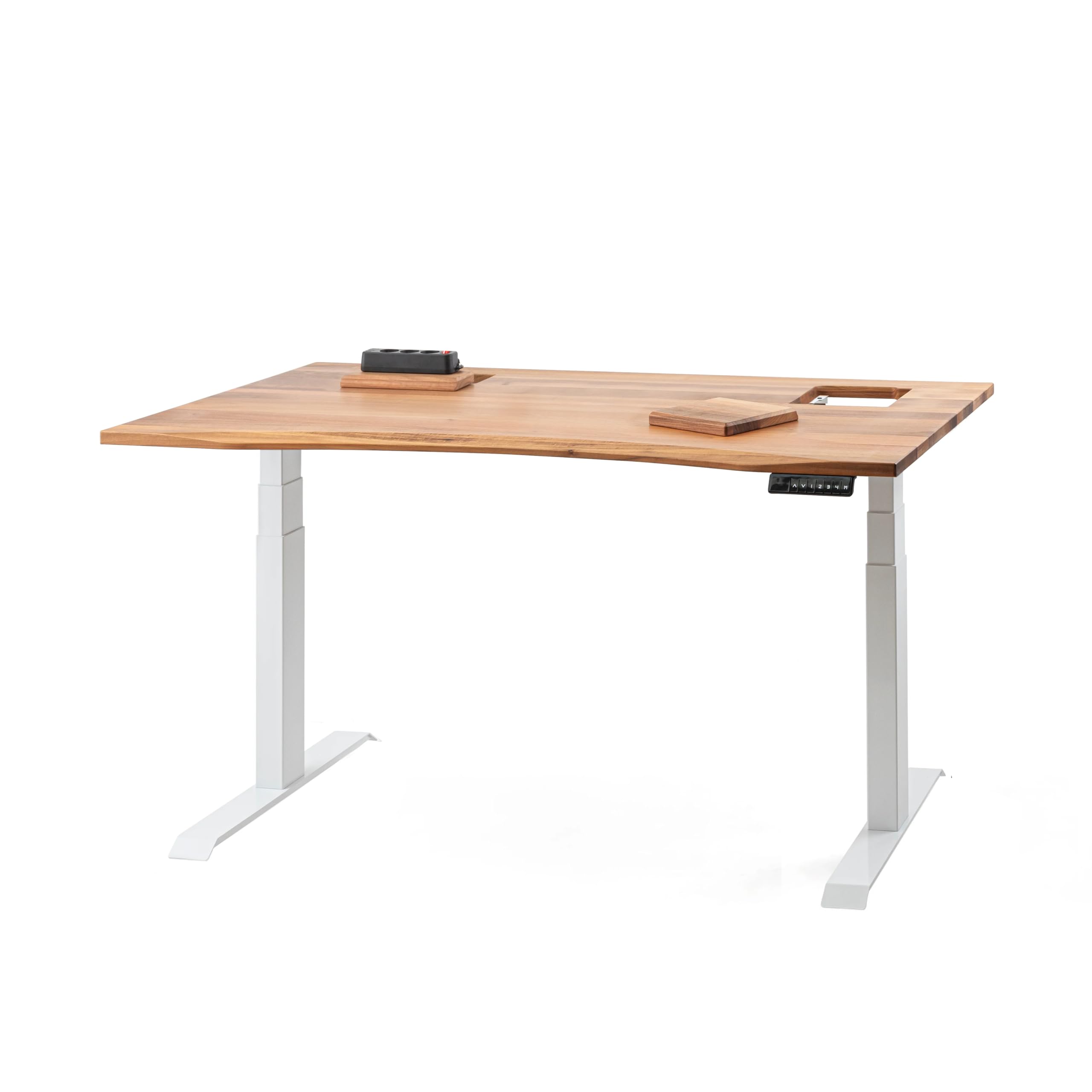
Image: The ErgoHide Adjustable Height Solid Wood Desk, showcasing its elegant design and integrated cable management features.
Setup
Package Contents
- Solid Wood Desktop (Walnut, 120 x 80 cm)
- Height-Adjustable Desk Frame (Alloy Steel)
- Control Panel with Memory Presets
- Cable Management Compartment
- Integrated Power Strips (2 for 120x80 cm model)
- Assembly Hardware and Tools
- Power Cable
Assembly Instructions
The ErgoHide desk requires assembly. Follow the detailed instructions provided in the separate assembly guide included with your package. Ensure all components are present and undamaged before beginning assembly.
- Unpack all components and verify against the parts list.
- Assemble the desk frame according to the provided diagrams, ensuring all screws are securely tightened.
- Carefully place the solid wood desktop onto the assembled frame, aligning it with the pre-drilled holes.
- Secure the desktop to the frame using the provided fasteners.
- Install the control panel in the designated location on the desktop.
- Connect the power strips and cable management compartment as shown in the assembly guide.
- Connect the power cable to the desk frame and then to a grounded power outlet.
For visual assistance, refer to the assembly diagrams. If you encounter any difficulties, please contact customer support.

Image: Technical diagram highlighting key features and specifications of the ErgoHide desk.
Operating Instructions
Height Adjustment
Your ErgoHide desk features an electric height adjustment system. Use the control panel located on the front edge of the desk to adjust the height.
- Up/Down Buttons: Press and hold the up or down arrow buttons to continuously adjust the desk height. Release the button to stop at your desired height.
- Height Range: The desk can be adjusted from 63 cm to 128 cm.
Memory Presets
The control panel allows you to save up to four preferred height settings for quick adjustments.
- Adjust the desk to your desired height using the up/down buttons.
- Press the 'M' button (Memory). The display will show 'S-'.
- Within 3 seconds, press one of the numbered preset buttons (1, 2, 3, or 4). The current height is now saved to that preset.
- To recall a saved height, simply press the corresponding numbered preset button. The desk will automatically move to the saved position.
Collision Detection
The desk is equipped with a collision detection system to prevent damage. If the desk encounters an obstruction during height adjustment, it will stop and reverse slightly. You can adjust the sensitivity of this feature via the control panel settings (refer to the detailed control panel manual for advanced settings).
Cable Management System
The advanced cable management system helps maintain a tidy workspace.
- Access: The cable management compartment is accessible via wooden covers on the desktop and rear openings.
- Integrated Power Strips: Two power strips are fixed to the opening flaps for easy access to power. An additional six-socket power strip is located inside the main cable compartment.
- Removing Power Strips: Power strips attached to the flaps can be removed by pressing them left or right, depending on their mounting.
- Routing Cables: Route all your device cables, power adapters, and routers through the integrated cable channel to keep them hidden and organized.
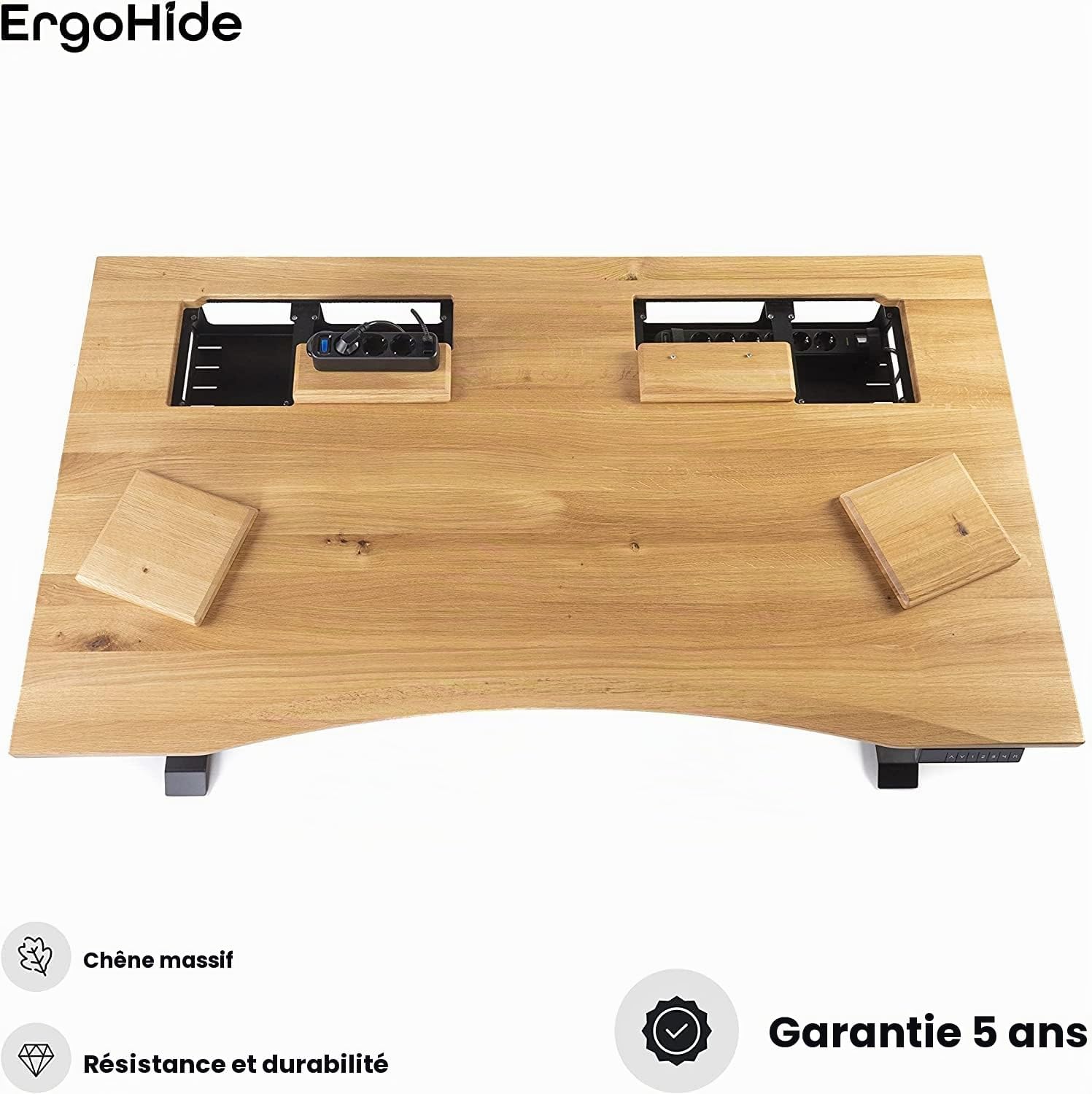
Image: Detail of the desk's top surface with cable management covers open, revealing integrated power strips.

Image: Side profile illustrating the discreet cable management tray integrated into the desk design.
Maintenance
Wood Desktop Care
The solid wood desktop is finished with oil. To maintain its appearance and durability, it is recommended to reapply a fresh coat of oil every few years, or as needed, depending on usage and environmental conditions. Use a wood-specific oil finish and follow the product manufacturer's instructions.
General Cleaning
- Wipe the desktop with a soft, damp cloth. Avoid abrasive cleaners or harsh chemicals.
- For the metal frame, use a mild cleaner and a soft cloth.
- Ensure no liquids enter the electrical components or control panel.
Troubleshooting
If you experience issues with your ErgoHide desk, refer to the following common solutions:
| Problem | Possible Cause | Solution |
|---|---|---|
| Desk does not move | Power cable disconnected, power outage, control panel error | Check power cable connection. Ensure power outlet is functional. Reset the desk by unplugging for 30 seconds and plugging back in. |
| Desk moves unevenly or makes unusual noise | Overload, obstruction, loose components | Ensure desk load does not exceed 100 kg. Check for obstructions under the desk. Verify all assembly screws are tight. |
| Collision detection is too sensitive/insensitive | Sensitivity setting needs adjustment | Refer to the detailed control panel manual for instructions on adjusting collision detection sensitivity. |
| Memory presets not working | Presets not saved correctly | Re-save your desired height presets following the 'Memory Presets' instructions. |
If the problem persists after attempting these solutions, please contact ErgoHide customer support.
Specifications
| Feature | Detail |
|---|---|
| Model Number | EH003 |
| Dimensions (L x W x H) | 120 x 80 x 63-128 cm |
| Desktop Material | FSC-certified Solid Walnut Wood |
| Desktop Thickness | 25 mm |
| Frame Material | Alloy Steel |
| Height Adjustment Range | 63 cm to 128 cm |
| Maximum Load Capacity | 100 kg (additional to desktop weight) |
| Operating Noise Level | 43 dB |
| Adjustment Speed | 30 mm/s |
| Memory Presets | 4 programmable height settings |
| Special Features | Advanced Cable Management, Integrated Power Strips, Collision Detection, Ergonomic Design |
| Assembly Required | Yes |
| Item Weight | 55 Kilograms |
Warranty and Support
Warranty Information
ErgoHide offers a comprehensive 5-year warranty on all parts of your desk, covering manufacturing defects and performance issues under normal use. Additionally, we provide a 180-day customer satisfaction guarantee. If you are not completely satisfied with your purchase within 180 days, you may return the desk at our expense for a full refund.
Customer Support
For any questions, technical assistance, or warranty claims, please contact ErgoHide customer support. Our team is available to help you with assembly, operation, troubleshooting, and any other inquiries you may have.
Please have your model number (EH003) and purchase date ready when contacting support to ensure efficient service.
