
HX-601 BLACK
RIZONE Heated Knee Massager Brace User Manual
Model: HX-601 BLACK
1. Introduction
Thank you for choosing the RIZONE Heated Knee Massager Brace. This innovative 3-in-1 device combines heat therapy, vibration massage, and compression to provide comprehensive relief for knee, shoulder, and elbow discomfort. Designed for portability and ease of use, this cordless massager aims to alleviate pain, reduce stiffness, and promote blood circulation. Please read this manual thoroughly before using the device to ensure safe and effective operation.
2. Safety Information
To ensure safe operation and prevent injury or damage, please observe the following safety precautions:
- Do not use the device if you have a pacemaker, heart condition, or are pregnant. Consult a physician before use if you have any pre-existing medical conditions.
- Do not use on open wounds, swollen areas, or inflamed skin.
- Keep the device away from water and high humidity. Do not immerse in water.
- Do not use while sleeping or in an unconscious state.
- If you experience any discomfort or pain during use, discontinue immediately.
- Keep out of reach of children and pets.
- Use only the provided charging cable.
- Do not disassemble, repair, or modify the device yourself. Contact customer support if needed.
- Avoid prolonged use at the highest heat setting to prevent skin burns. Monitor skin regularly.
3. Product Overview
3.1 Components
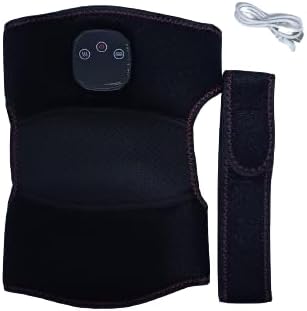

The RIZONE Heated Knee Massager Brace consists of the main brace unit with integrated heating and vibration elements, and a control panel. It comes with a USB charging cable for convenient power replenishment.
3.2 Control Panel
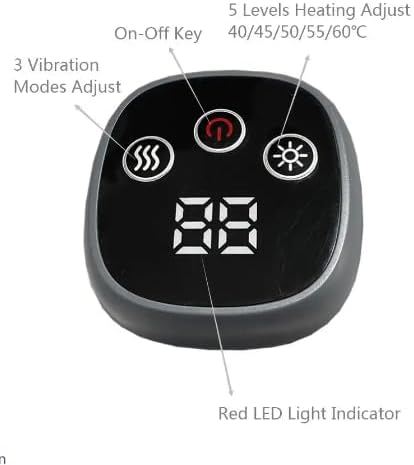
The control panel features an On-Off Key, a button for adjusting 3 Vibration Modes, a button for adjusting 5 Levels of Heating (40/45/50/55/60°C), and a Red LED Light Indicator/Digital Display to show current settings.
4. Setup
4.1 Charging the Device
- Before first use, fully charge the device.
- Connect the USB charging cable to the charging port on the massager.
- Plug the other end of the USB cable into a compatible USB power adapter (not included) or a computer USB port.
- The indicator light on the control panel will show charging status (e.g., blinking during charge, solid when full).
- A full charge typically takes approximately 2-3 hours.
4.2 Wearing the Brace
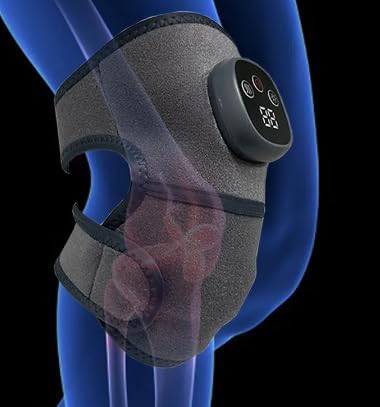
The brace is designed for versatile use on the knee, shoulder, or elbow. Use the adjustable straps to secure the brace firmly but comfortably around the desired area. Ensure the control panel is accessible for operation.
5. Operating Instructions
- Power On/Off: Press and hold the On-Off Key (power symbol) for 2-3 seconds to turn the device on or off. The digital display will illuminate.
- Adjust Vibration Mode: Short press the Vibration Mode Adjust button (wavy lines symbol) to cycle through the 3 available vibration modes. The display may indicate the current mode.
- Adjust Heating Level: Short press the Heating Level Adjust button (sun/heat symbol) to cycle through the 5 heating levels: 40°C, 45°C, 50°C, 55°C, and 60°C. The digital display will show the current temperature setting.
- Timer Function: The device may have an automatic shut-off timer (e.g., 15 or 30 minutes) for safety and convenience. Refer to the product specifications for exact timing.
- Combination Use: You can use the heating and vibration functions simultaneously or independently based on your preference.
Always start with the lowest settings and gradually increase as desired, paying attention to your comfort level.
6. Maintenance
6.1 Cleaning
- Ensure the device is turned off and unplugged before cleaning.
- Wipe the surface of the brace with a soft, damp cloth. Do not use abrasive cleaners or harsh chemicals.
- Do not submerge the device in water or allow water to enter the control panel.
- Allow the device to air dry completely before storing or next use.
6.2 Storage
- Store the device in a cool, dry place, away from direct sunlight and extreme temperatures.
- Keep it in its original packaging or a protective bag to prevent dust accumulation.
7. Troubleshooting
| Problem | Possible Cause | Solution |
|---|---|---|
| Device does not turn on. | Low battery or not charged. | Charge the device fully. Ensure the charging cable is properly connected. |
| No heat or weak heat. | Heat setting is too low or device is not properly positioned. | Increase the heat level. Ensure the brace is snug against the skin. |
| No vibration or weak vibration. | Vibration mode is off or setting is too low. | Cycle through vibration modes to select a stronger setting. |
| Device turns off unexpectedly. | Automatic timer activated or low battery. | This is normal if the timer is set. Recharge the device if the battery is low. |
If the problem persists after trying these solutions, please contact customer support.
8. Specifications
- Model: HX-601 BLACK
- Functions: Heat Therapy, Vibration Massage, Compression
- Heating Levels: 5 levels (40°C, 45°C, 50°C, 55°C, 60°C)
- Vibration Modes: 3 modes
- Power Source: Rechargeable Battery (Cordless)
- Application Area: Knee, Shoulder, Elbow
- Color: Grey and Black
- Country of Origin: China
9. Warranty and Support
This product is covered by a standard manufacturer's warranty. For specific warranty terms and conditions, please refer to the documentation provided with your purchase or contact the seller directly. If you encounter any issues or have questions regarding the use, maintenance, or troubleshooting of your RIZONE Heated Knee Massager Brace, please reach out to the seller or manufacturer's customer support for assistance.
Seller: RIZONE
Related Documents - HX-601 BLACK
 |
KARM Adjustable Knee Brace: User Guide and FAQ Comprehensive guide for the KARM Adjustable Knee Brace, covering how to put it on, take it off, usage tips, and answers to frequently asked questions for optimal knee support and comfort. |
 |
Wireless Knee Massager HX-601 User Manual and Safety Guide Comprehensive instructions for the Wireless Knee Massager HX-601, covering operation, safety precautions, and maintenance. This guide ensures proper and safe use of the device. |
 |
Sleeve Stars Ankle Brace User Guide: Fit, Usage, and Benefits Comprehensive user guide for the Sleeve Stars ankle brace. Discover how this compression sleeve aids in recovery from Plantar fasciitis, arthritis, sprains, and tendonitis. Learn about package contents, achieving the perfect fit, wearing with shoes, and customer support for optimal pain relief and ankle support. |
 |
Miele HS23 Cordless Stick Vacuum Cleaner Operating Instructions This document provides comprehensive operating instructions for the Miele HS23 Cordless Stick Vacuum Cleaner, covering setup, usage, maintenance, safety guidelines, and troubleshooting for optimal performance. |
 |
Black Ice CoolTherapy System: User Guide and Instructions Learn how to effectively use the Black Ice CoolTherapy System for pain and swelling relief. This guide covers charging packs, application, care, and important safety notices. |
 |
Miele HS23 Cordless Vacuum Cleaner: Operating Instructions and User Guide Discover how to use, maintain, and troubleshoot your Miele HS23 cordless vacuum cleaner with this comprehensive operating manual. Includes safety guidelines, accessory information, and detailed instructions for optimal cleaning performance. |