
1. Introduction
This manual provides essential information for the safe and efficient use of your Tekswamp La-Z-Boy Timotion TP2 Class 2 Power Supply. Please read this manual thoroughly before installation and operation, and retain it for future reference. This power supply is designed for specific applications, primarily for La-Z-Boy recliners and similar devices requiring a 29V 2.5A 5-pin power source.
2. Product Overview
The Tekswamp Timotion TP2 power supply is a reliable and robust unit designed to provide stable power to compatible devices. It features a durable casing, a standard AC input, and a 5-pin DC output connector.
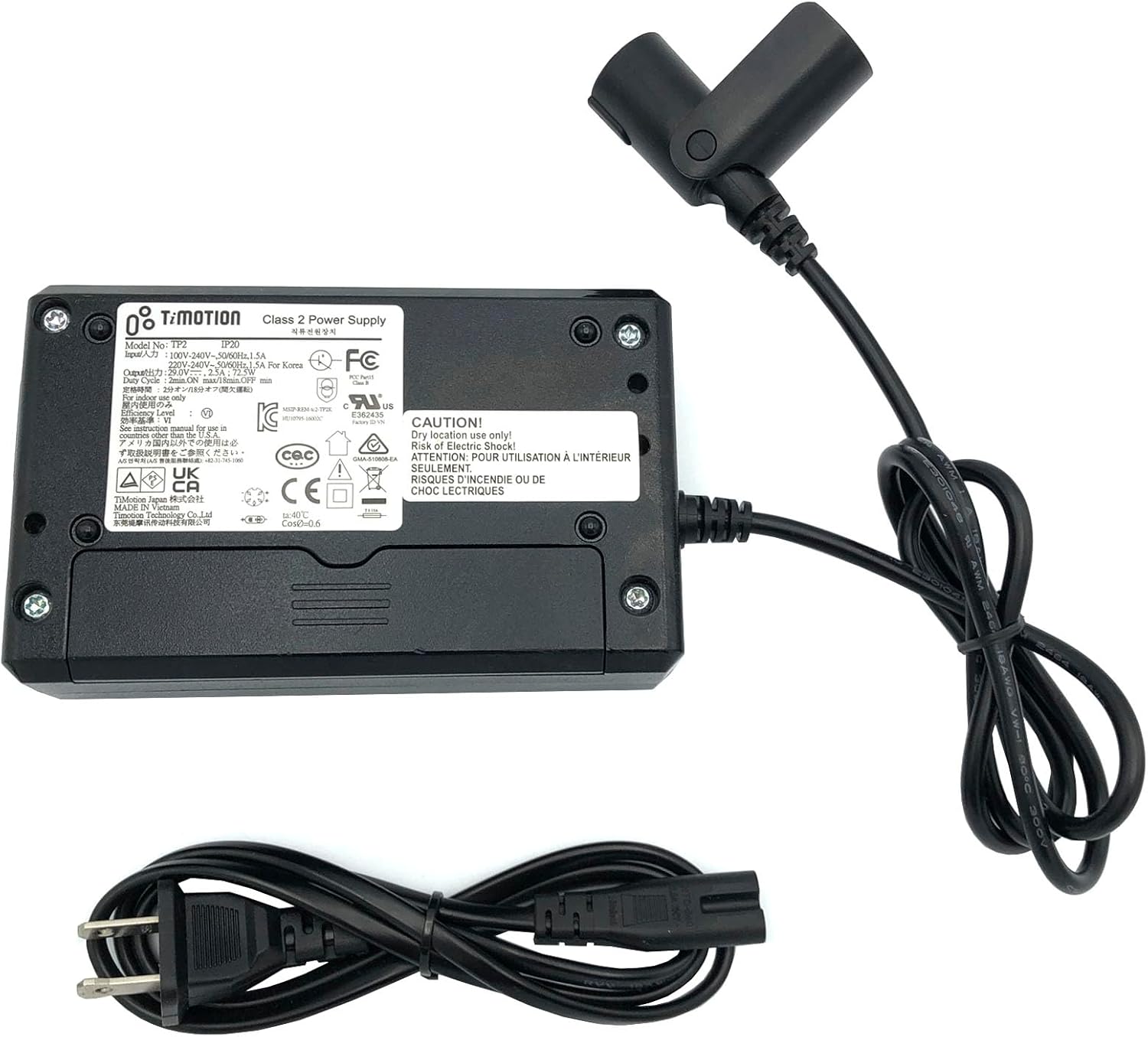
Figure 2.1: Complete power supply unit including the main adapter, output cable with 5-pin connector, and AC power cord.
2.1 Components
- Power Adapter Unit: The main black rectangular unit that converts AC power to DC power.
- 5-Pin Output Cable: Permanently attached cable with a 5-pin connector for connecting to your device.
- AC Power Cord: Detachable cord for connecting the power adapter to a wall outlet.

Figure 2.2: Detailed view of the product label on the power supply, showing model number, input/output specifications, and safety certifications.

Figure 2.3: Close-up of the 5-pin female connector on the power supply's output cable, showing the pin configuration.
3. Specifications
The following table details the technical specifications of the Timotion TP2 Power Supply:
| Feature | Specification |
|---|---|
| Model | TP2 |
| Input Voltage | 100-240V~1.5A 50/60Hz |
| Output Voltage | 29V |
| Output Current | 2.5A |
| Wattage | 72.5W |
| Connector Type | 5-Pin |
| Safety Features | Incorrect Voltage (IV), Short Circuit (SC), Internal Overheating (IO) Protection |
| Environmental Rating | IP20 (Indoor use only) |
4. Setup Instructions
Follow these steps to properly set up your power supply:
- Unpack the Unit: Carefully remove the power supply and all components from its packaging. Inspect for any visible damage.
- Connect AC Power Cord: Insert the detachable AC power cord into the input port of the power adapter unit. Ensure it is firmly seated.
- Connect to Device: Locate the 5-pin power input port on your La-Z-Boy recliner or compatible device. Align the 5-pin connector from the power supply's output cable with the device's input port and gently push to connect. Ensure the connection is secure.
- Plug into Wall Outlet: Plug the AC power cord into a standard wall electrical outlet (100-240V AC).
- Verify Power: Once connected, your device should receive power. Refer to your device's manual for specific power indicators.
Important: Ensure the power supply specifications (voltage, amperage, and connector type) match the requirements of your device before connecting.
5. Operating Instructions
The Timotion TP2 power supply operates automatically once connected to a power source and a compatible device. It provides a continuous 29V DC output.
- Normal Operation: The power supply will deliver power to your device as needed. There are no user-adjustable settings on the power supply itself.
- Duty Cycle: The power supply is designed with a duty cycle of 2 minutes ON / 18 minutes OFF. This means it can operate continuously for up to 2 minutes, followed by a recommended rest period of 18 minutes to prevent overheating and ensure longevity. Adhering to this duty cycle is crucial for the power supply's performance and lifespan.
- Safety Features: The unit includes built-in protections against incorrect voltage, short circuits, and internal overheating. In case of an anomaly, the power supply may temporarily shut down to protect itself and the connected device.
6. Maintenance
To ensure the longevity and optimal performance of your power supply, follow these simple maintenance guidelines:
- Keep Dry: This power supply is rated IP20, meaning it is for indoor use only and not protected against water. Keep it away from liquids and high humidity environments.
- Clean Regularly: Use a soft, dry cloth to wipe down the exterior of the power supply. Do not use liquid cleaners or abrasive materials.
- Ensure Ventilation: Do not cover the power supply or place it in an enclosed space where heat cannot dissipate. Adequate airflow is essential to prevent overheating.
- Inspect Cables: Periodically check the AC power cord and the 5-pin output cable for any signs of fraying, cuts, or damage. If damage is found, discontinue use and replace the unit.
- Store Properly: When not in use for extended periods, disconnect the power supply from the wall outlet and store it in a cool, dry place.
7. Troubleshooting
If you encounter issues with your power supply, refer to the following common problems and solutions:
| Problem | Possible Cause | Solution |
|---|---|---|
| No power to device | Power cord not fully plugged in; Wall outlet not active; Device not properly connected; Power supply fault; Overload/Overheat protection activated. | Ensure all connections are secure. Test the wall outlet with another device. Verify the 5-pin connector is fully inserted. Disconnect power for 5 minutes, then reconnect. If problem persists, unit may be faulty. |
| Power supply feels hot | Normal operation heat; Insufficient ventilation; Exceeding duty cycle. | Some warmth is normal. Ensure adequate airflow around the unit. Adhere to the 2 min ON / 18 min OFF duty cycle. If excessively hot, disconnect and allow to cool. |
| Device functions intermittently | Loose connection; Device power issue; Power supply nearing end of life. | Check all cable connections. Test the device with another compatible power supply if available. If issues persist, the power supply may need replacement. |
8. Warranty and Support
For warranty information or technical support, please contact Tekswamp customer service. Refer to your purchase documentation for specific warranty terms and contact details.
Tekswamp Customer Service:
- Visit the Tekswamp Store on Amazon for product information and support resources.