
1. Introduction
This manual provides essential instructions for the safe and efficient operation of your Aiwa AW-SSB180 Kabuki Soundbar. Please read this manual thoroughly before using the product and retain it for future reference.
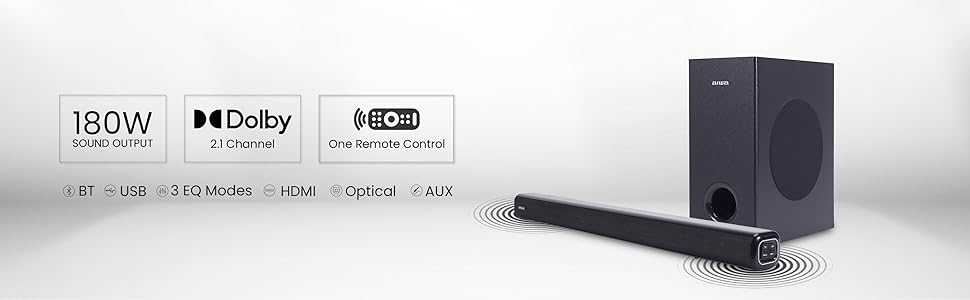
The Aiwa AW-SSB180 Kabuki Soundbar is designed to enhance your audio experience with powerful sound and versatile connectivity options. It features Bluetooth V5.3, a 5.25-inch wired subwoofer, and multiple input options including HDMI, AUX, USB, and Optical.
2. Package Contents
Verify that all items listed below are included in your package. If any items are missing or damaged, please contact customer support.
- 1N Soundbar
- 1N Wired Subwoofer
- 1N Remote Control
- 1N User Manual (this document)
- 1N 3.5mm Audio Cable
- 1N Power Cable

3. Product Overview
3.1. Soundbar Features
- 180W Sound Output
- 2.1 Channel Audio Configuration
- Bluetooth V5.3 for wireless connectivity
- Multiple EQ Modes
- Connectivity: HDMI, AUX, USB, Optical
3.2. Subwoofer Features
- 5.25-inch Wired Subwoofer
- Enhances bass performance for dynamic sound

3.3. Remote Control
The included remote control provides full access to the soundbar's settings, including power, volume, input selection, EQ modes, and playback controls.

4. Setup
4.1. Placement
- Place the soundbar on a stable, flat surface in front of your television, or mount it on the wall using appropriate hardware (not included).
- Position the subwoofer on the floor near the soundbar for optimal bass distribution.
4.2. Connections
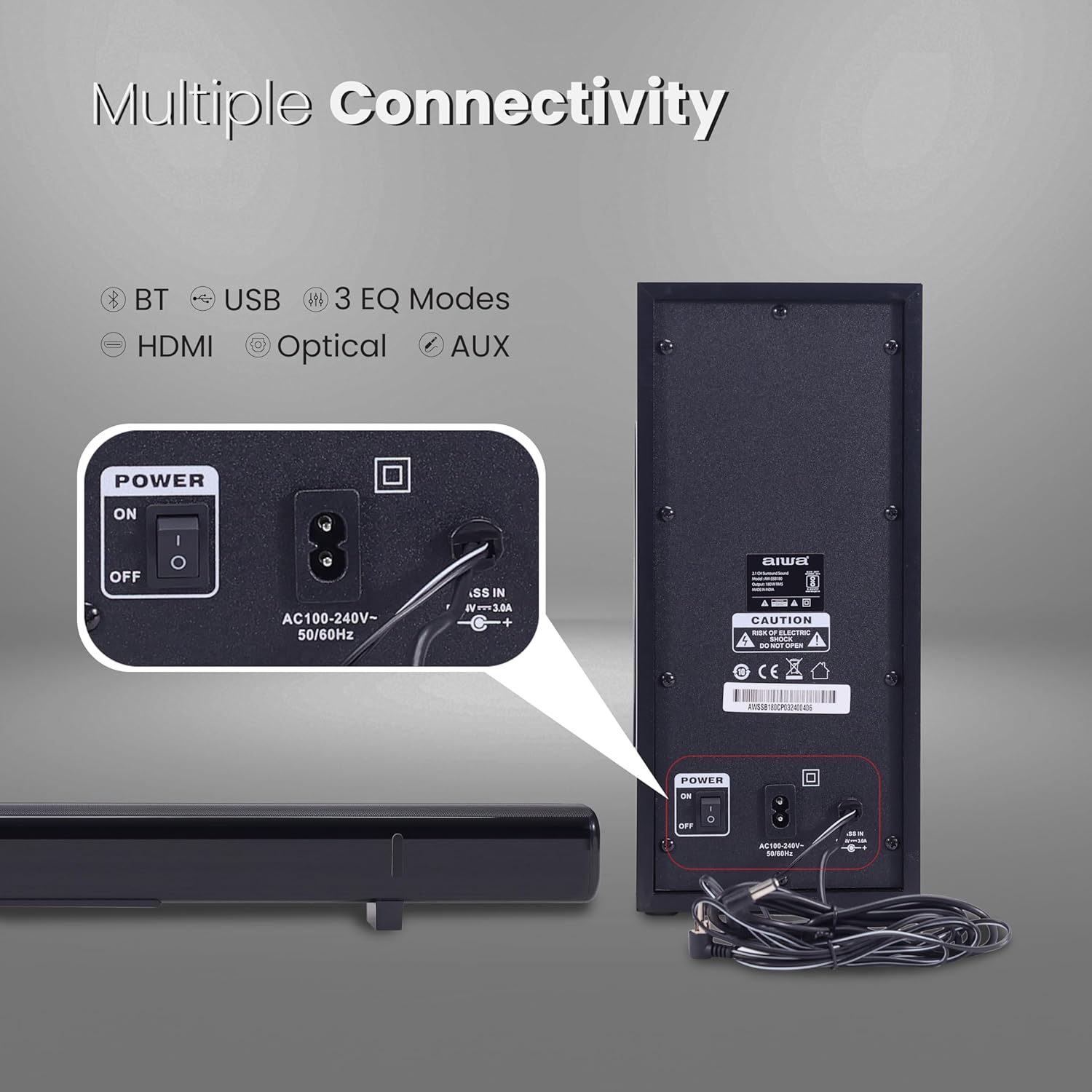
- Subwoofer Connection: Connect the wired subwoofer to the soundbar using the dedicated subwoofer cable.
- Power Connection: Connect the power cable to the soundbar's power input and then to a wall outlet. Ensure the power switch on the back of the soundbar is in the 'OFF' position before connecting.
- Audio Input: Choose your preferred audio input method (HDMI, AUX, USB, or Optical) and connect the corresponding cable from your audio source (e.g., TV, smartphone) to the soundbar.
5. Operating Instructions
5.1. Power On/Off
- Ensure the power switch on the back of the soundbar is in the 'ON' position.
- Press the Power button on the remote control or the soundbar's control panel to turn the unit on or off.
5.2. Input Selection
Press the Input button on the remote control or the soundbar to cycle through available input sources: Bluetooth, HDMI, AUX, USB, Optical.
5.3. Bluetooth Pairing
- Select the Bluetooth input on the soundbar. The indicator light will flash, indicating pairing mode.
- On your device (e.g., smartphone, tablet), enable Bluetooth and search for 'AW-SSB180'.
- Select 'AW-SSB180' to pair. Once connected, the indicator light will become solid.
5.4. Volume Control
Use the VOL+ and VOL- buttons on the remote control or soundbar to adjust the volume.
5.5. EQ Modes
Press the NEWS, MUSIC, or MOVIE buttons on the remote control to select different equalizer presets optimized for various audio content.
6. Maintenance
- Cleaning: Use a soft, dry cloth to clean the surfaces of the soundbar and subwoofer. Do not use liquid cleaners or abrasive materials.
- Storage: When not in use for extended periods, store the unit in a cool, dry place away from direct sunlight and extreme temperatures.
- Ventilation: Ensure proper ventilation around the soundbar and subwoofer to prevent overheating. Do not block any ventilation openings.
7. Troubleshooting
| Problem | Possible Cause | Solution |
|---|---|---|
| No power | Power cable not connected; Power switch off | Ensure power cable is securely connected and power switch is ON. |
| No sound | Incorrect input selected; Volume too low; Mute activated; Audio cable loose | Select correct input source. Increase volume. Deactivate mute. Check audio cable connections. |
| Bluetooth not connecting | Soundbar not in pairing mode; Device too far; Interference | Ensure soundbar is in Bluetooth pairing mode. Move device closer. Reduce interference from other devices. |
| Remote control not working | Batteries depleted; Obstruction between remote and soundbar | Replace remote control batteries. Remove any obstructions. |
8. Specifications
| Feature | Detail |
|---|---|
| Model Name | AW-SSB180 - KABUKI |
| Speaker Type | Soundbar |
| Speaker Maximum Output Power | 180 Watts |
| Surround Sound Channel Configuration | 2.1 |
| Subwoofer Diameter | 5.25 Inches |
| Connectivity Technology | Auxiliary, Bluetooth, HDMI, USB, Optical |
| Wireless Communication Technology | Bluetooth V5.3 |
| Control Method | Remote |
| Power Source | Corded Electric (AC100-240V~ 50/60Hz) |
| Product Dimensions | 88.9D x 20.3W x 45.7H Centimeters |
| Item Weight | 5 Kilograms |
| Mounting Type | Wall Mount |
| Compatible Devices | Television, Smartphones, Tablets |
| Special Feature | Dolby Enabled, Japanese Technology, USB Port |
9. Warranty and Support
Your Aiwa AW-SSB180 Kabuki Soundbar comes with a 1-year warranty from the date of purchase.
For warranty claims, technical support, or any product-related inquiries, please contact Aiwa customer service:
- Contact Number: 1800-120-5619
- Email: getintouch@aiwaindia.com
- Importer Address: AIWA INDIA SALES & SERVICES PRIVATE LIMITED, 2E/26, Jhandewalan Extn, New Delhi -110055
