
CUREBONE CB-RRG-100
CUREBONE Rehabilitation Robot Gloves User Manual
Model: CB-RRG-100
1. Introduction
The CUREBONE Rehabilitation Robot Gloves are designed to assist in hand muscle strength improvement and finger flexibility. This device integrates neuroscience and flexible robotics to support the recovery process for various hand conditions. It is a wireless, easy-to-use flexion glove that offers customizable rehabilitation options.

Figure 1.1: CUREBONE Rehabilitation Robot Gloves and included components.
2. Safety Information
Important Safety Precautions:
- Consult a healthcare professional before using this device, especially if you have pre-existing medical conditions or are recovering from an injury.
- Do not use the device if it is damaged or malfunctioning.
- Keep the device away from water and excessive moisture.
- Ensure the power adapter and cables are intact and not frayed.
- Do not attempt to disassemble or repair the device yourself. Contact customer support for assistance.
- Keep out of reach of children.
- This product does not include standalone lithium batteries.

Figure 2.1: Device certifications ensuring safety standards.
3. Package Contents
Verify that all items listed below are present in your package:
- Rehabilitation Robot Glove (Left or Right Hand, specified by order)
- Control Unit
- Mirror Hand Strap
- Training Ball
- Hand Pads
- Power Adapter and Charging Cable
- User Manual

Figure 3.1: All components included in the product package.
4. Setup
- Charge the Control Unit: Connect the power adapter to the control unit and plug it into a power outlet. Ensure the unit is fully charged before first use. A full charge provides approximately 3 hours of wireless operation.
- Attach the Glove: Connect the rehabilitation glove's cable to the designated port on the control unit. Ensure a secure connection.
- Wear the Glove: Carefully place the rehabilitation glove on the hand requiring therapy. Adjust the straps to ensure a comfortable and secure fit. The glove should not be too tight or too loose.
- Prepare for Mirror Mode (Optional): If using the mirror mode, place the mirror hand strap on your healthy hand. This allows the healthy hand's movements to control the rehabilitation glove.

Figure 4.1: The control unit can be used wirelessly after charging.
5. Operating Instructions
5.1. Control Panel Overview
The control unit features a user-friendly interface for managing therapy sessions.
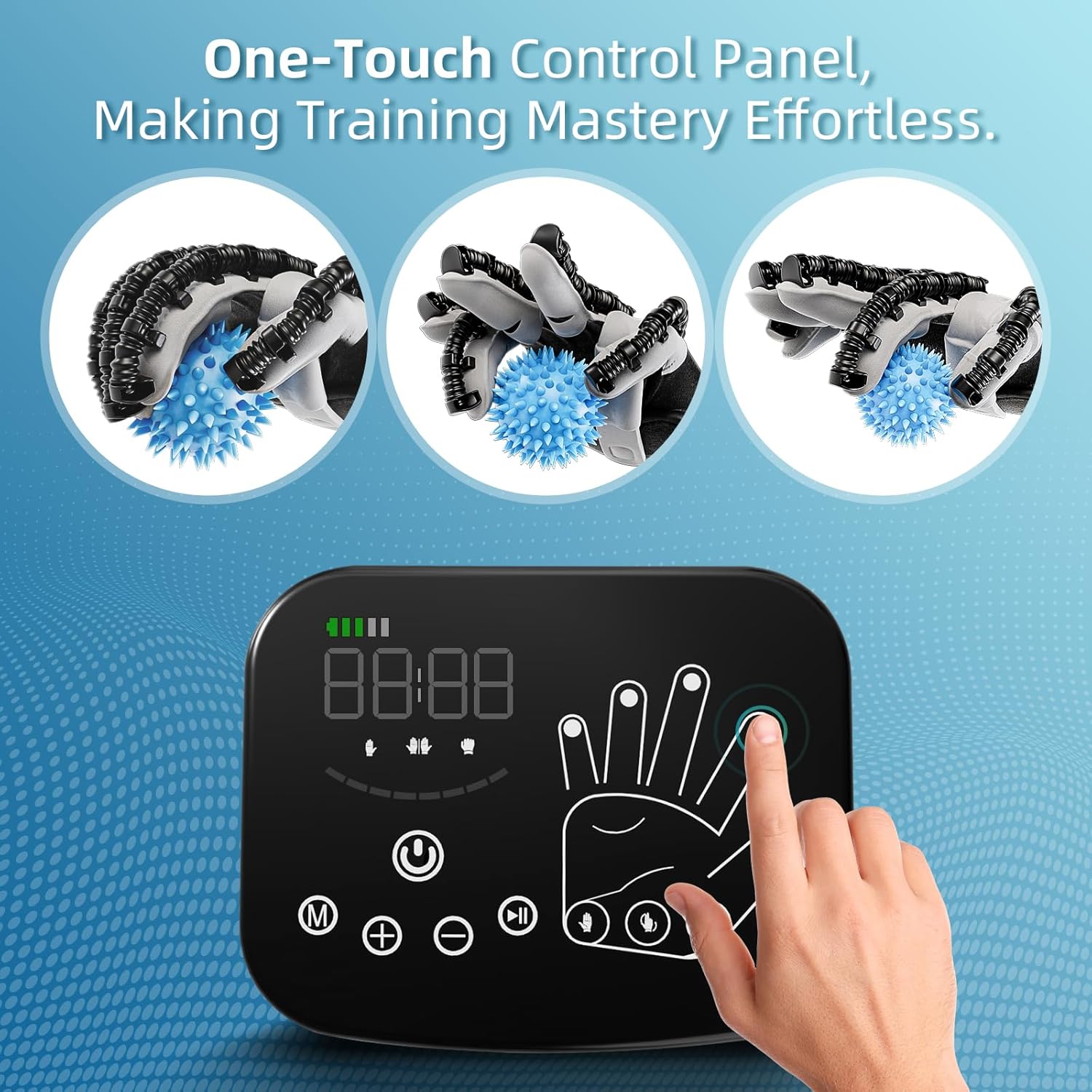
Figure 5.1: The intuitive one-touch control panel.
5.2. Powering On/Off
Press and hold the power button on the control unit to turn the device on or off.
5.3. Selecting Modes
The device offers various rehabilitation modes. Use the mode selection buttons to cycle through available options:
- Automatic Mode: Provides continuous flexion and extension movements.
- Passive Mode: The glove moves the fingers passively through a range of motion.
- Active Mode: User-initiated movements are assisted by the glove.
- Mirror Mode: Movements of the healthy hand (with mirror strap) are replicated by the rehabilitation glove.

Figure 5.2: Mirror mode allows the healthy hand to guide the rehabilitation glove.
5.4. Adjusting Intensity
The device features 8 levels of tensile and flexural settings. Use the '+' and '-' buttons on the control unit to adjust the intensity of the movements to a comfortable and effective level for your rehabilitation needs.

Figure 5.3: Adjusting the 8 intensity levels for personalized therapy.
5.5. Independent Finger Training
The control panel allows for independent training of each finger. Select the desired finger on the display to focus rehabilitation efforts on specific digits.

Figure 5.4: The control unit allows for individual finger training.
5.6. Using the Training Ball and Hand Pads
For enhanced hand exercise and effective hand stretch, utilize the included training ball and hand pads during your therapy sessions as recommended by your healthcare professional.
6. Maintenance
- Cleaning: The glove and control unit should be cleaned regularly. Use a soft, damp cloth to wipe down surfaces. Do not submerge the control unit in water. The glove is hand wash only.
- Storage: Store the device in a cool, dry place away from direct sunlight and extreme temperatures.
- Battery Care: To prolong battery life, avoid fully discharging the control unit frequently. Charge it regularly, even if not in active use.
7. Troubleshooting
| Problem | Possible Cause | Solution |
|---|---|---|
| Device does not power on. | Low battery or power cable not connected. | Charge the control unit. Ensure the power adapter is securely connected to the unit and a working power outlet. |
| Glove not moving fingers. | Glove cable loose or disconnected. Incorrect mode selected. | Check the connection between the glove and the control unit. Verify the selected operating mode. |
| Movements are too weak/strong. | Intensity setting is not optimal. | Adjust the intensity levels using the '+' and '-' buttons on the control unit. |
| Mirror mode not working. | Mirror hand strap not properly worn or connected. | Ensure the mirror hand strap is securely worn on the healthy hand and properly connected to the control unit. |
8. Specifications
- Model Number: CB-RRG-100
- Brand: CUREBONE
- Item Weight: 3 Pounds
- Battery: 1 A battery required (included)
- Material: ABS (Fabric type)
- Care Instructions: Hand Wash Only (Glove)
- First Available Date: June 7, 2024
8.1. Sizing Information
Refer to the table below for appropriate sizing based on hand measurements:

Figure 8.1: Product size table for selecting the correct glove size.
9. Warranty and Support
For warranty information and customer support, please refer to the contact details provided in your product packaging or visit the official CUREBONE website. Keep your purchase receipt for warranty claims.
Return Policy: 30 days for refund/replacement (as per Amazon listing, but general instruction manual should state to refer to seller/retailer policy).
Manufacturer: CUREBONE
Seller: CUREBONE-US
Ask a question about this manual
Ask about setup, troubleshooting, compatibility, parts, safety, or missing instructions. Manuals+ will review the question and use this page’s manual context to help answer it.