
1. Introduction and Overview
The YVV LED Rotating Display Stand (Model RND-120-BK) is designed to enhance the presentation of various items such as jewelry, action figures, dolls, collectibles, crystal art, and tumblers. This motorized turntable features adjustable rotation, multi-color LED illumination, and dual power options for versatile use.

Image 1.1: The YVV LED Rotating Display Stand in use, displaying various items.
2. Product Components
Please verify that all components are present upon unpacking:
- YVV LED Rotating Display Stand (Model RND-120-BK)
- USB Power Cable
3. Setup Instructions
- Unpack the Device: Carefully remove the display stand and USB cable from its packaging.
- Choose a Location: Place the display stand on a stable, flat surface. Ensure the surface can support the weight of the stand and the item to be displayed.
- Power Connection: Connect the display stand using either the USB cable or by inserting batteries. Refer to Section 5 for detailed power options.
- Place Item: Gently place the item you wish to display onto the center of the rotating platform. Ensure the item is stable and balanced to prevent it from falling during rotation. The stand has a load capacity of 4.4 pounds (2 kg).
4. Operating Instructions
The display stand features intuitive controls located on the front panel. Refer to Image 4.1 for button identification.
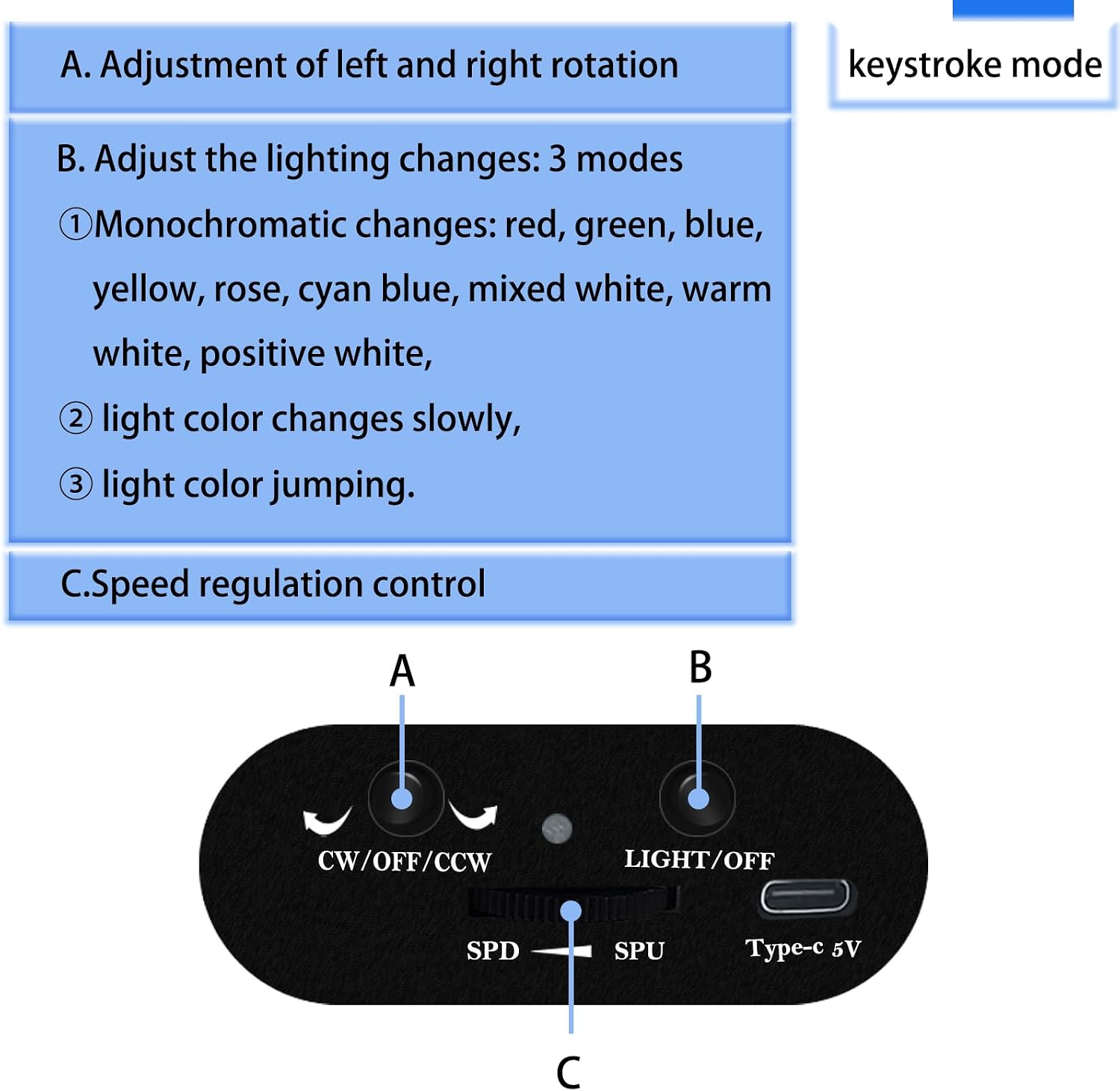
Image 4.1: Control panel of the YVV LED Rotating Display Stand.
4.1 Rotation Control
- CW/OFF/CCW Button:
- Tap: Enables/disables rotation or switches rotation direction (Clockwise/Counter-Clockwise).
- SPD/SPU Thumb Wheel Switch:
- SPD: Decreases rotation speed.
- SPU: Increases rotation speed.
4.2 Light Control
- LIGHT/OFF Button:
- Short Press: Switches between light colors.
- Double Click: Switches to RGB (color gradient/jump) mode.
- Long Press: Turns off the light.

Image 4.2: Explanation of light mode controls.
5. Light Modes and Colors
The YVV LED Rotating Display Stand offers a variety of lighting options to highlight your displayed items:
5.1 Available Colors
The stand provides eight distinct light colors:
- Red
- Green
- Blue
- Yellow
- Rose
- Cyan Blue
- Mixed White
- Warm White
- White
5.2 Lighting Modes
Choose from three dynamic lighting modes:
- Fixed Monochrome: Displays a single, static color.
- Color Gradient: Smoothly transitions between different colors.
- Color Jump: Abruptly switches between different colors.
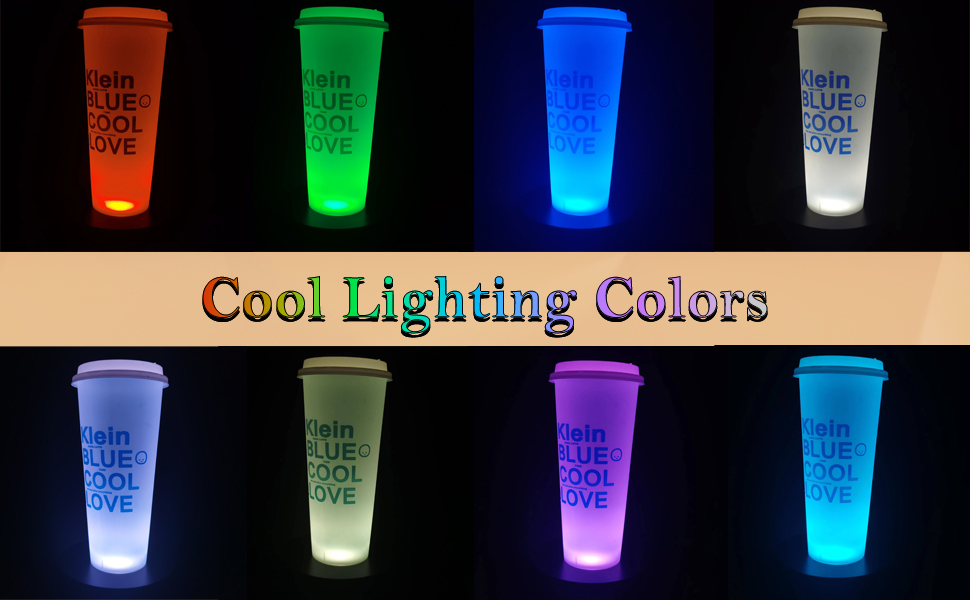
Image 5.1: Examples of cool lighting colors with tumblers.

Image 5.2: Examples of beautiful light shows with crystal balls.
6. Power Options
The YVV LED Rotating Display Stand offers flexible power options:
- USB Power: Use the included USB cable to connect the stand to a computer, laptop, power bank, or any standard USB adapter (5V).
- Battery Power: For wireless operation, insert 3 AA batteries (not included) into the battery compartment located on the underside of the stand.

Image 6.1: Power supply options for the display stand.
7. Maintenance
To ensure the longevity and optimal performance of your display stand, follow these maintenance guidelines:
- Cleaning: Wipe the surface of the stand with a soft, dry cloth. Avoid using abrasive cleaners or solvents, as these can damage the finish.
- Liquid Exposure: Do not expose the stand to water or other liquids. If liquid spills occur, immediately disconnect power and dry thoroughly.
- Battery Care: If using batteries, remove them if the stand will not be used for an extended period to prevent leakage.
- Storage: Store the stand in a cool, dry place away from direct sunlight when not in use.
8. Troubleshooting
If you encounter any issues with your YVV LED Rotating Display Stand, please refer to the following common problems and solutions:
| Problem | Possible Cause | Solution |
|---|---|---|
| Stand does not rotate. | No power or rotation is off. | Ensure USB cable is securely connected or batteries are correctly inserted and charged. Press the CW/OFF/CCW button to activate rotation. |
| Lights are not working. | No power or lights are off. | Verify power connection. Press the LIGHT/OFF button to turn on the lights. |
| Rotation is unstable or jerky. | Item is off-center or too heavy. | Ensure the displayed item is centered on the platform and does not exceed the 4.4 lb (2 kg) load capacity. |
| Stand makes unusual noise. | Obstruction or excessive load. | Check for any obstructions around the rotating mechanism. Reduce the weight of the displayed item if it exceeds the load capacity. |
9. Specifications
| Model Number | RND-120-BK |
| Brand | YVV |
| Product Dimensions | 4.72 x 4.72 x 1.77 inches (12 x 12 x 4.5 cm) |
| Item Weight | 7.8 ounces (0.22 kg) |
| Load Capacity | 4.4 Pounds (2 kg) |
| Material | Plastic |
| Color | Black |
| Power Options | USB (5V) or 3 AA Batteries (not included) |
| Finish Type | Polished |
| Assembly Required | No |
10. Warranty and Customer Support
YVV is committed to ensuring your satisfaction with our products. If you have any questions, concerns, or require after-sales support, please do not hesitate to contact us. We are dedicated to resolving any issues to ensure your positive experience.
For support, please refer to the contact information provided with your purchase or visit the official YVV brand store online.