
1. Introduction
Thank you for choosing the WINFREE HC-M1 Smart Lock. This keyless entry deadbolt offers multiple unlocking methods including fingerprint, RFID card, passcode, TT Lock Bluetooth App, and mechanical key. It is designed for easy installation and enhanced home security. This manual provides detailed instructions for installation, operation, and maintenance to ensure optimal performance and longevity of your smart lock.
2. Safety Information
- Do not attempt to disassemble or repair the lock yourself. Contact qualified personnel for service.
- Use only specified batteries (4 AAA/1.5V alkaline batteries). Do not mix old and new batteries or different types of batteries.
- Keep mechanical keys in a safe place outside your home.
- Avoid exposing the lock to direct sunlight or rain for extended periods.
- Ensure all screws are tightened securely during installation to prevent loosening.
- Regularly check the lock for any signs of wear or damage.
3. Product Overview
The WINFREE HC-M1 Smart Lock includes the following components:
- Front Panel with Keypad and Fingerprint Sensor
- Rear Panel with Battery Compartment and Thumb Turn
- Deadbolt Latch
- Mounting Plate
- Strike Plate and Strike Box
- Mounting Screws
- Mechanical Keys
- RFID Cards

Image: Overview of WINFREE HC-M1 Smart Lock components and packaging.
4. Setup & Installation
The WINFREE HC-M1 Smart Lock is designed for easy installation with a screwdriver. Please ensure your door meets the following specifications:
- Door Thickness: 1.5''-2.1'' (38-53 mm)
- Backset: 2.36'' (60mm) or 2.76'' (70mm)
- Compatible with US standard left or right-hand doors.
Installation Steps:
- Install Lock Body: Insert the deadbolt latch into the door edge and secure it with screws. Ensure the 'Up' arrow on the latch is pointing upwards.
- Fixing Screws: Attach the exterior assembly to the door, ensuring the lock bolt is kept on a level surface. Secure it with the provided screws.
- Install Rubber Pads: Place the rubber pads on the interior side of the door, aligning them with the holes.
- Install Iron Back Set: Mount the iron back set plate, feeding the cable through the designated opening. Secure it with screws.
- Joint the Plug: Connect the cable from the exterior assembly to the interior assembly.
- Screws On: Attach the interior assembly to the mounting plate and secure it with screws.
- Insert Batteries: Open the battery cover on the interior assembly and insert 4 AAA/1.5V alkaline batteries (not included).
Video: Detailed installation instructions for the WINFREE HC-M1 Smart Lock.
5. Operating Instructions
Unlocking Methods:
- Fingerprint Unlock: Place your registered finger on the sensor for quick access. The lock features a 160x160 pixel sensor with 0.3s unlocking speed.
- Passcode Unlock: Enter your registered passcode on the keypad. The anti-peep passcode function allows you to enter random digits before or after your actual code to protect privacy.
- RFID Card Unlock: Tap your registered RFID card against the card reader sensor on the lock.
- TT Lock App Control: Use the TT Lock app on your smartphone to unlock the door via Bluetooth. For remote unlock or voice control (Alexa/Google Assistant), an additional Bluetooth gateway (sold separately) is required.
- Mechanical Key: Use the provided mechanical key as a backup unlocking method.
App Pairing and User Management:
Download the TT Lock app from your smartphone's app store. Follow the in-app instructions to pair your smart lock via Bluetooth. Once paired, you can:
- Add and manage fingerprints (place finger on sensor 4 times during registration).
- Add and manage RFID cards.
- Generate permanent, timed, one-time, or recurring passcodes for guests or service staff.
- View real-time operation records and receive instant notifications.
- Set up Passage Mode: The lock remains unlocked during a specific time period until manually locked.
- Enable Auto-Lock: The lock automatically locks after a set period.
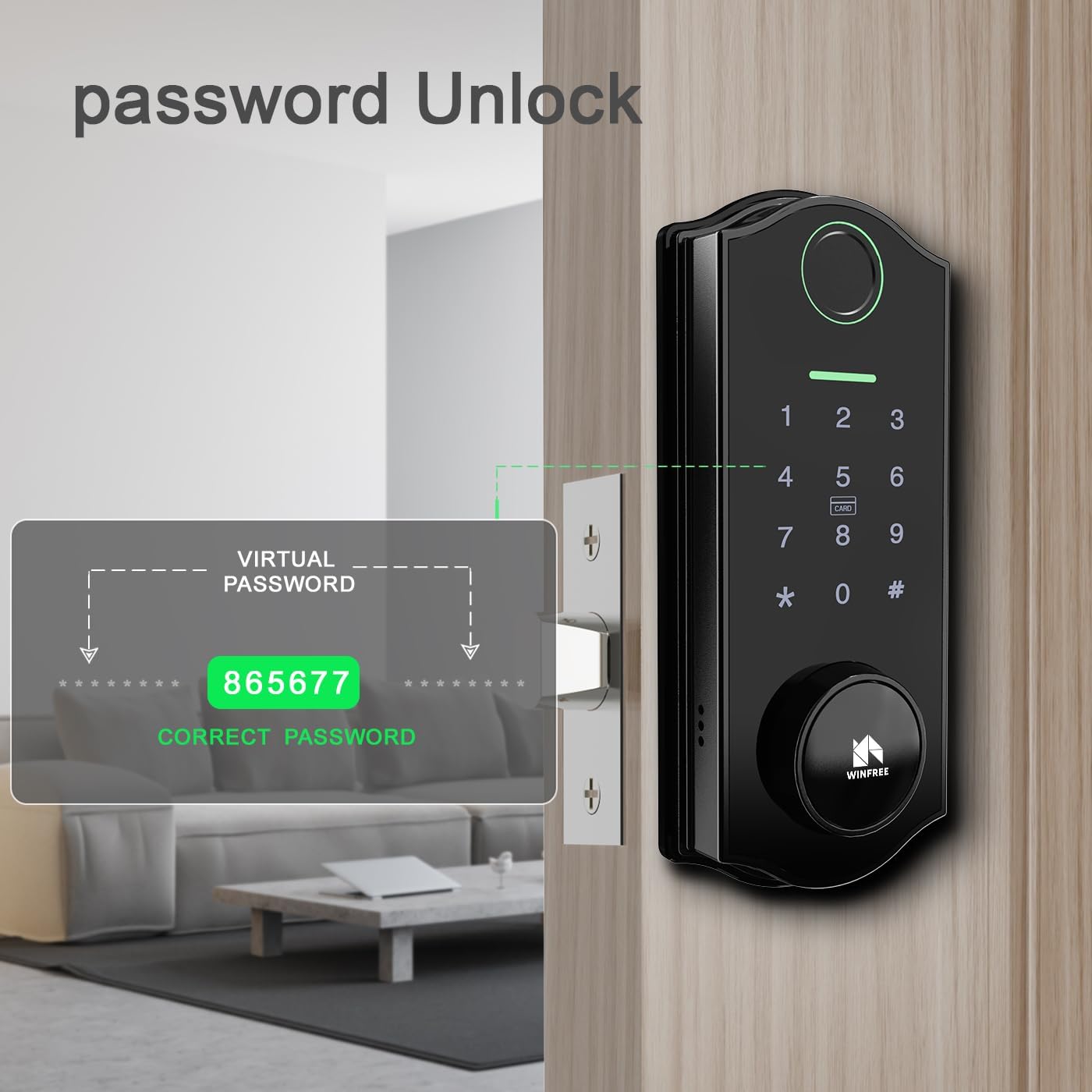
Image: Fingerprint unlock in action on the smart lock.
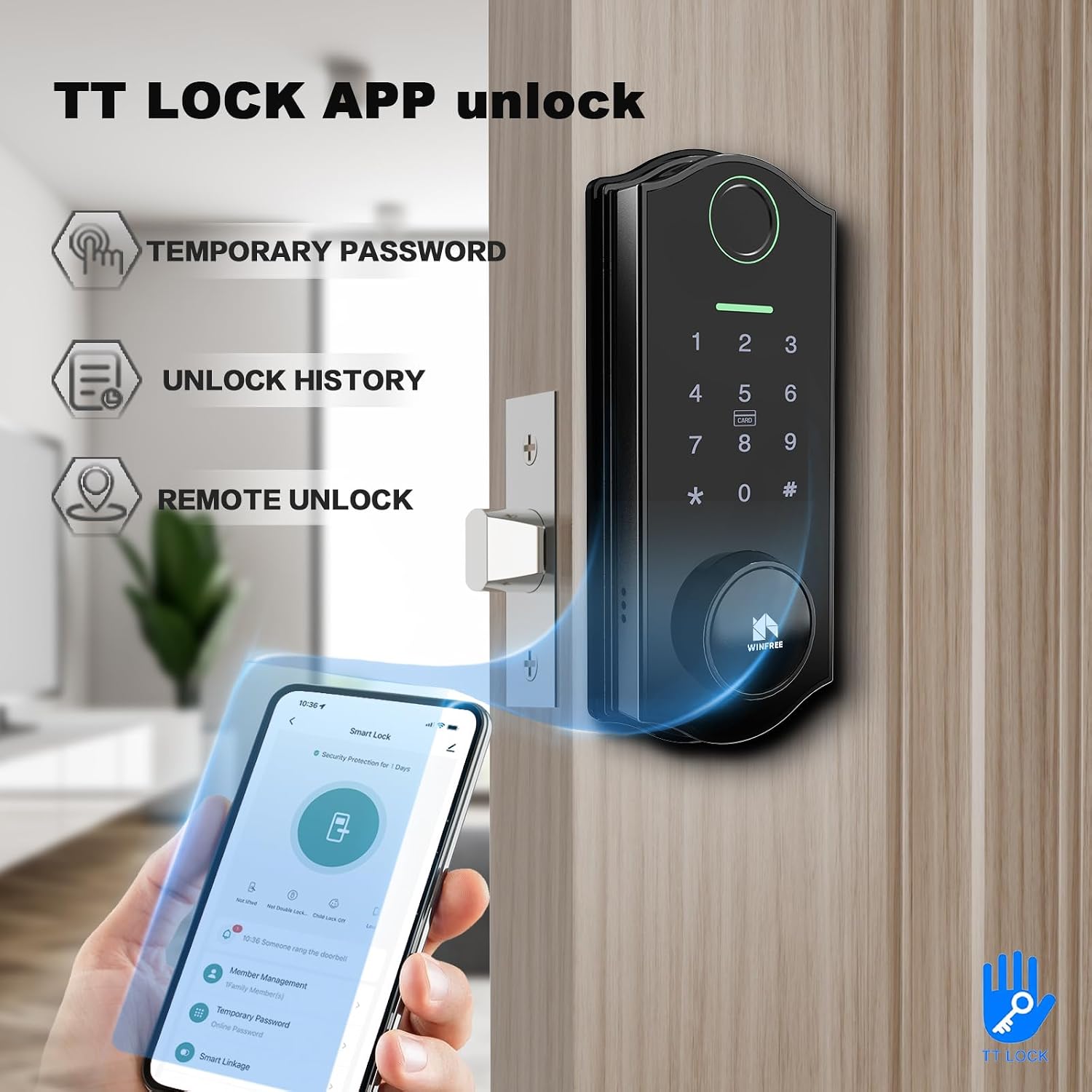
Image: Passcode unlock feature with virtual password display.

Image: TT Lock App interface for unlocking and managing the smart lock.

Image: RFID card unlock method for the smart lock.
Video: Demonstration of various unlocking methods and app functions for the WINFREE HC-M1 Smart Lock.
6. Maintenance
- Battery Replacement: The lock is powered by 4 AAA/1.5V alkaline batteries. When the battery is low, the lock will issue an alert. Replace all four batteries simultaneously.
- Emergency Power: In case of complete battery depletion, use a USB power bank to connect to the emergency power port on the exterior panel to temporarily power the lock and gain access.
- Cleaning: Wipe the lock surface with a soft, dry cloth. Avoid using abrasive cleaners or solvents that may damage the finish or electronic components.
- Fingerprint Sensor Care: Keep the fingerprint sensor clean and dry for optimal performance.

Image: Battery compartment of the smart lock, designed for 4 AAA batteries.

Image: USB emergency power port for temporary power supply.
7. Troubleshooting
- Lock not responding: Check battery levels. If low, replace batteries or use emergency USB power.
- Fingerprint not recognized: Ensure your finger is clean and dry. Re-register your fingerprint if issues persist.
- Passcode not working: Verify the correct passcode is entered. Ensure the lock is not in privacy mode.
- App connection issues: Ensure Bluetooth is enabled on your phone and you are within range of the lock. Restart the app or re-pair the lock if necessary.
- Auto-lock not engaging: Check the auto-lock settings in the TT Lock app.
- Lock is loose: Re-tighten all mounting screws.
8. Specifications
| Feature | Specification |
|---|---|
| Brand | WINFREE |
| Model Name | HC-M1 |
| Lock Type | Biometric, Deadbolt, Keypad |
| Special Features | Anti-Peeping Password, Auto-Lock, Fingerprint, Passcode Unlock, Touchscreen |
| Material | Acrylic, Zinc |
| Color | Black |
| Dimensions (L x W x H) | 0.98 x 0.79 x 0.39 inches |
| Item Weight | 4.4 pounds (2 Kilograms) |
| Connectivity Protocol | Bluetooth |
| Controller Type | Amazon Alexa, Google Assistant, TT Lock (requires separate gateway for voice control) |
| Power Source | 4 AAA/1.5V Alkaline Batteries (not included) |
| Operating Temperature | -4℉ to 158℉ (-20℃ to 70℃) |
| Recommended Uses | Residential, Commercial, Temporary/Shared Accommodations |
9. Warranty & Support
For warranty information and technical support, please refer to the warranty card included with your product or visit the official WINFREE website. You may also contact WINFREE customer service directly for assistance with product issues, troubleshooting, or general inquiries.
Please retain your purchase receipt for warranty claims.