1. Introduction
Thank you for choosing the CYCYHEAT Wireless Heated Blanket. This manual provides essential information for the safe and effective use of your heated blanket. Please read it thoroughly before operation and retain it for future reference.
This portable heated blanket, model RTPB-020P, is designed to provide warmth and comfort with its 8 heating zones and 3 adjustable temperature levels, powered by a high-capacity 20000mAh 7.4V battery. Its versatile design allows it to be used as a throw blanket or a wearable wrap.

Image 1.1: The CYCYHEAT Wireless Heated Blanket shown in use as a throw and a wearable wrap, alongside its 20000mAh battery and carrying bag.
2. Safety Instructions
To ensure safe operation and prevent injury or damage, please adhere to the following safety guidelines:
- Do not use the heated blanket while sleeping.
- Do not use with infants, incapacitated persons, or individuals who are insensitive to heat.
- Avoid folding, creasing, or bunching the blanket tightly during use to prevent localized overheating.
- Do not insert pins or any other metallic objects into the blanket.
- Do not dry clean the blanket. Refer to the 'Maintenance and Care' section for cleaning instructions.
- Keep the blanket away from pets to prevent damage to the heating elements or wiring.
- Do not use the blanket if it is wet.
- Regularly inspect the blanket and its power cord for any signs of damage. Discontinue use if damage is detected.
- Use only the provided 7.4V 20000mAh battery with this blanket. Using other batteries may cause damage or safety hazards.
- Do not expose the battery to extreme temperatures, direct sunlight, or fire.
- Do not puncture, disassemble, or modify the battery.
3. Package Contents
Please check the package contents upon receipt. If any items are missing or damaged, contact customer support immediately.
- 1 x CYCYHEAT Wireless Heated Blanket (132 x 110 cm)
- 1 x 20000mAh 7.4V DC Lithium-polymer Battery
- 1 x Battery Charging Cable
- 1 x Storage Bag
4. Product Overview
4.1 Key Features
- Dimensions: 132 x 110 cm (52 x 43 inches)
- Material: Soft and comfortable Polyester fabric
- Heating Zones: 8 strategically placed carbon fiber heating elements for even warmth distribution.
- Temperature Levels: 3 adjustable heat settings (High, Medium, Low).
- Battery: Powerful 20000mAh 7.4V Lithium-polymer battery for extended wireless use.
- Versatility: Can be used as a traditional throw blanket or worn as a wrap.
4.2 Heating Zones and Temperature Settings
The blanket features 8 heating zones to provide comprehensive warmth. You can select from three temperature levels:
- High (Red Light): Approximately 55°C (131°F)
- Medium (White Light): Approximately 50°C (122°F)
- Low (Blue Light): Approximately 45°C (113°F)

Image 4.1: Illustration of the 8 heating zones within the blanket, ensuring widespread warmth.
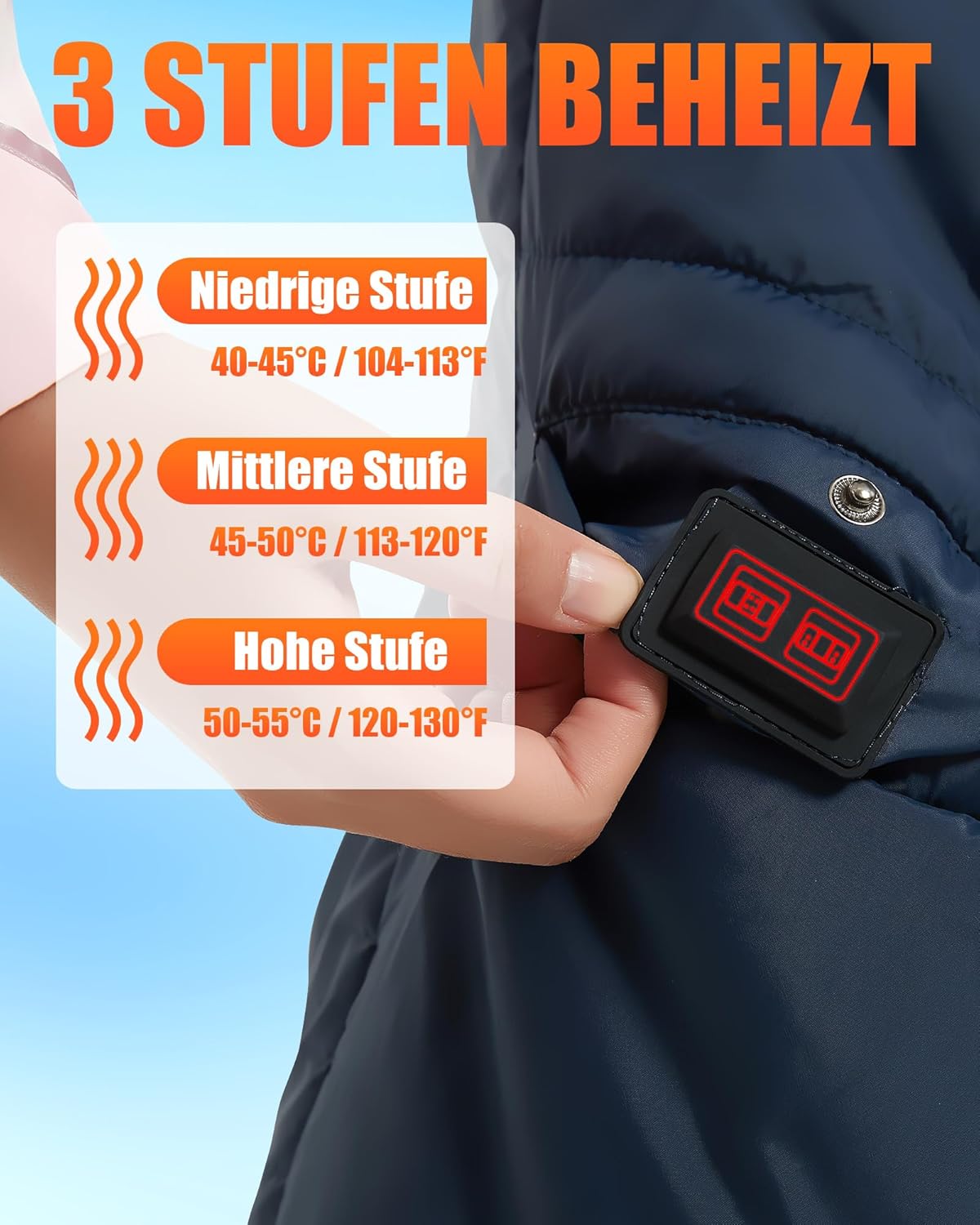
Image 4.2: The control button displaying the three temperature settings: Low (40-45°C), Medium (45-50°C), and High (50-55°C).
4.3 Battery Information
The included 20000mAh 7.4V battery provides long-lasting power for your heated blanket. Its compact size makes it easy to carry.
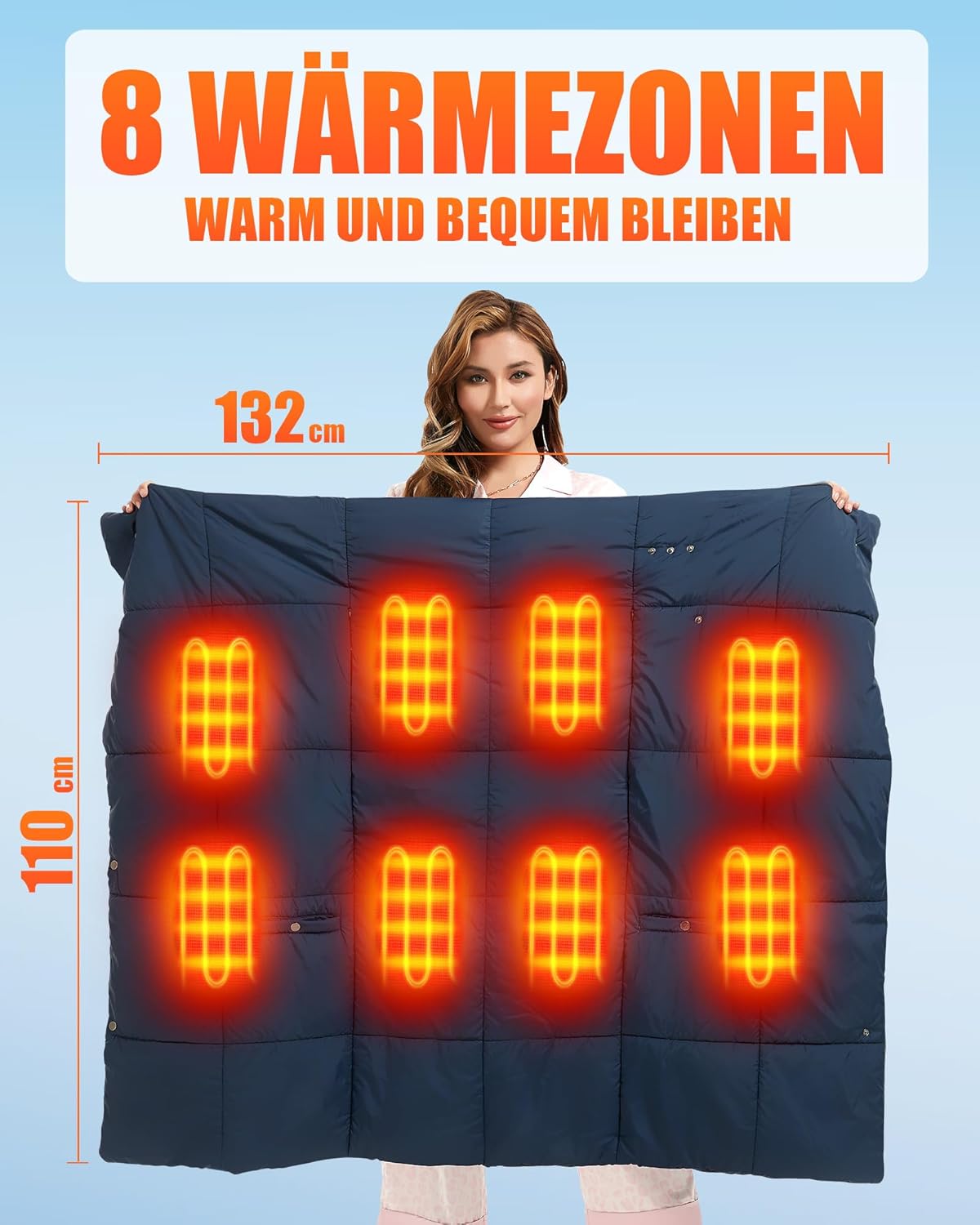
Image 4.3: The 20000mAh battery, measuring approximately 6.9 cm (2.75 in) by 13.4 cm (5.31 in), shown next to a smartphone for size comparison.
5. Setup
- Charge the Battery: Before first use, fully charge the 20000mAh battery using the provided charging cable. The battery indicator lights will show charging progress.
- Locate Battery Pocket: Find the battery pocket and the DC connector cable inside the blanket.
- Connect Battery: Connect the fully charged 7.4V battery to the DC connector cable. Ensure a secure connection.
- Secure Battery: Place the connected battery securely into the pocket and close the pocket zipper or fastener.

Image 5.1: Visual guide for inserting the battery and operating the power button. Step 1: Insert the battery. Step 2: Press and hold the switch for 3 seconds. Step 3: Press the switch once to change the temperature. Step 4: Rapid warming within ten minutes.
6. Operating Instructions
- Power On: Press and hold the power button on the blanket for 2 to 3 seconds. The indicator light will illuminate, typically starting at the highest heat setting (Red).
- Adjust Temperature: Press the power button once to cycle through the temperature settings:
- Red Light: High heat (approx. 55°C)
- White Light: Medium heat (approx. 50°C)
- Blue Light: Low heat (approx. 45°C)
- Power Off: Press and hold the power button for 2 to 3 seconds until the indicator light turns off.
6.1 Estimated Battery Life
The 20000mAh battery provides varying durations of warmth depending on the selected heat setting:
- High Temperature: 5-7 hours
- Medium Temperature: 9-11 hours
- Low Temperature: 13-15 hours
Note: Actual battery life may vary based on environmental conditions, ambient temperature, and specific usage patterns.
7. Maintenance and Care
7.1 Cleaning Instructions
- Disconnect Battery: Always disconnect the battery from the blanket and remove it from the pocket before cleaning.
- Washing: The blanket can be hand washed or machine washed on a gentle cycle with cold water. Use a mild detergent.
- Do Not: Do not bleach, iron, or dry clean the blanket.
- Drying: Tumble dry on a low heat setting or air dry. Ensure the blanket is completely dry before reconnecting the battery or storing.
7.2 Storage
When not in use, store the blanket in a cool, dry place. If storing for an extended period, remove the battery from the blanket.

Image 7.1: The skin-friendly polyester fabric, highlighting its soft and insulating properties.
8. Troubleshooting
If you encounter any issues with your CYCYHEAT Wireless Heated Blanket, please refer to the following common problems and solutions:
- Blanket is not heating:
- Ensure the battery is fully charged.
- Verify that the battery is securely connected to the DC connector inside the blanket's pocket.
- Confirm that the power button has been pressed and held for 2-3 seconds to activate the heating function.
- Check if the battery itself is functioning correctly.
- Battery is not charging:
- Ensure the charging cable is properly connected to both the battery and a functional power source.
- Try using a different charging cable or power adapter to rule out a faulty accessory.
- Indicator light is not working:
- If the blanket is not heating and the indicator light is off, after verifying battery connection and charge, contact customer support.
If the problem persists after attempting these solutions, please contact customer support for further assistance.
9. Specifications
| Feature | Specification |
|---|---|
| Brand | CYCYHEAT |
| Model Number | RTPB-020P |
| Dimensions | 132 x 110 cm (52 x 43 inches) |
| Material | Polyester |
| Heating Elements | 8 Carbon Fiber Heating Zones |
| Temperature Settings | 3 Levels (High: ~55°C, Medium: ~50°C, Low: ~45°C) |
| Battery Type | Lithium-polymer |
| Battery Capacity | 20000mAh, 7.4V |
| Estimated Battery Life | 5-15 hours (depending on setting) |
| Item Weight | 1.63 Kilograms |
10. Warranty and Support
CYCYHEAT is committed to providing quality products and customer satisfaction. If you have any questions regarding the use of your product, or if you receive a package with missing or defective components (such as batteries), please do not hesitate to contact us.
For support, please reach out to CYCYHEAT customer service through the Amazon platform where you made your purchase. We will provide a solution to any issues you may encounter.