
1. Introduction
This manual provides essential information for the safe and effective use of your Oukitel S68 replacement battery. Please read this manual thoroughly before installation and operation to ensure optimal performance and longevity of the battery.
2. Setup and Installation
Before installing the new battery, ensure your Oukitel C16 Pro smartphone is completely powered off and disconnected from any power sources. It is recommended to use appropriate tools for safe removal of the old battery and installation of the new one.
- Power Off Device: Completely shut down your Oukitel C16 Pro smartphone.
- Remove Back Cover: Carefully remove the back cover of your smartphone. Refer to your phone's specific disassembly guide if needed.
- Disconnect Old Battery: Gently disconnect the old battery's connector from the motherboard. Avoid pulling on the wires.
- Remove Old Battery: Carefully pry out the old battery. It may be secured with adhesive.
- Insert New Battery: Place the new Oukitel S68 battery into the battery compartment.
- Connect New Battery: Connect the new battery's connector firmly to the motherboard.
- Reassemble Device: Replace the back cover and secure it properly.
- Initial Charge: It is recommended to fully charge the battery before its first use.
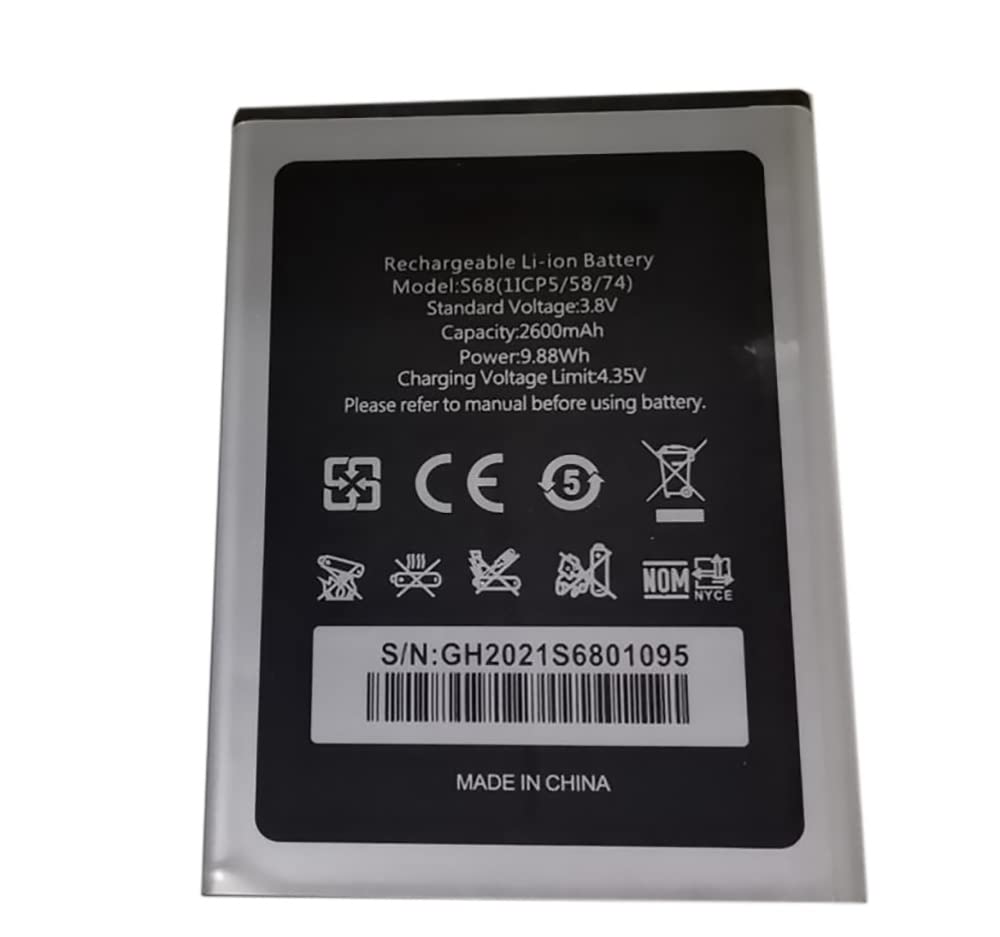
3. Operating Instructions
The Oukitel S68 battery is designed for seamless integration with your Oukitel C16 Pro. Follow these guidelines for optimal performance:
- Charging: Use only compatible and certified chargers for your Oukitel C16 Pro. Avoid using damaged or non-standard chargers.
- First Use: For the first few charge cycles, allow the battery to fully discharge and then fully charge to calibrate its capacity.
- Normal Use: The battery is designed for daily use. Avoid extreme discharge (letting the phone die completely) or constant charging to 100% if possible, as this can affect long-term battery health.
4. Maintenance and Care
Proper maintenance can significantly extend the lifespan of your Oukitel S68 battery:
- Temperature: Avoid exposing the battery to extreme temperatures (below 0°C or above 45°C). High temperatures can degrade battery performance and safety.
- Storage: If storing the battery for an extended period, ensure it is charged to about 50-60% and stored in a cool, dry place. Recharge it every few months to prevent deep discharge.
- Avoid Physical Damage: Do not puncture, drop, or disassemble the battery. Physical damage can lead to internal short circuits and potential hazards.
- Cleaning: Keep the battery contacts clean and free from dust or debris.
5. Troubleshooting
If you encounter issues with your Oukitel S68 battery, consider the following:
- Battery Not Charging:
- Ensure the charger and charging cable are working correctly. Try a different charger or cable.
- Check the charging port on your phone for any debris or damage.
- Restart your smartphone.
- Battery Draining Quickly:
- Check background apps and services that might be consuming excessive power.
- Reduce screen brightness and disable unnecessary features like Wi-Fi, Bluetooth, or GPS when not in use.
- Perform a factory reset on your phone (backup data first!) if software issues are suspected.
- Battery Not Recognized:
- Ensure the battery connector is securely seated.
- Re-install the battery to ensure proper contact.
- Safety Warning: If the battery appears swollen, damaged, or emits an unusual odor, discontinue use immediately and dispose of it properly. Do not attempt to repair a damaged battery.
6. Specifications
Detailed specifications for the Oukitel S68 Replacement Battery:
| Feature | Specification |
|---|---|
| Model Number | S68 (1ICP5/58/74) |
| Battery Type | Rechargeable Li-ion Battery |
| Standard Voltage | 3.8V |
| Capacity | 2600mAh |
| Power | 9.88Wh |
| Charging Voltage Limit | 4.35V |
| Compatible Device | Oukitel C16 Pro |
| Manufacturer | LIJIAJIAN |
| Origin | Made in China |
7. Warranty and Support
For warranty information and customer support, please refer to the terms and conditions provided by the seller at the time of purchase. Keep your proof of purchase for any warranty claims.
Due to ongoing product updates by the manufacturer, there may be slight variations in product recognition across different production batches. This does not affect the battery's compatibility or core specifications.
If you require further assistance or have questions not covered in this manual, please contact the seller or manufacturer directly.