
1. Introduction
Thank you for choosing the Cooler Depot BB2S Commercial Back Bar Cooler. This manual provides essential information for the safe and efficient installation, operation, and maintenance of your new refrigerator. Please read these instructions thoroughly before use and retain them for future reference.
2. Product Overview and Features
The Cooler Depot BB2S is a commercial-grade back bar cooler designed for under-counter placement, offering reliable cooling for beverages and cold food items. Its robust construction and user-friendly features ensure optimal performance in commercial environments.
Key Features:
- Capacity: 7.4 cubic feet (208 Liters)
- Temperature Range: Maintains safe temperatures between 35°F to 46°F (1.7°C to 7.8°C).
- Doors: Two double-pane, self-closing sliding glass doors with key lock and magnetic door gaskets for positive sealing.
- Shelving: Four adjustable wire shelves for flexible storage.
- Lighting: Interior LED lighting for enhanced visibility of contents.
- Controls: Easy-to-use digital temperature controls for precise temperature management.
- Construction: Durable black vinyl-on-steel exterior, galvanized steel interior walls and ceiling, and stainless steel floor and doorsills for corrosion resistance.
- Refrigerant: R600a/64g.
- Certifications: NSF certified for sanitation.
Product Dimensions:
- Overall Dimensions (W x D x H): Approximately 35.5 inches x 21 inches x 35.5 inches.
- Internal Shelf Depth: Approximately 14 inches.
- Internal Width: Approximately 32 inches.
- Internal Door Space Height: Approximately 29.5 inches.
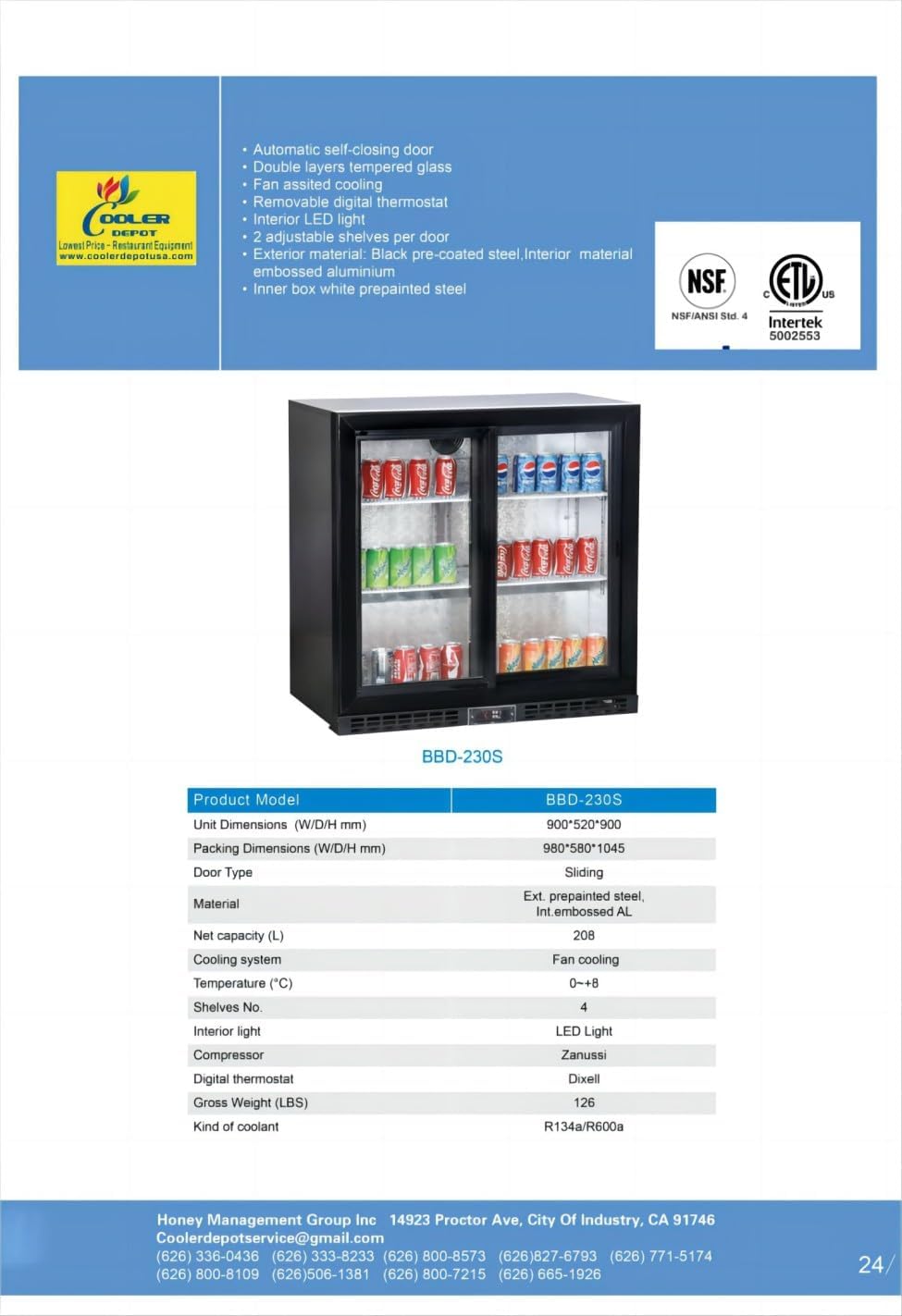
Figure 2.1: Front view of the Cooler Depot BB2S Commercial Back Bar Cooler.

Figure 2.2: Cooler interior showcasing bottled beverages.
3. Setup and Installation
3.1 Unpacking
- Carefully remove all packaging materials.
- Inspect the unit for any shipping damage. Report any damage immediately to the carrier and supplier.
- Remove all protective films and tapes from the surfaces.
3.2 Placement
- Place the cooler on a flat, level, and stable surface capable of supporting its weight when fully loaded.
- Ensure adequate ventilation around the unit. Maintain at least 4 inches (10 cm) of clearance from walls or other obstructions on the sides and rear to allow for proper airflow to the compressor and condenser.
- Avoid direct sunlight, heat sources, or areas with high humidity.
3.3 Electrical Connection
- The unit requires a dedicated 115V electrical connection.
- Plug the standard US power plug directly into a grounded electrical outlet. Do not use extension cords or adapter plugs.
- Allow the unit to stand upright for at least 2 hours before plugging it in to allow compressor oils to settle.

Figure 3.1: Rear view with power cord connection.
3.4 Shelf Installation
- Install the four wire shelves into the desired positions using the provided shelf clips.
- Ensure shelves are securely seated before placing items on them.

Figure 3.2: Interior with adjustable wire shelves.
4. Operation
4.1 Initial Startup
- After plugging in the unit, allow it to run for several hours to reach the desired operating temperature before loading products.
4.2 Digital Temperature Control
- The digital control panel is located at the front bottom of the unit.
- Press the 'SET' button to view the current set temperature.
- To adjust the temperature, press 'SET' again, then use the up and down arrow buttons to select the desired temperature. Press 'SET' once more to confirm.
- The unit features an automatic defrost system.

Figure 4.1: Digital temperature control panel.
4.3 Door Operation
- The glass doors slide smoothly for easy access. They are self-closing to help maintain internal temperatures.
- Use the integrated key lock to secure the contents of the cooler when necessary.
4.4 Interior Lighting
- The interior LED lights can be controlled via a dedicated button on the digital control panel.
5. Maintenance
5.1 Cleaning
- Exterior: Clean the exterior surfaces with a mild detergent and a soft cloth. Avoid abrasive cleaners.
- Interior: Regularly clean the interior with a solution of mild soap and water. Remove shelves for thorough cleaning. Rinse with clean water and dry completely.
- Glass Doors: Use a glass cleaner for the glass doors.
- Door Gaskets: Inspect and clean door gaskets regularly to ensure a tight seal. A damaged gasket can lead to inefficient cooling.
5.2 Condenser Coil Cleaning
- The condenser coils, located near the compressor at the bottom rear of the unit, should be cleaned every 3 months or more frequently in dusty environments.
- Unplug the unit before cleaning.
- Use a stiff brush or vacuum cleaner to remove dust and debris from the condenser fins.
5.3 Defrosting
- This unit features an automatic defrost system, minimizing the need for manual defrosting.
6. Troubleshooting
Before contacting service, please check the following common issues:
| Problem | Possible Cause | Solution |
|---|---|---|
| Unit not cooling | Power cord unplugged; circuit breaker tripped; temperature set too high; condenser coil dirty; door not closing properly. | Check power connection; reset breaker; adjust temperature setting; clean condenser coil; check door gaskets and alignment. |
| Excessive noise | Unit not level; fan obstruction; loose components. | Level the unit; check for obstructions around fans; tighten any loose screws. |
| Water on floor | Drain pan overflowing; drain line clogged. | Empty drain pan if accessible; clear drain line. |
7. Specifications
| Feature | Detail |
|---|---|
| Brand Name | Cooler Depot |
| Model Info | BB2S |
| Item Weight | 140 pounds |
| Product Dimensions (D x W x H) | 21" x 36" x 36" |
| Capacity | 7.4 Cubic Feet (208 Liters) |
| Annual Energy Consumption | 265 Watts |
| Refrigerator Fresh Food Capacity | 210 Liters |
| Installation Type | Freestanding |
| Form Factor | Side By Side |
| Special Features | Compact |
| Color | Black |
| Voltage | 110 Volts |
| Defrost System | Automatic |
| Door Hinges | Sliding |
| Door Material Type | Glass |
| Shelf Type | Wire |
| Number of Shelves | 4 |
| Certification | NSF |
| Material Type | Glass |
| Included Components | 2-sliding door backbar cooler |
| Number Of Doors | 2 |

Figure 7.1: Side view of the cooler.
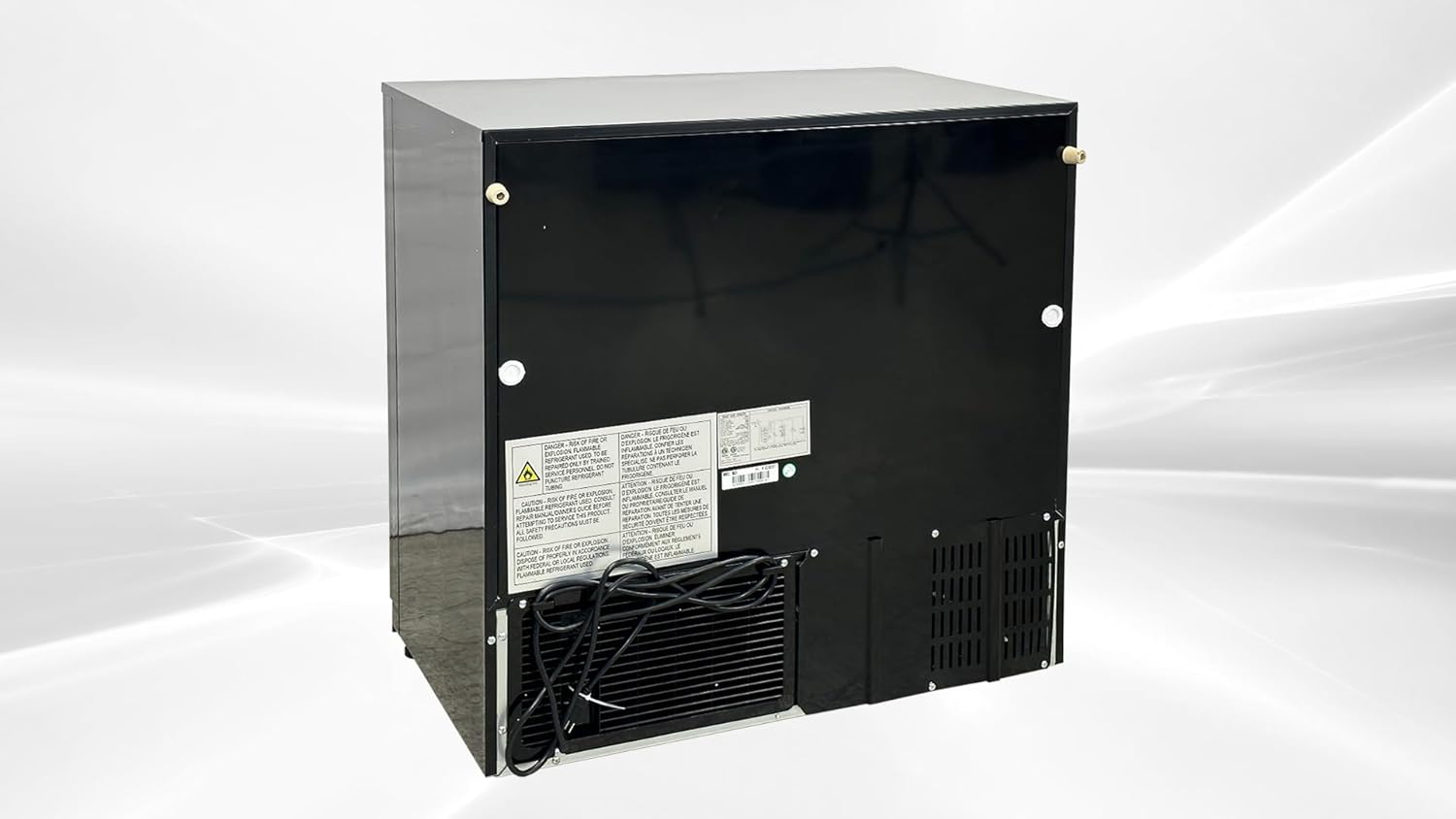
Figure 7.2: Interior circulation fan.
8. Warranty and Support
8.1 Warranty Information
- All-Parts Warranty: 3 Years
- Compressor Warranty: 6 Years
- Labor Warranty: 1 Year
8.2 Return Policy
A full refund for functional failures is available within 1 month of the item's delivered date. Please note: You must keep the original pallet when receiving the item, as returns cannot be processed until the product is bound to the pallet and wrapped.
8.3 Customer Support
For any questions, technical assistance, or warranty claims, please contact Cooler Depot USA customer service. Refer to your purchase documentation for specific contact details.
9. Product Video Demonstration
Video 9.1: Official product video demonstrating the Cooler Depot BB2S back bar cooler, including its dimensions, sliding doors, internal features like adjustable shelves and LED lighting, digital temperature controls, and rear power connection.


