
1. Product Overview
This manual provides essential information for the proper installation, operation, and maintenance of your Zodazoqa 6-pin Smart Desk Lifting Desk Push Rod Motor Control Cable. This cable is designed to extend the power and signal connection for lifting desk motors, ensuring reliable communication and power delivery.
The cable features oxygen-free copper conductors for optimal signal integrity and environmentally friendly PVC insulation for durability and safety. It is a male-to-female extension cable, specifically designed for 6-pin rotary connections commonly found in smart desk systems.

Figure 1: Zodazoqa 6-pin Smart Desk Motor Control Cable
2. Specifications
| Attribute | Detail |
|---|---|
| Model Number | 5557 |
| Material | Oxygen-free copper (conductors), Environmentally friendly PVC (insulation) |
| Number of Pins | 6 |
| Rated Voltage Range | 300V |
| Cable Length | 1.3 meters (51.18 inches) |
| Connector Gender | Male-to-Female |
| Color | Black |
| Item Weight | 4.2 ounces |
| Package Dimensions | 9.84 x 1.81 x 1.3 inches |
| Manufacturer | Zodazoqa |
| Country of Origin | China |
3. Setup and Installation
This extension cable is designed for simple plug-and-play installation. Ensure that the power to your lifting desk system is disconnected before proceeding with installation.
- Identify Connectors: Locate the 6-pin male connector on your existing desk motor control cable and the 6-pin female port on your desk's control unit or motor.
- Connect the Male End: Carefully insert the male end of the Zodazoqa extension cable into the female port of your desk's control unit or motor. Ensure the pins align correctly and push firmly until it clicks into place.
- Connect the Female End: Insert the female end of the Zodazoqa extension cable onto the male connector of your existing desk motor control cable. Ensure a secure and snug fit.
- Secure the Connection: Verify that both connections are fully seated and secure to prevent accidental disconnections during operation.
- Restore Power: Once the cable is securely installed, you may reconnect power to your lifting desk system.

Figure 2: Male and Female Connectors
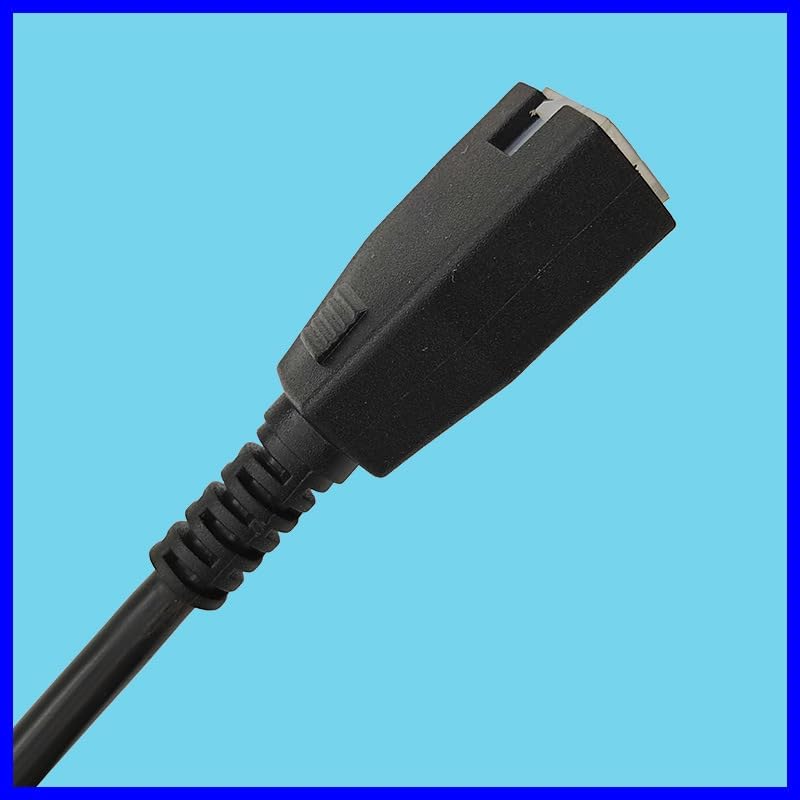
Figure 3: Detail of Female Connector

Figure 4: Connected Cable
Important: Do not force connections. If the connectors do not fit easily, check for proper alignment of the pins. Incorrect connection can damage the cable or your desk system.
4. Operating Instructions
The Zodazoqa 6-pin extension cable functions as a passive extension for your smart desk's motor control and power signal. Once properly installed, it allows for increased reach between your desk's control unit and the motor, enabling more flexible placement of components.
No specific operational steps are required for the cable itself beyond proper installation. The desk's normal operation (raising, lowering, memory presets) will function as usual, with the extension cable seamlessly transmitting the necessary signals and power.
5. Maintenance
The Zodazoqa 6-pin extension cable requires minimal maintenance to ensure long-term performance.
- Cleaning: If the cable becomes dusty or dirty, gently wipe it with a soft, dry cloth. Avoid using harsh chemicals or abrasive cleaners.
- Inspection: Periodically inspect the cable for any signs of damage, such as cuts, fraying, or bent pins on the connectors. If damage is observed, discontinue use and replace the cable.
- Storage: When not in use, store the cable in a cool, dry place, away from direct sunlight and extreme temperatures. Avoid tightly coiling or bending the cable excessively to prevent internal damage.
6. Troubleshooting
If you experience issues after installing the extension cable, consider the following troubleshooting steps:
- Desk Not Responding:
- Ensure all connections (including the extension cable, motor, and control unit) are fully seated and secure.
- Verify that the power supply to the desk is active and functioning correctly.
- Temporarily remove the extension cable and connect the original motor cable directly to the control unit. If the desk functions normally, the extension cable may be faulty.
- Intermittent Operation:
- Check for loose connections at either end of the extension cable.
- Inspect the cable for any visible damage or kinks that might be affecting signal transmission.
- Incorrect Pin Alignment:
- If the cable does not connect smoothly, do not force it. Examine the pin configuration on both the cable and the device ports to ensure they match the 6-pin rotary design.
If troubleshooting steps do not resolve the issue, please contact customer support.
7. Warranty and Support
For information regarding warranty coverage and customer support for your Zodazoqa 6-pin Smart Desk Lifting Desk Push Rod Motor Control Cable, please refer to the product packaging or contact the manufacturer directly through their official website or the retailer where the product was purchased.
Please have your model number (5557) and purchase details ready when contacting support.