
Cijprinter ENM10102963
ENM10102963 9029 M6 Module User Manual
Model: ENM10102963 | Brand: Cijprinter
1. Introduction
This manual provides essential information for the proper use, installation, and maintenance of the ENM10102963 9029 M6 Module. Please read this manual thoroughly before operating the device to ensure safe and efficient performance.
The ENM10102963 is a critical component designed for Markem Imaje 9029 Inkjet Coding Printers. It is an M6 module with an estimated lifespan of 7500 hours, specifically for purple ink applications.
2. Product Overview
The ENM10102963 module is a replacement part for Continuous Inkjet (CIJ) systems, ensuring the continued operation of your Markem Imaje 9029 printer. This module is designed for purple ink applications and is available as an original or compatible part.
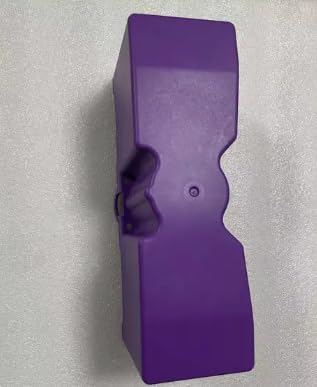

What's in the Box:
- 1 x ENM10102963 9029 M6 Module (Purple)
- Note: Additional components or tools required for installation are typically part of the printer system and not included with this module.
3. Setup and Installation
This module is intended for professional installation within compatible Markem Imaje 9029 Inkjet Coding Printers. Refer to your printer's specific service manual for detailed installation procedures.
Safety Precautions:
- Ensure the printer is powered off and disconnected from the main power supply before beginning any installation or maintenance.
- Wear appropriate personal protective equipment (PPE), such as gloves and eye protection, when handling printer components and ink.
- Avoid touching electrical contacts directly.
- Dispose of old modules and ink cartridges according to local environmental regulations.
Installation Steps (General Guidance):
- Locate the module compartment within your Markem Imaje 9029 printer.
- Carefully remove the old module, if present, following the printer manufacturer's instructions.
- Align the new ENM10102963 module with the slot, ensuring correct orientation.
- Gently push the module into place until it is securely seated. Do not force it.
- Close the module compartment cover.
- Reconnect the printer to power and turn it on.
- Perform any necessary calibration or system checks as outlined in your printer's operational manual.
4. Operating Considerations
Once installed, the ENM10102963 module functions as an integral part of the Markem Imaje 9029 Inkjet Coding Printer's ink delivery and management system. Its operation is managed by the printer's internal software and hardware.
Key Operational Aspects:
- The module is designed for use with purple ink formulations compatible with Markem Imaje 9029 printers.
- The module's lifespan is approximately 7500 hours of operation. Monitor printer diagnostics for module life indicators.
- Proper functioning of the module is crucial for consistent print quality and reliable coding.
5. Maintenance
The ENM10102963 module itself requires minimal direct maintenance beyond proper installation and replacement at the end of its service life. However, regular maintenance of the overall printer system is essential for the module's longevity and optimal performance.
General Printer Maintenance (Affecting Module Life):
- Regular Cleaning: Keep the printer's external and internal components clean, especially areas around the printhead and ink system, to prevent blockages and contamination.
- Ink Management: Use only genuine or approved compatible inks. Ensure ink levels are maintained and replace ink cartridges as needed.
- Environmental Control: Operate the printer within recommended temperature and humidity ranges to prevent component degradation.
- Software Updates: Keep printer firmware and software updated to ensure compatibility and optimal performance with all components.
Replace the module when the printer's diagnostic system indicates it has reached the end of its service life (approximately 7500 hours) or if print quality issues persist despite other troubleshooting steps.
6. Troubleshooting
If you experience issues with your Markem Imaje 9029 printer after installing the ENM10102963 module, consider the following common troubleshooting steps. Always refer to your printer's comprehensive troubleshooting guide for specific error codes and solutions.
| Problem | Possible Cause | Solution |
|---|---|---|
| Printer not recognizing module | Module not seated correctly; damaged contacts; incorrect module type. | Power off printer, re-seat module firmly. Check for bent pins or debris on contacts. Ensure it's the correct ENM10102963 module. |
| Poor print quality (fading, streaks) | Module nearing end of life; clogged printhead; incorrect ink; general printer issue. | Check module life indicator. Perform printhead cleaning cycle. Verify ink type and freshness. Consult printer manual for print quality adjustments. |
| Module life indicator not resetting after replacement | Printer software not updated; reset procedure not followed. | Ensure printer firmware is up to date. Follow the printer's specific procedure for resetting module life counters. |
If issues persist after attempting these steps, contact a qualified service technician or the printer manufacturer's support.
7. Specifications
| Attribute | Detail |
|---|---|
| Part Number | ENM10102963 |
| Product Type | M6 Module for Inkjet Coding Printer |
| Product Family | Continuous Inkjet (CIJ) |
| Compatible Printer | Markem Imaje 9029 Inkjet Coding Printer |
| Estimated Lifespan | 7500 Hours |
| Ink Color Application | Purple |
| Dimensions | 16 x 14 x 14 inches (Product Packaging/Shipping Dimensions) |
| Item Weight | 8 pounds |
| Manufacturer | Cijprinter |
| Country of Origin | China |
| UPC | 604542691704 |
8. Warranty and Support
This product is supplied by Cijprinter. For specific warranty information, please refer to the terms and conditions provided at the time of purchase or contact your supplier directly.
Customer Support:
For technical assistance, troubleshooting beyond this manual, or warranty claims, please contact the vendor or manufacturer. When contacting support, please have your product model number (ENM10102963) and purchase details readily available.
Note: As this is a replacement part, support may also be available through the manufacturer of your Markem Imaje 9029 printer for issues related to the overall printer system.
Ask a question about this manual
Ask about setup, troubleshooting, compatibility, parts, safety, or missing instructions. Manuals+ will review the question and use this page’s manual context to help answer it.