
Introduction
Thank you for choosing the Yoobure L-Shaped Gaming Desk. This manual provides detailed instructions for the assembly, operation, maintenance, and troubleshooting of your new desk. Please read this manual carefully before assembly and use to ensure proper function and longevity of the product. Keep this manual for future reference.
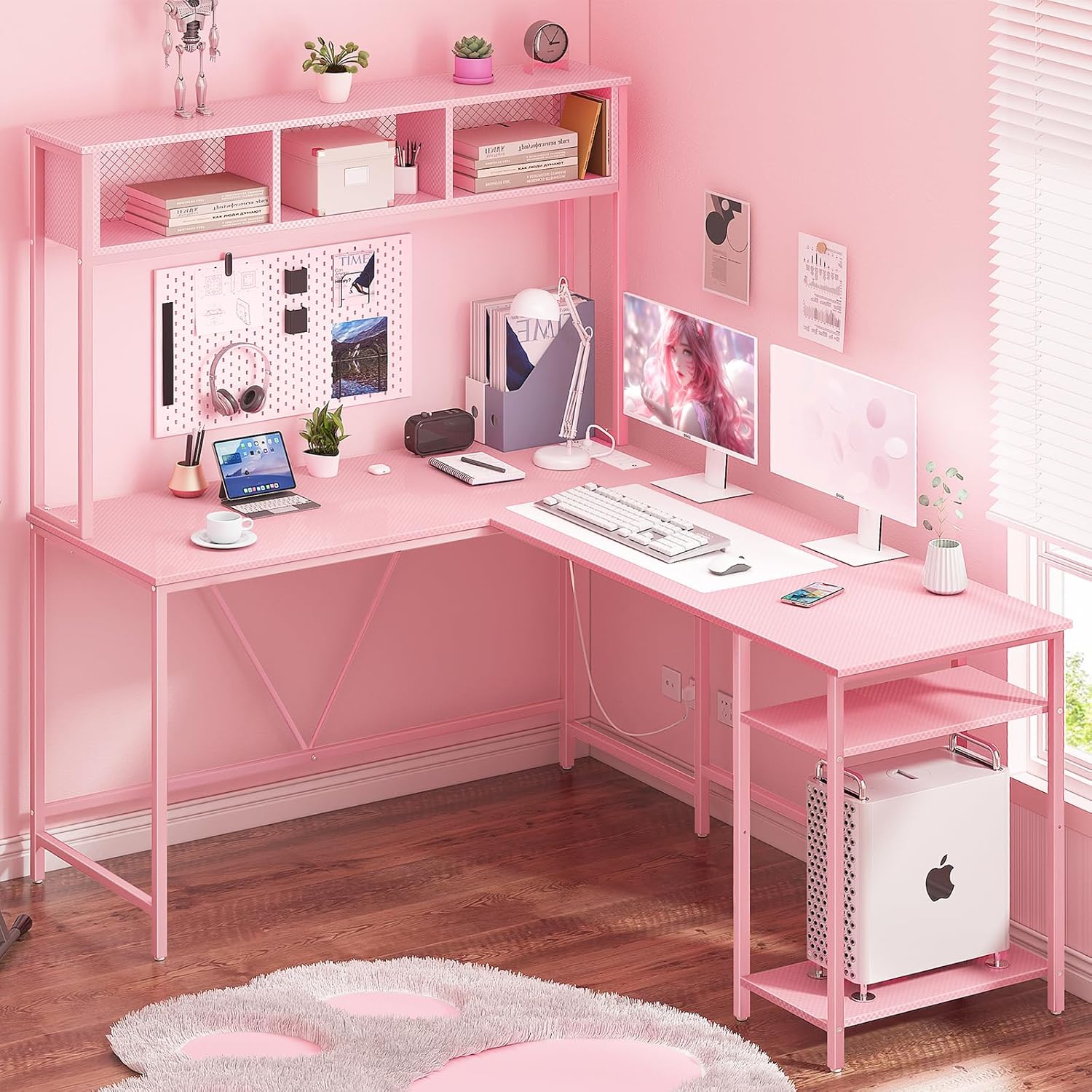
Image: The Yoobure L-Shaped Gaming Desk, featuring a pink finish, integrated shelving, and a spacious desktop suitable for multiple monitors and gaming peripherals.
Setup and Assembly
Assembly of the Yoobure L-Shaped Gaming Desk is designed to be straightforward. Please ensure all parts are present before beginning. Clear and detailed instructions, along with numbered parts, are included in the packaging to guide you through the process. It is recommended to assemble the desk on a soft, clean surface to prevent scratches.
Key Assembly Features:
- Reversible Design: The L-shaped configuration can be assembled with the longer section on either the left or right side to best fit your space.
- Adjustable Foot Pads: Ensure stability on uneven floors by adjusting the foot pads at the base of the desk legs.
- Storage Shelf: The integrated storage shelf can be adjusted to accommodate various items, such as a computer tower or books.

Image: A detailed diagram illustrating the dimensions of the L-shaped desk and its reversible assembly options, highlighting the 6.5ft power cord length.

Image: An illustration demonstrating how the L-shaped desk can be configured in two directions, allowing for flexible placement in a room.

Image: Close-up views of the desk's features, including the 3-grid top hutch for additional storage, adjustable foot pads for stability, and an adjustable storage shelf for versatile organization.
Important Safety Note: This product has a weight limit of 500 lbs. For added stability and safety, it is recommended to anchor the desk to the wall, especially if heavy items are placed on the hutch or shelves. Ensure the desk is stable on a level surface before use.
Operating Instructions
LED Strip Operation:
The integrated RGB LED strip offers customizable lighting to enhance your environment. It can be controlled via a dedicated mobile application or the included remote control.
- Color Options: Choose from over 60,000 colors.
- Flashing Modes: Select from 29 different flashing modes.
- Music Sync Function: The lights can change color in rhythm with sound and music.
- Timer Function: Set a timer for the lights to turn off automatically. The LED lights will retain the last mode when turned on again.

Image: A visual representation of the RGB LED light strip in action, with an overlay showing the remote control and its various functions like fade, flash, jump, and static modes.
Power Outlet Usage:
The desk is equipped with a recessed power strip for convenient charging of your devices.
- AC Outlets: 4 standard 120V/12A AC outlets.
- USB Ports: 2 USB ports (5V/2A) for charging smaller devices.
- Power Cord: Features a 6.5ft power cord for flexible placement.

Image: A close-up view of the recessed power strip integrated into the desk, showing the 4 AC outlets and 2 USB ports in use, charging a tablet and a smartphone.
Maintenance
To maintain the appearance and longevity of your Yoobure L-Shaped Gaming Desk, follow these simple care instructions:
- Cleaning: Wipe the surfaces with a damp cloth. Avoid using harsh chemicals or abrasive cleaners, which can damage the finish.
- Spills: Clean up spills immediately to prevent staining or damage to the wood board.
- Stability Check: Periodically check all screws and connections to ensure they are tight. Re-tighten if necessary.
Troubleshooting
If you encounter any issues with your Yoobure L-Shaped Gaming Desk, please refer to the following common solutions:
- LED Lights Not Working:
- Ensure the LED strip is properly connected to its power source.
- Check the remote control battery.
- Verify the mobile application is correctly paired and updated.
- Power Outlets Not Functioning:
- Ensure the desk's main power cord is securely plugged into a working wall outlet.
- Check if the wall outlet itself is receiving power (test with another device).
- Avoid overloading the power strip with too many high-power devices.
- Desk Wobbles:
- Adjust the foot pads at the bottom of each leg to level the desk on uneven surfaces.
- Ensure all assembly screws are tightened securely.
- Consider anchoring the desk to the wall for maximum stability.
If these steps do not resolve the issue, please contact customer support for further assistance.
Product Specifications
| Feature | Detail |
|---|---|
| Brand | Yoobure |
| Model | B0D6BP45JT |
| Product Dimensions (D x W x H) | 55.1" x 19.7" x 59.9" |
| Material Type | Engineered Wood, Metal |
| Color | Carbon Fiber Pink |
| Maximum Weight Recommendation | 500 Pounds |
| Special Features | Built-In USB Outlet, LED Light, Reversible Design |
| Power Outlets | 4 AC Outlets (120V/12A) |
| USB Ports | 2 USB Ports (5V/2A) |
| Power Cord Length | 6.5 Feet |
| Number of Drawers | 2 |
| Number of Shelves | 1 (Adjustable) |
| Required Assembly | Yes |
Warranty Information
The Yoobure L-Shaped Gaming Desk comes with a 1 Year Warranty from the date of purchase. This warranty covers manufacturing defects and material flaws under normal use. It does not cover damage caused by misuse, accidents, unauthorized modifications, or normal wear and tear. Please retain your proof of purchase for warranty claims.
Customer Support
Should you have any questions, concerns, or require assistance with your Yoobure L-Shaped Gaming Desk, please do not hesitate to contact our customer service team. We are committed to providing prompt support, and our team will reply within 24 hours.
For contact information, please refer to the packaging or the retailer's website where you purchased the product.