
MAXSHOT V1MAX
MAXSHOT V1MAX Electric Scooter User Manual
Your guide to safe and efficient operation
1. Introduction
Thank you for choosing the MAXSHOT V1MAX Electric Scooter. This manual provides essential information for the safe assembly, operation, maintenance, and troubleshooting of your new electric scooter. Please read it thoroughly before your first ride and keep it for future reference.
Important Safety Information
- Always wear a helmet and appropriate safety gear when riding.
- Familiarize yourself with local laws and regulations regarding electric scooter use.
- Do not ride in heavy traffic, on slippery surfaces, or in adverse weather conditions.
- Ensure all components are securely fastened before each ride.
- Do not exceed the maximum weight limit of 265 lbs (120 kg).
- This scooter is designed for adults.
2. What's in the Box
Upon unpacking your MAXSHOT V1MAX Electric Scooter, please ensure all the following items are present:
- MAXSHOT V1MAX Electric Scooter
- User Manual (this document)
- Charger
3. Setup and Initial Charge
3.1 Unfolding the Scooter
- Place the scooter on a flat surface.
- Release the folding latch located near the base of the handlebar stem.
- Carefully lift the handlebar stem until it locks into the upright position. Ensure the locking mechanism is fully engaged.
- Secure the handlebar by tightening any quick-release clamps or screws as instructed in the quick start guide.

Image: The folding mechanism of the MAXSHOT V1MAX electric scooter, demonstrating how to fold and carry the scooter for compact storage.
3.2 Initial Charging
Before your first ride, fully charge the scooter's battery.
- Locate the charging port on the scooter.
- Connect the charger to the charging port.
- Plug the charger into a standard wall outlet. The indicator light on the charger will typically turn red during charging and green when fully charged.
- A full charge takes approximately 5 hours. Do not overcharge the battery.

Image: Visual representation of the scooter's battery specifications, highlighting a 42V 14.5A lithium battery, 5-hour fast charge time, and a 28-mile travel range.
4. Operating the Scooter
4.1 Controls and Display
The MAXSHOT V1MAX features an intuitive handlebar design with an integrated LED digital display for easy monitoring of your ride.
- Power Button: Press to turn on/off the scooter.
- Accelerator: Use the thumb throttle to control speed.
- Brake Handle: Activates the dual braking system for safe stopping.
- Headlight Button: Turns the front LED headlight on/off.
- Display: Shows current speed, battery level, and riding mode.
- Cruise Control: Engage for consistent speed on long rides.

Image: Close-up of the scooter's handlebar, detailing the digital display and various controls such as the brake handle, scooter bell, anti-slip handlebar, and cruise control.
4.2 Smart App Connectivity
Enhance your riding experience by connecting your MAXSHOT V1MAX to your smartphone via the dedicated app (compatible with iPhone and Android devices).
- Phone Pairing: Connect your scooter to the app via Bluetooth.
- Headlight Control: Remotely manage the scooter's headlight.
- Lock & Unlock: Secure your scooter digitally.
- Cruise Control: Activate and adjust cruise control settings.
- Customized Speed Limit: Set preferred speed limits for different riding conditions.
- Switch Riding Modes: Easily change between various performance modes.

Image: A smartphone screen displaying the MAXSHOT scooter app interface, illustrating various control options like locking, headlight control, and speed settings.
4.3 Riding Guidelines
- Starting: Kick off gently with one foot while pressing the accelerator.
- Speed: The scooter can reach speeds up to 22 MPH. Adjust speed according to conditions and your skill level.
- Range: Expect a range of up to 28 miles on a single charge under specific conditions (e.g., flat terrain, moderate speed, rider weight).
- Suspension: The dual front and rear suspension system, combined with 10-inch solid tires, provides a smooth ride over varied surfaces.
- Night Riding: Utilize the ultra-bright LED headlights and warning taillights for visibility and safety during nighttime rides.
- Braking: The dual braking system ensures responsive and controlled stops. Apply brakes smoothly.

Image: The scooter ascending an incline, showcasing its powerful headlight and rear brake light for enhanced safety and visibility.
5. Maintenance
Regular maintenance ensures the longevity and optimal performance of your MAXSHOT V1MAX Electric Scooter.
- Cleaning: Wipe the scooter with a damp cloth. Do not use high-pressure water or immerse the scooter in water.
- Battery Care: Charge the battery regularly, even if not in use, to maintain its health. Avoid fully draining the battery. Store in a cool, dry place.
- Tire Inspection: Regularly check the 10-inch solid tires for wear and tear. While solid tires reduce puncture risk, they can still degrade over time.
- Brake System: Periodically inspect brake cables and levers for proper function and tension. Adjust as needed.
- Fasteners: Check all screws and bolts regularly and tighten if loose to ensure structural integrity.
- Storage: Store the scooter in a dry environment, away from direct sunlight and extreme temperatures.
- General Durability: Use the scooter on flat, urban roads as recommended. Avoid overloading beyond the specified weight limit of 265 pounds.
6. Troubleshooting
Refer to the following common issues and their solutions:
| Problem | Possible Cause | Solution |
|---|---|---|
| Error code E07 displayed | Throttle may be disconnected or damaged. | Power off the scooter, check the throttle cable for loose or broken connections, and reconnect or replace if needed. |
| Rear wheel making noise or not braking well | Loose screws or motor misalignment. | Check and tighten all rear wheel screws. |
| Hand brake feels loose or doesn't work | Brake cable connection issue or incorrect tension. | Check the brake cable connection and adjust tension with a wrench. |
| Charger light remains off when plugged in | Faulty outlet or loose connections. | Use a different outlet or check for loose connections at both the wall and scooter ends. |
| Brake wire issue (wear or tension) | Worn brake cable or improper tension. | Inspect the brake cable for wear and tension; adjust using the brake lever nut if loose. |
7. Specifications
| Feature | Detail |
|---|---|
| Brand | MAXSHOT |
| Model Name | V1MAX |
| Motor Power | 500W |
| Max Speed | 22 MPH |
| Max Distance Range | 28 miles (under specific conditions) |
| Battery | 42V 14.5AH Lithium-ion |
| Battery Charge Time | 5 hours |
| Tire Type | 10-inch Solid Rubber |
| Suspension Type | Dual Suspension (Front and Rear) |
| Brake Style | Dual Braking System |
| Max Weight Limit | 265 pounds |
| Frame Material | Aluminum |
| Product Dimensions (L x W x H) | 46.5" x 18.5" x 48.8" (Unfolded) |
| Item Weight | 40.8 pounds |
| Special Features | Cruise Control, Digital Display, Dual Suspension, Foldable, Lightweight, App Connectivity |
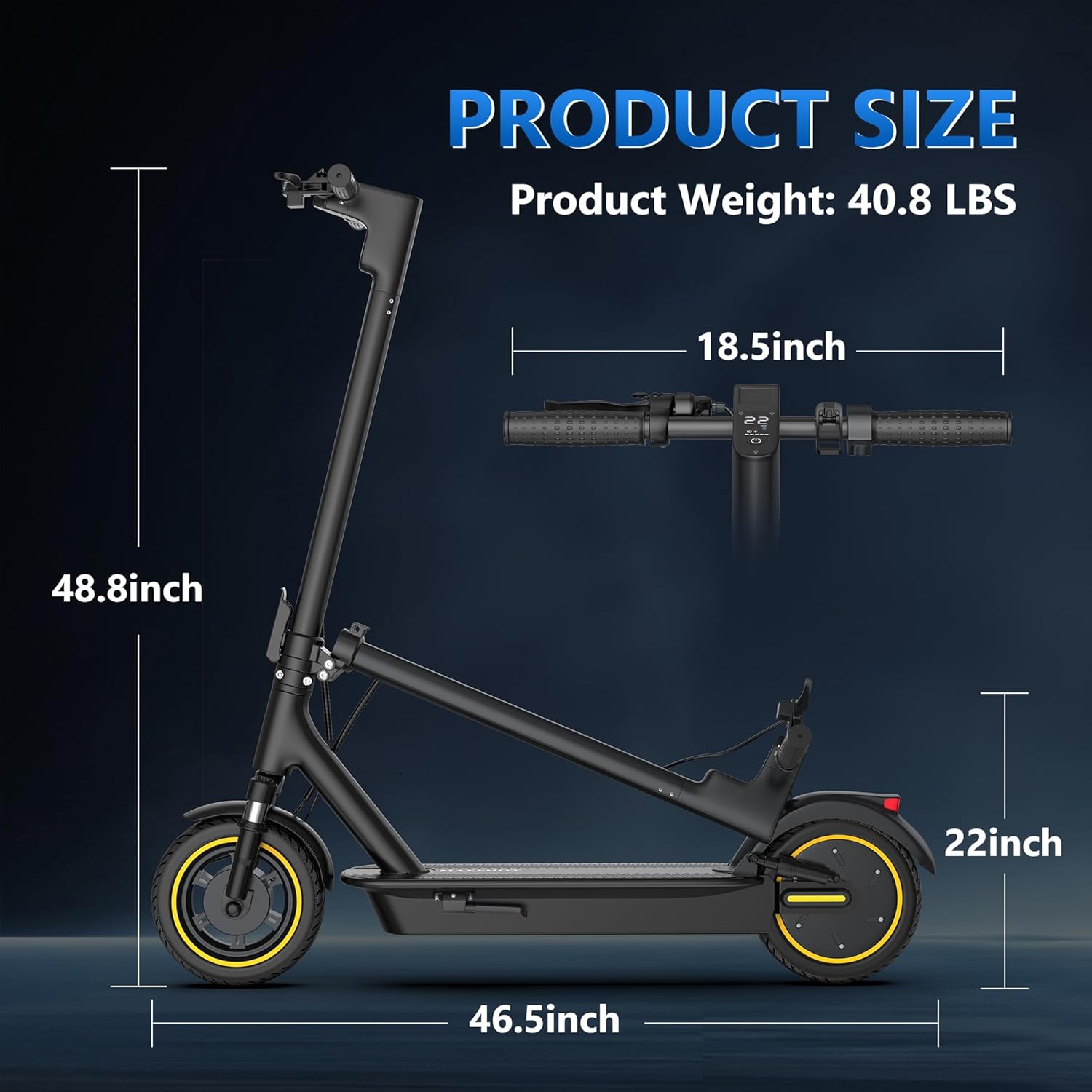
Image: Detailed product dimensions for the MAXSHOT V1MAX electric scooter, illustrating its size when unfolded and folded for storage.
8. Warranty and Support
8.1 Warranty Information
The MAXSHOT V1MAX Electric Scooter comes with a 1-year limited warranty from the date of purchase. This warranty covers manufacturing defects under normal use. It does not cover damage caused by misuse, accidents, unauthorized modifications, or normal wear and tear. Please retain your proof of purchase for warranty claims.
8.2 Customer Support
For any questions, technical assistance, or warranty claims, please contact MAXSHOT customer support through the platform where you purchased the scooter. Our team is dedicated to providing timely assistance and ensuring your satisfaction.
For common issues, please refer to the troubleshooting section of this manual or the FAQ section on the MAXSHOT brand store page.
You can visit the official MAXSHOT store for more information: MAXSHOT Store
Ask a question about this manual
Ask about setup, troubleshooting, compatibility, parts, safety, or missing instructions. Manuals+ will review the question and use this page’s manual context to help answer it.