
1. Introduction
Thank you for choosing the OLEVS 2858-All Black-Black Gold watch. This manual provides essential information for the proper use, care, and maintenance of your new timepiece. Designed for elegance and functionality, this watch features a precise quartz movement, a durable stainless steel construction, and multiple useful functions.

Figure 1: Front view of the OLEVS 2858-All Black-Black Gold watch.
2. Product Features
- Movement: High-quality quartz movement for stable and precise timekeeping.
- Crystal: High hardness coated glass mirror, offering excellent wear and scratch resistance.
- Clasp: Secure butterfly shaped double buckle for comfortable wear.
- Chronograph Function: Built-in stopwatch with hour, minute, and second hands for accurate timing.
- Luminous Display: Hands and markers glow in the dark after exposure to light, providing visibility in low-light conditions.
- Water Resistance: Water-resistant to 30 meters (100 feet), suitable for daily use such as splashing or brief submersion. Not suitable for swimming or bathing.
- Dimensions: Mirror Diameter: 41 mm (1.6 inches), Case Thickness: 11 mm (0.43 inches), Band Length: 200 mm (7.87 inches). Weight: 123 g (4.3 ounces).
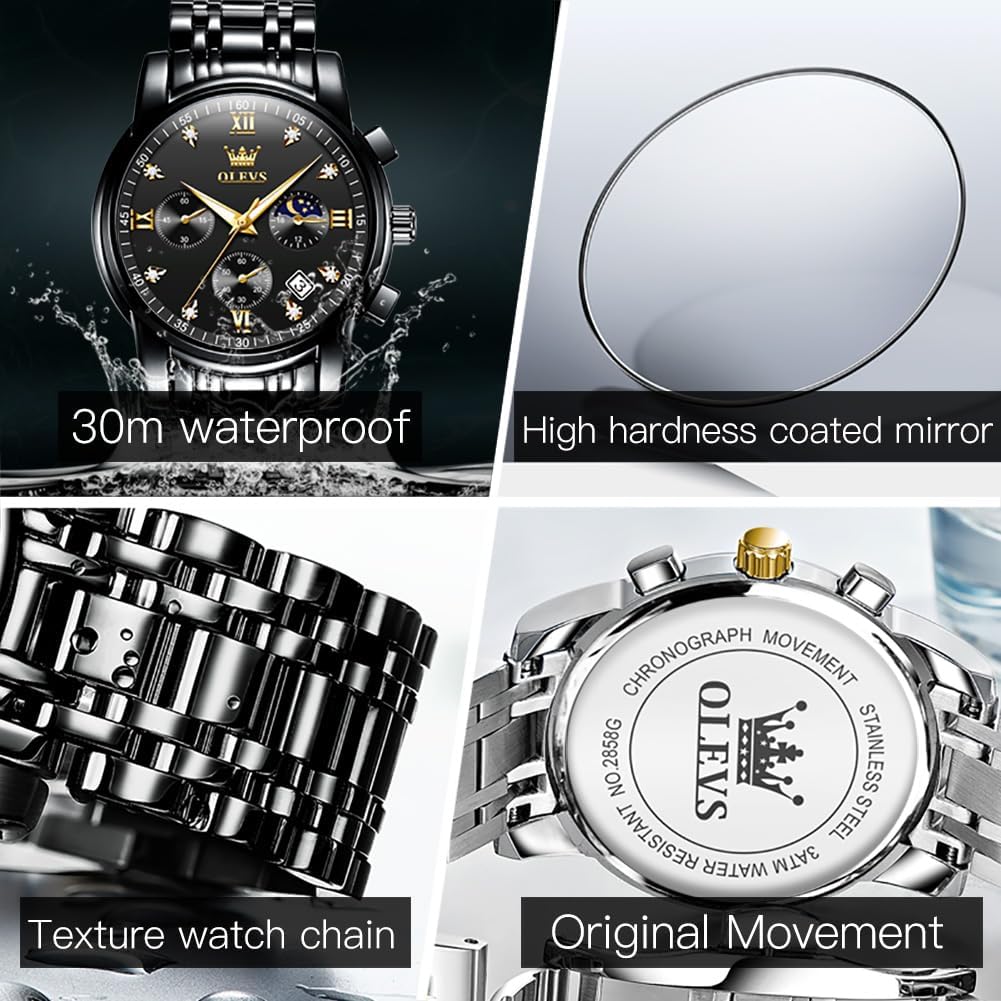
Figure 2: Key features including water resistance, crystal durability, and movement details.

Figure 3: Detailed product parameters and specifications.
3. Setup and Operating Instructions
3.1. Time and Date Adjustment
Your OLEVS watch comes with a user manual that provides detailed instructions on how to adjust the time and calendar. Generally, the crown on the side of the watch is used for these adjustments.
- Setting the Date: Gently pull the crown out to the first click position. Rotate the crown to adjust the date.
- Setting the Time: Pull the crown out to the second click position. Rotate the crown to set the hour and minute hands. Push the crown back in to start the watch.
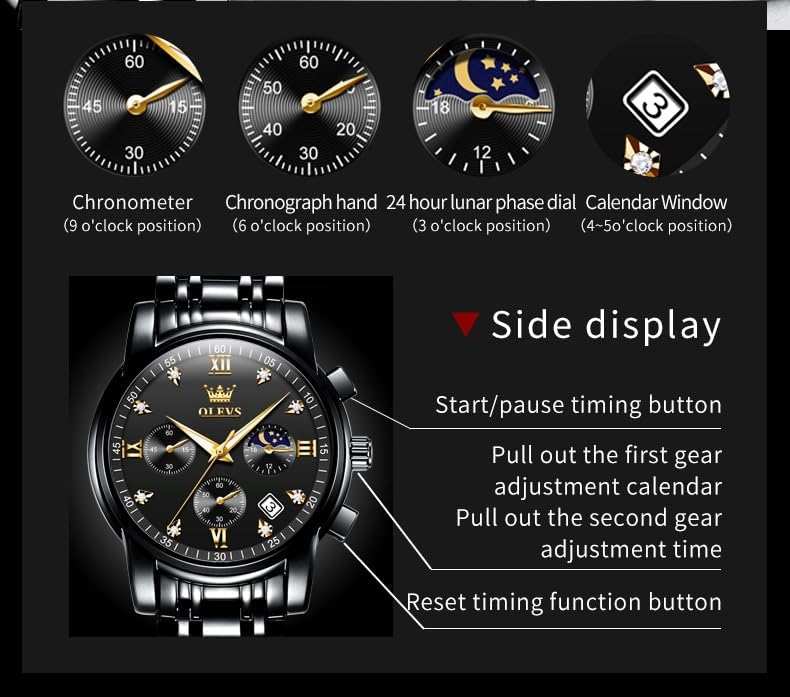
Figure 4: Side view illustrating crown positions for time and date adjustment.
3.2. Chronograph (Stopwatch) Function
The watch features a multifunction chronograph for precise timing.
- Start/Pause: Press the top button (usually above the crown) to start or pause the chronograph.
- Reset: Press the bottom button (usually below the crown) to reset the chronograph hands to zero.

Figure 5: Overview of the multifunctional dial and its sub-dials.
3.3. Luminous Function Activation
To activate the luminous function of your watch, expose it to a strong light source for 30-40 seconds. This will charge the luminous material on the hands and markers, providing a clear visual experience in the dark.
4. Maintenance and Care
- Water Resistance: While water-resistant to 30 meters, this watch is designed for everyday splashes, rain, and brief submersion. Avoid prolonged water exposure, hot water, or steam (e.g., showering, swimming, diving) as this can compromise the seals.
- Cleaning: Wipe the watch regularly with a soft, dry cloth to remove dust and dirt. For the metal band, a slightly damp cloth can be used, followed by immediate drying.
- Avoid Chemicals: Do not expose the watch to harsh chemicals, solvents, or detergents, as these can damage the finish and seals.
- Temperature Extremes: Avoid exposing the watch to extreme temperatures (hot or cold) or sudden temperature changes, which can affect the movement and seals.
- Impact: Protect your watch from strong impacts or shocks, which can damage the internal mechanism or external components.
- Battery Replacement: The watch uses 1 LR44 battery (included). Battery replacement should ideally be performed by a qualified watch technician to ensure proper sealing and function.

Figure 6: Water resistance guidelines for the OLEVS watch.
5. Troubleshooting
| Problem | Possible Cause | Solution |
|---|---|---|
| Watch stops or runs inaccurately. | Low battery, impact, or internal mechanism issue. | Replace battery (professional recommended). If issue persists, contact support. |
| Condensation inside the crystal. | Exposure to extreme temperature changes or compromised water resistance. | Immediately contact support. Do not attempt to open the watch. |
| Chronograph hands do not reset to zero. | Minor misalignment or internal issue. | Refer to the detailed manual for specific chronograph reset procedures or contact support. |
| Clasp opens unexpectedly. | Band is too tight or clasp mechanism is worn/damaged. | Adjust band length using the provided tool. If clasp is damaged, contact support for repair or replacement. |
6. Official Product Videos
Watch these official videos for a visual guide to your OLEVS watch's features and operation.
OLEVS Fashion Watches
Description: An overview of OLEVS fashion watches, showcasing various styles and features. This video highlights the aesthetic appeal and general design of the watches.
Black Watches for Men
Description: A closer look at the black OLEVS watches for men, emphasizing their design and how they look when worn. This video provides a detailed view of the specific model.
A Watch you can't live without
Description: This video highlights the overall appeal and essential nature of the OLEVS watch, showcasing its versatility and style for daily wear.
7. Warranty and Support
For any problems with your OLEVS watch, please contact the seller directly. Keep your purchase receipt as proof of purchase for any warranty claims.
For additional information or to explore more products, visit the official OLEVS store: OLEVS Store on Amazon
A detailed User Manual (PDF) is also available for download: Download User Manual (PDF)


