
1. Introduction
Thank you for choosing the X-Sense Smart Wi-Fi Smoke Detector System. This system is designed to provide reliable and intelligent smoke detection for your home, offering advanced features such as voice prompts, app control, and seamless integration with other X-Sense smart devices. This manual will guide you through the setup, operation, and maintenance of your new smoke detector system.
The X-Sense XS0B-MR61 kit includes multiple smoke detectors and an SBS50 Base Station, ensuring comprehensive coverage and enhanced safety for your living spaces.
2. Safety Information
Please read all safety instructions carefully before installation and operation. Failure to follow these instructions may result in malfunction, property damage, or injury.
- Do not paint the detector: Paint can clog the openings and prevent the sensor from detecting smoke.
- Do not install near heat sources: Avoid placing detectors near heating vents, furnaces, or direct sunlight.
- Regular testing: Test your smoke detectors weekly to ensure proper functionality.
- Battery replacement: Replace batteries as indicated by the low battery warning.
- Proper placement: Install smoke detectors on every level of your home, inside each sleeping area, and in the hallway outside of each sleeping area.
3. Product Overview
The X-Sense Smart Wi-Fi Smoke Detector System consists of the XS0B-MR smoke detectors and the SBS50 Base Station. The detectors feature a slim 33mm profile and a 360-degree smoke inlet for rapid detection. The base station acts as the central hub, connecting all devices and providing Wi-Fi connectivity for app control and notifications.
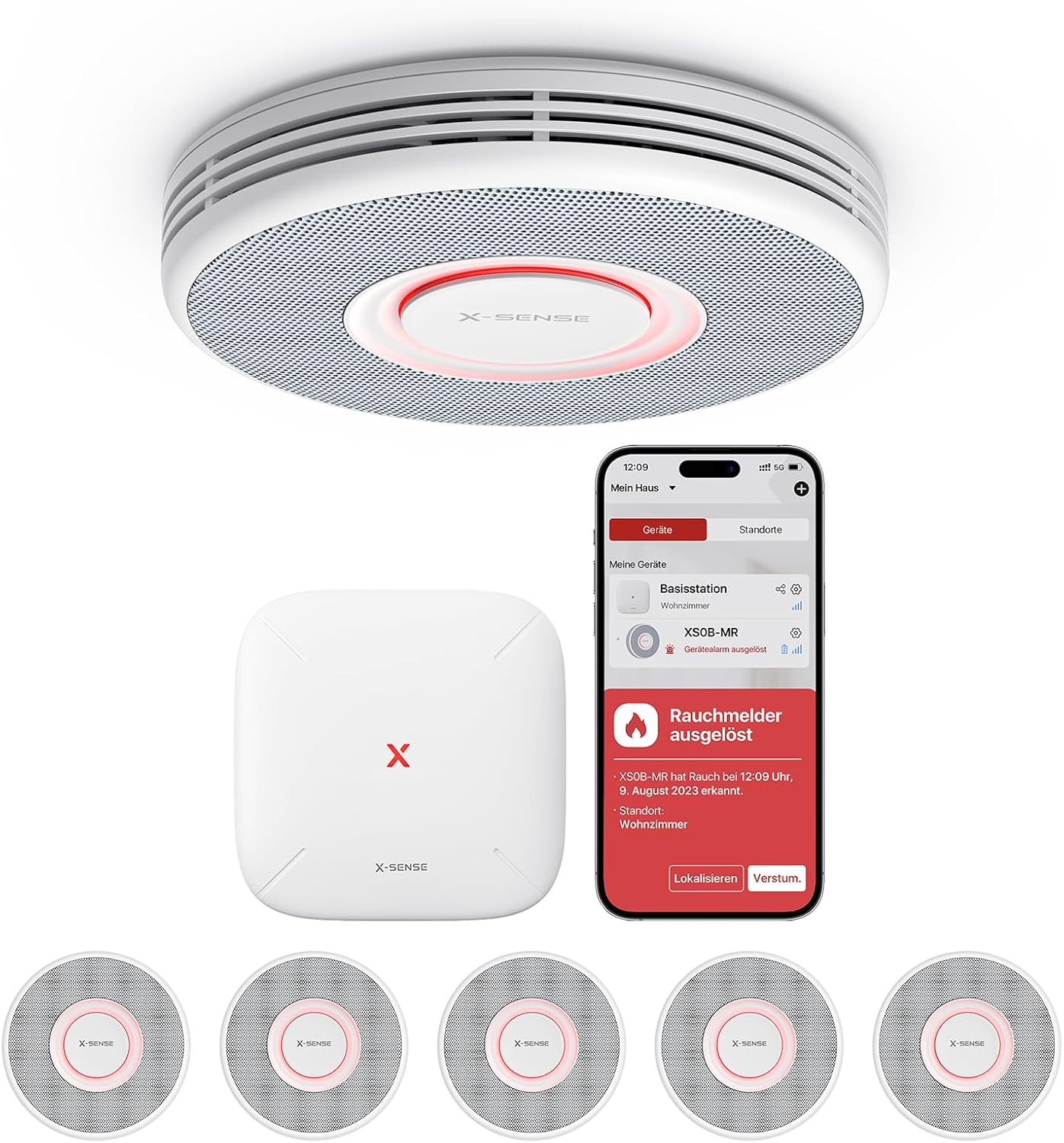
Image: Overview of the X-Sense Smart Wi-Fi Smoke Detector System, showing the central base station and multiple smoke detector units.

Image: Detailed view highlighting the bright light ring for status indication and the 360-degree smoke inlet for efficient detection.
4. Setup
4.1 Unboxing and Initial Check
Upon opening the package, verify that all components are present:
- X-Sense XS0B-MR Smoke Detectors
- X-Sense SBS50 Base Station
- Mounting Screws and Anchors
- User Manual

Image: The X-Sense smoke detector kit, showing the product packaging and included components such as detectors, base station, and mounting hardware.
4.2 Battery Installation
Each XS0B-MR smoke detector comes with a pre-installed, replaceable CR123A lithium battery. Ensure the battery tab is removed before use. The battery is designed to last up to 5 years.
4.3 Base Station Setup
- Plug in the SBS50 Base Station to a power outlet.
- Download the X-Sense Home Security App from your smartphone's app store.
- Create an account and follow the in-app instructions to add the base station to your Wi-Fi network.
4.4 Detector Pairing
Once the base station is set up, pair your smoke detectors:
- In the X-Sense Home Security App, select the option to add a new device.
- Follow the app's prompts to put the smoke detector into pairing mode.
- Assign a specific location (e.g., 'Living Room', 'Bedroom 1') to each detector within the app. This enables the voice prompt feature.
4.5 Mounting the Detectors
Choose appropriate locations for your smoke detectors, typically on the ceiling or high on a wall. Avoid corners or areas with poor air circulation.

Image: An illustration demonstrating the best and acceptable locations for installing smoke detectors on ceilings and walls, avoiding dead air spaces.
- Use the provided mounting bracket as a template to mark screw holes on the ceiling or wall.
- Drill holes and insert wall anchors if necessary.
- Secure the mounting bracket with screws.
- Attach the smoke detector to the mounting bracket by twisting it clockwise until it clicks into place.
5. Operating
5.1 Voice Prompt Alarm with Location
When smoke is detected, the system will not only sound a loud alarm but also announce the specific location of the smoke (e.g., "Warning! Smoke in the living room. Evacuate."). You can choose from up to 17 pre-set locations in the app.

Image: A visual representation of the voice prompt feature, showing a smoke detector emitting a voice warning about smoke in a specific room.
5.2 Instant Mobile Alerts
In case of a smoke detection, you will receive an immediate alert on your smartphone via the X-Sense Home Security App, keeping you informed no matter where you are.

Image: This illustration shows how all networked detectors alarm simultaneously throughout the house, with a mobile phone receiving an instant notification.
5.3 Night Mode
Activate Night Mode through the app to turn off the green indicator light on the detectors during custom-set times, ensuring undisturbed sleep. This mode does not affect the alarm's operation.
Image: A visual depicting the Night Mode feature, where the detector's LED light is turned off to allow for peaceful sleep.
5.4 App-Based Testing
Test your smoke detectors conveniently from your smartphone using the X-Sense Home Security App. This eliminates the need for ladders or reaching high ceilings.

Image: A user comfortably testing the smoke detector through the X-Sense Home Security App on their smartphone.
5.5 Device Sharing
Share access to your X-Sense system with up to 12 family members through the app, allowing them to monitor alarm status and receive important alerts.

Image: This image illustrates the practical family sharing feature, showing how multiple household members can stay connected and informed via the app.
6. Maintenance
6.1 Regular Cleaning
Dust and debris can affect the performance of your smoke detector. Gently vacuum or wipe the exterior of the detector with a soft, damp cloth at least once a month. Do not use cleaning sprays or solvents.
6.2 Battery Replacement
The CR123A battery in your smoke detector has a lifespan of up to 5 years. When the battery is low, the detector will emit a low battery warning. Replace the battery promptly by twisting the detector off its mounting bracket, removing the old battery, and inserting a new one. Ensure correct polarity.
6.3 Self-Test
Perform a self-test of each detector weekly using the test button on the device or through the X-Sense Home Security App. This confirms the alarm and battery are functioning correctly.
7. Troubleshooting
| Problem | Possible Cause | Solution |
|---|---|---|
| Detector not alarming | No power (dead battery), sensor malfunction, or not paired. | Check/replace battery. Perform self-test. Re-pair with base station if necessary. |
| False alarms | Dust accumulation, high humidity, cooking fumes, or improper placement. | Clean the detector. Relocate if near cooking areas or high humidity. Ensure proper ventilation. |
| No app notifications | Base station offline, app permissions, or phone settings. | Check base station's internet connection. Ensure app notifications are enabled on your phone. Log out and back into the app. |
| Voice prompt incorrect | Incorrect location assigned in app. | Verify and correct the assigned location for the detector in the X-Sense Home Security App. |
For further assistance, refer to the X-Sense Home Security App's help section or contact customer support.
8. Specifications
| Feature | Specification |
|---|---|
| Model Number | XS0B-MR61 |
| Dimensions | 25.7 x 10.3 x 17.3 cm (Kit) |
| Weight | 1.5 Kilograms (Kit) |
| Battery Type | 1 x CR123A Lithium Metal (included) |
| Battery Life | Up to 5 years |
| Sensor Type | Photoelectric |
| Sensor Lifespan | 10 years |
| Operating Humidity | 10% to 85% RH |
| Alarm Volume | Up to 100 dB (Base Station and networked detectors) |
| Wireless Range | Up to 500 m (open air) |
| Compatible Devices | SBS50 Base Station supports up to 50 devices including XS01-M, XC01-M, SWS51, STH51, XH02-M, XP02S-MR/XS0B-MR |
9. Warranty and Support
The X-Sense Smart Wi-Fi Smoke Detector features a durable photoelectric sensor with a 10-year lifespan, providing continuous protection. For any product inquiries, technical support, or warranty claims, please refer to the X-Sense Home Security App's support section or visit the official X-Sense website for contact information.