
1. Introduction
Thank you for choosing the DR DOUBLE ROCK MX10D4 10-inch Car Audio Subwoofer. This product is engineered to deliver powerful and clear bass reproduction for your vehicle's audio system. To ensure optimal performance and longevity, please read this manual thoroughly before installation and operation. This guide provides essential information on setup, operation, maintenance, and troubleshooting.

Image 1.1: The DR DOUBLE ROCK MX10D4 10-inch Car Subwoofer, highlighting its 600 Watts RMS and 1200 Watts Max power capabilities.
2. Safety Information
Please observe the following safety precautions to prevent injury or damage to the product and your vehicle:
- Always disconnect the vehicle's negative battery terminal before beginning any electrical installation.
- Ensure all wiring is correctly connected and insulated to prevent short circuits and electrical hazards.
- Mount the subwoofer securely to prevent it from becoming a projectile in the event of sudden stops or collisions.
- Avoid prolonged exposure to extremely high volume levels, which can cause permanent hearing damage.
- If you are unsure about any installation steps, consult a qualified car audio professional.
3. Setup and Installation
Proper installation is crucial for the performance and safety of your subwoofer. The MX10D4 is designed for enclosure mounting.
3.1. Enclosure Requirements
The subwoofer requires a suitable enclosure for optimal sound reproduction. Refer to the specifications section for recommended enclosure volumes and dimensions. Ensure the enclosure is robust and sealed properly (for sealed enclosures) or ported correctly (for ported enclosures).
3.2. Physical Installation
- Carefully place the subwoofer into the designated opening in your enclosure.
- Align the mounting holes on the subwoofer frame with the pre-drilled holes in the enclosure.
- Secure the subwoofer using appropriate screws, ensuring a tight fit without overtightening.

Image 3.1: Angled view of the MX10D4 subwoofer, illustrating its robust construction and cone design.
3.3. Wiring Connections
The MX10D4 features a dual 4 Ohm voice coil configuration, offering flexibility in wiring options to match your amplifier's impedance requirements. Common wiring configurations include:
- Parallel Wiring (2 Ohm Load): Connect the positive terminals of both voice coils together, and the negative terminals of both voice coils together. Then connect the combined positive to the amplifier's positive output and the combined negative to the amplifier's negative output. This results in a 2 Ohm load.
- Series Wiring (8 Ohm Load): Connect the positive terminal of one voice coil to the negative terminal of the other voice coil. Then connect the remaining positive terminal to the amplifier's positive output and the remaining negative terminal to the amplifier's negative output. This results in an 8 Ohm load.
Always ensure correct polarity (+ to + and - to -) and use appropriate gauge wiring for your power levels. Consult your amplifier's manual for its stable impedance range.
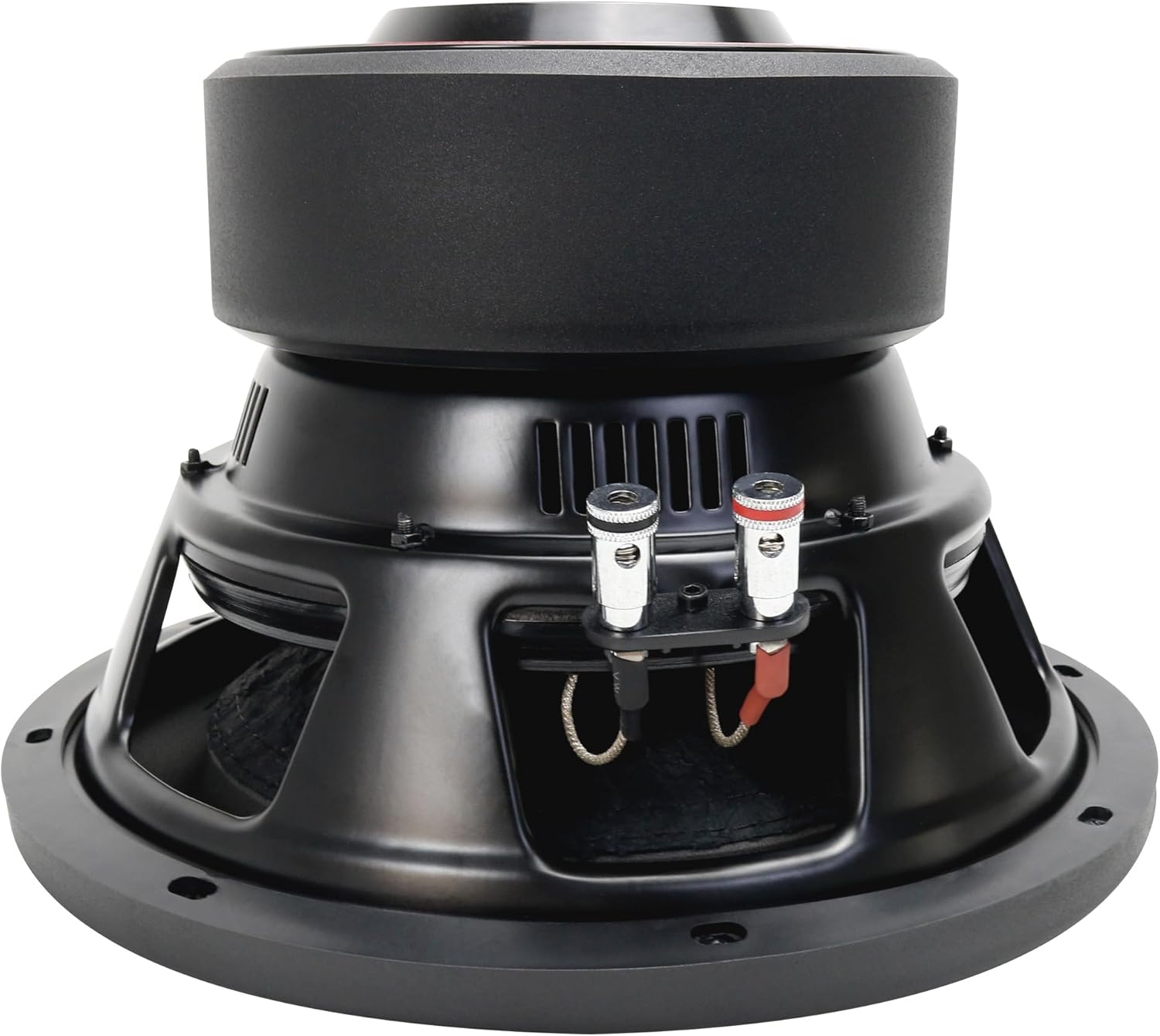
Image 3.2: Side view of the MX10D4 subwoofer, detailing the dual wiring terminals for flexible impedance configurations.

Image 3.3: Detailed dimensions of the MX10D4 subwoofer, including product size (Ø260*180mm), installation aperture (Ø237mm), and installation depth (163mm).
4. Operating Instructions
Once installed, follow these guidelines for optimal operation:
4.1. Amplifier Settings
- Gain Control: Set the amplifier's gain control carefully. Start with the gain at its minimum and slowly increase it until the desired volume is achieved without distortion. Avoid setting the gain too high, as this can lead to clipping and damage the subwoofer.
- Low-Pass Filter (LPF): Use the amplifier's LPF to filter out high frequencies, allowing only bass frequencies to reach the subwoofer. A common starting point is between 80Hz and 120Hz.
- Subsonic Filter: If your amplifier has a subsonic filter, enable it and set it below the tuning frequency of your enclosure (typically 25-35Hz) to protect the subwoofer from playing frequencies too low for its design.
- Bass Boost: Use bass boost sparingly, if at all. Excessive bass boost can cause distortion and damage.
4.2. Break-in Period
Allow a break-in period of approximately 10-20 hours of normal listening before operating the subwoofer at its maximum potential. This allows the suspension components (surround and spider) to loosen up, improving performance and longevity.
5. Maintenance
The DR DOUBLE ROCK MX10D4 subwoofer requires minimal maintenance to ensure long-term performance:
- Keep the subwoofer clean and free from dust and debris. Use a soft, dry cloth for cleaning.
- Periodically inspect all wiring connections to ensure they are secure and free from corrosion.
- Avoid exposing the subwoofer to extreme temperatures or moisture.
- Do not apply excessive force or pressure to the cone or surround.
6. Troubleshooting
If you experience issues with your subwoofer, refer to the following common problems and solutions:
- No Sound:
- Check all power and ground connections to the amplifier.
- Verify the remote turn-on wire is connected and receiving power.
- Ensure RCA cables are securely connected between the head unit and amplifier.
- Check the amplifier's fuse and the vehicle's fuse.
- Confirm the subwoofer's voice coil wires are properly connected to the amplifier.
- Distorted Sound:
- Reduce the amplifier's gain setting.
- Check for clipping indicators on your amplifier.
- Ensure the subwoofer is in a properly sized and constructed enclosure.
- Verify that the low-pass filter is set correctly.
- Check for damaged wiring or loose connections.
- Weak or Lack of Bass:
- Check the phase setting on your amplifier or head unit.
- Ensure the enclosure volume and type are appropriate for the subwoofer.
- Adjust the amplifier's gain and bass boost settings.
- Verify that the low-pass filter is not set too low.
If these steps do not resolve the issue, contact customer support or a qualified technician.
7. Specifications
The following are the technical specifications for the DR DOUBLE ROCK MX10D4 10-inch Subwoofer:
| Feature | Specification |
|---|---|
| Model Name | MX10D4 |
| Speaker Type | Subwoofer |
| Subwoofer Diameter | 10 Inches |
| Impedance | Dual 4 Ohms |
| Max Power | 1200 Watts |
| RMS Power | 600 Watts |
| Voice Coil | 2.5 Inch 4-Layer High Temperature Copper |
| Cone Material | Competition Grade Pressed Paper Cone |
| Sensitivity (1W/1M) | 86.20dB |
| Motor Weight | 99 Oz |
| Resonant Frequency | 53.8Hz |
| Product Dimensions (D x W x H) | 10"D x 10"W x 6.8"H (Ø260*180mm) |
| Installation Aperture | Ø237mm |
| Installation Depth | 163mm |
| Item Weight | 16.5 Pounds (7.48 kg) |
| Mounting Type | Enclosure |
| Special Feature | Bass Boost |
| Manufacturer | DR Double Rock |

Image 7.1: Bottom view of the MX10D4 subwoofer, displaying key specifications such as model number, peak power, and DC resistance.

Image 7.2: Features of the MX10D4 subwoofer, including the large magnet for enhanced sound quality, fine iron cone frame for rigidity, and opening designs for improved cooling efficiency.
8. Warranty Information
The DR DOUBLE ROCK MX10D4 subwoofer comes with a limited warranty. For specific details regarding warranty coverage, duration, and terms, please refer to the warranty card included with your product or contact the seller/manufacturer directly. Keep your proof of purchase for warranty claims.
9. Customer Support
If you have any questions, require technical assistance, or need to report an issue with your DR DOUBLE ROCK MX10D4 subwoofer, please contact the retailer where you purchased the product or reach out to DR DOUBLE ROCK customer service through their official website or contact channels. Please have your product model number (MX10D4) and purchase information ready when contacting support.