
TRYKERPET 40-50 Gallon Aquarium Stand
TRYKERPET 40-50 Gallon Aquarium Stand Instruction Manual
Model: 40-50 Gallon Aquarium Stand
1. Introduction
Thank you for purchasing the TRYKERPET 40-50 Gallon Aquarium Stand. This stand is designed to provide a sturdy and functional base for your aquarium, featuring integrated power outlets and convenient storage. Please read this manual carefully before assembly and use to ensure proper installation and safe operation.

Image: The TRYKERPET 40-50 Gallon Aquarium Stand, showcasing its design and functionality with an aquarium placed on top.
2. Safety Information
Please observe the following safety precautions to prevent injury or damage to the product:
- Always assemble the stand on a soft, clean surface to prevent scratches.
- Ensure all screws and fasteners are securely tightened before placing an aquarium on the stand.
- Do not exceed the maximum weight capacity of 440 pounds (200 kg).
- Place the stand on a level, stable surface to prevent tipping.
- Keep electrical components (power outlets, USB ports) away from water. Ensure hands are dry when plugging or unplugging devices.
- Do not allow children to climb on or play with the stand.
- Regularly inspect the stand for any signs of wear or damage.
3. Package Contents
Verify that all components are present before beginning assembly. If any parts are missing or damaged, please contact customer support.
| Part | Description | Quantity |
|---|---|---|
| Top Panel | Main surface for aquarium | 1 |
| Side Panels | Left and Right structural sides | 2 |
| Bottom Panel | Base of the stand | 1 |
| Cabinet Door | Sliding barn door style | 1 |
| Adjustable Shelves | Internal storage shelves | 2 |
| Metal Frame Components | Support legs and crossbars | Various |
| Power Outlet Unit | 2 AC outlets, 2 USB ports | 1 |
| Hardware Pack | Screws, dowels, cam locks, etc. | 1 set |
| Assembly Tools | Hex key (Allen wrench) | 1 |
4. Assembly Instructions
Follow these steps carefully for proper assembly. It is recommended to have two people for assembly.
- Prepare the Area: Clear a spacious, clean, and soft area for assembly to prevent damage to components.
- Identify Parts: Lay out all parts and hardware, comparing them with the package contents list.
- Assemble the Base Frame: Connect the metal frame components using the provided screws and hex key. Ensure all connections are snug.

Image: Detail showing the 1.6" thick durable legs and 0.8" thick durable tabletop, highlighting the stand's robust construction.
- Attach Side Panels: Secure the side panels to the assembled base frame. Pay attention to the orientation of the panels, especially the side designed for the power outlet.
- Install Internal Shelving: Insert the adjustable shelf pins into the desired holes within the cabinet section. Place the adjustable shelves onto the pins.

Image: The stand's interior, demonstrating the large storage capacity with adjustable shelves and a magnetic door.
- Mount the Power Outlet Unit: Carefully insert the power outlet unit into its designated slot on the side panel. Ensure it clicks securely into place.
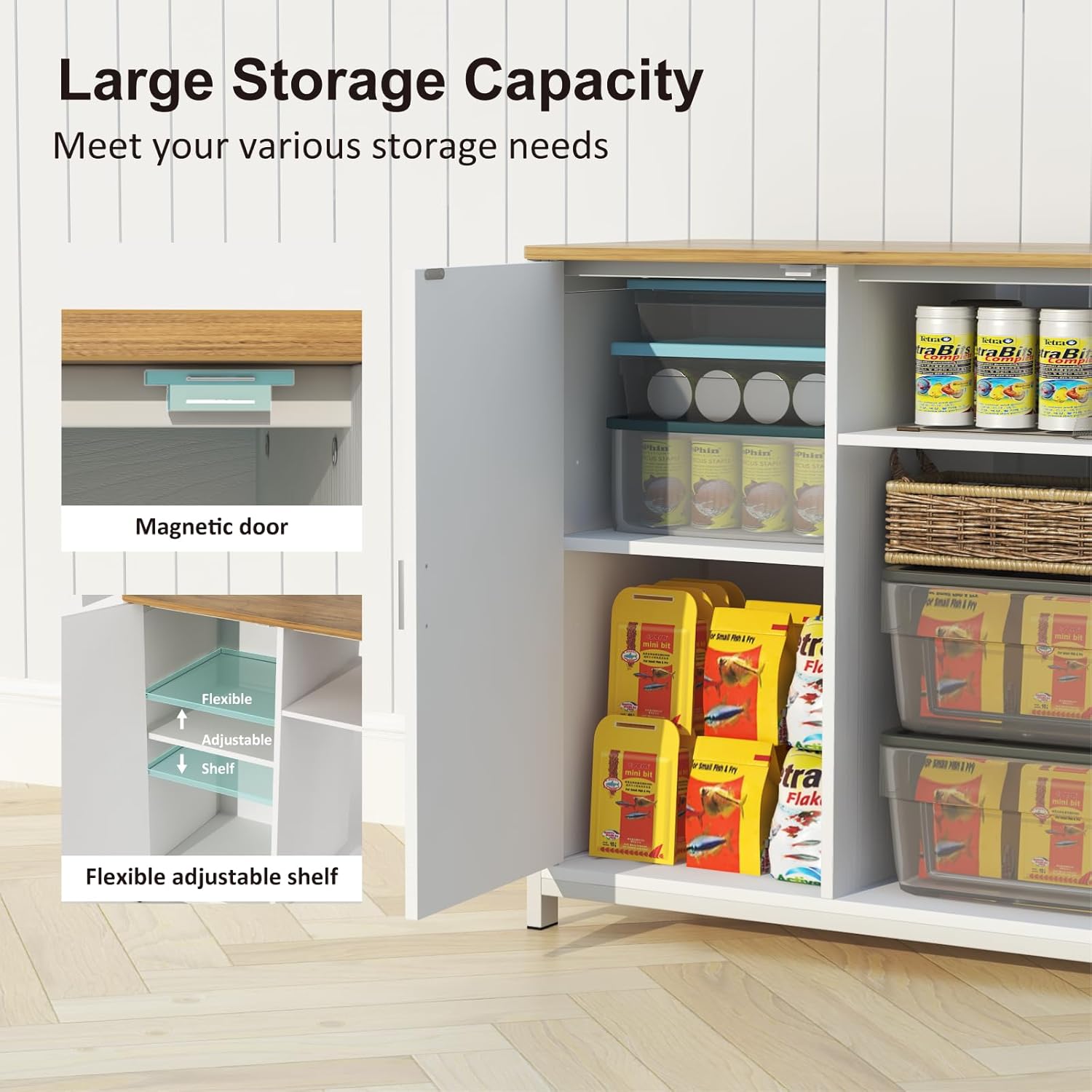
Image: The built-in power strip, featuring 2 AC outlets and 2 USB charging ports, with UL certification for safety.
- Attach the Top Panel: Place the top panel onto the assembled structure, aligning it with the pre-drilled holes. Secure it with the remaining screws.
- Install Cabinet Door: Attach the sliding cabinet door according to the instructions provided in the hardware pack. Ensure it slides smoothly.
- Final Check: Double-check all screws and connections to ensure they are tight and the stand is stable.
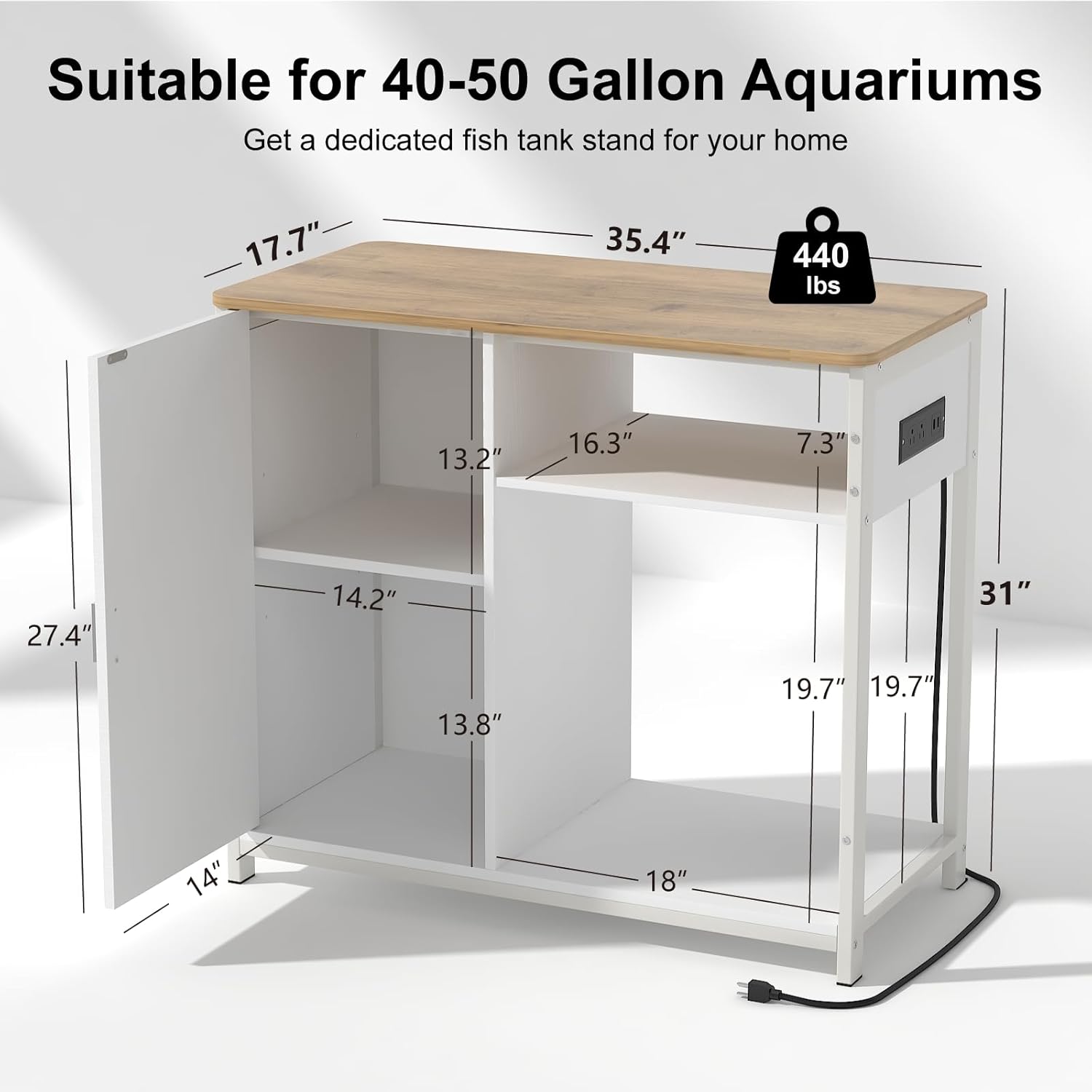
Image: Detailed dimensions of the stand, indicating it is suitable for 40-50 gallon aquariums with a 440 lbs capacity.
5. Operating Instructions
Once assembled, the stand is ready for use.
- Placement: Position the stand on a flat, stable surface, preferably near a wall outlet for the integrated power strip.
- Aquarium Placement: Carefully lift and place your 40-50 gallon aquarium onto the top surface of the stand. Ensure it is centered and stable. The stand is designed to support up to 440 lbs.
- Using Power Outlets: Plug the stand's power cord into a wall outlet. You can then connect your aquarium heater, filter, LED lights, and other devices to the 2 AC outlets and charge mobile devices using the 2 USB ports.
- Storage: Utilize the cabinet and open shelves for storing fish food, cleaning supplies, aquarium accessories, or other household items. The adjustable shelves allow for flexible storage configurations.
6. Maintenance
Regular maintenance will help prolong the life of your aquarium stand.
- Cleaning: Wipe down the surfaces with a soft, damp cloth. Avoid abrasive cleaners or harsh chemicals that could damage the finish.
- Spills: Immediately wipe up any water spills from the aquarium to prevent water damage to the wood components.
- Hardware Check: Periodically check all screws and fasteners to ensure they remain tight. Re-tighten if necessary.
- Electrical Safety: Ensure the power cord and outlets are free from damage and moisture.
7. Troubleshooting
| Problem | Possible Cause | Solution |
|---|---|---|
| Stand feels wobbly after assembly. | Screws not fully tightened; uneven floor. | Re-tighten all assembly screws. Move stand to a level surface or use shims if necessary. |
| Power outlets/USB ports not working. | Power cord not plugged in; tripped circuit breaker; faulty unit. | Ensure the stand's power cord is securely plugged into a working wall outlet. Check your home's circuit breaker. If still not working, contact customer support. |
| Cabinet door does not slide smoothly. | Improper installation of door or track; debris in track. | Check door and track alignment. Clean any dust or debris from the sliding track. |
8. Specifications
| Feature | Detail |
|---|---|
| Product Dimensions | 35.4"L x 17.7"W x 31"H (90cm x 45cm x 79cm) |
| Item Weight | 57 pounds (25.85 kg) |
| Material | Metal, Wood |
| Color | White |
| Max. Weight Capacity | 440 pounds (200 kg) |
| Tank Volume Compatibility | 40-50 Gallons |
| Power Outlets | 2 AC Outlets (125V/12A) |
| USB Charging Ports | 2 USB Ports (5V/2A) |
| Certifications | UL certified outlets and plugs |
| Assembly Required | Yes |
9. Warranty and Support
TRYKERPET is committed to providing high-quality products. For any questions, concerns, or assistance with your aquarium stand, please contact our customer support team.
Customer Support:
- Email: support@trykerpet.com (Example email, as no specific email is provided)
- Website: Visit the official TRYKERPET store on Amazon for FAQs and product information: TRYKERPET Amazon Store
Please have your product model number (40-50 Gallon Aquarium Stand) and purchase date ready when contacting support.
Ask a question about this manual
Ask about setup, troubleshooting, compatibility, parts, safety, or missing instructions. Manuals+ will review the question and use this page’s manual context to help answer it.