
XJD AS106
XJD 6-in-1 Folding Toddler Tricycle (Model AS106) Instruction Manual
Your comprehensive guide to assembly, operation, and maintenance.
1. Safety Information
- Always ensure adult supervision when a child is using the tricycle.
- Ensure all parts are securely fastened before each use.
- Do not use on public roads or near motor vehicles.
- Always wear appropriate safety gear, including a helmet.
- Recommended age range: 10 months to 48 months.
- Maximum weight capacity: Not explicitly stated, but designed for toddlers 1-4 years old.
2. Product Overview
The XJD 6-in-1 Folding Toddler Tricycle is a versatile and adaptable ride-on toy designed to grow with your child. It seamlessly transitions between multiple modes to support different developmental stages.
Key Features:
- Multifunctional Design: Easily switch between Push Tricycle, Push Balance Bike, Tricycle, Balance Bike, and Sliding modes.
- Parental Control Handle: Adjustable in four levels (35.4 to 41.4 inches) with 135-degree steering control for adult assistance.
- Adjustable Comfort: Seat height adjustable by 1.5 inches (4cm) and adjustable handlebars to fit growing children.
- Removable Pedals: Pedals can be easily removed and stored in two designated positions.
- One-Touch Folding: Compact folding for convenient storage and transport.
- Durable Construction: Made with a safe carbon steel frame and wider, silent wheels for indoor and outdoor use.
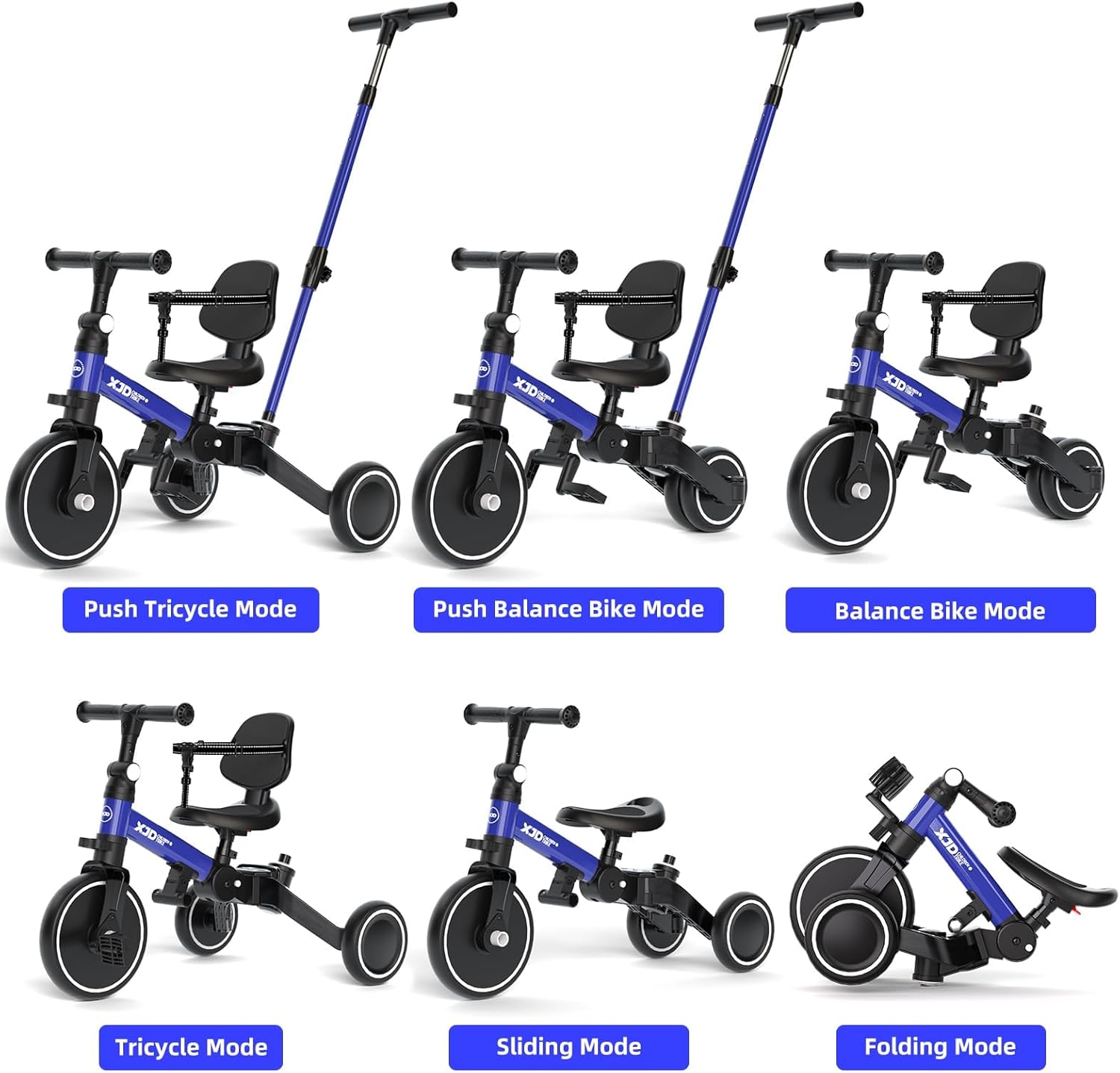
Figure 2.1: The XJD 6-in-1 Toddler Tricycle demonstrating its various modes: Push Tricycle, Push Balance Bike, Balance Bike, Tricycle, Sliding, and Folding.
3. Assembly Instructions
The XJD Toddler Tricycle requires minimal assembly. Follow the steps below or refer to the installation video for a visual guide.
- Install Front Wheel and Handlebar: Insert the front wheel fork assembly through the frame headtube. Then, install the handlebar and secure it by threading through the screws and tightening with the provided Allen wrench.
- Attach Seat: Loosen the saddle clevis using an Allen wrench. Insert the riser tube into the side of the step with the saddle on it.
- Assemble Parental Control Handle (Actuator): Connect the three rods of the actuator. Insert the assembled actuator handle into the square hole in the rear seat. Ensure the actuator lugs pop out, indicating it's in the locked position.
- Attach Pedals: If using the tricycle mode, attach the pedals to the front wheel. Ensure they are securely fastened.
Video 3.1: Official XJD Toddler Tricycle Installation Video. This video provides a step-by-step visual guide for assembling your tricycle, including attaching the front wheel, handlebar, seat, and parental control handle.
4. Operating Modes
The XJD Tricycle offers six distinct modes to adapt to your child's growth and skill level:
- Push Tricycle Mode: For younger children, use the parental control handle to steer and push. Pedals can be attached or removed.
- Push Balance Bike Mode: Remove pedals and use the parental handle to guide your child as they learn to balance.
- Tricycle Mode: With pedals attached and parental handle removed, children can pedal and steer independently.
- Balance Bike Mode: Remove pedals and the parental handle. The rear wheels can be adjusted closer together to form a two-wheel balance bike.
- Sliding Mode: Similar to balance bike mode, but often implies a lower seat setting for easier ground contact.
- Folding Mode: For compact storage and easy transport.
Video 4.1: XJD 6-in-1 Toddler Bike Overview. This video showcases the various modes and functionalities of the XJD Toddler Tricycle, demonstrating its adaptability for different age groups and skill levels.

Figure 4.2: A toddler enjoying the XJD Tricycle in a push-assisted mode, guided by the parental control handle.
5. Adjustments
5.1 Seat Height Adjustment
The seat height can be adjusted by 1.5 inches (4cm) to accommodate your child's leg length. Locate the quick-release lever or bolt under the seat, adjust to the desired height, and secure firmly.

Figure 5.1: Close-up view of the adjustable seat mechanism, allowing for height customization.
5.2 Handlebar Adjustment
The handlebar can be adjusted for optimal reach and comfort. Loosen the handlebar clamp, set to the appropriate angle/height, and re-tighten securely.

Figure 5.2: Illustration of the adjustable handlebar, allowing for comfortable grip and steering.
5.3 Parental Control Handle Adjustment
The parental control handle has four height settings, ranging from 35.4 to 41.4 inches, to suit different adult heights. Press the adjustment button on the handle and slide to the desired height until it clicks into place. The handle also offers 135-degree steering control.
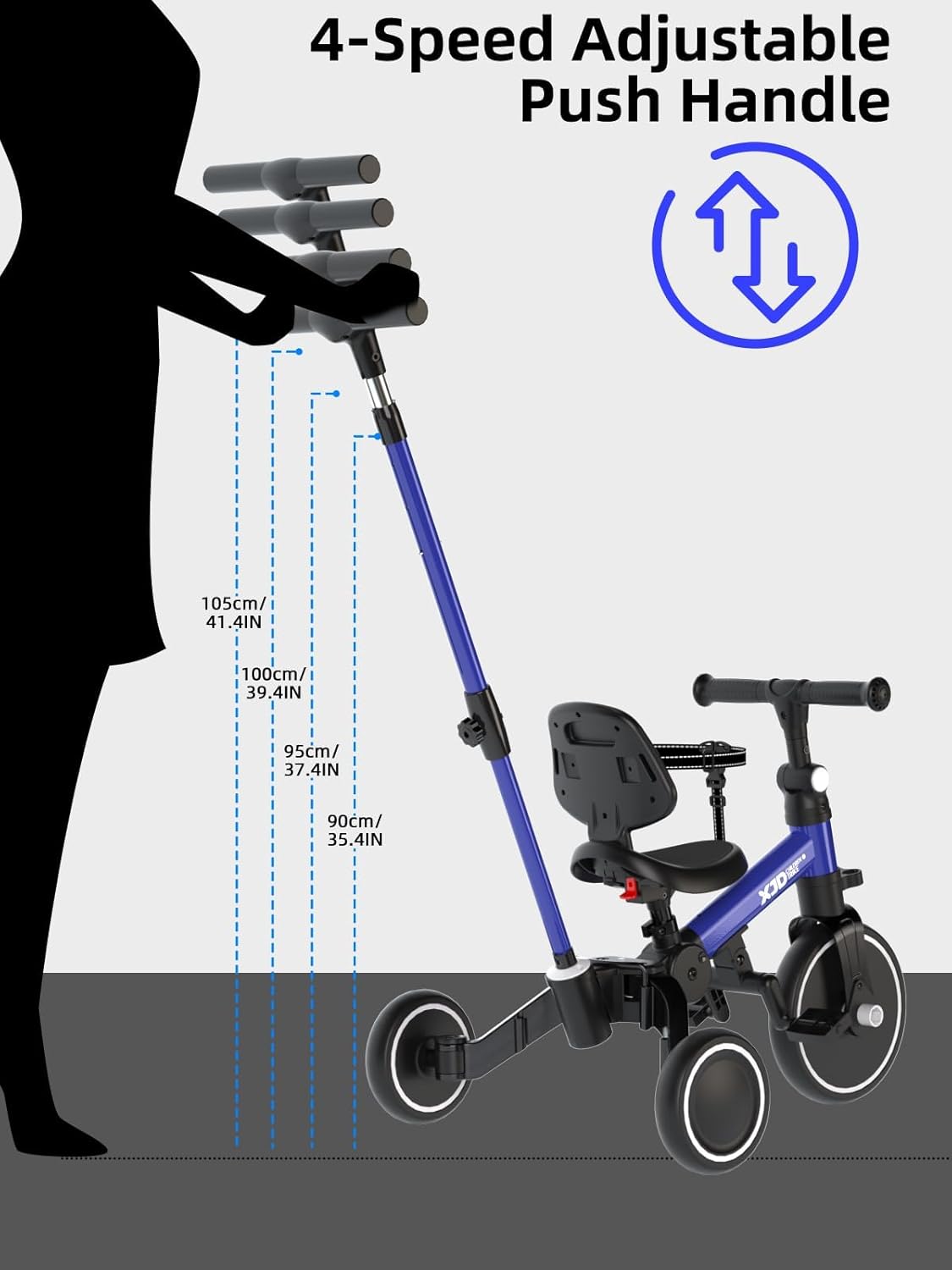
Figure 5.3: Diagram showing the four adjustable height settings for the parental push handle.
5.4 Rear Wheel Adjustment (Balance Bike Mode)
To convert to balance bike mode, the rear wheels can be adjusted closer together. Locate the adjustment mechanism on the rear axle, release the lock, and push the wheels inward until they are side-by-side, then re-lock.

Figure 5.4: Illustration demonstrating how to adjust the rear wheels for different modes.
5.5 Pedal Removal/Storage
The pedals can be easily removed for balance bike or push modes. They can be stored in two designated positions on the tricycle frame when not in use.

Figure 5.5: Image showing the removable pedals and their storage option.
6. Folding and Storage
The XJD Tricycle features a one-touch folding function for easy portability and compact storage. Locate the folding button (often near the frame hinge), press it, and fold the tricycle into its compact form. This makes it ideal for travel or storing in small spaces.

Figure 6.1: The XJD Toddler Tricycle in its compact folded state, easily fitting into a car trunk for transport.
7. Maintenance
- Cleaning: Wipe down the tricycle with a damp cloth and mild soap. Avoid harsh chemicals.
- Inspection: Regularly check all bolts, screws, and moving parts to ensure they are tight and functioning correctly.
- Storage: Store the tricycle in a dry place away from direct sunlight and extreme temperatures to prolong its lifespan.
- Wheels: Inspect wheels for wear and tear. The durable, silent wheels are designed for longevity.
8. Troubleshooting
| Problem | Possible Cause | Solution |
|---|---|---|
| Tricycle feels unstable. | Loose connections or incorrect assembly. | Check all bolts and screws, especially on the frame and wheels, and tighten as necessary. Refer to assembly instructions. |
| Parental handle not steering correctly. | Handle not fully engaged or locked. | Ensure the parental control handle is fully inserted into the rear seat's square hole and the lugs are popped out in the locked position. |
| Difficulty folding the tricycle. | Folding mechanism not properly engaged. | Ensure the folding button is fully pressed and all parts are aligned for smooth folding. Do not force. |
9. Specifications
- Model: AS106
- Brand: XJD
- Material: Carbon Steel
- Item Weight: 6.1 Kilograms
- Item Dimensions (L x W x H): 25.6" x 19.3" x 19.7"
- Recommended Minimum Age: 10 Months
- Recommended Maximum Age: 48 Months
- Assembly Required: Yes
- Included Components: 1X kids tricycle
10. Warranty and Support
For warranty information, product support, or to purchase replacement parts, please visit the official XJD website or contact customer service through your retailer.
You can visit the XJD Store for more products and information: XJD Official Store
Ask a question about this manual
Ask about setup, troubleshooting, compatibility, parts, safety, or missing instructions. Manuals+ will review the question and use this page’s manual context to help answer it.