
Osusuent ZQ16001
Osusuent Cold Spark Machine User Manual
Model: ZQ16001
1. Important Safety Instructions
Read all instructions carefully before operating the device. Failure to follow these instructions may result in injury or damage to the product.
- Ensure the device is placed on a stable, level surface.
- Maintain a safe distance of at least 3 meters (10 feet) from the spark output to any objects or persons.
- Do not touch the ejected sparks as they are hot, although designed to be non-scalding.
- Do not block or cover the spark outlet or air vents.
- Only use the specified consumable powder for this machine.
- Unplug the machine from the power source before cleaning or maintenance.
- Do not operate the machine if any part is damaged. Contact qualified personnel for repairs.
- This machine is for professional use. Non-professionals should not attempt to repair it.
- If the flame is sprayed, please close the cover of the added material.
- Do not block the air inlet and the air outlet to impact on heat dissipation.
- If the flame exceeds 30 seconds, it will affect the life of the machine.
2. Package Contents
Verify that all items listed below are included in your package:
- 1 x Cold Spark Machine
- 1 x Power Cord
- 1 x 8-Key Remote Control
- 1 x 1.2m Signal Cable (for DMX connection)
- 1 x Instruction Manual (this document)

Figure 2.1: Package Contents. The image displays the cold spark machine, a power cord, a DMX signal cable, a wireless remote control, and the user manual.
3. Product Overview
The Osusuent Cold Spark Machine is designed to produce spectacular, non-pyrotechnic spark effects for various events. It features a robust design and multiple control options.
3.1 Components

Figure 3.1: Front view of the Cold Spark Machine with its wireless remote control.

Figure 3.2: Key components and design features including the portable handle, 4-digit display, safety ventilation, and durable aluminum alloy construction.
- Spark Outlet: Where the cold sparks are ejected.
- Powder Hopper: Inlet for the consumable spark powder.
- Control Panel: Features a 4-digit LED display and control buttons (MENU, UP, DOWN, ENTER).
- Indicator Lights: READY, DMX, FAULT, HEAT status indicators.
- DMX IN/OUT Ports: For DMX512 control connections.
- Power Switch: ON/OFF toggle.
- Power IN/OUT Ports: For power connection and daisy-chaining multiple units.
- Wireless Remote Control: For convenient remote operation.
- Portable Handle: For easy transport.
- Safety Ventilation: Ensures proper heat dissipation.
3.2 Features
- Adjustable Spark Height: Three adjustable jet heights (BCD buttons on remote) for varied effects (2.5m to 5.5m).
- DMX512 Control: Advanced control system allowing connection of up to 6 machines simultaneously via signal cable.
- Wireless Remote Control: Provides convenient operation from a distance.
- Quick Heating: Heats up in approximately 3-5 minutes.
- Safe Operation: Produces cold sparks that are touchable and non-scalding (temperature below 40°C).
- Durable Construction: Made from aluminum alloy for long-term use.
4. Setup
Follow these steps to set up your Cold Spark Machine:
- Placement: Place the machine on a stable, flat surface in a well-ventilated area, ensuring a minimum clearance of 3 meters (10 feet) from any flammable materials or audience.
- Power Connection: Connect the provided power cord to the machine's Power IN port and then to a suitable power outlet (AC220V/50Hz or AC110V/60Hz).
- Powder Loading:
- Unscrew the cap of the powder hopper located on the top of the machine.
- Carefully pour the designated cold spark powder into the hopper. Do not overfill.
- Replace the cap securely.

Figure 4.1: Filling the powder hopper. Ensure the cap is securely replaced after filling.
- DMX Connection (Optional): If using DMX control, connect a DMX cable from your DMX controller to the DMX IN port of the machine. For multiple machines, daisy-chain them by connecting the DMX OUT of the first machine to the DMX IN of the next.
- Initial Power On: Flip the power switch to the "ON" position. The machine will begin its heating process. The "HEAT" indicator light will illuminate.
5. Operation
5.1 Remote Control Operation
The machine can be operated wirelessly using the provided 8-key remote control.
- Pairing the Remote:
- Press the "MENU" button on the machine's control panel until the display shows "L--H".
- Press and hold button "A" on the remote control for 4-5 seconds.
- The machine's display will change to "LA-H", indicating successful pairing.
- Heating: After pairing, press button "A" on the remote again. The "HEAT" indicator light on the machine will turn on, and the machine will begin heating. This process takes a maximum of 5 minutes. The "READY" light will illuminate when heating is complete.
- Spark Ejection:
- Use the "High 30s", "Low 30s", "High 90s", "Low 90s" buttons to control the spark duration and height.
- The remote features three BCD buttons for adjusting spark height. The "D" button provides a more noticeable height change compared to "B" and "C".
- Press "stop" to cease spark ejection.
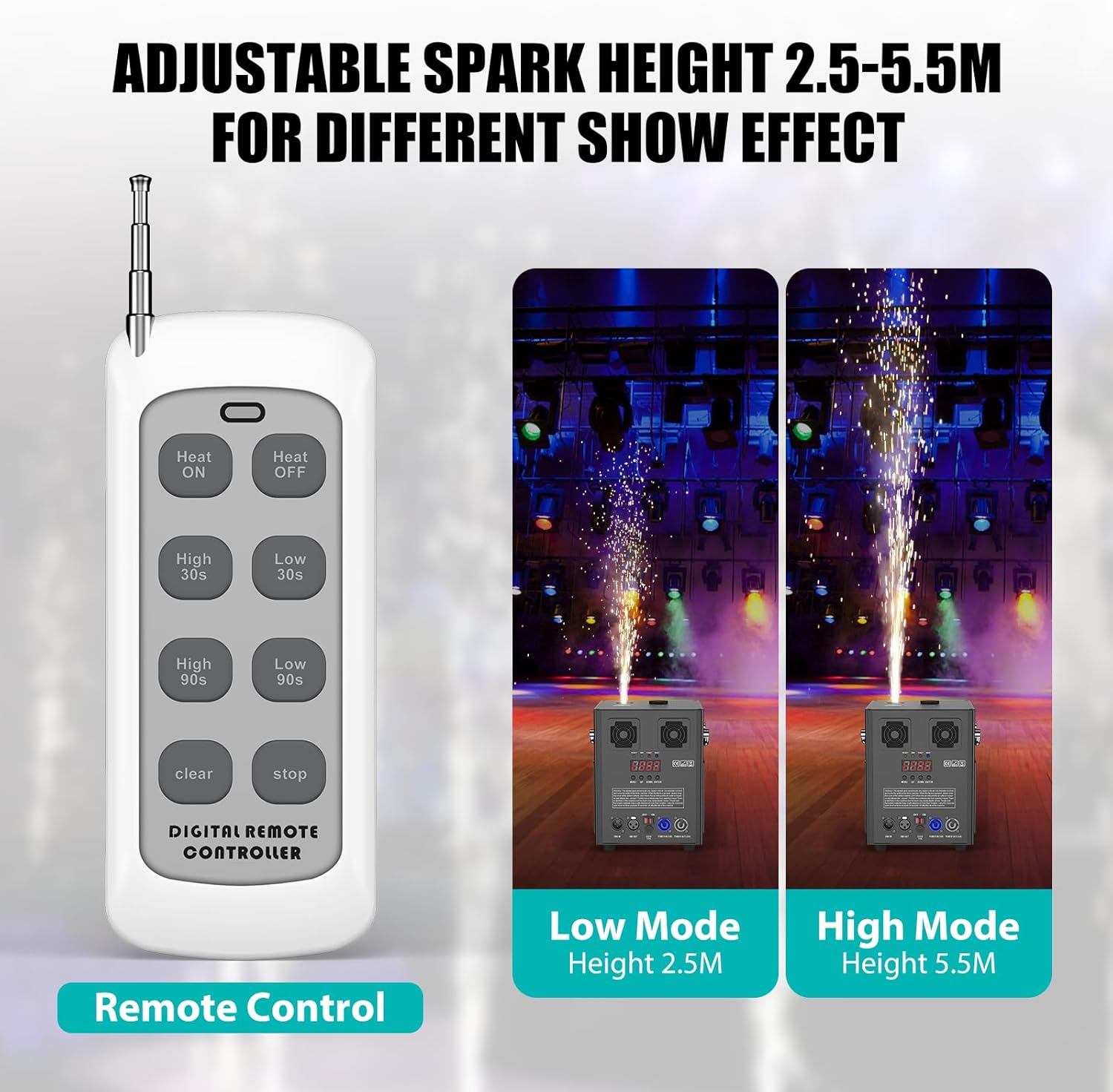
Figure 5.1: Wireless remote control and visual representation of adjustable spark heights (Low Mode: 2.5M, High Mode: 5.5M).
5.2 DMX Control Operation
For advanced control and integration into larger setups, use the DMX512 system.
- Connect your DMX controller to the machine's DMX IN port.
- Set the DMX address for each machine using the control panel. Refer to your DMX controller's manual for specific channel assignments and values for spark output and height control.
- The machine supports 2 control channels (2CH).
- Up to 6 machines can be connected in a daisy-chain configuration.
5.3 Video Demonstration
Video 5.1: A demonstration of the Osusuent Cold Spark Machine in operation, showcasing its features and effects. This video illustrates the setup process, spark height adjustment, and the visual impact of the machine in various event settings.
6. Maintenance
Proper maintenance ensures the longevity and optimal performance of your Cold Spark Machine.
- Regular Cleaning: After each use, it is recommended to run the machine until all powder is consumed. Then, let the machine run idle for 1 to 2 minutes to clear any remaining powder from the internal mechanisms. This prevents clogging and ensures smooth operation for future uses.
- Exterior Cleaning: Wipe the exterior of the machine with a soft, dry cloth. Do not use abrasive cleaners or solvents.
- Storage: Store the machine in a cool, dry place away from direct sunlight and moisture.
7. Troubleshooting
If you encounter issues with your Cold Spark Machine, refer to the table below for common problems and solutions.
| Problem | Possible Cause | Solution |
|---|---|---|
| Machine does not power on. | No power supply; power cord loose; power switch off. | Check power connection; ensure power switch is ON; test outlet. |
| No sparks ejected. | No powder in hopper; machine not heated; remote not paired; DMX signal issue. | Fill powder; wait for "READY" light; re-pair remote; check DMX connections and address. |
| Spark height is inconsistent or too low. | Insufficient powder; incorrect remote setting; clogged nozzle. | Ensure sufficient powder; adjust height setting on remote/DMX; perform cleaning procedure. |
| Machine displays "FAULT" light. | Internal error; overheating. | Turn off and unplug the machine. Allow it to cool down. If the problem persists, contact customer support. |
If the problem persists after attempting these solutions, please contact Osusuent customer support for further assistance.
8. Specifications
Detailed technical specifications for the Osusuent Cold Spark Machine:
- Model: ZQ16001
- Product Material: Aluminum Alloy
- Power: 530W (Note: Product title specifies 530W, while some images may indicate 700W. Please refer to the product packaging for the most accurate power rating.)
- Input Voltage: AC220V/50Hz or AC110V/60Hz
- Fuse: 5A or 10A (depending on voltage)
- Preheating Time: About 3-5 minutes
- Control Mode: DMX512, Remote Control
- Control Channel: 2CH
- Remote Control Jet Height: 2.5 meters to 5.5 meters (adjustable)
- Display Board: LCD (4-digit LED display)
- Working Temperature: -10°C to 50°C
- Cooling Mode: Built-in Fan
- Scope of Application: Outdoor/Indoor
- Product Dimensions: 20 x 19 x 25 cm (7.87 x 7.48 x 9.45 inches)
- Manufacturer: Shenzhen Zhuoqiong Technology Co., Ltd.

Figure 8.1: Detailed technical specifications and dimensions of the machine.
9. Warranty and Support
Osusuent is committed to providing high-quality products and customer satisfaction.
- Warranty Information: Please refer to the warranty card included with your product or visit the official Osusuent website for detailed warranty terms and conditions.
- Customer Support: For technical assistance, troubleshooting, or spare parts, please contact Osusuent customer support. Have your model number (ZQ16001) and purchase information ready when contacting support.
10. Application Scenarios
The Osusuent Cold Spark Machine is versatile and suitable for a wide range of events and performances, creating a festive and dynamic atmosphere.
- Weddings
- Stage Performances
- Bar and Club Events
- Parties (Halloween, Christmas, etc.)
- Grand Openings
- Commercial Events

Figure 10.1: Examples of the Cold Spark Machine in use across different event types.

Figure 10.2: Cold Spark Machines enhancing a wedding celebration.
Ask a question about this manual
Ask about setup, troubleshooting, compatibility, parts, safety, or missing instructions. Manuals+ will review the question and use this page’s manual context to help answer it.