
Conpert Reversing Camera for Renault Megane II
Conpert Reversing Camera User Manual
Model: Reversing Camera for Renault Megane II
1. Introduction
This manual provides instructions for the installation, operation, and maintenance of your Conpert CCD 1080Px720P Car Reverse Rear View Camera. This camera is designed to enhance safety by providing a clear view of the area behind your vehicle when reversing.
1.1 Compatible Vehicle Models
This reversing camera is compatible with various Renault models. Please verify your vehicle's model and year before installation to ensure compatibility.
- Renault Fluence (2009-2014)
- Renault Megane (2002-2008)
- Renault Megane (2003-2008) (Taiwan)
- Renault Megane (2006-2010) (Brazil Sedan)
- Renault Megane (2006-2012) (Brazil Estate)
- Renault Twingo II (2007-2014)
- Renault Laguna II/III X91 (2007-2015)
- Renault Vel Satis X73 (2002-2009)
- Renault Espace IV (2003-2014)
2. Package Contents
Please check the package for the following items:
- Car Reversing Camera
- Power Cord (1.5M)
- Video RCA Cable (6M)
- 12V Power Filters Rectifier
- Installation Tool (Plastic Pry Tool)
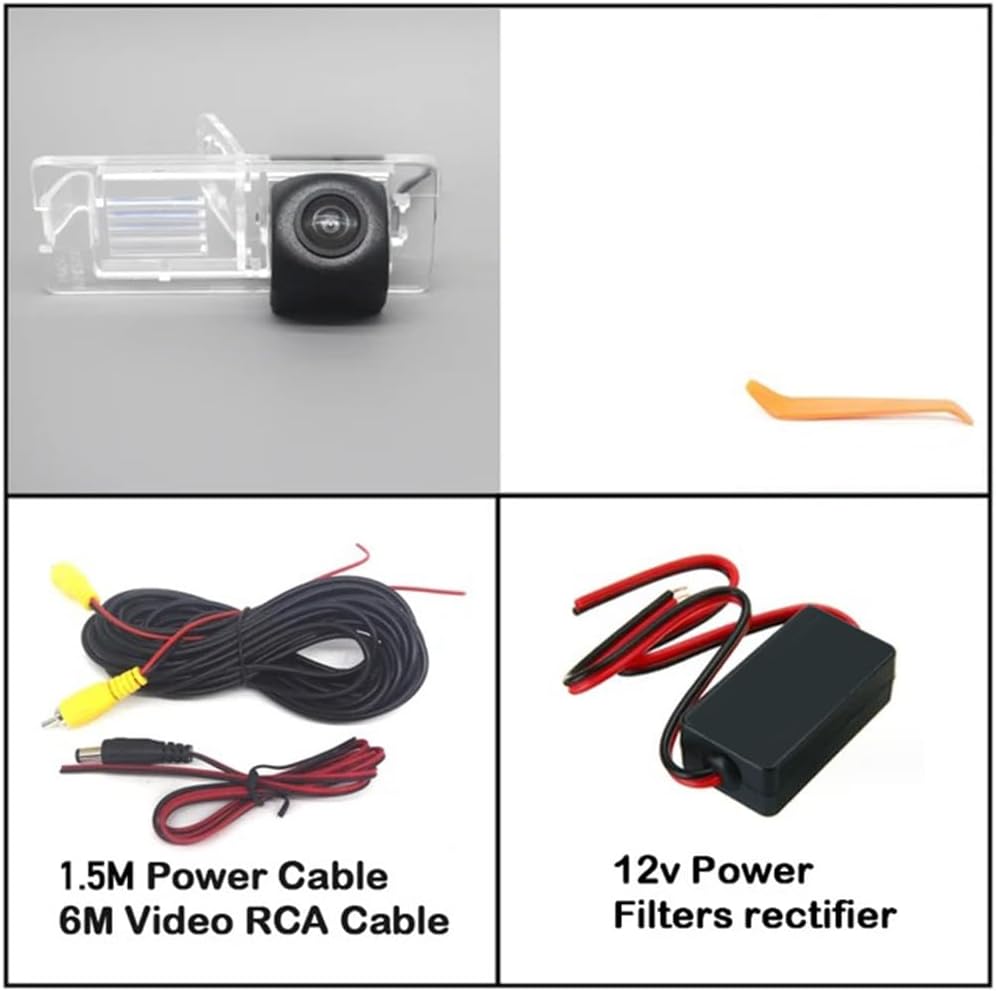
Figure 2.1: Contents of the Conpert Reversing Camera package.
3. Specifications
| Feature | Description |
|---|---|
| Brand | Conpert |
| Compatible Devices | Monitor |
| Installation Type | Surface Mount |
| Voltage | 12 Volts (DC12V >= 80mA) |
| Optical Sensor Technology | CCD |
| Lens Type | Wide Angle |
| Real Angle of View | 170 Degrees |
| Resolution | 1080Px720P |
| Operating Temperature | -22°F to 176°F (-30°C to 80°C) |
| Waterproof Standard | International standards (glue filling technology) |

Figure 3.1: Camera dimensions (80mm x 31mm).
4. Setup and Installation
Professional installation is recommended. Ensure the vehicle's power is off before beginning installation.
4.1 Installation Location
The camera is designed to replace the original license plate light housing on compatible Renault models. This ensures a discreet and integrated look.

Figure 4.1: Example of camera installation on a compatible vehicle.
4.2 Wiring Instructions
- Power Connection: Connect the camera's power cable to the vehicle's reverse light circuit. This ensures the camera receives power only when the vehicle is in reverse gear. The included 12V power filters rectifier should be used to stabilize the power supply and prevent interference.
- Video Signal Connection: Connect the 6M RCA video cable from the camera to your car's display monitor or head unit. Ensure a secure connection at both ends.
- Ground Connection: Ensure the camera has a proper ground connection to the vehicle's chassis.
Important: The camera requires a 12V power supply. Do not connect to 24V truck systems or high-power transformers.
5. Operating Instructions
Once properly installed and wired, the Conpert Reversing Camera operates automatically.
- Engage Reverse Gear: When you shift your vehicle into reverse gear, the camera will automatically power on.
- Monitor Display: The video feed from the camera will appear on your connected car monitor or head unit, providing a wide-angle view of the area behind your vehicle.
- Disengage Reverse Gear: When you shift out of reverse gear, the camera will power off, and your monitor will return to its previous display.
The camera features excellent night vision capabilities, enhancing visibility in low-light conditions.
6. Maintenance
To ensure optimal performance and longevity of your reversing camera, follow these maintenance guidelines:
- Cleaning the Lens: Regularly clean the camera lens with a soft, damp cloth to remove dirt, dust, or water spots. Avoid abrasive cleaners that could scratch the lens.
- Checking Connections: Periodically inspect all wiring connections to ensure they are secure and free from corrosion.
- Environmental Protection: The camera is designed to be waterproof and impact-resistant. However, avoid exposing it to extreme physical impact or harsh chemicals.
7. Troubleshooting
If you encounter issues with your Conpert Reversing Camera, refer to the following common problems and solutions:
- No Image on Monitor:
- Check all power and video cable connections. Ensure they are securely plugged in.
- Verify that the camera is receiving 12V power when the vehicle is in reverse.
- Ensure your monitor is set to the correct input source for the camera.
- Distorted or Flickering Image:
- Ensure the 12V power filters rectifier is correctly installed and functioning.
- Check for loose video cable connections.
- Inspect the video cable for damage or kinks.
- Poor Night Vision:
- Clean the camera lens thoroughly.
- Ensure there are no obstructions blocking the camera's view.
- Camera Not Activating:
- Confirm that the power cable is correctly connected to the reverse light circuit.
- Check the vehicle's reverse light bulb and fuse.
8. Warranty and Support
Conpert is committed to providing high-quality products. For any questions, issues, or warranty claims regarding your reversing camera, please contact Conpert customer service through your purchase platform or the official Conpert website. Please have your purchase details and product model information ready when contacting support.
Ask a question about this manual
Ask about setup, troubleshooting, compatibility, parts, safety, or missing instructions. Manuals+ will review the question and use this page’s manual context to help answer it.