
1. Introduction
Thank you for choosing the VASAGLE L Shaped Electric Standing Desk. This desk is designed to provide a versatile and ergonomic workspace, allowing you to easily switch between sitting and standing positions. Its L-shaped design optimizes corner spaces, making it ideal for home offices or studies. This manual provides detailed instructions for assembly, operation, maintenance, and troubleshooting to ensure you get the most out of your new desk.

Image: The VASAGLE L Shaped Electric Standing Desk, showcasing its spacious desktop and integrated power outlets.
2. Safety Information
Please read and understand all safety instructions before using this product. Failure to follow these instructions may result in injury or damage to the product.
- Avoid humid environments to prevent damaging the electric components.
- Always use the anti-collision protection feature to prevent accidents.
- Ensure the desk is stable and properly anchored for safe and quiet use.
- Keep children and pets away from the desk during operation.
- Do not overload the desk; refer to the maximum weight recommendation in the specifications.
3. Package Contents
Before beginning assembly, verify that all components listed below are present and undamaged:
- 1 x L-Shaped Desk with Charging Station
- 1 x Accessory Kit (containing all necessary screws and tools)
- 6 x Lockable Swivel Casters
- 1 x Instructions Manual
4. Setup & Assembly
Assembly of the VASAGLE L Shaped Electric Standing Desk is designed to be straightforward. Follow the included detailed instructions step-by-step. It is recommended to have a clear, spacious area for assembly.

Image: The desk in a room, highlighting its spacious desktop and stable design, crucial for proper setup.

Image: A diagram illustrating the desk's dimensions and its maximum static load capacity of 176 lb (80 kg).
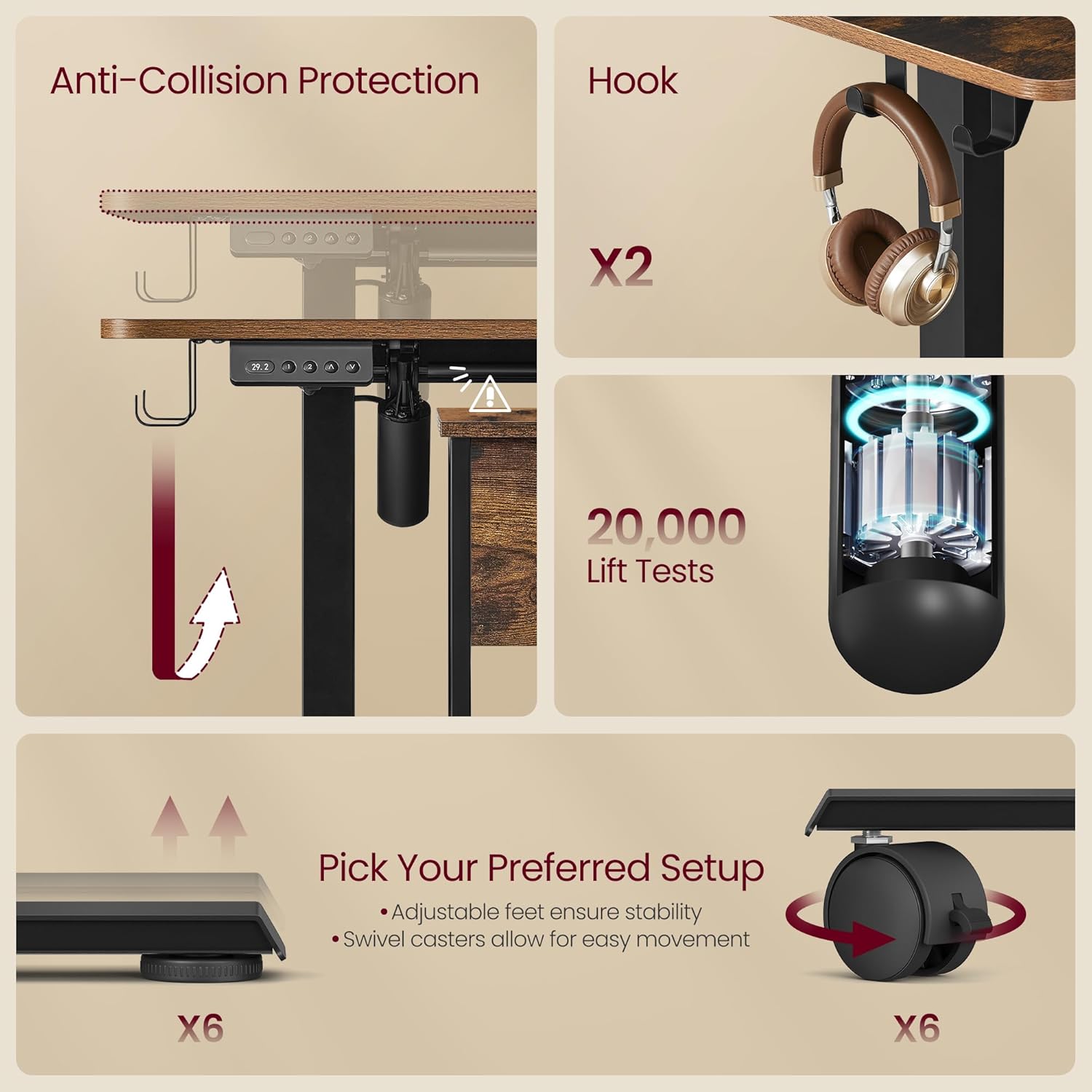
Image: Key features like anti-collision protection, dual headphone hooks, and the choice between adjustable feet or lockable swivel casters for stability or mobility.
5. Operating Instructions
5.1 Height Adjustment
The desk features an electric height adjustment system with a convenient control panel. You can easily switch between sitting and standing positions to reduce fatigue from prolonged sitting.
- Use the Up and Down arrows on the control panel to manually adjust the desk height.
- The LED display will show the current height in inches.
- Memory Buttons: The desk includes 2 memory buttons to save your preferred heights. To set a memory position, adjust the desk to your desired height, then press the 'S' (Set) button followed by either '1' or '2'. The desk will now move to this saved height with a single touch.

Image: Visual representation of the desk's adjustable height range and the intuitive control panel with memory settings.
5.2 Built-in Power Strip and USB Ports
The desk is equipped with a built-in power strip for convenient charging and power access.
- It includes 2 AC outlets (125V/12A) and 2 USB ports (5V/2.1A).
- Simply plug in your devices to the integrated outlets for easy power access.

Image: The integrated power strip, demonstrating its utility for charging various electronic devices.
5.3 Official Product Video
Video: An official product video demonstrating the features and functionality of the VASAGLE L-Shaped Electric Standing Desk, including its height adjustment and spacious design.
6. Maintenance
Proper care and maintenance will extend the life of your VASAGLE L Shaped Electric Standing Desk.
- Cleaning: Wipe with a dry cloth. Avoid using harsh chemicals or abrasive cleaners that could damage the finish.
- Electrical Components: Ensure all electrical connections are secure and free from moisture. Do not attempt to repair electrical components yourself.
- Regular Checks: Periodically check all screws and fasteners to ensure they are tight. Retighten if necessary.
7. Troubleshooting
If you encounter any issues with your desk, refer to the following common problems and solutions:
| Problem | Possible Cause | Solution |
|---|---|---|
| Desk does not move or respond to controls. | Power cable disconnected; motor overload; control panel error. | Check power connection. Unplug and replug the desk. Reduce weight on the desk. Contact customer support if the issue persists. |
| Desk moves unevenly or makes unusual noises. | Loose connections; uneven weight distribution; obstruction. | Ensure all screws are tightened. Distribute weight evenly. Check for any obstructions under or around the desk. |
| Anti-collision feature frequently activates. | Obstruction in path; sensitive setting. | Remove any objects that might be obstructing the desk's movement. Refer to the full manual for adjusting sensitivity if applicable. |
| Memory settings are not saving. | Incorrect saving procedure. | Ensure you press 'S' then the desired memory button (1 or 2) immediately after reaching the desired height. |
If you are unable to resolve an issue using the troubleshooting guide, please contact VASAGLE customer support for assistance.
8. Specifications
| Feature | Detail |
|---|---|
| Brand | VASAGLE |
| Model Number | ULSD242K01 |
| Product Dimensions | 47.2"D x 63"W x 47.2"H |
| Color | Rustic Brown |
| Style | L-Shape |
| Base Material | Particleboard, Steel |
| Top Material Type | Engineered Wood |
| Special Feature | Adjustable Height |
| Recommended Uses | Working (Office, Study Room) |
| Item Weight | 71.7 Pounds |
| Maximum Height | 47.2 Inches |
| Minimum Height | 28.3 Inches |
| Maximum Weight Recommendation | 176 Pounds |
| Power Outlets | 2 AC Outlets (125V/12A) |
| USB Ports | 2 USB Ports (5V/2.1A) |
9. Warranty and Support
VASAGLE is committed to providing high-quality products and excellent customer service. For any inquiries, assistance with assembly, or troubleshooting not covered in this manual, please contact our customer support team.
9.1 Protection Plans
Extended protection plans are available for purchase to cover your product beyond the standard warranty. Options include 2-Year and 3-Year Protection Plans, as well as a monthly Complete Protect plan.
9.2 Customer Support
For direct assistance, please visit the official VASAGLE store on Amazon or refer to the contact information provided with your purchase. Our team is ready to help you with any product-related questions or concerns.
Thank you for choosing VASAGLE.


