
Introduction
This manual provides instructions for the proper use and care of your BIOWAVE BioWrap Back Brace Lumbar Support. This device is designed to provide lumbar support and facilitate the integration of a BioWaveGO TENS unit for muscle stimulation and pain relief. Please read this manual thoroughly before initial use.

Image illustrating common areas of back pain and related discomfort where the BioWrap may be applied.
Safety Information
Important: The BioWrap Back Brace is intended for use with the BioWaveGO TENS Unit (sold separately). Do not use this product without consulting a healthcare professional if you have pre-existing medical conditions, are pregnant, or have implanted electronic devices.
- Ensure electrodes are properly attached and skin is clean before use.
- Do not apply electrodes over open wounds, rashes, or irritated skin.
- Keep out of reach of children.
- Discontinue use if irritation or discomfort occurs.
Package Contents
Verify that all items are present in your package:
- 1 x BIOWAVE BioWrap Back Brace (S/M)
- 4 x Electrode Pads (for use with BioWaveGO)
Note: The BioWaveGO TENS Unit is required for electrical stimulation and is sold separately.

Image showing the BioWrap Back Brace, electrode pads, and the BioWaveGO device (indicated as a separate purchase).
Product Specifications
| Feature | Detail |
|---|---|
| Brand | BIOWAVE |
| Model | BioWrap Back Brace |
| Size | S/M (For Waist Size 28”-38”) |
| Material (Inside) | Neoprene |
| Material (Outside) | Tricote |
| Compatibility | BioWaveGO TENS Unit |
| Specific Uses | Lumbar Support, Sciatica, Back Pain Relief |
Setup and Application
Follow these steps to properly set up and apply your BioWrap Back Brace with the BioWaveGO TENS Unit.
- Prepare Electrodes: Place the Velcro-backed side of each electrode pad directly onto the designated areas on the inside of the BioWrap. Ensure a secure attachment.
- Connect Leadwires: Plug the blue pad connectors into the blue leadwire cable connectors from your BioWaveGO device.
- Position the Brace: Wrap the BioWrap around your lower back, ensuring it is centered and comfortable. Pull tight to achieve a snug fit.
- Secure the Brace: Attach the main Velcro closure over the left side. Unhook any secondary straps and pull them down to further tighten the BioWrap for optimal compression and electrode contact.
- Connect to BioWaveGO: Plug the single end of the cable into your BioWaveGO device.
- Power On and Adjust: Power on your BioWaveGO device. Press the '+' button to increase intensity and control your comfort level.
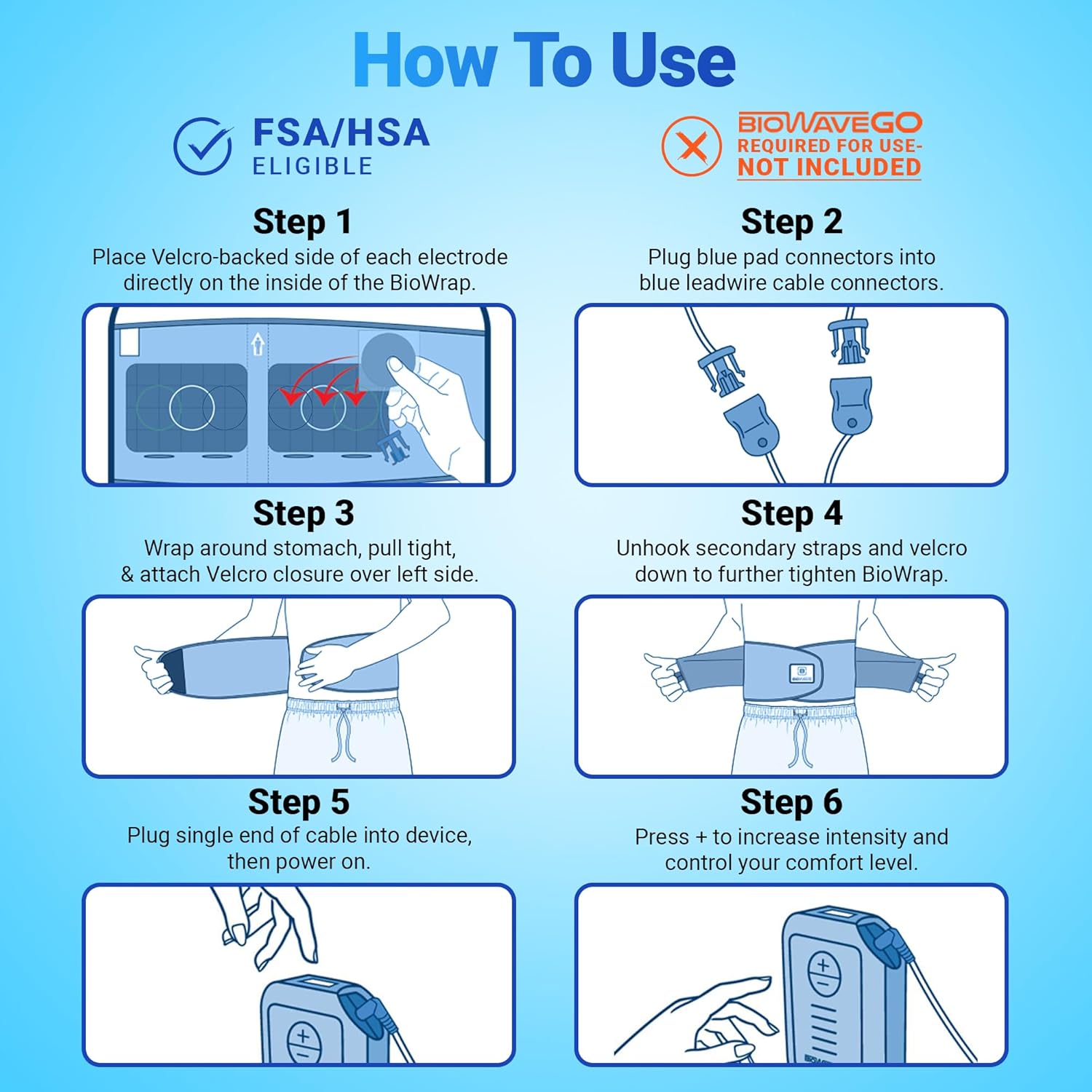
Visual guide for applying electrodes, connecting the BioWaveGO, and wearing the BioWrap brace.
Operating Instructions
Once the BioWrap Back Brace is properly applied and connected to the BioWaveGO TENS Unit, you can begin your therapy session.
- Starting a Session: Refer to your BioWaveGO TENS Unit manual for specific instructions on initiating a therapy session. Typically, a session lasts 30 minutes.
- Adjusting Intensity: Use the controls on your BioWaveGO device to adjust the intensity of the electrical stimulation to a comfortable yet effective level.
- Monitoring Comfort: The sensation should be a deep, soothing massage, not painful. If you experience any discomfort, reduce the intensity or discontinue use.
- Wearable Use: The BioWrap is designed for mobility. You can wear it during light activities.

The BioWrap Back Brace allows for mobility during use.
Maintenance and Care
- Cleaning the Brace: Hand wash the BioWrap Back Brace with mild soap and cold water. Air dry completely. Do not machine wash, tumble dry, bleach, or iron.
- Electrode Care: Replace electrode pads when they lose their adhesiveness or if you notice reduced effectiveness. Always apply electrodes to clean, dry skin.
- Storage: Store the BioWrap and electrodes in a cool, dry place away from direct sunlight.
Troubleshooting
| Problem | Possible Cause | Solution |
|---|---|---|
| No sensation or weak sensation | Electrodes not making good contact; Electrodes worn out; BioWaveGO device not powered on or faulty connection. | Re-position electrodes, ensure skin is clean; Replace electrodes; Check BioWaveGO power and cable connections. |
| Skin irritation | Electrodes applied to irritated skin; Allergic reaction; Overuse. | Discontinue use immediately; Consult a healthcare professional; Ensure skin is clean and dry before application. |
| Brace feels too loose or too tight | Incorrect sizing or improper application. | Adjust Velcro straps for a snug, comfortable fit. Ensure correct size was purchased (S/M for 28”-38” waist). |
Warranty and Support
For information regarding warranty coverage for your BIOWAVE BioWrap Back Brace, please refer to the documentation included with your purchase or visit the official BIOWAVE website.
For customer support, technical assistance, or to purchase replacement parts, please contact BIOWAVE directly through their official channels.
- Manufacturer: BioWave
- Brand Store: BIOWAVE Amazon Store