
1. Introduction
The LeLuv Magna Pro LCD Smart Handheld Digital Electric Vacuum Pump Controller is an advanced device designed for precise and consistent vacuum control. It features a digital interface, multiple programmable modes, and a USB-rechargeable battery for convenient operation. This manual provides detailed instructions for the safe and effective use of your device.
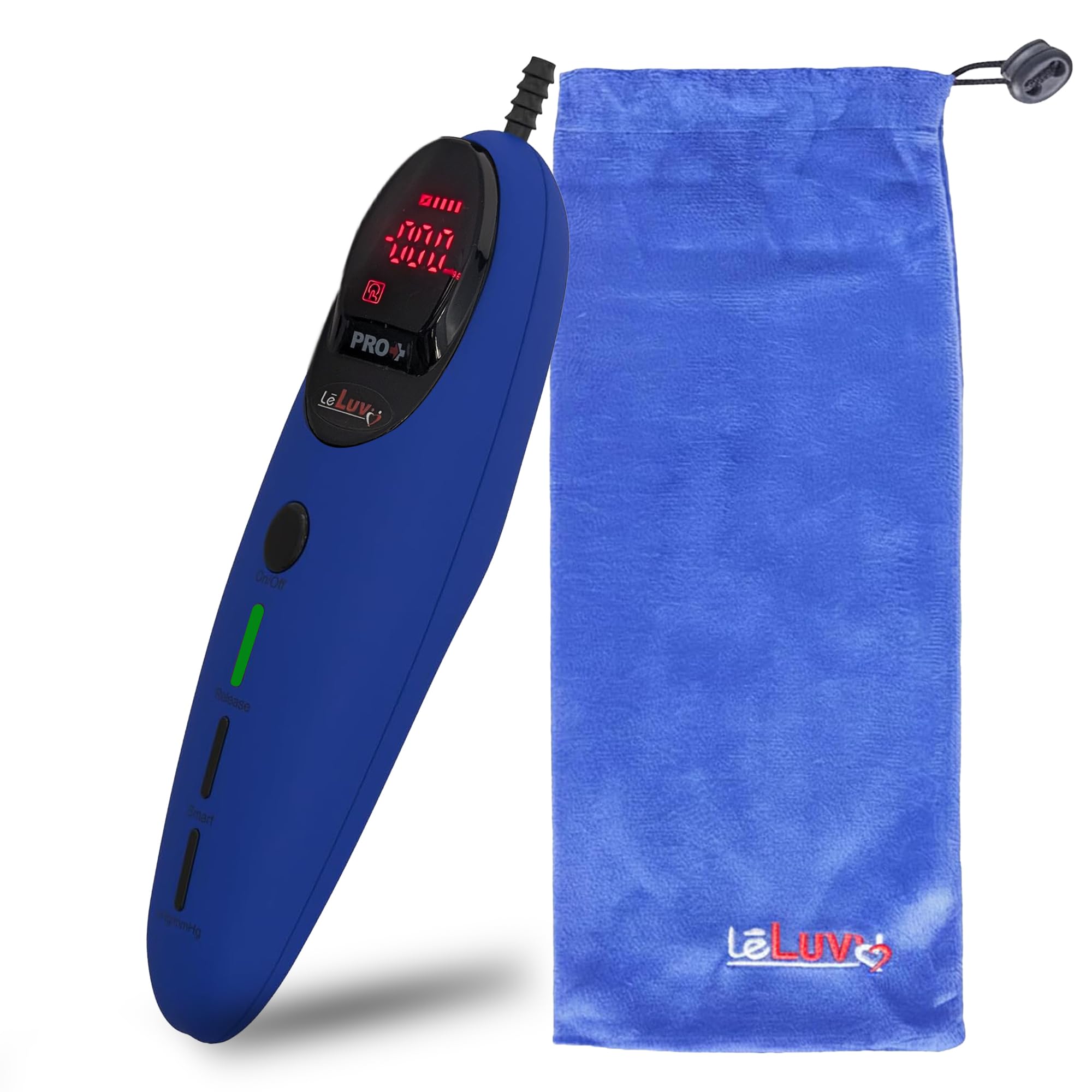
Figure 1: LeLuv Magna Pro LCD Smart Handheld Digital Electric Vacuum Pump Controller (Blue variant).
2. Safety Information
Please read all safety instructions before using the device. Failure to follow these instructions may result in injury or damage to the product.
- Do not immerse the device in water or any other liquid.
- Keep out of reach of children.
- Use only the provided USB-C charging cable.
- Avoid extreme temperatures and direct sunlight.
- If the device malfunctions or shows signs of damage, discontinue use immediately.
3. Product Overview
The Magna Pro+ controller features an advanced digital interface and a whisper-quiet brushless motor for precise and consistent vacuum levels. It offers both manual and smart preset modes, displayed on a clear LCD with red text.
Key Features:
- Smart Precision Digital Control: Monitor, adjust, and maintain preferred vacuum levels with precision.
- Whisper-Quiet Brushless Motor: Provides smoother, longer-lasting, and cool-running operation.
- USB Rechargeable Extended Battery: Lithium battery with USB-C charging for extended use.
- 10 Programmable Smart Preset Modes: Cycle vacuum levels in customizable patterns.
- Enhanced Red Light Display: Minimizes blue light exposure and improves readability.

Figure 2: Overview of the Magna Pro+ controller's intelligent features.

Figure 3: Dynamic vacuum cycling process for consistent performance.
4. Setup
Before initial use, ensure the device is fully charged. Connect the controller to a compatible vacuum cylinder using the appropriate hose.
Initial Charging:
- Locate the USB-C charging port on the device.
- Connect the provided USB-C cable to the device and a suitable power source (e.g., USB wall adapter, computer USB port).
- Allow approximately 1 hour for a full charge, which provides up to 50 uses or 120 minutes of operation.

Figure 4: Connecting the USB-C charging cable.
5. Operating Instructions
The Magna Pro+ controller offers intuitive operation with both manual and smart modes.
Basic Operation:
- Connect: Ensure the controller is securely connected to your vacuum cylinder.
- Power On: Press the On/Off button to activate the device. The LCD will illuminate.
- Select Program: Use the Smart button to cycle through the available modes (see Section 6 for details).
- Adjust Vacuum: In manual mode, use the +/- buttons to set the desired vacuum level.
- Release Pressure: Press the Release button for instant pressure release.

Figure 5: The On/Off button for single-button control.

Figure 6: Simple, intuitive operation steps.
Unit Selection:
The device supports both metric (mmHg) and imperial (inHg) units. To switch between units, press and hold the inHg/mmHg button located at the bottom of the controller.

Figure 7: Digital display showing various mode selections.
6. Modes and Settings
The Magna Pro+ features 10 programmable modes, including factory presets and customizable options, designed for various applications. All modes include an auto-stop feature after 30 minutes of operation.
- Mode 0 (Massage Mode): Rhythmic 1-second pulses for relaxation and warm-up.
- Modes 1-3 (Factory Preset): Pre-set holds (30s - 2 min) for steady sessions.
- Modes 4-9 (Custom Preset): User-preset vacuum with auto hold durations (30s - 10 min).

Figure 8: Detailed description of the 10 smart modes.
7. Charging
The device is equipped with a rechargeable lithium battery. A full charge takes approximately 1 hour and provides power for up to 50 uses or 120 minutes of continuous operation.
- Use the included USB-C cable for charging.
- The battery indicator on the LCD will show charging status.
- Disconnect the charger once fully charged to preserve battery life.
8. Maintenance and Cleaning
Proper maintenance ensures the longevity and hygiene of your Magna Pro+ controller.
- Wipe the exterior of the device with a soft, damp cloth after each use.
- Do not use abrasive cleaners or solvents.
- Ensure the device is completely dry before storing.
Video 1: Demonstrates cleaning the Magna Pro+ controller with a soft cloth.
9. Troubleshooting
If you encounter issues with your Magna Pro+ controller, refer to the following common problems and solutions:
| Problem | Possible Cause | Solution |
|---|---|---|
| Device does not turn on | Low battery | Charge the device for at least 1 hour. |
| Vacuum level is inconsistent | Loose connection or air leak | Check all connections to the vacuum cylinder and hose for a secure fit. |
| Buttons are unresponsive | Device frozen or software glitch | Turn the device off and then on again. If the issue persists, contact customer support. |
10. Specifications
Detailed technical specifications for the LeLuv Magna Pro+ controller.
- Package Dimensions: 10.71 x 2.87 x 2.87 inches
- Weight: 6 ounces
- Battery: 1 Lithium Ion battery (included)
- Vacuum Range: 0 to -18 inHg (0 to -457 mmHg)
- Session Duration: 30 minutes (auto-stop)
- Motor Type: Upgraded Brushless Motor
- Preset Programs: 10 (3 Factory, 7 Customizable)
- Charging: USB-C

Figure 9: Physical dimensions and available colors of the Magna Pro+ controller.
11. Warranty and Support
For warranty information, product support, or to purchase accessories, please visit the official LeLuv website or contact their customer service department. Keep your purchase receipt for warranty claims.
LeLuv Official Website: LeLuv Store on Amazon