1. Introduction
Thank you for choosing the Generic Qx7 Smart Watch. This manual provides essential information for setting up, operating, and maintaining your device. Please read it carefully to ensure optimal performance and longevity of your smartwatch.
2. Product Overview
The Generic Qx7 Smart Watch features a sleek design with a 2.02-inch TFT high-definition display, offering a captivating visual experience. It is designed for comprehensive health monitoring, sports tracking, and seamless communication.

Figure 2.1: Front view of the Generic Qx7 Smart Watch, showcasing its rectangular display and black silicone strap.
2.1. Components
- Display: 2.02-inch TFT high-definition touch screen.
- Strap: Soft silicone strap, suitable for wrist sizes between 5.9-9.1 inches.
- Side Button: For navigation and power control.
- Sensors: Integrated sensors for health monitoring.
- Charging Port: Magnetic charging contacts on the rear.
3. Setup
3.1. Charging the Smart Watch
Before first use, fully charge your Generic Qx7 Smart Watch. The device is equipped with a 270mAh high-capacity battery.
- Connect the magnetic charging cable to the charging contacts on the back of the watch.
- Connect the USB end of the cable to a standard USB power adapter (not included) or a computer's USB port.
- The watch screen will display a charging indicator.
A full charge takes approximately 2 hours. Once fully charged, the watch can last for up to 3 days with normal use or up to 30 days in standby mode. The watch supports 7.5W fast magnetic charging.
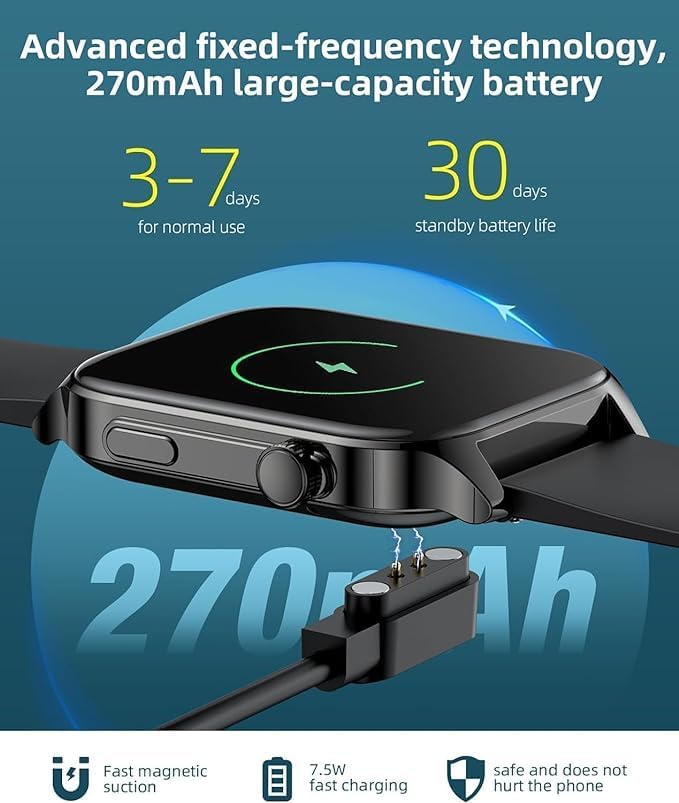
Figure 3.1: The Generic Qx7 Smart Watch connected to its magnetic charging cable.
3.2. App Installation and Pairing
To unlock the full potential of your smartwatch, download and install the companion application on your smartphone. The watch is compatible with Android 5.0+ and iOS 9.0+ systems.
- Scan the QR code provided in the watch's packaging or search for the "LIMTZOPY" app (as mentioned in product description) in your smartphone's app store (Google Play Store for Android, Apple App Store for iOS).
- Install the application.
- Open the app and follow the on-screen instructions to create an account or log in.
- Enable Bluetooth on your smartphone.
- Within the app, select "Add Device" or similar option and choose your Qx7 Smart Watch from the list of available devices.
- Confirm the pairing request on both your smartphone and the watch. The watch features a one-touch connection for stable pairing.
4. Operating Instructions
4.1. Basic Navigation and Customization
The Qx7 Smart Watch features a responsive touch screen for easy navigation.
- Swipe Up/Down: Access quick settings or notifications.
- Swipe Left/Right: Navigate through different widgets and features (e.g., heart rate, activity data, weather).
- Tap: Select an icon or confirm an action.
- Press Side Button: Return to the home screen or access the app menu.
You can personalize your watch face with over 100 online options or by uploading your own photos through the companion app.

Figure 4.1: The Qx7 Smart Watch displaying various app icons and a heart rate monitor, highlighting its 1.91" HD full touch screen.
4.2. Health Monitoring
The Qx7 Smart Watch provides comprehensive real-time health monitoring features:
- Heart Rate Monitoring: Continuously tracks your heart rate throughout the day.
- Blood Oxygen (SpO2) Monitoring: Measures your blood oxygen saturation levels.
- Blood Pressure Monitoring: Provides estimates of your blood pressure.
- Menstrual Cycle Tracking: Offers specific reminders and tracking for female users.
Access these features by swiping through the watch interface or via the companion app for detailed historical data and insights. For accurate readings, ensure the watch is worn snugly on your wrist.

Figure 4.2: The Qx7 Smart Watch and its companion app displaying blood pressure, blood oxygen, and heart rate monitoring capabilities.
4.3. Sports Modes and Activity Tracking
The watch supports over 107 sports modes, allowing you to track various physical activities comprehensively.
- Activity Tracking: Automatically records steps, distance, and calories burned.
- Sports Modes: Select a specific sport (e.g., running, cycling, swimming, basketball) to get tailored data including heart rate, calories, distance, and cadence.
- GPS: Utilizes GPS via your connected smartphone for accurate route tracking during outdoor activities.
Review your workout progress and historical data in the companion app to help achieve your fitness milestones.

Figure 4.3: The Qx7 Smart Watch tracking heart rate, calories, and other exercise data during a workout.
4.4. Bluetooth Calling and Notifications
With its built-in high-end speaker and microphone, the Qx7 Smart Watch allows for convenient Bluetooth calls directly from your wrist.
- Making Calls: Dial numbers directly from the watch or access your phone's contacts (via app sync).
- Answering Calls: Answer incoming calls with a tap on the watch screen.
- Call Records: View call history on your watch.
- Notifications: Receive real-time SMS and app notifications (e.g., social media, email) directly on your watch screen.
Ensure your watch is stably connected to your smartphone via Bluetooth to utilize these features.

Figure 4.4: The Qx7 Smart Watch demonstrating its HD Bluetooth call functionality with a call interface and dial pad.
4.5. Other Practical Features
The Qx7 Smart Watch includes several other convenient features:
- Alarm Clock: Set alarms directly on your watch.
- Weather Forecast: Get real-time weather updates.
- Stopwatch & Timer: Useful for various activities.
- Find Phone: Locate your paired smartphone by making it ring.
5. Maintenance
5.1. Waterproofing
The Generic Qx7 Smart Watch has an IP68 waterproof rating. This means it can withstand:
- Daily activities like handwashing and face washing.
- Sweating during workouts.
- Brief immersion in water (e.g., swimming in shallow water).
Note: Avoid hot water, steam, or prolonged immersion in deep water. The waterproof rating may decrease over time with wear and tear. Do not operate buttons underwater.
5.2. Cleaning
To keep your watch in good condition:
- Wipe the screen and strap regularly with a soft, damp cloth.
- Avoid using harsh chemicals or abrasive materials.
- Ensure the charging contacts are clean and dry before charging.
6. Troubleshooting
If you encounter issues with your Generic Qx7 Smart Watch, try the following solutions:
- Watch not turning on: Ensure it is fully charged. Connect it to the charger for at least 30 minutes.
- Cannot pair with smartphone:
- Ensure Bluetooth is enabled on your phone and the watch.
- Make sure the watch is within range of your phone.
- Restart both the watch and your phone.
- Try unpairing and re-pairing the device through the app.
- Inaccurate health data: Ensure the watch is worn snugly on your wrist, not too loose or too tight. Clean the sensor area on the back of the watch.
- Notifications not appearing: Check app notification settings on your phone and within the companion app to ensure they are enabled. Ensure the watch is connected via Bluetooth.
- Short battery life: Reduce screen brightness, disable unnecessary features, or limit background app refresh.
If the problem persists, refer to the support section or contact customer service.
7. Specifications
| Feature | Detail |
|---|---|
| Model Name | smart watch (Qx7) |
| Brand | Generic |
| Screen Size | 5 Inches (Note: Product description states 2.02-inch TFT) |
| Shape | Rectangular |
| GPS | GPS Via Smartphone |
| Battery Cell Composition | Lithium Polymer |
| Wireless Communication Standard | Bluetooth |
| Connectivity Technology | USB |
| Special Feature | Activity Tracker |
| Operating System | Android Wear 1.0 |
| Manufacturer | china |
| Batteries | 1 Lithium Polymer battery required |
| Waterproof Rating | IP68 |
8. Warranty and Support
Specific warranty details for the Generic Qx7 Smart Watch are not provided in this manual. For warranty information, technical support, or any product-related inquiries, please contact the seller or manufacturer directly through your point of purchase.


