
VIVO STAND-V002OW
VIVO Dual Monitor Desk Mount User Manual
Model: STAND-V002OW
Brand: VIVO
Introduction
This manual provides comprehensive instructions for the assembly, operation, and maintenance of your VIVO Dual Monitor Mechanical Arm Desk Mount (Model: STAND-V002OW). Designed for ergonomic workspace solutions, this mount supports two monitors up to 32 inches and 19.8 lbs each, offering versatile positioning and efficient cable management.
Setup and Installation
Follow these steps carefully for proper assembly and installation.
Official VIVO assembly video for the STAND-V002O Mechanical Arm Dual Monitor Desk Mount. This video demonstrates the complete installation process, including attaching the clamp, assembling the arms, mounting monitors, and managing cables.
Step-by-Step Assembly
Step 1: Assemble the Clamp Base
Adjust the knob on the lower clamp. Attach the lower clamp to the upper clamp. Then, secure the clamp assembly to the base and attach it to your desktop.

Image showing the VIVO Dual Monitor Desk Mount with both C-clamp and grommet base options.
Step 2: Insert Lower Arms
Insert the lower arms into the base and secure them by tightening the set screws.
Step 3: Insert Upper Arms
Insert the upper arms into the lower arms and secure them by tightening the set screws.
Step 4: Attach VESA Plates
Attach the VESA plates to the upper arms.
Step 5: Prepare Monitors
Install two screws into the top two VESA holes on each monitor.
Step 6: Mount Monitors
Hook each monitor onto its respective VESA plate and secure it.
Step 7: Cable Management
Manage cables using the integrated cable system in the upper and lower arms.

Image illustrating the cable management system integrated into the monitor arms.
Important Note on Monitor Extension
DO NOT EXTEND MONITOR BEHIND DESK. Doing so may cause stability issues for the mount and/or accidental desk tip over.
Operating and Adjustments
The VIVO Dual Monitor Desk Mount offers extensive adjustability for optimal viewing comfort.
Height Adjustment:
The arms feature a mechanical spring system allowing for toolless monitor placement. Adjust the height by gently moving the monitor up or down.

Diagram illustrating the height adjustment range of the monitor arms from 6.25 inches to 16 inches.
Tilt, Swivel, and Rotation:
The mounting brackets offer +90° to -90° tilt, 180° swivel, and 360° rotation for convenient, customizable viewing angles.
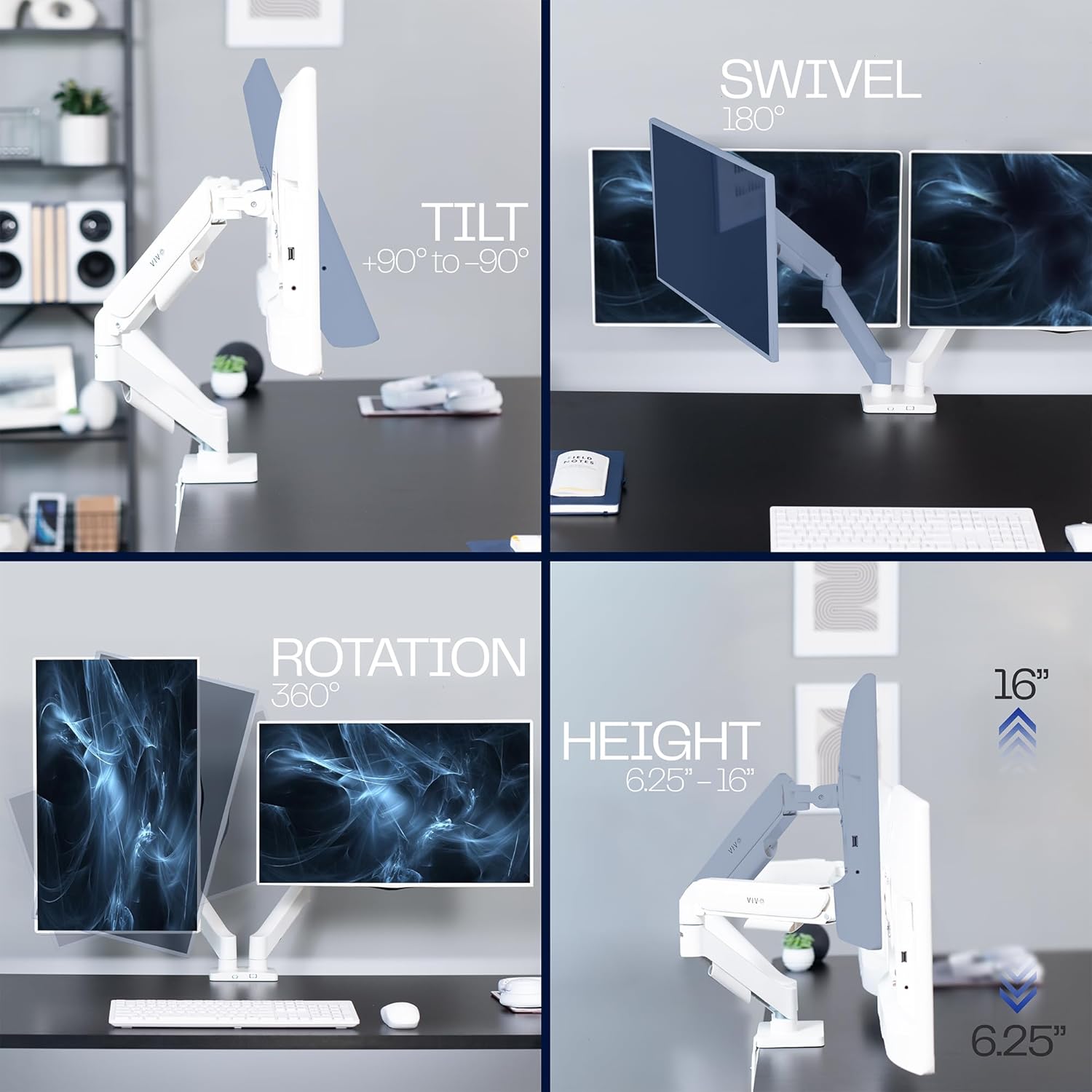
Images demonstrating the tilt (+90° to -90°), swivel (180°), and rotation (360°) features of the monitor mount.
Arm Tension Adjustment:
If the monitor won't lower, adjust the arm tension counter-clockwise to decrease support (may take 10-20 turns). If the monitor won't raise, adjust the arm tension clockwise to increase support (may take 10-20 turns). Use the provided Allen key for this adjustment.
Cable Management
Keep your workspace tidy by routing cables through the built-in cable channels located on the underside of the upper and lower arms.
Troubleshooting
Monitor is too low or sags:
The arm tension may be too loose. Turn the adjustment screw clockwise to increase support until the monitor holds its position.
Monitor is too high or won't lower:
The arm tension may be too tight. Turn the adjustment screw counter-clockwise to decrease support until the monitor can be easily lowered.
Mount feels unstable:
Ensure the C-clamp or grommet base is securely tightened to the desk. Verify all arm connections are firm. Avoid extending monitors too far behind the desk.
For further assistance, please refer to the contact information in the "Warranty and Support" section.
Specifications
| Feature | Detail |
|---|---|
| Brand | VIVO |
| Model Number | STAND-V002OW |
| Compatible Screen Size | 17 to 32 inches (flat and curved) |
| Weight Capacity (per screen) | 4.4 lbs to 19.8 lbs |
| VESA Compatibility | 75x75mm, 100x100mm |
| Mounting Type | C-clamp (up to 3.1" thick) or Grommet (up to 1.9" thick) |
| Tilt Angle | +90° to -90° |
| Swivel Angle | 180° |
| Rotation | 360° |
| Material | Aluminum, Steel, Plastic |
| Item Weight | 8.8 pounds |
Warranty and Support
VIVO is committed to providing high-quality products and customer support.
Product Protection:
This product is backed by VIVO's generous product protection. For details, please refer to the official VIVO website or your purchase documentation.
Contact Support:
For technical assistance or warranty claims, please visit the VIVO Store on Amazon or consult the User Manual (PDF) for contact information.
Related Documents - STAND-V002OW
 |
VIVO Articulating Arm Single TV Desk Mount (STAND-V155D) - Assembly Guide Comprehensive instruction manual for the VIVO STAND-V155D articulating arm single TV desk mount. Learn how to safely install and adjust your monitor for optimal viewing. |
 |
VIVO Pneumatic Arm Single Monitor Desk Mount Assembly Manual This assembly manual provides step-by-step instructions for installing the VIVO Pneumatic Arm Single Monitor Desk Mount, model STAND-V101G1. It includes details on package contents, hardware, tools needed, and assembly procedures for both clamp and grommet mounting options. Learn how to adjust tilt, height, and ensure secure monitor placement. |
 |
VIVO STAND-V001Q Pneumatic Arm Single Monitor Desk Mount User Manual Detailed installation and usage guide for the VIVO STAND-V001Q Pneumatic Arm Single Monitor Desk Mount, covering clamp and grommet mounting, monitor attachment, height adjustment, and cable management. |
 |
Mechanical Arm Single Monitor Desk Mount Assembly Manual (STAND-V001O Series) Assembly instructions for the VIVO Mechanical Arm Single Monitor Desk Mount (STAND-V001O and STAND-V001OW). Includes installation steps for clamp and grommet mounting, monitor attachment, and tension adjustments. |
 |
VIVO Pneumatic Arm Single Monitor Desk Mount STAND-V1010 Series User Manual User manual for the VIVO STAND-V1010 Series Pneumatic Arm Single Monitor Desk Mount, detailing installation, assembly, adjustments, and safety precautions for ergonomic monitor setup. |
 |
VIVO Pneumatic Arm Single Monitor Desk Mount (STAND-V101H) Instruction Manual Assembly and installation instructions for the VIVO Pneumatic Arm Single Monitor Desk Mount (SKU: STAND-V101H). Includes parts list, step-by-step setup, and safety warnings. |
Ask a question about this manual
Ask about setup, troubleshooting, compatibility, parts, safety, or missing instructions. Manuals+ will review the question and use this page’s manual context to help answer it.