1. Introduction
This manual provides detailed instructions for the Tinwoo Smart Watch T17. Please read this manual thoroughly before using the device to ensure proper operation and to maximize its features. This smartwatch is designed for daily use, fitness tracking, and communication, offering a rugged design and various health monitoring functions.

Image 1.1: Overview of Tinwoo Smart Watch T17 features.
2. Package Contents
Please check the package for the following items:
- Tinwoo Smart Watch T17
- Charging Cable (Magnetic)
- User Manual
If any items are missing or damaged, please contact customer support.
3. Product Overview
The Tinwoo Smart Watch T17 features a 2.01-inch HD display, a durable casing, and multiple sensors for health and fitness tracking.

Image 3.1: Front view of the Tinwoo Smart Watch T17.
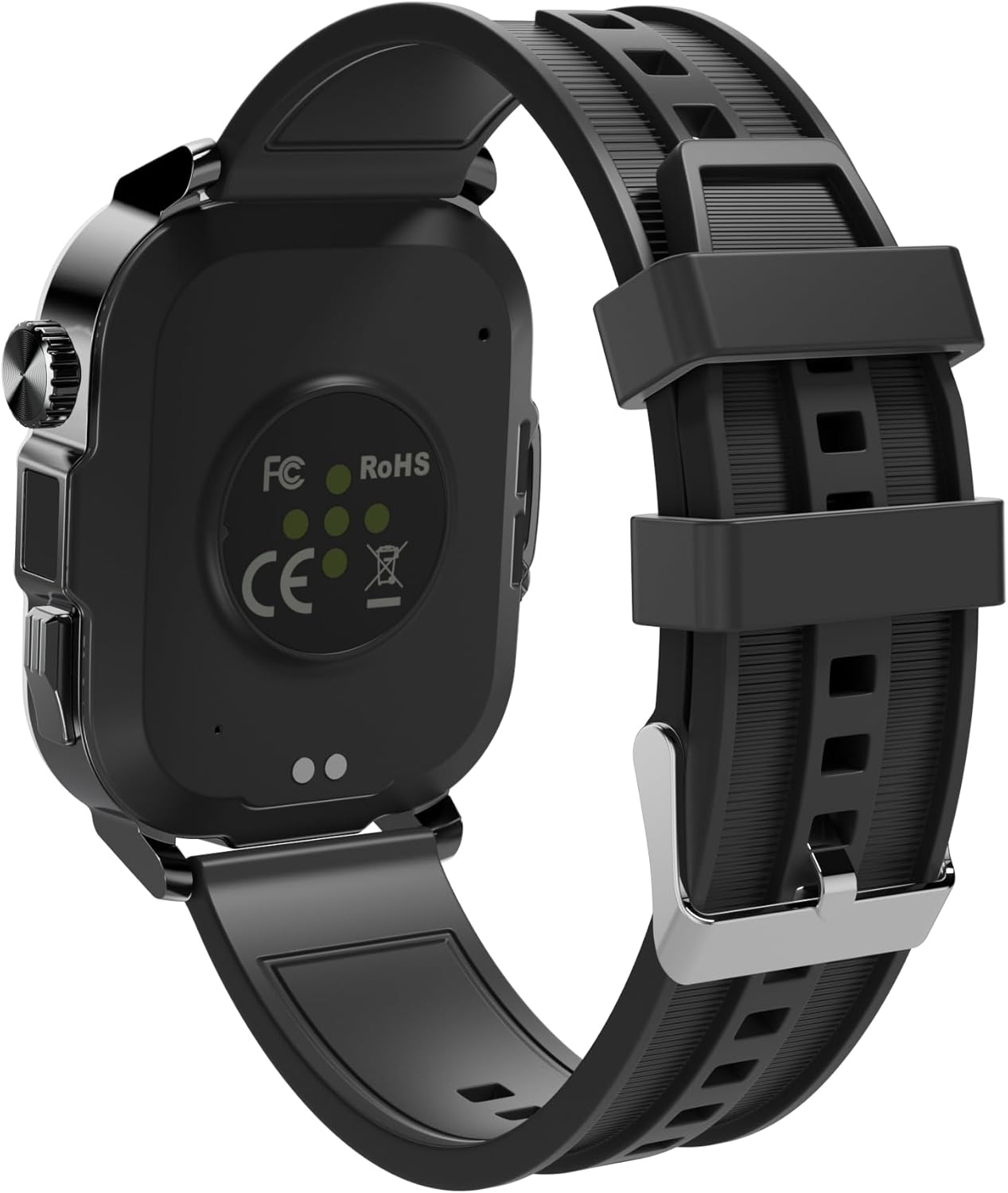
Image 3.2: Rear view of the Tinwoo Smart Watch T17, highlighting sensors and charging points.
4. Setup Guide
4.1 Charging the Device
Before first use, fully charge your smartwatch. Connect the magnetic charging cable to the charging points on the back of the watch and plug the USB-A end into a compatible power source. A full charge takes approximately 2 hours.

Image 4.1: Smartwatch battery charging indicator.
4.2 App Installation and Pairing
- Download the companion app from your smartphone's app store. The app is compatible with Android 6.0+ and iOS 9.0+ devices.
- Ensure Bluetooth is enabled on your smartphone.
- Open the app and follow the on-screen instructions to search for and pair with your Tinwoo Smart Watch T17.
- Once paired, the watch will automatically synchronize time and date with your phone.
5. Operating Instructions
5.1 Basic Navigation
- Touch Screen: Swipe left, right, up, or down to navigate through menus and features. Tap to select.
- Side Buttons: The watch features two physical controls on the right side: a button and a rotatable crown. These can be used for navigation, returning to the home screen, or accessing specific functions.
5.2 Display and Watch Faces
The 2.01-inch HD display offers clear visuals. You can adjust brightness and screen-on time (5, 10, or 15 seconds) through the watch settings. The watch supports over 200 customizable watch faces, accessible via the companion app.

Image 5.1: Selection of available watch faces.
5.3 Bluetooth Calling and Notifications
Once connected to your phone via Bluetooth, the smartwatch allows you to make and receive calls directly from your wrist. You can also view call history and access frequently contacted contacts. The watch vibrates to alert you of incoming messages and app notifications (e.g., Facebook, WhatsApp, Instagram, X, Telegram, TikTok, Skype). Note that direct replies are not supported through the watch.

Image 5.2: Bluetooth calling feature in action.
5.4 Multifunctional Features
The Tinwoo Smart Watch T17 includes various utility features:
- Music Control: Play music through the smartwatch's built-in speaker or control music playback on your phone.
- Camera Control: Remotely control your phone's camera.
- Sedentary Reminders: Alerts to encourage movement after periods of inactivity.
- Breathing Training: Guided breathing exercises.
- Weather Updates: Real-time weather information.
- Alarm Clock, Stopwatch, Timer: Standard timekeeping functions.
- Female Period Tracking: Monitor menstrual cycles.
- Find Your Phone: Locate your paired smartphone.
- Calculator: Basic arithmetic functions.
- Voice Assistant: Access your phone's voice assistant.
- LED Flashlight: A super bright LED flashlight is integrated into the watch. Access it through the watch's menu.

Image 5.3: AI Voice Assistant function.

Image 5.4: Integrated LED flashlight.
6. Health Monitoring
The smartwatch provides comprehensive health tracking features:
- Heart Rate Monitoring: 24-hour continuous heart rate tracking.
- SpO2 Monitoring: Real-time blood oxygen saturation (SpO2) monitoring.
- BP Monitoring: Blood pressure monitoring.
- Sleep Tracking: Analyzes sleep quality, including deep sleep, light sleep, and wake-up times.

Image 6.1: Multifaceted health monitoring features.
7. Sports Modes
The Tinwoo Smart Watch T17 supports over 100 different sports modes, accurately tracking steps, distance, and calories burned. Examples include:
- Walking
- Running
- Cycling
- Gym Workouts
- Swimming
- Yoga
- Hiking
- Football
- Baseball
- And many more.

Image 7.1: Examples of supported sports modes.
8. Maintenance
8.1 Water Resistance
The Tinwoo Smart Watch T17 has an IP68 waterproof rating, making it suitable for use in rainy conditions and during swimming. Avoid prolonged submersion in hot water or exposure to high-pressure water jets.

Image 8.1: IP68 waterproof capability.
8.2 Cleaning and Care
Wipe the watch regularly with a soft, dry cloth. For stubborn dirt, use a slightly damp cloth and then dry thoroughly. Avoid using harsh chemicals or abrasive materials.
8.3 Battery Care
To prolong battery life, avoid extreme temperatures and fully discharge and recharge the battery periodically. If the watch will not be used for an extended period, charge it to about 50% before storing.
9. Troubleshooting
- Watch not turning on: Ensure the watch is fully charged.
- Connection issues: Check if Bluetooth is enabled on your phone and the watch. Restart both devices and try pairing again. Ensure the companion app is running in the background.
- Inaccurate time/date: Ensure the watch is properly paired with the app, as time and date sync automatically.
- Charging problems: Verify the charging cable is correctly aligned with the magnetic contacts on the watch. Use the original charging cable provided.
- App frequently disconnects: Check your phone's power saving settings, which might be closing the app in the background. Ensure the app has necessary permissions.
For further assistance, refer to the warranty and support section.
10. Specifications

Image 10.1: Product dimensions and parameters.
| Feature | Specification |
|---|---|
| Model Number | T17 |
| Display | 2.01-inch HD, 240x296 resolution, Full screen touch |
| Battery Capacity | 410 mAh |
| Battery Life | Up to 50 days standby, 15 days regular use, 7 days heavy use |
| Waterproofing Grade | IP68 |
| Compatibility | Android 6.0 and above, iOS 9.0 and above |
| Connectivity | Bluetooth |
| Dimensions | 2.09 x 1.61 x 0.45 inches (53 x 41 x 11.5 mm) |
| Item Weight | 1.62 ounces (46 Grams) |
| Memory Storage Capacity | 128 MB |
| RAM Memory Installed Size | 2048 KB |
| Strap Material | Silicone/Metal |
11. Warranty and Support
The Tinwoo Smart Watch T17 comes with a 12-month warranty from the date of purchase. This warranty covers manufacturing defects and issues arising from normal use.
If you encounter any issues with your device, such as accessory problems, quality concerns, or charging difficulties, please contact our customer support team. We are committed to providing a solution within 24 hours.
Customer Support: Refer to the contact information provided on the product packaging or the official Tinwoo website.