1. Introduction
This manual provides essential information for the safe and efficient operation, maintenance, and troubleshooting of your COSTWAY 66 L Commercial Dehumidifier. This powerful unit is designed for high-efficiency moisture removal in large areas up to 418 square meters, making it suitable for commercial, industrial, and residential applications such as construction sites, warehouses, basements, and wine cellars. Please read this manual thoroughly before operating the appliance and retain it for future reference.
2. Product Overview and Components
The COSTWAY 66 L Commercial Dehumidifier features a robust design with integrated components for ease of use and portability.
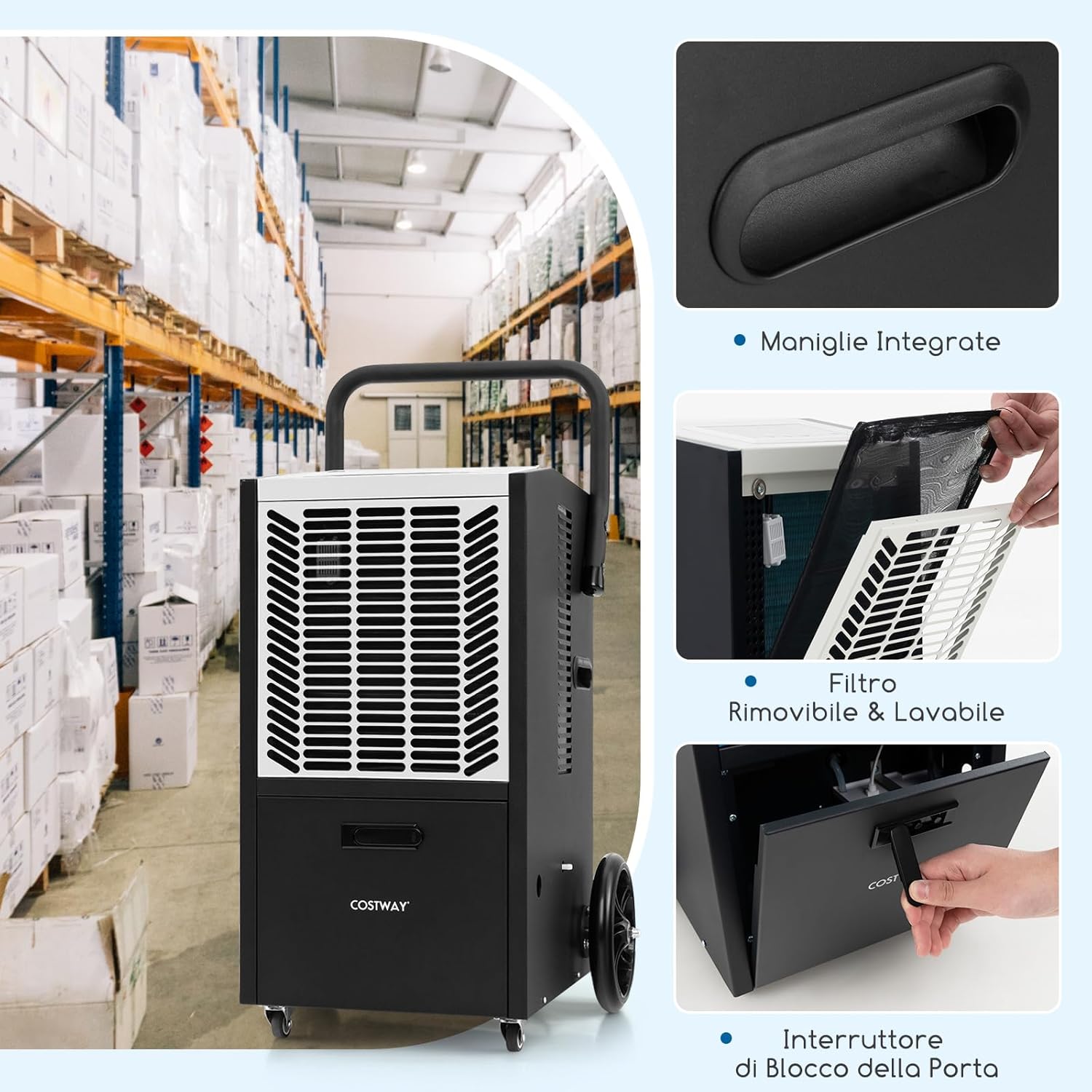

Main Components:
- Control Panel: Intuitive touch panel with LED display for settings adjustment.
- Air Inlet/Outlet: Where air enters and exits the unit.
- Drainage Port: For connecting the drainage hose.
- Removable Filter: Located behind a panel for air purification and easy cleaning.
- Integrated Handles: For lifting and carrying.
- Wheels: Universal lockable front wheels and large rear wheels for mobility.
- Push Handle: For convenient maneuvering.
3. Setup
3.1 Placement
- Place the dehumidifier on a stable, level surface.
- Ensure there is at least 20 cm (8 inches) of space around the air inlet and outlet for proper airflow.
- Avoid placing the unit near heat sources or in direct sunlight.
3.2 Power Connection
- Connect the power cord to a grounded electrical outlet with the correct voltage (220-240V/50Hz).
- Do not use extension cords or adapters.
3.3 Drainage Setup
This dehumidifier features a built-in pump for continuous drainage, allowing water to be discharged vertically or horizontally to a drain or sink.

- Locate the drainage port on the unit.
- Connect the provided drainage hose securely to the drainage port.
- Direct the other end of the hose to a suitable drain, sink, or container. Ensure the hose is not kinked or blocked.
- The maximum vertical drainage height is 500 cm (5 meters).
4. Operating Instructions
The dehumidifier is controlled via an intuitive touch panel with a clear LED display.
4.1 Power On/Off
- Press the STAND-BY button to turn the unit on or off.
4.2 Fan Speed Adjustment
- Press the FAN SPEED button to toggle between High and Low fan speeds.
4.3 Humidity Setting
- Press the UP or DOWN buttons to adjust the desired humidity level. The adjustable range is from 20% to 90% Relative Humidity (RH).
- The unit will operate until the set humidity level is reached, then cycle on and off to maintain it.
4.4 Timer Function
- Press the TIMER button to set the operating duration from 0 to 24 hours.
- Use the UP or DOWN buttons to adjust the desired time.
- The unit will automatically turn off or on after the set time has elapsed.
4.5 Automatic Defrost
- The dehumidifier is equipped with an automatic defrost function. If frost builds up on the evaporator coils, the unit will automatically enter defrost mode to protect the system and ensure efficient operation.
4.6 Automatic Restart
- In case of a power outage, the unit will automatically restart with the previously set parameters once power is restored.
5. Maintenance
Regular maintenance ensures optimal performance and extends the lifespan of your dehumidifier.
5.1 Filter Cleaning
- The dehumidifier features a removable and washable filter.
- It is recommended to clean the filter every two weeks or more frequently depending on usage and air quality.
- To clean: Turn off and unplug the unit. Remove the filter panel. Gently pull out the filter. Wash the filter with warm, soapy water. Rinse thoroughly and allow it to air dry completely before reinserting.
5.2 General Cleaning
- Wipe the exterior of the unit with a soft, damp cloth. Do not use harsh chemicals or abrasive cleaners.
- Ensure the air inlet and outlet grilles are free from dust and obstructions.
5.3 Storage
- If storing the unit for an extended period, ensure it is clean and dry.
- Drain any remaining water from the unit and hose.
- Store in a cool, dry place, preferably covered to protect from dust.
6. Troubleshooting
Before contacting customer support, please refer to the following common issues and solutions:
| Problem | Possible Cause | Solution |
|---|---|---|
| Unit does not turn on | No power supply Power cord not securely plugged in Power outage | Check power outlet Ensure power cord is fully inserted Wait for power to be restored |
| Dehumidifier not collecting water | Humidity setting too high Room temperature too low Air filter clogged Unit in defrost mode | Lower the desired humidity setting Ensure room temperature is above 5°C (41°F) Clean the air filter Allow unit to complete defrost cycle |
| Weak airflow | Air filter clogged Air inlet/outlet blocked | Clean the air filter Remove any obstructions from air inlet/outlet |
| Unit is noisy | Unit not on a level surface Loose parts Fan obstruction | Place unit on a firm, level surface Check for any loose components Inspect fan for obstructions (unplug first) |
| Water leakage | Drainage hose not properly connected Drainage hose kinked or blocked | Ensure hose is securely attached Straighten or clear any blockages in the hose |
7. Specifications
Technical data for the COSTWAY 66 L Commercial Dehumidifier.
| Specification | Value |
|---|---|
| Brand | COSTWAY |
| Dehumidification Capacity | 66 L/day (35°C, 90% RH) 47 L/day (27°C, 60% RH) 23 L/day (18°C, 60% RH) |
| Power Supply | 220-240V/50Hz |
| Rated Input Power | 790 W |
| Rated Input Current | 4.6 A |
| Maximum Coverage Area | 418 m² |
| Airflow Rate | 355 m³/h |
| Drainage Hose Length | 510 cm |
| Power Cord Length | 164 cm |
| Product Dimensions (D x W x H) | 44 cm x 41 cm x 81.5 cm |
| Net Weight | 31.5 kg |
| Number of Speeds | 2 (High/Low) |
| Special Features | Integrated pump, removable and washable filter, portable design with wheels |
8. Warranty and Support
For warranty information or technical support, please refer to the purchase documentation or contact your retailer. Keep your proof of purchase for any warranty claims.
For further assistance, please contact COSTWAY customer service through their official website or the contact information provided with your purchase.


