1. Introduction
The ZOYI ZT-Y Digital Multimeter is a high-precision, auto-ranging instrument designed for a wide range of electrical measurements. It is suitable for students, electricians, maintenance personnel, and laboratory use. This multimeter features True RMS measurement capabilities, an easy-to-read inverted triple display, a built-in flashlight, and a comfortable rotary dial for quick function selection.
Package Contents:
- ZT-Y Digital Multimeter
- Cloth Bag
- Test Leads
- Temperature Probe
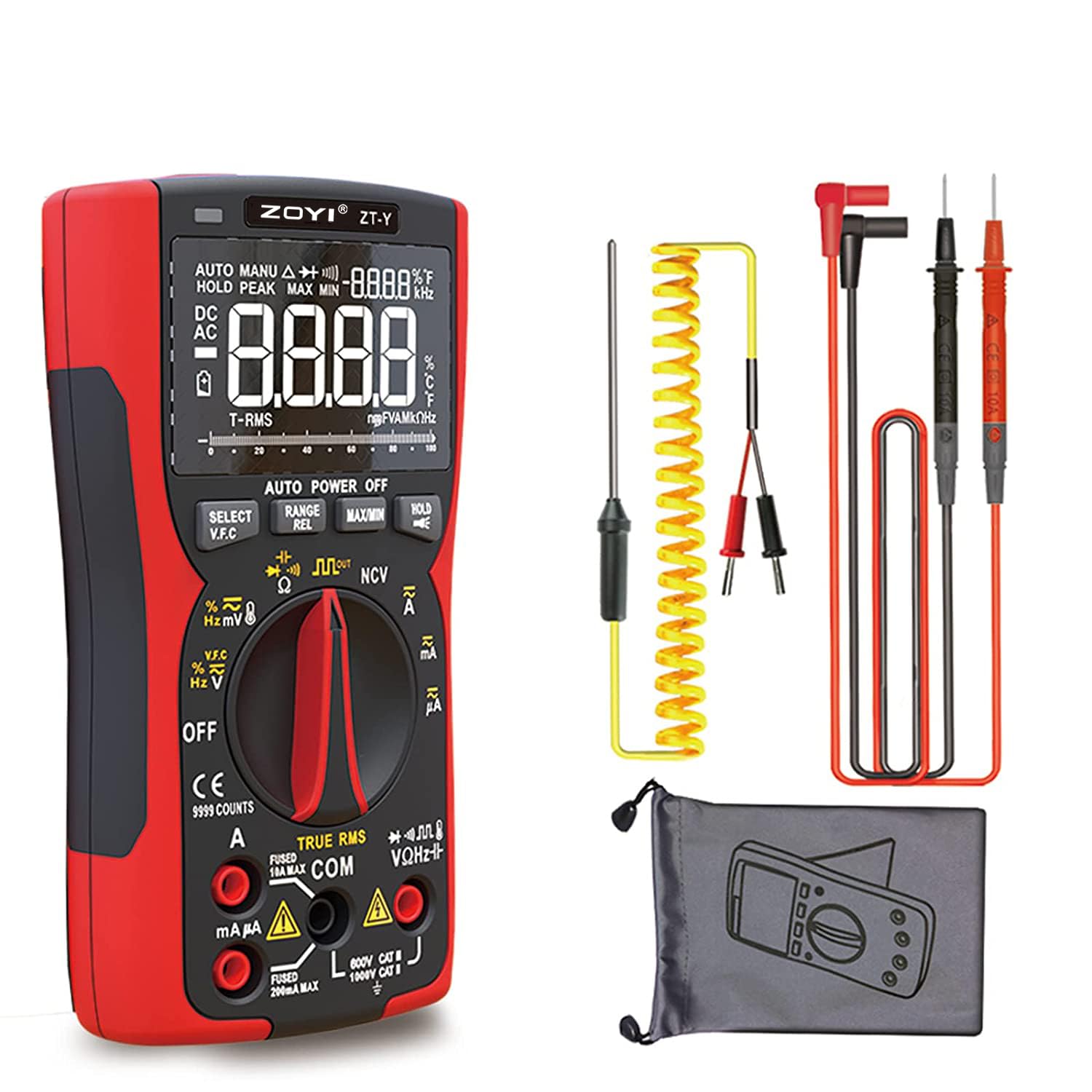
Figure 1: ZT-Y Digital Multimeter and its accessories, including test leads, a temperature probe, and a cloth carrying bag.
2. Safety Information
WARNING: Always exercise extreme caution when working with electricity. Incorrect use of this multimeter can lead to electric shock, injury, or damage to the device or equipment under test.
- This multimeter is designed to meet CAT II 600V safety standards.
- Do not exceed the maximum input values specified for each function.
- Ensure the test leads are properly connected and the function dial is set to the correct range before making any measurements.
- Inspect test leads for damage before each use. Do not use if insulation is cracked or damaged.
- Do not operate the multimeter if it appears damaged or is not functioning properly.
- Always disconnect power to the circuit before connecting or disconnecting test leads, especially when measuring current.
- Avoid touching exposed wires or circuit components while taking measurements.
- Use caution when working with voltages above 30V AC RMS, 42V peak, or 60V DC, as they pose a shock hazard.
3. Product Overview
The ZT-Y multimeter features a robust design with an intuitive layout for ease of use.

Figure 2: Front view of the ZT-Y Digital Multimeter, highlighting the display, function dial, and input terminals.
3.1. Components
- LCD Display: Inverted triple display for clear readings.
- Function Dial: Rotary switch to select measurement modes.
- Function Buttons:
- SELECT/V.F.C: Toggles between AC/DC, selects sub-functions, activates V.F.C mode.
- RANGE/REL: Toggles between auto/manual ranging, activates relative measurement.
- MAX/MIN: Records maximum and minimum values.
- HOLD/Light: Freezes the current reading, long press activates/deactivates backlight.
- Input Jacks:
- COM: Common terminal for all measurements.
- VΩHz-||-NCV: Input for Voltage, Resistance, Frequency, Capacitance, Diode, Continuity, and Non-Contact Voltage.
- mAµA: Input for milliampere and microampere current measurements.
- 10A MAX: Input for up to 10A current measurements.
- Flashlight: Located at the top for illuminating the measurement area.
4. Setup
4.1. Battery Installation
The ZT-Y multimeter is powered by batteries (typically AA or AAA, refer to the battery compartment for specifics). To install or replace batteries:
- Ensure the multimeter is turned OFF.
- Locate the battery compartment cover on the back of the unit.
- Unscrew the retaining screw(s) and remove the cover.
- Insert new batteries, observing the correct polarity (+/-) as indicated inside the compartment.
- Replace the cover and secure the screw(s).
4.2. Connecting Test Leads
Always connect the black test lead to the COM jack. Connect the red test lead to the appropriate input jack based on the measurement you intend to make:
- For Voltage, Resistance, Capacitance, Diode, Continuity, Frequency, NCV: Connect red lead to VΩHz-||-NCV jack.
- For Current (mA/µA): Connect red lead to mAµA jack.
- For Current (10A): Connect red lead to 10A MAX jack.
5. Operating Modes and Measurements
Turn the function dial to the desired measurement mode. The multimeter features auto-ranging, simplifying operation. Press the RANGE button to switch to manual ranging if needed.

Figure 3: Overview of the multi-function capabilities of the ZT-Y Digital Multimeter.
5.1. AC/DC Voltage Measurement (V~ / V-)
- Set the function dial to V~ (AC Voltage) or V- (DC Voltage).
- Connect the test leads in parallel to the circuit or component to be measured.
- Read the voltage value on the display.
5.2. AC/DC Current Measurement (A~ / A-, mA~ / mA-, µA~ / µA-)
- Set the function dial to the appropriate current range (A, mA, or µA).
- WARNING: Disconnect power to the circuit. Connect the multimeter in series with the circuit.
- Apply power and read the current value.
5.3. Resistance Measurement (Ω)
- Set the function dial to Ω.
- Ensure the circuit is de-energized before measuring resistance.
- Connect the test leads across the component.
- Read the resistance value.
5.4. Continuity Test (•))
- Set the function dial to •)).
- Connect the test leads across the circuit or component.
- A continuous beep indicates continuity (low resistance).
5.5. Diode Test (→|)
- Set the function dial to →|.
- Connect the red lead to the anode and the black lead to the cathode of the diode.
- The display shows the forward voltage drop. Reverse the leads to check for open circuit.
5.6. Capacitance Measurement (—||—)
- Set the function dial to —||—.
- WARNING: Discharge capacitors before testing to avoid damage to the meter.
- Connect the test leads across the capacitor.
- Read the capacitance value.
5.7. Non-Contact Voltage (NCV) Detection
The NCV function allows detection of AC voltage without direct contact.
- Set the function dial to NCV.
- Move the top of the multimeter close to the conductor.
- The meter will beep and the NCV indicator will flash, with the frequency increasing as it gets closer to the AC voltage source.
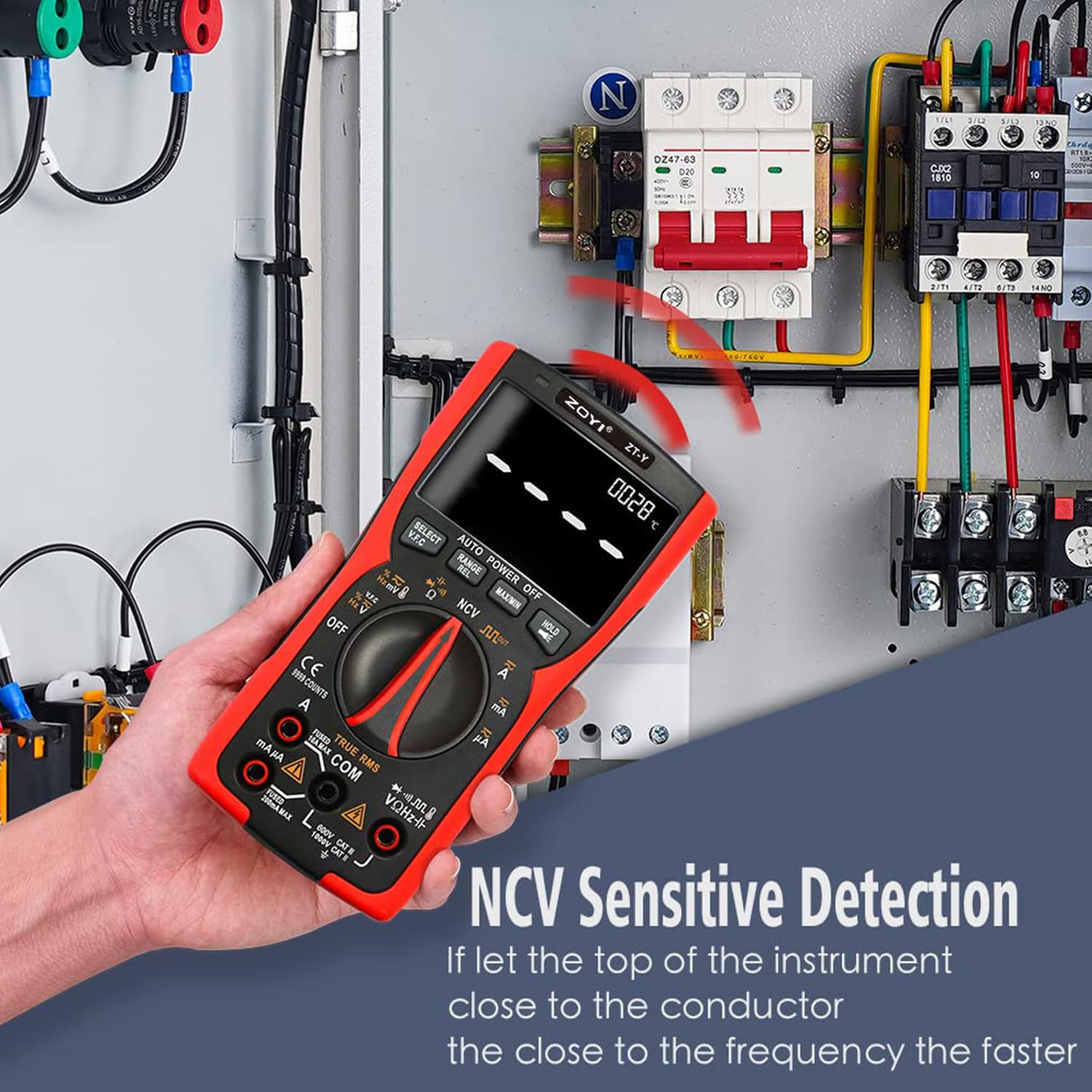
Figure 4: Demonstrating the NCV (Non-Contact Voltage) detection feature, where the multimeter detects AC voltage when brought close to a conductor.
5.8. Temperature Measurement (°C/°F)
Use the included temperature probe for this function.
- Set the function dial to TEMP.
- Connect the temperature probe to the VΩHz-||-NCV and COM jacks, observing polarity.
- Place the probe tip on or near the object whose temperature is to be measured.
- Read the temperature on the display.

Figure 5: The ZT-Y multimeter measuring temperature using its dedicated probe, showing a reading of 176°F for a cup of tea.
5.9. Frequency Measurement (Hz)
- Set the function dial to Hz.
- Connect the test leads to the signal source.
- Read the frequency value.
5.10. Square Wave Output
The multimeter can generate a 5KHz square wave output.
- Set the function dial to the Square Wave Output mode.
- The output will be available at the VΩHz-||-NCV and COM jacks.
5.11. V.F.C Immunity Measurement
This mode is designed for measuring variable frequency voltage.
- Set the function dial to V.F.C.
- Connect the test leads to the circuit.
- The multimeter will display the voltage with improved immunity to frequency variations.
5.12. REL (Relative Value) Measurement
The REL function allows you to store a reading as a reference and display subsequent measurements as a deviation from that reference.
- Take a measurement.
- Press the REL button (often combined with RANGE). The display will show "0" and subsequent readings will be relative to the stored value.
5.13. True RMS Measurement
The ZT-Y is a True RMS multimeter, meaning it accurately measures the RMS (Root Mean Square) value of AC voltage and current, even for non-sinusoidal waveforms. This provides a more accurate reading compared to average-responding meters when dealing with distorted waveforms common in modern electronics.

Figure 6: Illustration of True RMS capability, demonstrating its accuracy in measuring various waveform types compared to average-responding meters.
6. Maintenance
6.1. Cleaning
Wipe the case with a damp cloth and mild detergent. Do not use abrasives or solvents. Keep the input terminals free of dirt and moisture.
6.2. Battery Replacement
When the battery indicator appears on the display, replace the batteries promptly to ensure accurate readings. Refer to section 4.1 for battery installation instructions.
6.3. Fuse Replacement
If the current measurement function stops working, the fuse may need replacement. This typically requires opening the multimeter case. Refer to the internal diagram or contact customer support for fuse specifications and replacement procedures. Always use a fuse with the correct rating.
WARNING: Disconnect all test leads and turn off the multimeter before opening the case for fuse replacement.
7. Troubleshooting
| Problem | Possible Cause | Solution |
|---|---|---|
| No display or dim display | Low batteries; Power OFF. | Replace batteries; Turn on the multimeter. |
| Incorrect readings | Incorrect function selected; Damaged test leads; Overload. | Select correct function; Check/replace test leads; Ensure measurement is within range. |
| Current measurement not working | Blown fuse; Incorrect connection. | Replace fuse (refer to 6.3); Ensure multimeter is connected in series. |
| No continuity beep | Open circuit; Damaged test leads. | Check circuit for breaks; Check/replace test leads. |
8. Specifications
| Feature | Detail |
|---|---|
| Model Number | ZT-Y |
| Display | 9999 Counts, Inverted Triple Display |
| True RMS | Yes |
| Auto-Ranging | Yes |
| Safety Level | CAT II 600V |
| AC/DC Voltage | Includes millivolts |
| AC/DC Current | Includes milliamps and microamps |
| Temperature Measurement | -20°C ~ 1000°C (-4°F ~ 1832°F) with probe |
| Resistance Measurement | Yes |
| Continuity Test | Yes |
| Diode Test | Yes |
| Capacitance Measurement | Yes |
| NCV Measurement | Yes |
| Square Wave Output | 5KHz |
| V.F.C Immunity Measurement | Yes |
| REL Absolute Value Measurement | Yes |
| Data Hold | Yes |
| Flashlight | Yes |
| Power Source | Battery Powered (refer to battery compartment for type) |
| Maximum Operating Voltage | 4.5 Volts (DC) (Internal operating voltage, not measurement voltage. Measurement safety rating is CAT II 600V.) |
| Dimensions | 7.48 x 5.12 x 2.76 inches |
| Weight | 1.32 Pounds |
9. Warranty and Support
For warranty information, technical support, or service inquiries, please contact ZOYI customer service through their official website or the retailer where the product was purchased. Keep your purchase receipt as proof of purchase.
Online Resources:
- Visit the ZOYI Official Store on Amazon for product information and updates.