
ANBWEHR xll-4335e-2p
ANBWEHR Chamberlain LiftMaster 4335E Compatible Garage Door Remote Control User Manual
1. Introduction
This manual provides instructions for the ANBWEHR wireless garage door remote control, designed as a replacement transmitter for various Chamberlain, MotorLift, LiftMaster, PowerDrive, and HomEntry garage door openers. This remote operates at 433.92 MHz and offers a single channel for efficient operation.
1.1. Product Overview

A pair of ANBWEHR garage door remote controls, featuring a blue casing and a silver button panel.
1.2. Compatibility
The ANBWEHR remote control is compatible with the following garage door opener models:
- Chamberlain, MotorLift, LiftMaster, PowerDrive, HomEntry
- 4330E (including 4330EML, G4330E, G4330)
- 4332E (including 4332EML, G4332E, G4332)
- 4333E (including 4333EML, G4333E, G4333)
- 4335E (including 4335EML, HE4331, G4335E, G4335)
- Other compatible models: 1A5477-1, 1A5477-3, 1A5097, 1A5080, HE4331
2. Setup: Programming Instructions
To ensure proper function, the ANBWEHR remote control must be programmed to your garage door opener. The following steps outline a common programming procedure. Refer to your specific garage door opener's manual for detailed instructions if these steps do not apply.
2.1. Programming the Remote
- Locate the Learn Button: On your garage door opener motor unit, find the 'Learn' button. This button is typically located near the antenna wire or the light cover. The color of the button may vary (e.g., red, orange, purple, green, yellow).
- Activate Learn Mode: Press and immediately release the 'Learn' button on your garage door opener. The LED indicator on the opener will illuminate, signaling that the unit is in programming mode. You usually have about 30 seconds to complete the next step.
- Press Remote Button: Within the 30-second window, press and hold the desired button on your new ANBWEHR remote control.
- Confirm Programming: The garage door opener's light will flash once (or you may hear two clicks) to indicate that the remote control has been successfully programmed. Release the button on the remote.
- Test the Remote: Press the programmed button on your ANBWEHR remote control to test its operation. The garage door should activate.
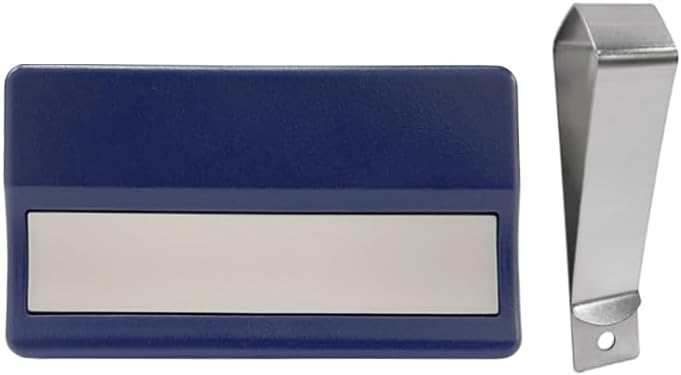
One ANBWEHR remote control shown next to its detachable metal clip for attachment.
3. Operating Your Remote
Once programmed, operating your ANBWEHR remote control is straightforward.
- To Open/Close: Point the remote control towards your garage door opener and press the programmed button. The garage door will begin to open or close.
- To Stop: Press the button again while the door is in motion to stop it.
- Operational Range: The remote has an effective range of approximately 10 meters (as per specifications), but practical range can be around 20-50 meters depending on environmental factors and obstructions.

A person inside a car using the ANBWEHR remote control to open a garage door, demonstrating its operational range.
4. Maintenance
4.1. Battery Replacement
The remote control is powered by one AA battery (included). If the remote's range decreases significantly or it stops responding, the battery may need replacement.
- Open the Casing: Carefully open the remote control casing. This may involve sliding a cover or gently prying it open with a small tool.
- Remove Old Battery: Remove the old AA battery from its compartment.
- Insert New Battery: Insert a new AA battery, ensuring the positive (+) and negative (-) terminals are correctly aligned according to the markings inside the compartment.
- Close Casing: Securely close the remote control casing.
- Test Functionality: Test the remote control to ensure it operates correctly with your garage door opener.
4.2. Cleaning
Wipe the remote control with a soft, dry cloth. Avoid using abrasive cleaners or solvents, as these can damage the casing or internal components.
5. Troubleshooting
If you encounter issues with your ANBWEHR remote control, refer to the table below for common problems and solutions.
| Problem | Possible Cause | Solution |
|---|---|---|
| Remote does not activate garage door. | Battery is dead or low. Remote is not programmed. Remote is out of range. | Replace the AA battery. Re-program the remote control (refer to Section 2.1). Move closer to the garage door opener. |
| Remote range is poor. | Low battery. Interference from other devices. Obstructions. | Replace the AA battery. Ensure no large metal objects or electronic devices are blocking the signal path. |
| Remote cannot be programmed. | Incorrect programming steps. Incompatible opener. Opener's memory is full. | Review programming steps carefully (Section 2.1). Verify your opener model is listed in Section 1.2. Consult your opener's manual for clearing its memory or adding new remotes. |
6. Specifications
Key technical specifications for the ANBWEHR remote control (model xll-4335e-2p).
| Feature | Detail |
|---|---|
| Brand | ANBWEHR |
| Model Name | xll-4335e-2p |
| Color | Silver |
| Connectivity Technology | High Frequency (433.92 MHz) |
| Controller Type | Radio Frequency Remote Control |
| Number of Buttons | 1 |
| Maximum Range | 10 Meters (specified), typically 20-50 meters in practice |
| Compatible Devices | Chamberlain, MotorLift, LiftMaster, PowerDrive, HomEntry, and specific 433MHz models (see Section 1.2) |
| Special Features | Universal, easy to program, quick door opening |
| Battery Type | 1 AA (included) |

An image illustrating the dimensions of the remote control, showing a length of 65mm and a width of 35mm.
7. Warranty Information
Specific warranty information for this product is not provided in the available documentation. For details regarding warranty coverage, please contact the seller or manufacturer directly.
8. Customer Support
If you have any questions, require assistance with programming, or experience issues not covered in this manual, please contact the seller or manufacturer for support. Refer to your purchase documentation for contact details.
Related Documents - xll-4335e-2p
 |
Scimagic Garage Door Opener Remote Programming Instructions Concise guide to programming Scimagic garage door opener remotes, covering changing modes, locating the learn button, and the programming process. Includes model numbers and manufacturer details. |
 |
Chamberlain Garage Door Opener Remote Programming Guide Step-by-step instructions for programming Chamberlain, Liftmaster, and Motorlift garage door opener remotes, including model numbers 94335E, 94334E, 94333E, 84335, 84333E, 84330E, 4330E, 4333E, and 4335E. Learn how to program and clear codes. |
 |
Yinuogo YNG106 Garage Door Opener Remote Programming Instructions Step-by-step guide for programming your Yinuogo YNG106 garage door opener remote control. Learn how to pair a new remote with your receiver. |
 |
SKYSHALO F-Clamp User Manual and Specifications Detailed user manual and specifications for SKYSHALO F-Clamps, including model information, assembly instructions, safety precautions, troubleshooting, and maintenance for various models like FCA and F1500 series. |
 |
VEVOR F-CLAMP Instruction Manual and Technical Specifications Comprehensive guide for VEVOR F-CLAMPS, including model details, assembly instructions, safety precautions, troubleshooting, maintenance, and warranty information. |
 |
VEVOR F-CLAMP User Manual: FCA & F1500 Series Bar Clamps Comprehensive user manual for VEVOR F-CLAMP bar clamps, covering models FCA24-2P, FCA36-2P&Y, FCA36-4P, FCA6-2P, FCA12-2P, F1500-24-2P, F1500-30-2P, and F1500-36-2P. Includes instructions, specifications, assembly, and maintenance guidance. |
Ask a question about this manual
Ask about setup, troubleshooting, compatibility, parts, safety, or missing instructions. Manuals+ will review the question and use this page’s manual context to help answer it.