
NOKTA DETECTION TECHNOLOGIES Triple Score PRO PACK
Nokta Triple Score PRO Pack Metal Detector Instruction Manual
Model: Triple Score PRO PACK
Brand: NOKTA DETECTION TECHNOLOGIES
Introduction
Welcome to your new Nokta Triple Score PRO Pack Metal Detector. This advanced, multi-frequency device is designed for treasure hunting across various terrains, offering exceptional depth and target identification capabilities. Its fully waterproof design allows for both land and underwater exploration.
Setup and Assembly
Unpacking
Carefully remove all components from the packaging. Ensure all parts listed in the packing list are present.
Assembling the Detector
The Triple Score PRO Pack comes with a modular shaft system.
- Connect the lower shaft with the search coil to the middle shaft. Ensure the cable is securely wrapped around the shaft.
- Attach the control box assembly (upper shaft) to the middle shaft. The non-slip rubberized hand grip is angled for easy screen viewing and one-thumb access to buttons.
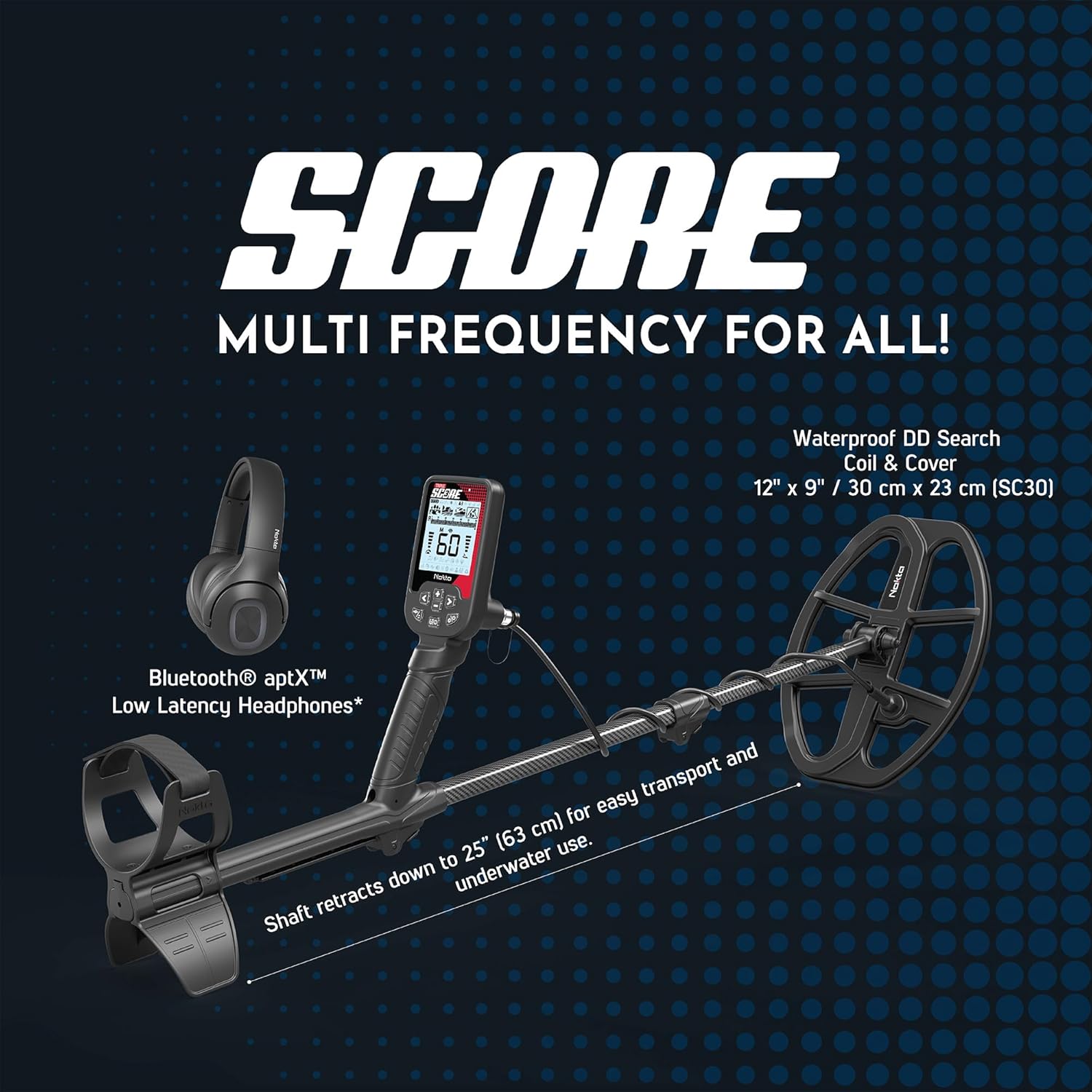
Image: The fully assembled Nokta Triple Score PRO Pack Metal Detector, showing the control box, shaft, and search coil.
Initial Charging
The detector is equipped with a rechargeable 3250 mAh Lithium Polymer battery. Before first use, fully charge the device.
- Locate the charging port on the back of the control box.
- Connect the included USB charging cable to the port and a compatible USB charger or power bank.
- The battery indicator on the screen will show charging progress. A full charge provides up to 12 hours of use.

Image: The control box of the metal detector connected to a USB charging cable, illustrating the charging process.
Operating Your Metal Detector
Control Panel Overview
The Triple Score features a user-friendly 7-button keypad and an LCD display.

Image: A close-up of the detector's control panel, highlighting the display, navigation buttons, and function keys.
- Left/Right Arrow Buttons: Navigate through settings and modes.
- Plus/Minus Buttons: Adjust levels of settings (e.g., sensitivity, volume).
- Frequency/Noise Cancellation Button: Used for frequency shifting to reduce electromagnetic interference.
- Pinpoint/Discrimination Button: Activates pinpoint mode for precise target location and cycles through discrimination patterns.
- Power/Settings Button: Turns the device on/off and accesses the main settings menu.
Powering On/Off
To turn the machine on, press and hold the Power button for approximately 2 seconds. The version number (e.g., 1.1) will briefly appear, followed by the home screen. To turn off, press and hold the Power button again.
Home Screen Layout
The home screen provides essential information at a glance:
- Information Bar (Top): Displays current battery level and active settings (e.g., backlight, Bluetooth).
- Detecting Modes: Icons representing Park, Field, Beach, and Relic modes. The currently active mode is outlined.
- Discrimination Pattern: Shows which target IDs are currently being accepted or rejected.
- Target ID Scale (1-60): A bar with 30 dashes, where each dash represents two unique target identifying numbers. An arrow indicates the segment where a detected target falls.
- Two-Digit Target ID: A large number in the center of the screen providing a precise target identification value.
Search Modes
The Triple Score PRO Pack offers four specialized search modes:
- Park Mode: Optimized for areas with high trash content, like parks and urban environments.
- Field Mode: Ideal for open fields and agricultural land, balancing depth and target separation.
- Beach Mode: Designed for wet sand and saltwater conditions, handling mineralization effectively.
- Relic Mode: (Exclusive to Triple Score) Specifically tuned for finding historical artifacts and relics.
Use the Left/Right Arrow buttons to cycle through these modes.

Image: The metal detector's screen displaying the four available search modes, indicating their suitability for different environments.
Target Identification (ID)
The two-digit Target ID number (0-60) in the center of the screen helps determine what your target might be.
- Low Conductors (e.g., Iron): Typically yield low numbers (e.g., 1-12) and appear on the left side of the Target ID scale.
- High Conductors (e.g., Silver, Copper Coins): Typically yield higher numbers (e.g., above 40) and appear on the right side of the Target ID scale.
- Relics: Can fall anywhere on the scale depending on their composition and orientation.
When you swing over a target, an arrow will appear under the corresponding segment on the Target ID scale, along with the precise two-digit ID.
Discrimination
Discrimination allows you to filter out unwanted targets (e.g., iron trash). The discrimination pattern on the screen indicates which target IDs are currently being eliminated.
- A solid rectangle above a dash on the Target ID scale means targets in that range will be alerted.
- No solid rectangle means targets in that range are discriminated out, and no response will be received.
To change the discrimination pattern, tap the Pinpoint/Discrimination button and cycle through the available patterns. "All Metal" mode (indicated by 'A') will alert you to every metal target.
Noise Cancellation (Frequency Shift)
If your detector acts erratically near power lines, cell towers, or other electromagnetic devices, perform a noise cancellation.
- Lift the search coil into the air, away from the ground.
- Press and hold the Frequency/Noise Cancellation button for about 3 seconds.
- The machine will scan 13 different channels to find the quietest one for optimal operation in your environment.
This process ensures the machine is as quiet and stable as possible by canceling out interference.
Maintenance
Cleaning
The detector is IP68 fully submersible up to 16ft (5 meters). After use, especially in saltwater or muddy conditions, rinse the search coil and lower shaft with fresh water. Wipe down the control box with a damp cloth. Do not use abrasive cleaners.

Image: The metal detector's search coil being submerged in water, demonstrating its waterproof capability for cleaning.
Firmware Updates
Stay up-to-date with the latest features and improvements by performing online firmware updates via USB. Visit the official NOKTA DETECTION TECHNOLOGIES website for instructions and downloads.
Troubleshooting
Erratic Signals / Interference
- Cause: Electromagnetic interference (EMI) from power lines, cell towers, or other electronic devices.
- Solution: Perform a Noise Cancellation (Frequency Shift) as described in the Operating section. Move away from known sources of EMI if the issue persists.
No Power / Not Charging
- Cause: Battery fully depleted, faulty charging cable, or charger issue.
- Solution: Ensure the USB cable is securely connected to both the detector and a working USB power source. Allow sufficient time for charging. If the issue persists, try a different USB cable or charger.
No Target Response
- Cause: High discrimination settings, low sensitivity, or target is too deep/small.
- Solution: Check your discrimination pattern to ensure desired targets are not being filtered out. Increase sensitivity if necessary. Ensure the search coil is properly grounded and calibrated.
Specifications
| Feature | Detail |
|---|---|
| Brand | NOKTA DETECTION TECHNOLOGIES |
| Model | Triple Score PRO PACK |
| Color | Black |
| Material | Carbon Fiber |
| Item Weight | 2.6 Pounds (1.25 kg) |
| Product Dimensions | 52"L x 25"W x 12"H (Extended Length: 52 Inches) |
| Power Source | Battery Powered (Rechargeable 3250 mAh Lithium Polymer) |
| Battery Life | Up to 12 Hours |
| International Protection Rating | IP68 (Fully submersible up to 16ft / 5 meters) |
| Display Type | LCD |
| Number of Programs (Search Modes) | 4 (Park, Field, Beach, Relic) |
| Search Coils Included | 12" x 9" DD Search Coil, 9.5" x 6" DD Sniper Coil |
| Connectivity | Bluetooth Enabled (Low Latency Headphones) |
| Firmware | Online Firmware Updates via USB |
Warranty and Support
Warranty Information
The Nokta Triple Score PRO Pack Metal Detector comes with a 3-year warranty from NOKTA DETECTION TECHNOLOGIES. Please retain your proof of purchase for warranty claims.
Customer Support
For further assistance, technical support, or warranty inquiries, please visit the official NOKTA DETECTION TECHNOLOGIES Store on Amazon or their official website.
Related Documents - Triple Score PRO PACK
 |
دليل المستخدم لجهاز الكشف عن المعادن Nokta SCORE دليل شامل لجهاز الكشف عن المعادن SCORE من Nokta، يشرح التركيب، الإعدادات، أوضاع البحث، الاستخدام الصحيح، معلومات البطارية، والصيانة لضمان أفضل أداء. |
 |
Manual do Utilizador Nokta SCORE: Detetor de Metais Multifrequência Guia completo do detetor de metais Nokta SCORE. Aprenda a usar, configurar e otimizar seu desempenho com este manual do utilizador detalhado, cobrindo todos os modos e funcionalidades. |
 |
Nokta SCORE User Manual: Multi-Frequency Metal Detector Guide Comprehensive user manual for the Nokta SCORE series metal detectors, covering assembly, operation, settings, search modes, and technical specifications for optimal metal detecting. |
 |
Nokta Pointer User Manual: Operating Your Metal Detector Comprehensive user manual for the Nokta Pointer metal detector, detailing its features, operation, battery installation, and technical specifications. Learn how to use your Nokta Pointer effectively for metal detection. |
 |
Nokta The LEGEND 2 Kullanım Kılavuzu: Yüksek Performanslı Metal Dedektörü Nokta The LEGEND 2 metal dedektörünün kapsamlı kullanım kılavuzu. Montaj, kullanım, ayarlar ve teknik özellikler hakkında detaylı bilgi edinin. |
 |
Nokta Pointer User Manual: Operation, Features & Specifications Your guide to the Nokta Pointer metal detector pinpointer. Discover how to install batteries, use its features, understand its technical specifications, and more. |
Ask a question about this manual
Ask about setup, troubleshooting, compatibility, parts, safety, or missing instructions. Manuals+ will review the question and use this page’s manual context to help answer it.