1. Introduction
Thank you for choosing the DWVO 55-75 Gallon Aquarium Stand with Power Outlet. This stand is designed to provide a stable and functional base for your aquarium, turtle tank, or reptile terrarium, offering convenient storage and integrated power solutions. Please read this manual thoroughly before assembly and use to ensure proper installation and safe operation.
2. Safety Information
- Weight Capacity: Do not exceed the maximum load capacity of 860 lbs (390 kg). Overloading can cause structural failure and injury.
- Level Surface: Always place the stand on a flat, level, and stable surface to prevent tipping.
- Anti-Tip Devices: Utilize the included anti-tip devices to secure the stand to a wall, especially in households with children or pets.
- Electrical Safety: Ensure all electrical connections to the power outlet are secure and that the total wattage of connected devices does not exceed the outlet's rating. Do not use in wet conditions.
- Assembly: Follow all assembly steps carefully. Do not overtighten screws. If any parts are missing or damaged, do not proceed with assembly. Contact customer support.
- Water Spills: In case of water spills, immediately disconnect power to the stand's outlets and clean up the liquid to prevent electrical hazards and damage to the stand.
3. Package Contents
Verify that all components are present before beginning assembly. Refer to the included parts list in your packaging for detailed identification.
Typical components include:
- Top Panel
- Side Frames (Left and Right)
- Shelf Panels (Various sizes)
- Bottom Panel
- Power Outlet Unit with Cable
- Assembly Hardware (Screws, bolts, Allen wrench)
- Anti-Tip Kit
4. Assembly Instructions
Assembly typically requires two people. Follow the numbered steps provided in the separate assembly diagram for your specific model. Ensure all connections are secure before placing any weight on the stand.
Step-by-Step Assembly Overview:
- Unpack and Identify Parts: Lay out all components on a clean, soft surface to prevent scratches. Compare with the parts list.
- Assemble Base Frame: Connect the bottom panel to the lower sections of the side frames using the provided hardware.
- Install Shelves: Attach the various shelf panels to the side frames according to the diagram. Ensure they are oriented correctly for the multi-layer storage design.
- Attach Top Panel: Secure the top panel to the upper sections of the side frames.
- Install Power Outlet: Carefully insert the power outlet unit into its designated slot on the top panel or a shelf, securing it with screws if applicable. Route the power cable as intended.
- Secure Anti-Tip Device: Attach the anti-tip device to the back of the stand and to a wall stud using appropriate hardware.
- Final Check: Verify all screws are tightened and the stand is stable.

Figure 1: Assembled DWVO Aquarium Stand in a living room environment.
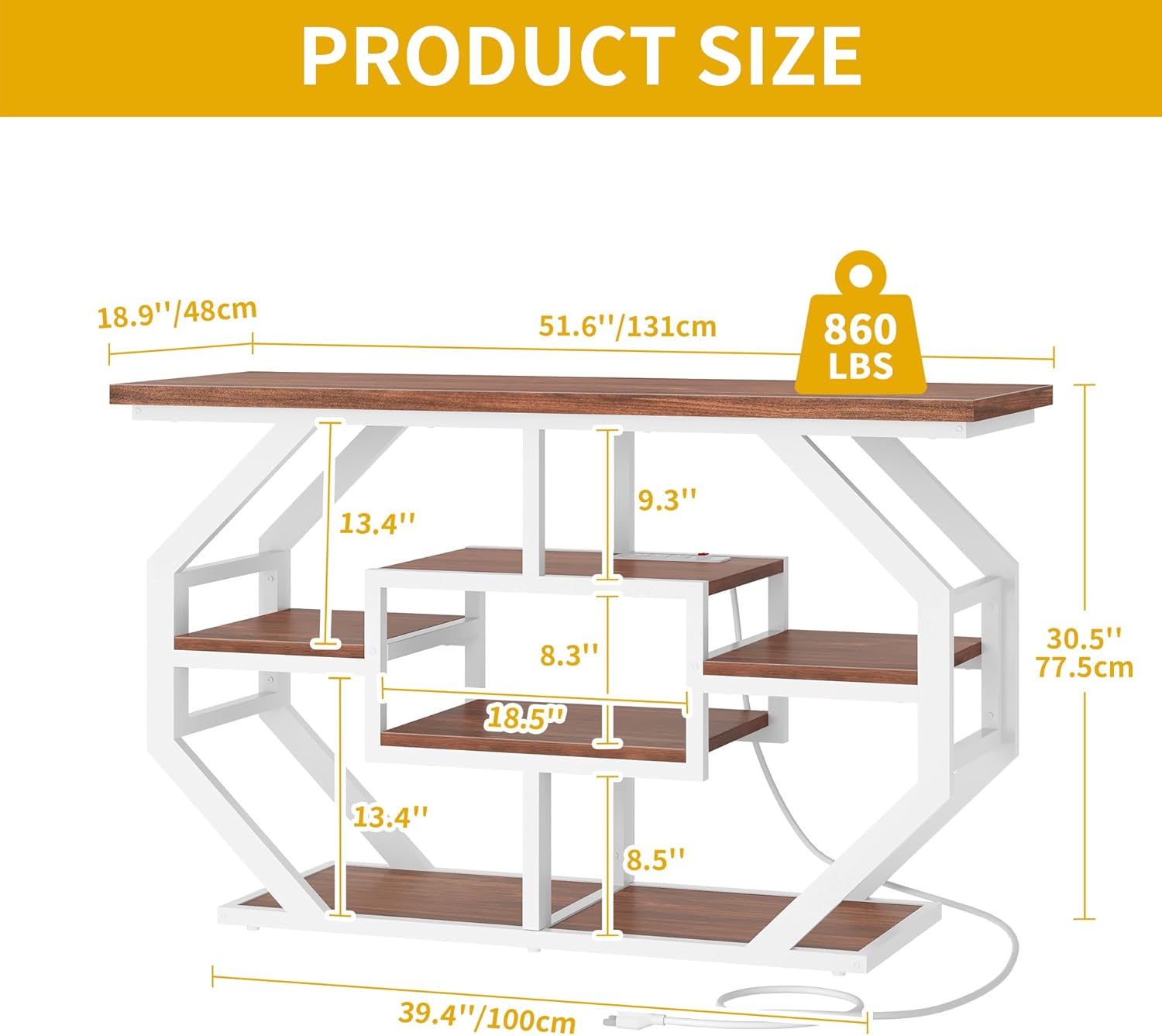
Figure 2: Product dimensions for the DWVO 55-75 Gallon Aquarium Stand.
5. Operating Instructions
Using the Integrated Power Outlet:
The DWVO Aquarium Stand features a built-in power outlet with 2 USB ports, 3 AC outlets, and a power switch. This allows for convenient power access for your aquarium equipment.
- Connect to Wall Outlet: Plug the stand's main power cord (78.74” white wire) into a grounded wall outlet.
- Power On/Off: Use the red switch on the power outlet unit to turn the power to the outlets ON or OFF.
- Connect Devices: Plug your aquarium lights, heaters, oxygen pumps, or other electronic devices into the AC outlets. Use the USB ports for charging compatible devices.
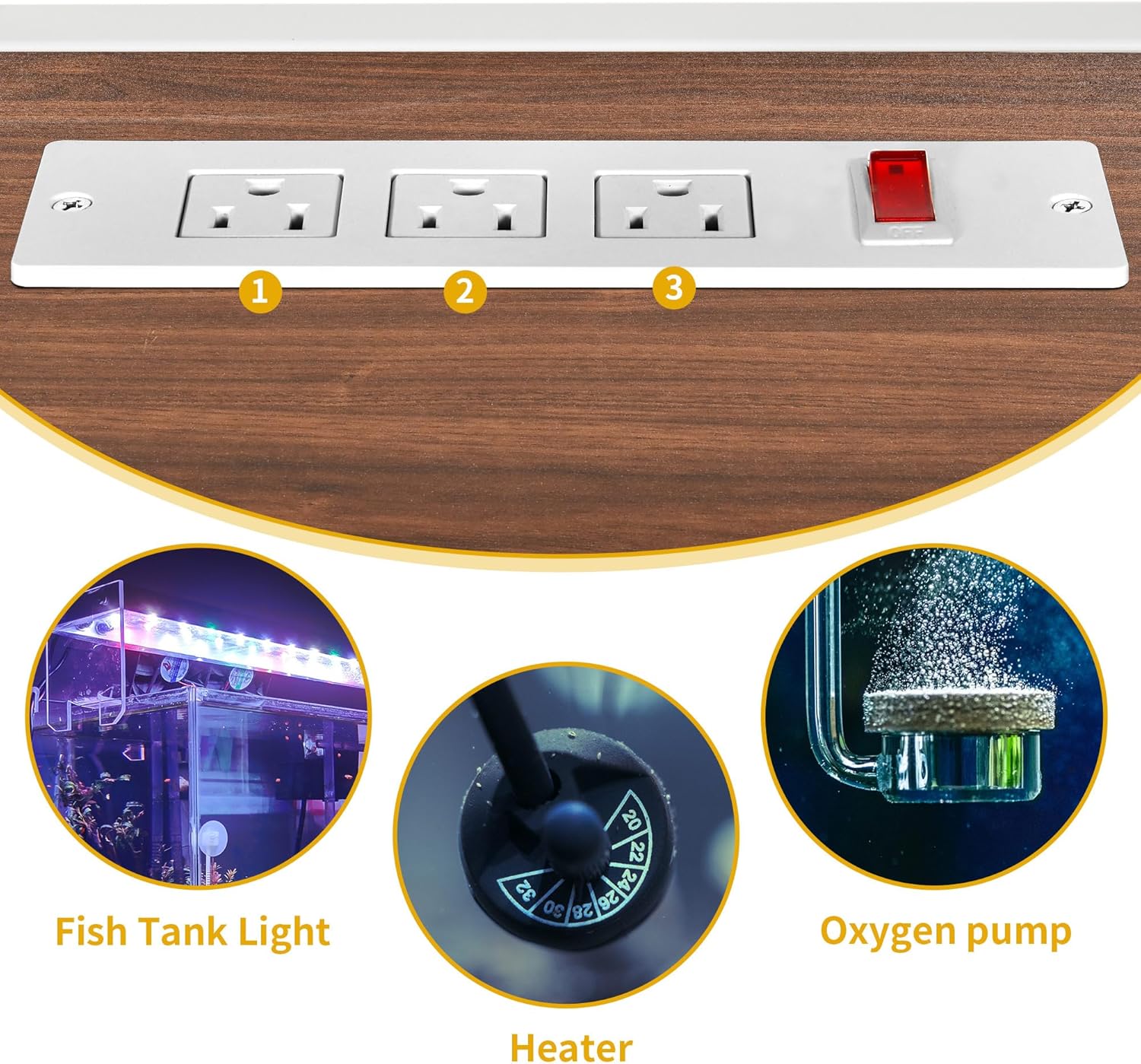
Figure 3: Integrated power outlet for connecting aquarium accessories.
Utilizing Storage Space:
The stand offers multiple storage compartments for organizing fish food, cleaning tools, and other accessories.

Figure 4: Multi-layer storage space for organizing various items.
Video 1: This video demonstrates the DWVO 55-75 Gallon Aquarium Stand with Power Outlet, showcasing its design, integrated power strip, and various storage compartments in a home setting.
6. Maintenance
- Cleaning: Wipe the stand with a soft, damp cloth. Avoid harsh chemicals or abrasive cleaners that could damage the finish.
- Spills: Promptly clean any water spills to prevent water damage to the particle board and potential electrical hazards.
- Hardware Check: Periodically check all screws and connections to ensure they remain tight and secure.
- Power Outlet: Keep the power outlet free from dust and debris. Do not immerse in water.

Figure 5: The stand is constructed with 15mm P2 grade particle board for durability.
7. Troubleshooting
- Stand is Wobbly: Ensure all screws are tightened. Check that the stand is on a level surface. Adjust the non-slip adjustable foot pads if present.
- Power Outlet Not Working: Verify the main power cord is securely plugged into a wall outlet. Check if the red power switch on the outlet unit is in the 'ON' position. Test the wall outlet with another device.
- Missing Parts: If any parts are missing upon arrival, do not proceed with assembly. Contact DWVO customer support for assistance.
- Damaged Parts: If any parts are damaged, do not use them. Contact DWVO customer support for replacements.
8. Specifications
| Feature | Detail |
|---|---|
| Model Number | Aquarium Stand |
| Dimensions (L x W x H) | 51.6 x 18.9 x 30.5 inches (131 x 48 x 77.5 cm) |
| Weight Capacity | 860 lbs (390 kg) |
| Material | Iron + P2 Grade Particle Board |
| Color | White + Walnut |
| Power Outlet | 3 AC Outlets, 2 USB Ports |
| Power Cord Length | 78.74 inches (200 cm) |
| Assembly Required | Yes |
| Special Feature | Anti-tip devices included |
9. Warranty and Support
This DWVO product comes with a 1-year manufacturer's warranty. For warranty claims, missing parts, or technical support, please contact DWVO customer service. Keep your purchase receipt for warranty validation.
Manufacturer: DWVO
UPC: 197839446649
ASIN: B0D63222KB