
1. Introduction and Compatibility
This document provides operational instructions for the Generic replacement remote control designed for specific Lennox Inventor air conditioner units. This remote is not a universal remote control. To ensure proper functionality, it is crucial that your original remote control matches the appearance and button layout of the remote shown in this manual.
Important Note: This replacement remote may not support all advanced functions present on your original unit's remote. Please verify compatibility by comparing your existing remote with the images provided.
2. Product Overview
The remote control features a clear LCD display and a series of buttons for various air conditioner functions. Familiarize yourself with the layout below.
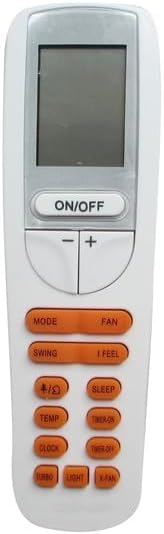
Image 2.1: Front view of the Generic remote control. It features a rectangular LCD screen at the top, an ON/OFF button below it, and temperature adjustment buttons (- and +). Below these are two rows of orange-colored function buttons, including MODE, FAN, SWING, I FEEL, TEMP, SLEEP, TIMER ON, CLOCK, TIMER OFF, TURBO, LIGHT, and X-FAN.
3. Battery Installation
The remote control requires two AAA batteries (not included). Follow these steps to install them:
- Locate the battery compartment cover on the back of the remote control.
- Slide the cover downwards or press the latch and lift to open the compartment.
- Insert two AAA batteries, ensuring the positive (+) and negative (-) terminals align correctly with the markings inside the compartment.
- Replace the battery compartment cover by sliding it back into place until it clicks securely.

Image 3.1: Back view of the remote control with the battery compartment open. The white cover is detached, revealing two empty slots for AAA batteries with clear polarity markings.
4. Basic Operation
Once batteries are installed, the remote is ready for use. No setup or coding is required.
- ON/OFF Button: Press this button to power the air conditioner unit on or off.
- Temperature Adjustment (+/-): Use the '+' button to increase the temperature setting and the '-' button to decrease it.
- MODE Button: Press to cycle through available operating modes (e.g., Cool, Heat, Dry, Fan, Auto). The current mode will be displayed on the LCD screen.
- FAN Button: Press to adjust the fan speed (e.g., Auto, Low, Medium, High).
5. Advanced Functions
The remote control includes several advanced functions for enhanced comfort and control:
- SWING Button: Activates or deactivates the automatic louver swing function, directing airflow.
- I FEEL Button: Activates the 'I Feel' function, which senses the temperature at the remote's location to optimize comfort.
- SLEEP Button: Engages the sleep mode, which adjusts temperature and fan speed for comfortable sleep and energy saving.
- TIMER ON Button: Sets a timer for the unit to turn on automatically.
- TIMER OFF Button: Sets a timer for the unit to turn off automatically.
- CLOCK Button: Used to set the current time on the remote's display.
- TURBO Button: Activates maximum cooling or heating power for rapid temperature change.
- LIGHT Button: Controls the display light on the air conditioner unit (if applicable).
- X-FAN Button: Activates the X-Fan (or anti-mildew) function, which runs the fan for a short period after shutdown to dry the indoor coil.
6. Troubleshooting
If the remote control is not functioning as expected, consider the following:
- No Response from AC Unit:
- Ensure the remote has fresh AAA batteries and they are inserted with correct polarity.
- Check for any obstructions between the remote control and the air conditioner's receiver.
- Confirm that the remote control is pointed directly at the air conditioner unit.
- Verify that the air conditioner unit is powered on at the main switch.
- Limited Functionality:
- As a replacement remote, some specific functions of your original unit may not be supported. Refer to Section 1 for compatibility notes.
- Display Issues:
- If the LCD display is dim or blank, replace the batteries.
7. Specifications
| Brand | Generic |
| Compatible Devices | Lennox Inventor Air Conditioners (Models: LI018HI-180P432, LI024HI-180P432, LI018CI-180P432, LI018CO-180P432, LI012CI-180V432, LI012CO-180V432) |
| Power Source | 2 x AAA Batteries (not included) |
| Special Feature | Celsius Only, Cooling & Heating functions. Please check your air conditioner's manual for correct remote control compatibility. |
| Color | Grey |
8. Important Notes and Disclaimer
- This remote control is a replacement product and is not manufactured by Lennox.
- Functionality may vary slightly compared to the original remote control.
- Always ensure your air conditioner model is listed in the compatible models section before use.
- No instructions are included with the physical product; this manual serves as the primary guide.