
1. Introduction
This document serves as a user guide for the Generic replacement remote control designed for specific Bluestar and Bryant Room Air Conditioner models. This remote is an infrared (IR) replacement intended to function similarly to your original remote. Please note that this manual focuses on the remote control itself and its basic operation. For detailed functions of your air conditioner, please refer to your air conditioner's original user manual.
2. Compatibility
It is crucial to verify that your original remote control matches the appearance of the remote shown in this manual and that your air conditioner model is listed in the product title. This replacement remote is compatible with the following Bluestar and Bryant Room Air Conditioner models:
- Bluestar YAA1FB
- Bryant 538PR/619PB
- Bryant 538PR/619FB
- Bryant 538KR/619
- Bryant 538TR/619
- Bryant 538PR/619RD
- Bryant 538PR/619RF
- Bryant 538PR/619RC
If your model number is not listed or your current remote differs significantly, this replacement may not be fully compatible. The replacement remote may not offer all the exact same functions as your original unit.
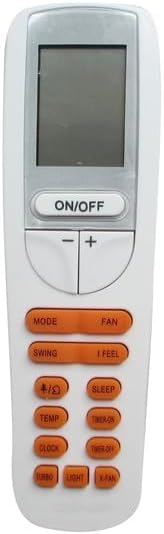
Image: Front view of the replacement remote control, showing the display screen and various control buttons.
3. Setup: Battery Installation
The remote control requires 2 AAA batteries (not included) for operation. Follow these steps to install the batteries:
- Locate the battery compartment on the back of the remote control.
- Slide the battery cover downwards or in the direction indicated by an arrow to open it.
- Insert two AAA batteries, ensuring the positive (+) and negative (-) terminals align correctly with the markings inside the compartment.
- Slide the battery cover back into place until it clicks securely.
Note: If the remote is not used for an extended period, remove the batteries to prevent leakage and damage.

Image: Rear view of the remote control, showing the open battery compartment ready for AAA battery insertion.
4. Operating the Remote Control
This replacement remote is designed to mimic the functions of your original air conditioner remote. The buttons on the remote control typically include:
- ON/OFF: Powers the air conditioner on or off.
- MODE: Cycles through operating modes such as Cool, Heat, Fan, Dry, Auto.
- FAN: Adjusts fan speed (e.g., Low, Medium, High, Auto).
- TEMP (+/-): Increases or decreases the desired temperature setting.
- SWING: Controls the vertical swing of the air conditioner's louvers.
- I FEEL: Activates a function where the remote senses the ambient temperature at its location and adjusts the AC accordingly.
- SLEEP: Activates sleep mode, which typically adjusts temperature and fan speed for comfortable sleep.
- TIMER ON/OFF: Sets a timer for the air conditioner to turn on or off automatically.
- CLOCK: Sets the current time on the remote's display.
- TURBO: Activates maximum cooling or heating for rapid temperature change.
- LIGHT: Controls the display light on the air conditioner unit.
- X-FAN: Activates the X-Fan (or Anti-mildew) function, which keeps the fan running for a short period after shutdown to dry the evaporator.
Please Note: The exact functionality and availability of each button may vary depending on your specific air conditioner model. Refer to your air conditioner's original manual for detailed instructions on using these functions.
5. Maintenance
- Cleaning: Wipe the remote control with a soft, dry cloth. Do not use liquid cleaners or abrasive materials.
- Battery Replacement: Replace batteries when the remote's display becomes dim or the remote stops responding. Always replace both batteries at the same time with new ones of the same type.
- Storage: If the remote will not be used for an extended period, remove the batteries to prevent corrosion. Store in a cool, dry place.
6. Troubleshooting
- Remote not responding:
- Check if the batteries are inserted correctly with the correct polarity.
- Replace old batteries with new ones.
- Ensure there are no obstructions between the remote and the air conditioner's receiver.
- Make sure you are within the effective operating range of the air conditioner.
- Display is dim or blank:
- Batteries are low. Replace them.
- Some functions do not work:
- This replacement remote may not support all functions of your original air conditioner remote. Verify compatibility with your specific AC model.
- Ensure your air conditioner unit supports the specific function you are trying to use.
7. Specifications
| Brand | Generic |
| Compatible Devices | Bluestar YAA1FB, Bryant 538PR/619PB, 538PR/619FB, 538KR/619, 538TR/619, 538PR/619RD, 538PR/619RF, 538PR/619RC Room Air Conditioners |
| Power Source | 2 x AAA Batteries (not included) |
| Color | Grey |
| Manufacturer | Easytry |
8. Support and Contact
As this is a replacement remote, no specific manual is included with the product. For any doubts, questions, or issues regarding the compatibility or functionality of this remote control, please contact the seller directly through the platform where you purchased the item. They can provide further assistance and clarification.
It is recommended to refer to your air conditioner's original user manual for comprehensive details on its features and operation.