
Widazzla IP860
Professional Underwater Metal Detector User Manual
Model: IP860
Introduction
This manual provides comprehensive instructions for the operation and maintenance of your Widazzla Professional Underwater Metal Detector. Designed for both freshwater and saltwater environments, this IP68 waterproof detector features a 1600mAh rechargeable battery, an upgraded DSP chip for accurate detection, and multiple alarm systems. Please read this manual thoroughly before using the device to ensure proper function and longevity.
The Widazzla IP860 is a fully submersible metal detector suitable for adults, ideal for treasure hunting in various aquatic and terrestrial settings, including scuba diving, beaches, and oceans.
Package Contents
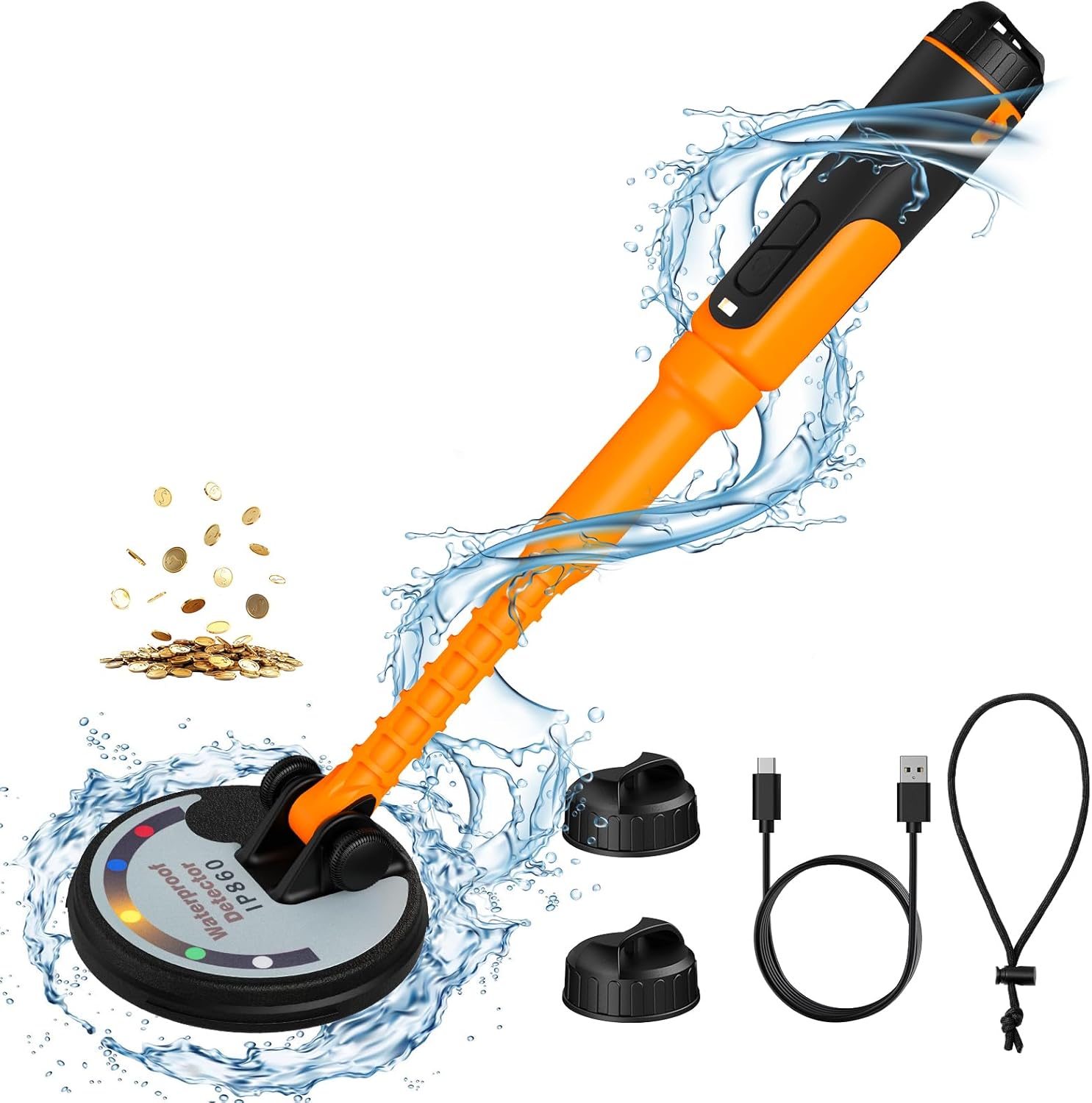
- Widazzla Professional Underwater Metal Detector (Model: IP860)
- USB Type-C Charging Cable
- Waterproof Sealing Caps (2)
- Portable Lanyard/Chain
- User Manual
Product Overview
Setup and Initial Use
1. Charging the Battery
The detector is equipped with a 1600mAh built-in lithium battery. Before first use, ensure the device is fully charged. The Type-C charging interface supports power bank charging for convenience.
- Locate the charging port at the end of the handle, protected by a waterproof sealing cap.
- Unscrew the sealing cap.
- Connect the provided Type-C USB cable to the charging port and a suitable power source (e.g., USB wall adapter, power bank, computer USB port).
- The indicator light will show charging status (refer to device for specific light behavior).
- Once fully charged, disconnect the cable and securely re-tighten the waterproof sealing cap to maintain IP68 rating.


2. Attaching the Portable Lanyard
For added security, especially during underwater use, attach the portable lanyard to the detector.
- Thread the loop of the lanyard through the designated attachment point near the sealing cap.
- Secure the lanyard to your wrist to prevent accidental loss during operation.
3. Powering On/Off
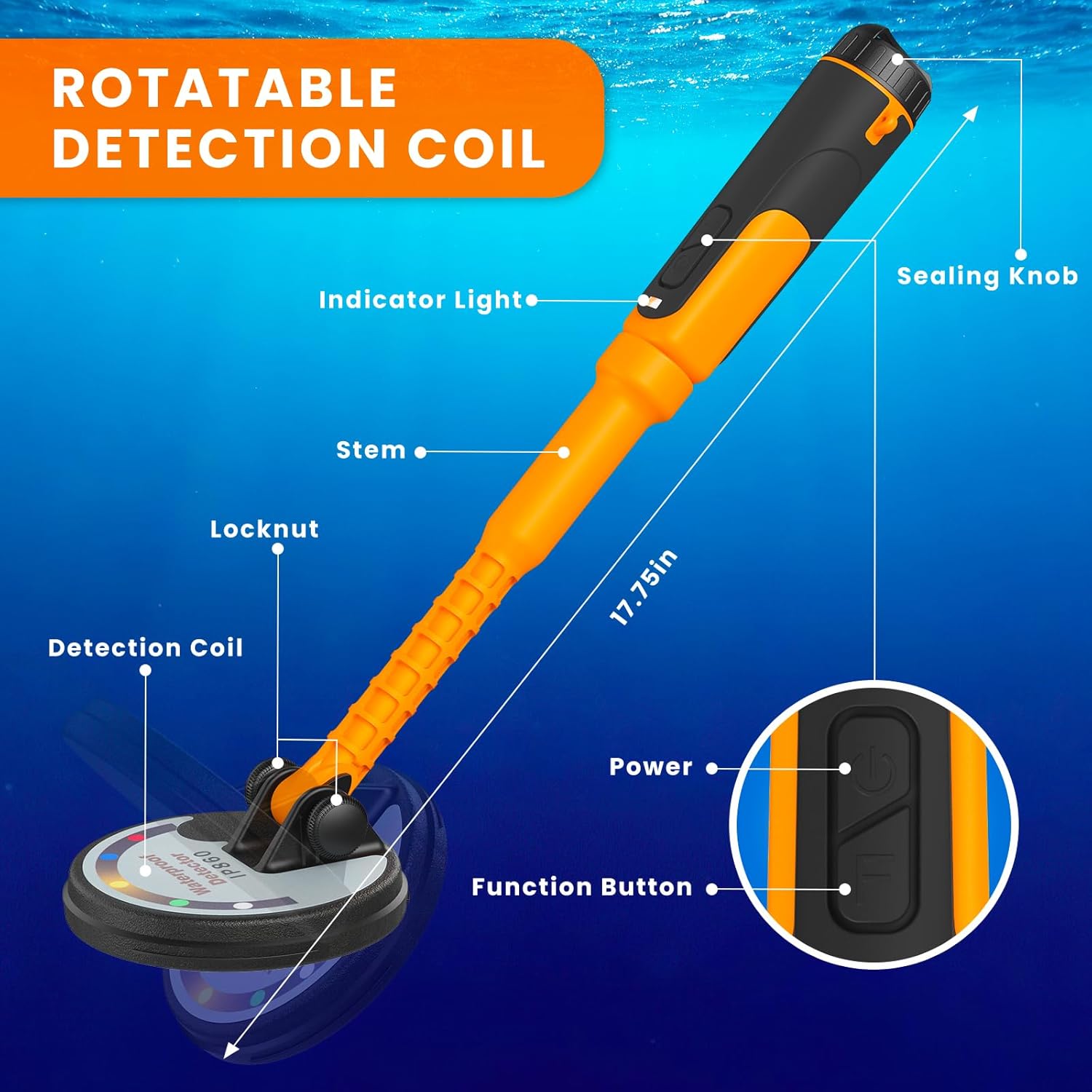
- To turn on: Long press the "Power" button for 3 seconds.
- To turn off: Long press the "Power" button for 3 seconds.
Note: If the detector is not used within five minutes after being turned on, it will vibrate, emit sounds, and the indicator light will flash as a reminder. If left unused for another five minutes, it will alarm and automatically shut down after 30 seconds to conserve energy.
Operating Instructions
1. Detection Modes
The detector offers three distinct detection modes:
- Vibration Mode: The device vibrates when metal is detected.
- Sound Mode: The device emits an audible alert when metal is detected.
- Vibration + Sound Mode: The device both vibrates and emits an audible alert when metal is detected.
To switch between modes: Long press the "F" (Function) button for 3 seconds.
The frequency of the alerts (vibration and/or sound) increases as the detector gets closer to the target. The indicator light will also flash as a visual reminder.


2. Detection Depth and Accuracy
Equipped with an upgraded DSP chip, this handheld metal detector offers enhanced positioning ability and sensitivity. It can detect metal objects up to 4 inches below the surface, significantly improving detection efficiency.


3. Rotatable Detection Coil
The detection coil is rotatable, allowing for more portable and user-friendly operation in various environments and angles.


Maintenance
1. Cleaning
- After each use, especially in saltwater or sandy environments, rinse the detector thoroughly with fresh water.
- Wipe the device dry with a soft cloth.
- Ensure no sand or debris is lodged in the rotatable coil mechanism or around the sealing cap.
2. Storage
- Store the detector in a cool, dry place away from direct sunlight and extreme temperatures.
- Ensure the waterproof sealing cap is securely tightened during storage to prevent dust or moisture ingress.
3. Battery Care
- To prolong battery life, avoid fully discharging the battery frequently.
- If storing for an extended period, charge the battery to approximately 50% before storage and recharge every 3-6 months.
Troubleshooting
| Problem | Possible Cause | Solution |
|---|---|---|
| Detector keeps beeping when turned on. | Device is in a metal environment upon startup. | Place the detector in the air (away from metal) and then press the power button to turn it on normally. |
| Detector will not turn on. | Possible internal error or need for reset. | Open the end cap (where the charging port is) and short-press the reset button to restore proper function. Ensure battery is charged. |
| Buttons require harder press underwater. | Designed to prevent accidental activation due to water pressure. | This is normal operation. Apply firm pressure to the buttons when operating underwater. |
| No lighting lamp. | The product design does not include a lighting lamp. | This metal detector only has an indicator light, not a separate lighting lamp. This is not a malfunction. |
Specifications
| Feature | Detail |
|---|---|
| Brand | Widazzla |
| Model Number | IP860 |
| Color | Orange+Black |
| Material | Plastic |
| Power Source | Battery Powered |
| Battery Type | 1600mAh Lithium Ion (included) |
| Battery Life | More than 15 hours |
| Charging Interface | Type-C |
| Item Weight | 1 Pound (approx. 0.45 kg) |
| Product Dimensions (L x W x H) | 17.32" x 1.57" x 4.72" (approx. 44cm x 4cm x 12cm) |
| International Protection Rating | IP68 (Fully submersible up to 60 feet) |
| Operating Frequency | 7.69 KHz |
| Detection Depth | Up to 4 inches (approx. 10 cm) |
| Display Type | LED or OLED (Indicator Light) |
| Adjustable Length | Yes |
| Country of Origin | China |
Warranty and Support
Specific warranty details for the Widazzla Professional Underwater Metal Detector are not provided within this manual. For information regarding warranty coverage, terms, and conditions, please refer to the product packaging, the official Widazzla website, or contact Widazzla customer support directly.
For technical support, troubleshooting assistance beyond what is covered in this manual, or inquiries about replacement parts, please reach out to the manufacturer's customer service department. Contact information can typically be found on the product's official website or the original purchase platform.
Ask a question about this manual
Ask about setup, troubleshooting, compatibility, parts, safety, or missing instructions. Manuals+ will review the question and use this page’s manual context to help answer it.