Instruction Manual: Generic Replacement Remote Control
For AERMEC CK260FS, CK360FS, CK500FS & York DHZ09NWB21S, DHZ09CSB21S, DHZ12NWB21S, DHZ12CSB21S, DHZ18NWB21S, DHZ18CSB21S Room Air Conditioners
1. Introduction
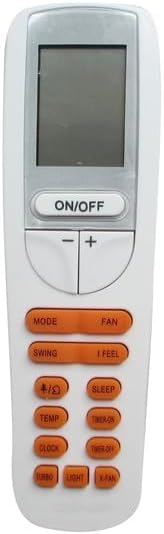
This manual provides essential information for the proper setup, operation, and maintenance of your Generic replacement infrared remote control. This remote is designed to function with specific AERMEC and York room air conditioner models as listed. Please ensure your original remote matches the appearance of this replacement for compatibility.
Important Note: This is an infrared (IR) replacement remote. While it is designed to replace your original remote, it may not offer all identical functions. Always refer to your air conditioner's original manual for detailed operational instructions specific to your unit.
2. Product Overview


3. Setup
3.1 Battery Installation
The remote control requires two (2) AAA batteries (not included) for operation. Follow these steps to install the batteries:
- Locate the battery compartment cover on the back of the remote control.
- Slide the cover downwards or press the latch (if present) to open the compartment.
- Insert two AAA batteries, ensuring the positive (+) and negative (-) ends align correctly with the markings inside the compartment.
- Slide the battery compartment cover back into place until it clicks securely.
Note: Always use new batteries and replace both batteries at the same time. Do not mix old and new batteries or different types of batteries.
4. Operating Instructions
This remote control is designed for straightforward operation. Point the remote directly at the air conditioner's infrared receiver when pressing buttons.
4.1 Basic Functions
- ON/OFF: Press this button to turn the air conditioner on or off.
- +/- (Temperature Adjustment): Use these buttons to increase or decrease the desired temperature. The remote operates in Celsius only.
- MODE: Cycles through available operating modes such as Cool, Heat, Fan, Dry, and Auto.
- FAN: Adjusts the fan speed (e.g., Low, Medium, High, Auto).
4.2 Advanced Functions
- SWING: Activates or deactivates the automatic swing of the air conditioner's louvers.
- SLEEP: Engages the sleep mode, which typically adjusts temperature and fan speed for comfortable sleep.
- TIMER ON/OFF: Sets a timer for the air conditioner to turn on or off automatically. Refer to your air conditioner's manual for specific timer programming.
- TURBO: Activates maximum cooling or heating for rapid temperature change.
- LIGHT: Controls the display light on the air conditioner unit (if applicable).
- X-FAN: Activates the X-Fan (or anti-mildew) function, which runs the fan for a short period after shutdown to dry the indoor coil.
5. Maintenance
5.1 Cleaning the Remote Control
- Wipe the remote control with a soft, dry cloth.
- Do not use liquid cleaners, abrasive cleaners, or chemical sprays, as these can damage the remote's surface or internal components.
5.2 Battery Replacement
Replace batteries when the remote's range decreases or if the display becomes dim. Always replace both batteries simultaneously with new AAA batteries.
6. Troubleshooting
| Problem | Possible Cause | Solution |
|---|---|---|
| Remote not responding | Dead or incorrectly installed batteries. Obstruction between remote and AC unit. Remote not compatible. | Replace batteries, ensuring correct polarity. Remove any obstructions. Verify remote compatibility with your AC model. |
| Limited range | Weak batteries. Infrared sensor on AC unit is dirty or obstructed. | Replace batteries. Clean the infrared sensor on the AC unit. Ensure direct line of sight. |
| Some functions not working | This replacement remote may not support all functions of your original remote. | Refer to your air conditioner's original manual for specific functions. This remote is a replacement and may have limited functionality compared to the original. |
7. Specifications
- Product Type: Infrared (IR) Replacement Remote Control
- Compatible Devices: AERMEC CK260FS, CK360FS, CK500FS & York DHZ09NWB21S, DHZ09CSB21S, DHZ12NWB21S, DHZ12CSB21S, DHZ18NWB21S, DHZ18CSB21S Room Air Conditioners
- Power Source: 2 x AAA Batteries (not included)
- Color: Grey
- Max Number of Supported Devices: 1
- Special Features: Cooling & Heating control, Celsius temperature display only.
8. Support
If you encounter any issues or have questions regarding the compatibility or operation of this remote control, please contact the seller directly through the platform where you purchased the product. Provide your order details and a clear description of the issue for prompt assistance.
Note: This product does not include a separate manufacturer's manual. All available information is provided within this document and the product listing.


