
1. Important Safety Information
Please read and understand all instructions before beginning installation. Failure to follow these instructions may result in electric shock, fire, or personal injury.
- Ensure the power is disconnected at the circuit breaker before installation or maintenance.
- All wiring must be in accordance with national and local electrical codes. If you are unfamiliar with wiring, consult a qualified electrician.
- The ceiling fan must be mounted to a structurally sound ceiling joist or outlet box capable of supporting the fan's weight (approximately 12.12 lbs).
- Do not operate the fan with damaged blades or housing.
- Keep hands, clothing, and other objects clear of the fan blades when the fan is in operation.
- This fan is designed for indoor use.
2. Package Contents
Verify that all components are present and undamaged before proceeding with installation. If any parts are missing or damaged, contact customer service.
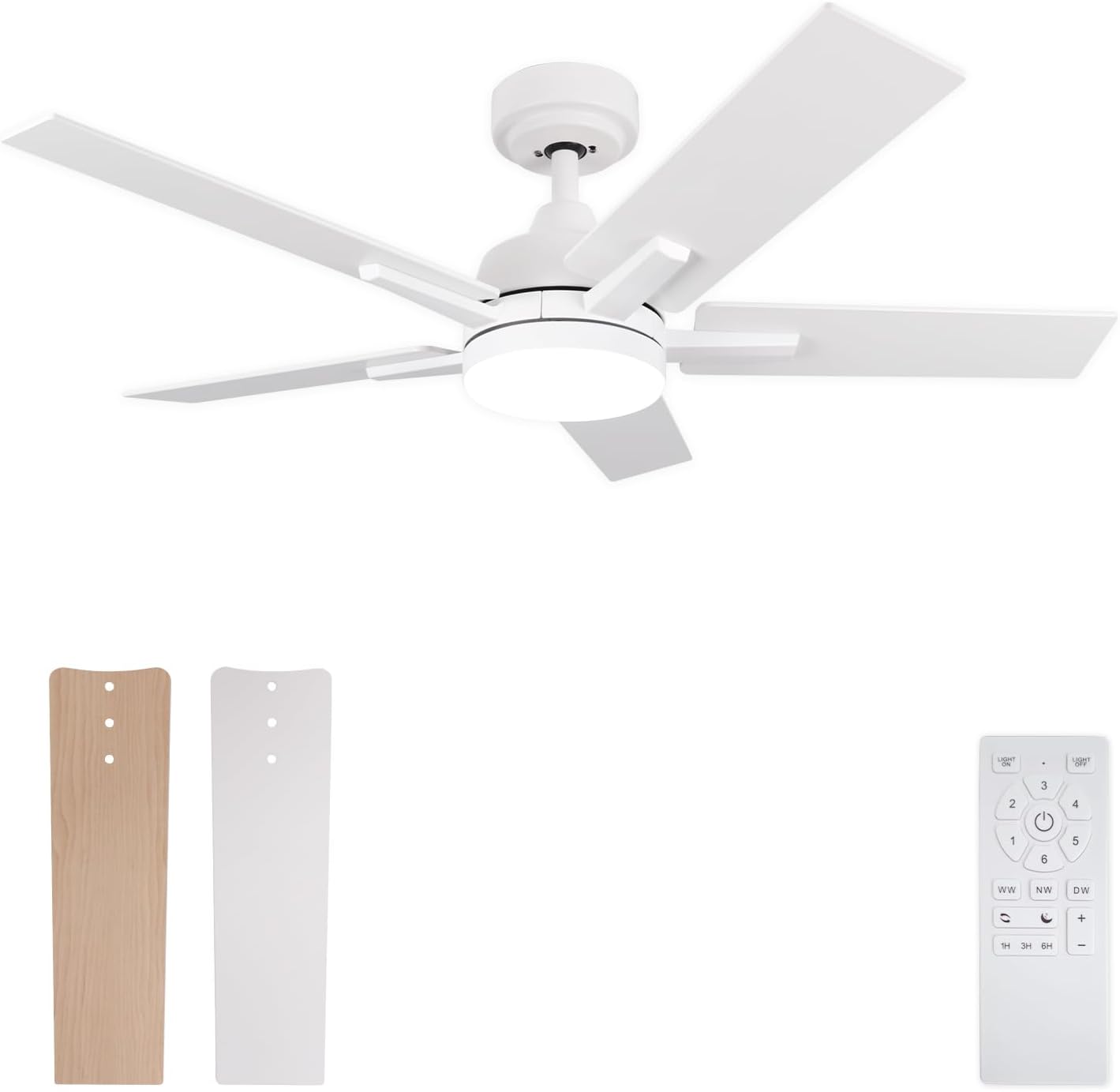
Image: Main components of the Viossn 42 Inch White Ceiling Fan, including the motor housing, five reversible blades (matte white and light woodgrain options), and the remote control unit.
- Ceiling Fan Motor Housing with Integrated LED Light
- Five Reversible Fan Blades (Matte White / Light Woodgrain)
- Remote Control with Wall Mount
- Mounting Bracket
- Downrod (if applicable, not explicitly stated but implied by images)
- Hardware Pack (screws, wire nuts, etc.)
- Instruction Manual
3. Setup and Installation
Professional installation is recommended for safety and optimal performance. Ensure all connections are secure.
- Power Disconnection: Turn off power at the main circuit breaker to prevent electrical shock.
- Mounting Bracket Installation: Secure the mounting bracket to a ceiling joist or an approved outlet box. Ensure the bracket is firmly attached and can support the fan's weight.
- Wiring: Connect the fan's electrical wires to the household wiring according to local electrical codes. Typically, this involves connecting live, neutral, and ground wires.
- Fan Assembly: Attach the fan motor housing to the mounting bracket.
- Blade Attachment: Select your desired blade finish (Matte White or Light Woodgrain). Attach the five fan blades to the motor housing using the provided screws. Ensure all screws are tightened securely.
- Light Kit Installation: Connect the LED light kit wiring and secure the light cover to the fan housing.
- Sloped Ceiling Installation: This ceiling fan supports installation on sloped ceilings up to a maximum of 10 degrees. Ensure the downrod and mounting bracket are compatible with sloped ceiling applications.
- Power Restoration: Once installation is complete and all connections are checked, restore power at the circuit breaker.

Image: Illustration of ceiling fan mounting options, including direct ceiling installation and installation on a sloped ceiling with a maximum incline of 10 degrees.

Image: Detail of the reversible fan blades, highlighting the matte white finish on one side and the light woodgrain finish on the other, allowing for customizable aesthetics.
4. Operating Instructions
The Viossn ceiling fan is controlled via the included remote control. Ensure the remote has fresh batteries installed.

Image: A comprehensive guide to the remote control buttons, illustrating functions such as fan on/off, speed control (1-6), light on/off, light color temperature adjustment (WW, NW, DW), light brightness adjustment (+/-), sleep wind mode, forward/reverse rotation, and timing settings (1H, 3H, 6H).
- Power On/Off: Press the Light ON/OFF button to turn the light on or off. Press the Fan Off button to turn the fan off.
- Fan Speed Control: Use buttons 1 through 6 to select the desired fan speed. Speed 1-2 is suitable for sleep, 3-4 for family activities, and 5-6 for cooling during warmer periods.
- Light Color Temperature: Press WW (Warm White 3000K), NW (Natural White 4000K), or DW (Daylight White 6500K) to cycle through the three available light color temperatures.
- Light Brightness Adjustment: Use the + and - buttons to adjust the LED light brightness from 12% to 100%.
- Light Memory Function: The fan's light has a memory function. If the light is switched off for more than 10 seconds using the remote control and then switched on again, it will resume the previously set color temperature and brightness. Briefly toggling the light switch (wall switch) can also change the color temperature.
- Reversible Motor (Forward/Reverse): Press the Forward/Reverse button to change the direction of the fan blades. In summer, use downward airflow (forward rotation) for a cooling effect. In winter, use upward airflow (reverse rotation) to circulate warm air.
- Timer Function: Press 1H, 3H, or 6H to set the fan to automatically turn off after 1, 3, or 6 hours, respectively.
- Sleep Wind Mode: Press the Sleep Wind button for a gentle, quiet airflow suitable for sleeping.

Image: Visual representation of the reversible motor function, showing forward rotation for summer cooling (downward airflow) and reverse rotation for winter air circulation (upward airflow).

Image: Demonstrates the three adjustable light color temperatures (3000K Warm, 4000K Natural, 6500K Cool) and stepless dimming capability from 12% to 100% brightness.
5. Maintenance
Regular maintenance ensures the longevity and optimal performance of your ceiling fan.
- Cleaning: Periodically clean the fan blades and motor housing with a soft, damp cloth. Do not use abrasive cleaners or solvents, as these may damage the finish.
- Blade Inspection: Check fan blade screws periodically to ensure they are tight. Loose screws can cause wobbling and noise.
- Light Cover: Ensure the light cover is securely fastened.
- No Lubrication Required: The DC motor is permanently lubricated and does not require additional oiling.
6. Troubleshooting
If you experience issues with your ceiling fan, refer to the following common problems and solutions:
| Problem | Possible Cause | Solution |
|---|---|---|
| Fan does not start | No power; Loose wire connections; Remote control battery low/dead. | Check circuit breaker; Verify all wire connections are secure; Replace remote control batteries. |
| Fan wobbles | Loose blade screws; Improperly balanced blades; Loose mounting bracket. | Tighten all blade screws; Ensure blades are installed correctly; Verify mounting bracket is secure. |
| Light does not work | Loose wire connection to light kit; LED driver issue. | Check light kit wiring; Contact customer service if LED light remains unresponsive. |
| Remote control not working | Dead batteries; Remote not paired (if applicable); Obstruction between remote and receiver. | Replace batteries; Ensure clear line of sight; Contact customer service for pairing instructions if needed. |
| Excessive noise | Loose screws; Fan not level; Internal component issue. | Check and tighten all screws; Ensure fan is mounted level; Contact customer service if noise persists. |
If the problem persists after attempting these solutions, please contact Viossn customer service for further assistance.
7. Specifications

Image: Visual representation of the fan's dimensions (42 inches diameter, 8.5 inches height) and recommended application areas such as bedrooms, courtyards, living rooms, and dining rooms.
| Feature | Detail |
|---|---|
| Brand | Viossn |
| Model Name | US-1240-Viossn |
| Size | 42 Inch |
| Color | White |
| Product Dimensions | 52"D x 52"W x 8.5"H (Note: Product title and size specification state 42 inch. The 52 inch dimension may refer to packaging or a different variant. This manual refers to the 42 inch model.) 1060mm (42 inch) Diameter x 215mm (8.5 inch) Height |
| Item Weight | 12.12 Pounds |
| Number of Blades | 5 (Two-sided: Matte White / Light Woodgrain) |
| Power Source | DC Motor |
| Voltage | 120 Volts |
| Wattage (Light) | 24 Watts (LED) |
| Light Color Temperature | 3000K (Warm), 4000K (Natural), 6500K (Cool) |
| Dimmable Light | Yes (12%-100% brightness) |
| Fan Speeds | 6 |
| Air Flow Capacity | 3062 Cubic Feet Per Minute (CFM) |
| Control Method | Remote Control |
| Special Features | Reversible Motor, Timer Function (1/3/6H), Sleep Wind Mode, Light Memory Function, Quiet DC Motor (<30dB) |
| Indoor/Outdoor Usage | Indoor |
| Recommended Room Size | 100-200 sq. ft. |
| Certification | ETL |
8. Warranty and Support
For warranty information, please refer to the documentation included with your purchase or contact Viossn customer service directly. Viossn offers 24/7 customer service for any questions or assistance you may require.
Contact Information: Refer to your product packaging or the official Viossn website for the most current customer service contact details.