
WeCar AVIC-MRZ99
WeCar Backup Camera Connection Cable for Carrozzeria Rakunavi Lite AVIC-MRZ99 (RD-C106 Compatible)
Model: AVIC-MRZ99
Introduction
This manual provides instructions for the WeCar backup camera adapter, designed to connect aftermarket backup cameras to compatible Carrozzeria, Cyber Navi, Rakunavi, and Rakunavi Lite car navigation systems. This adapter facilitates the input of video signals from RCA-output backup camera units into dedicated camera input terminals, ensuring seamless integration without complex wiring modifications. It is specifically compatible with the Rakunavi Lite AVIC-MRZ99 model.
Compatibility
This product is compatible with the following Carrozzeria Rakunavi Lite model:
- Rakunavi Lite: AVIC-MRZ99
The adapter supports backup cameras with RCA video output. Only CMOS type cameras are compatible for installation with this adapter.

Image: Compatibility table showing various Carrozzeria navigation models and their compatible years. The table lists models such as AVIC-VH9000, AVIC-ZH9900, AVIC-MRZ99, and others under categories like Carrozzeria, Rakunavi, Rakunavi Lite, and EV Navi.
Setup and Installation
Follow these steps to install the WeCar backup camera connection cable:
- Safety First: Before beginning installation, ensure the vehicle's battery is disconnected. Wait at least 5 minutes after disconnecting the battery to allow any residual power to dissipate.
- Access Navigation Unit: Carefully remove the car navigation unit from its mounting location in the vehicle dashboard. Refer to your vehicle's service manual or the navigation unit's manual for specific removal instructions.
- Connect Adapter: Locate the white 5-pin connector on the back of the navigation unit. Insert the WeCar backup camera connection cable into the 5-pin coupler located next to this white connector.
- Connect Backup Camera: Connect the RCA terminal of your aftermarket backup camera to the corresponding RCA input on the WeCar adapter cable.
- Temporary Test: Before fully reinstalling the navigation unit, perform a temporary setup. Reconnect the vehicle battery and test the backup camera functionality to ensure proper operation.
- Secure Installation: Once confirmed working, disconnect the battery again, secure all connections, and reinstall the navigation unit and any removed vehicle panels.
Note: The installation method uses a coupler (connector) type, allowing for easy connection without requiring complex wiring modifications. If the adapter needs to be removed, the navigation system can be easily restored to its original state.

Image: A diagram illustrating the connection process. It shows the backup camera adapter connecting to the car navigation unit, with separate lines for the backup signal and camera power. An example backup camera is also shown connected via RCA.
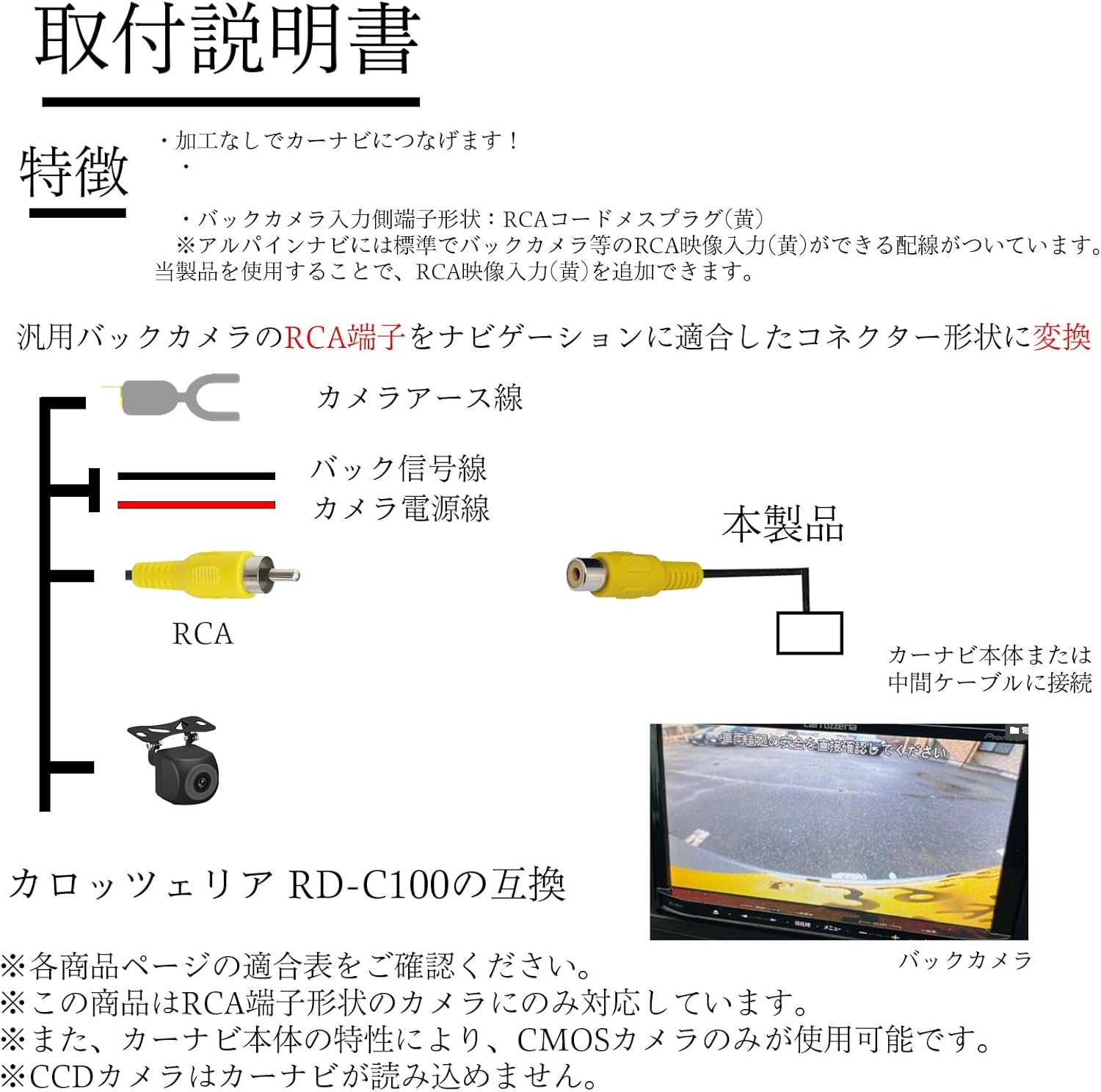
Image: The WeCar backup camera adapter cable, approximately 18cm long, featuring an RCA female connector on one end and a proprietary 5-pin connector on the other, designed for direct connection to the navigation unit.
Operating Instructions
Once the backup camera adapter and camera are correctly installed, operation is straightforward and similar to using a genuine product:
- Automatic Screen Switching: When the navigation unit receives a reverse signal (e.g., when the vehicle is shifted into reverse gear), the screen will automatically switch to display the backup camera feed.
- Guideline Display: If your navigation system has a built-in guideline display function, these guidelines will appear on the screen along with the camera feed, assisting with parking and maneuvering.
- Camera Power: Ensure your backup camera is properly powered according to its manufacturer's instructions. The WeCar adapter handles the video signal conversion, but camera power is typically managed separately.
Maintenance
The WeCar backup camera connection cable is a passive adapter and requires minimal maintenance. Keep connections clean and secure. Avoid exposing the cable to extreme temperatures or moisture. If the cable or connectors appear damaged, replace the unit.
Troubleshooting
- No Camera Image:
- Check all cable connections, ensuring they are secure and fully inserted.
- Verify that the backup camera itself is receiving power and functioning correctly.
- Ensure the vehicle is in reverse gear to trigger the camera display.
- Confirm that your backup camera is a CMOS type, as other types may not be compatible.
- Poor Image Quality:
- Inspect the camera lens for dirt or obstructions.
- Check the RCA cable for damage or kinks.
- Screen Does Not Switch Automatically:
- Ensure the reverse signal wire to the navigation unit is correctly connected (if applicable, refer to your navigation unit's manual).
- Confirm the adapter is fully seated in the navigation unit's input.
Specifications
| Brand | WeCar |
| Model Compatibility | Carrozzeria Rakunavi Lite AVIC-MRZ99 (RD-C106 Compatible) |
| Product Dimensions (L x W x H) | Approximately 20 x 30 x 30 mm (Adapter cable length approx. 18 cm) |
| Input Type | RCA Video (Female) |
| Output Type | 5-pin coupler for Carrozzeria navigation systems |
| Compatible Camera Type | CMOS cameras with RCA video output |
| Country of Origin | China |
| ASIN | B0D62S69F |
Warranty and Support
This product comes with a warranty against manufacturing defects. For warranty claims or technical support, please contact your retailer or the manufacturer, WeCar, directly. Please retain your proof of purchase for warranty validation.
Ask a question about this manual
Ask about setup, troubleshooting, compatibility, parts, safety, or missing instructions. Manuals+ will review the question and use this page’s manual context to help answer it.