
WeCar B3-003
WeCar Rear View Camera RCA Conversion Cable Adapter User Manual
Model: B3-003 | Compatible with Clarion NXV977D, MAX777W, MAX677W, NX717, NX61, NX617W and more.
1. Product Overview
The WeCar Rear View Camera RCA Conversion Cable Adapter (Model B3-003) is designed to connect aftermarket rear view cameras with RCA video output to compatible car navigation systems, specifically those from Clarion, Honda, and Nissan that do not feature standard RCA input terminals. This adapter provides a seamless and easy installation solution without requiring complex wiring modifications.
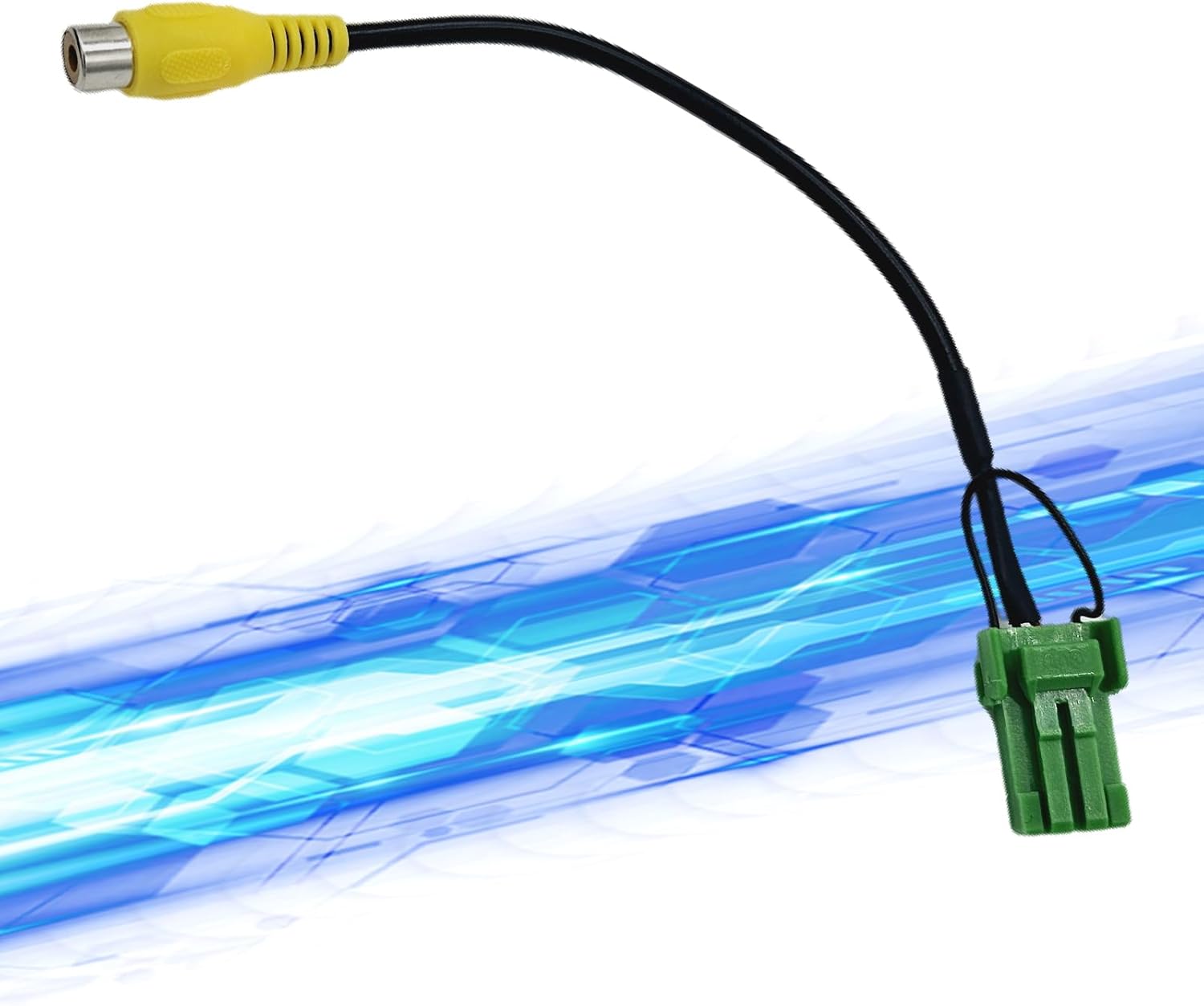
Image 1: WeCar Rear View Camera RCA Conversion Cable Adapter. This image shows the adapter cable with a yellow RCA female connector on one end and a green proprietary connector on the other, designed for specific car navigation systems.
2. Features
- Universal Compatibility: While its shape differs from genuine manufacturer parts, this adapter is designed to be compatible with a wide range of car navigation models from Clarion, Honda, and Nissan.
- RCA Conversion: Facilitates the connection of rear view cameras with standard RCA video output to car navigation systems that utilize a non-RCA dedicated input.
- Broad Camera Support: Compatible not only with Clarion systems but also allows connection of other CMOS rear view cameras.
- Easy Installation: Designed for direct plug-and-play connection to the car navigation system, eliminating the need for wire processing or modification.
- Compact Design: The cable has an approximate length of 22 cm, providing flexibility for installation.
- Standard RCA Input: The input terminal on the rear view camera side is a standard RCA female plug (yellow).
3. Package Contents
The package includes the following item:
- WeCar Rear View Camera Connection Cable Adapter (Main Unit)
4. Setup and Installation
This adapter is designed for straightforward installation. Please follow these steps:
- Prepare the Navigation Unit: Carefully remove your car's navigation system from its mounting location to access the rear connectors. Refer to your car's or navigation system's manual for specific removal instructions.
- Locate the Input Terminal: Identify the dedicated rear view camera input terminal on the back of your navigation unit. This adapter connects directly to this specific port.
- Connect the Adapter: Plug the green proprietary connector of the WeCar adapter into the corresponding input terminal on the navigation unit. Ensure a secure connection.
- Connect the Rear View Camera: Connect the yellow RCA male plug from your aftermarket rear view camera to the yellow RCA female plug of the WeCar adapter.
- Power Connection (Camera): The power connection for the rear view camera should be handled according to the camera manufacturer's installation instructions. This adapter only handles the video signal.
- Test the Connection: Before fully re-installing the navigation unit, test the rear view camera functionality. When the reverse gear is engaged and the reverse signal is input to the navigation unit, the screen should automatically switch to the camera view.
- Re-install Navigation Unit: Once confirmed, carefully re-install the navigation unit back into your car's dashboard.

Image 2: Installation Diagram. This diagram illustrates how the adapter connects between the car navigation system and an aftermarket rear view camera. It shows the proprietary connector plugging into the navigation unit and the RCA connector for the camera's video signal. It also indicates the camera's power and reverse signal lines, which are handled separately by the camera itself.
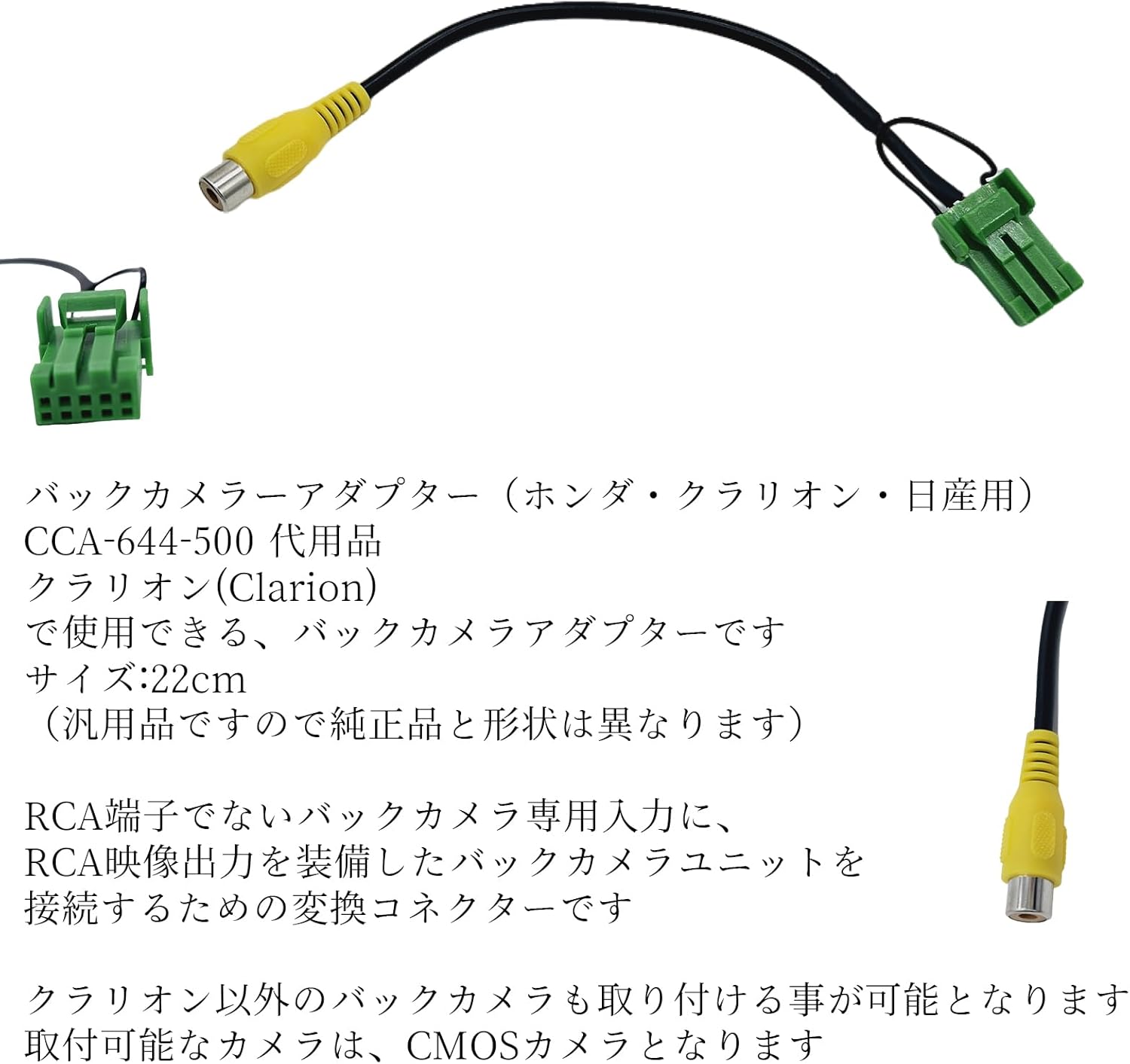
Image 3: WeCar Rear View Camera Adapter. This image provides a closer look at the adapter, highlighting the RCA female connector (yellow) and the proprietary green connector, along with the cable length of approximately 22cm. It also mentions compatibility with Honda, Clarion, and Nissan systems and that it's a replacement for CCA-644-500.
5. Operating Instructions
Once installed, the operation of the rear view camera system with this adapter is similar to using a genuine product.
- Automatic Screen Switching: When the reverse gear is engaged and the reverse signal is sent to the navigation unit, the screen will automatically switch to display the rear view camera feed.
- Guideline Display: If your navigation system has a guideline display function, the guidelines will be shown on the screen when the camera view is active.
- Camera Power: Ensure your rear view camera is properly powered according to its own installation instructions. This adapter only transmits the video signal.
6. Compatibility
This adapter is compatible with various car navigation models. Please verify your model number against the tables below. Note that only CMOS cameras are supported, and some models may not display guidelines.
Clarion Compatibility

Image 4: Clarion and Nissan Compatibility Table. This table lists various Clarion and Nissan navigation models and their corresponding model years that are compatible with this adapter. For Nissan models, additional harnesses or dealer consultation might be required for certain connections.
Clarion Models:
- 2020: NXV997D, NXV897D
- 2018: NXV987D
- 2017: NXV977D, NXV777W, MAX777W, MAX677W, NX717, NX61, NX617W
- 2016: MAX676W, MAX776W, NX616, NX716
- 2015: NX515, NX615, NX615W, NX715, MAX675, MAX775W
- 2014: NX714, NX714W, NX614, NX614W
- 2013: NX713, NX613
- 2012: NX712, NX712W, NX612
- 2011: NX811, NX711, NX311, NX111
- 2010: NX710, NX610, NX610W, NX310, NX110
- 2009: NX809, NX609, NX309, NX209
- 2008: NX808, NX708, NX308, NX208, MAX685, MAX675, MAX575
Honda Compatibility
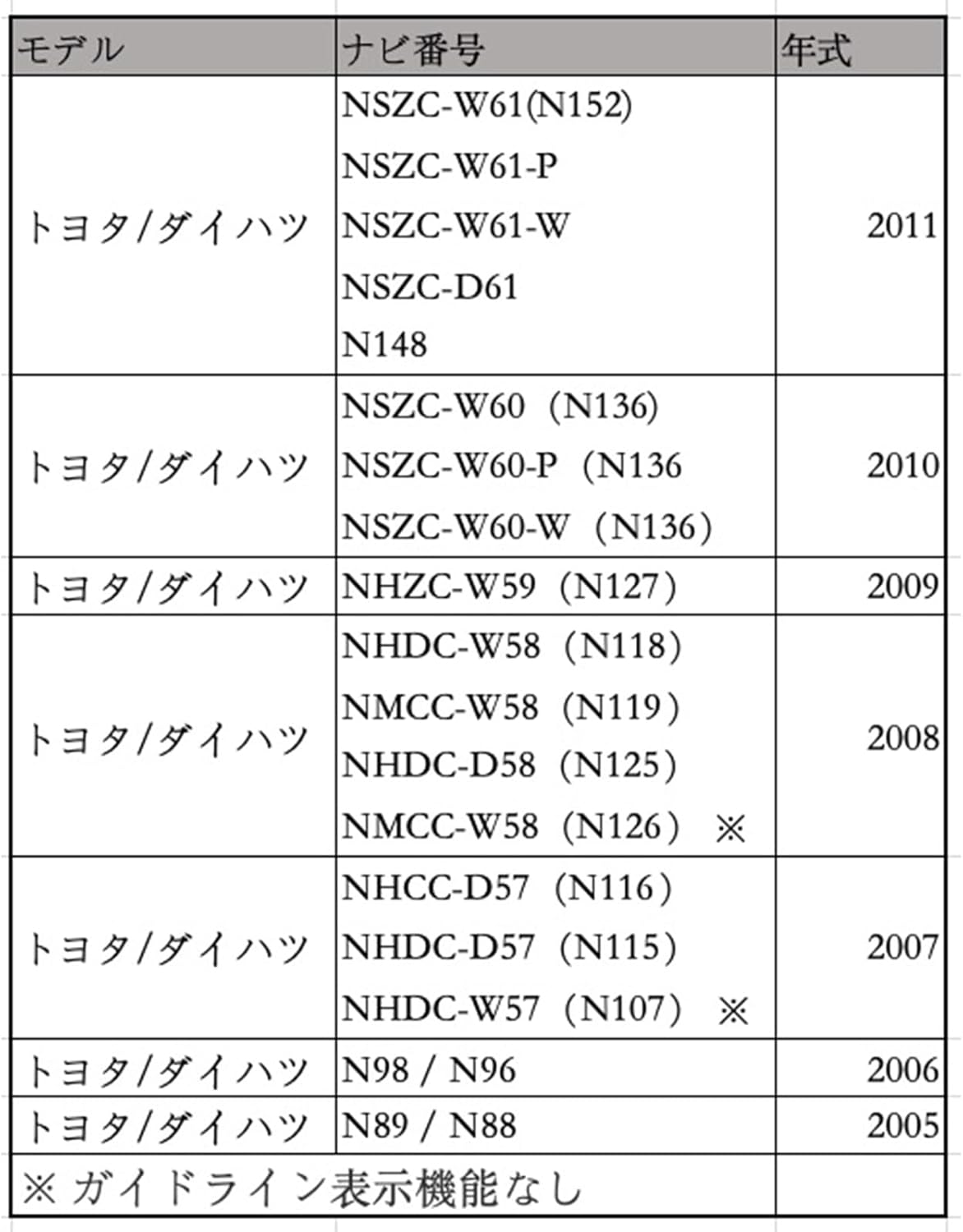
Image 5: Honda Compatibility Table. This table lists various Honda navigation models and their corresponding model years that are compatible with this adapter.
Honda Models:
- 2010: VXH-112VS, VXM-118VS, VXM-118C
- 2009: VXH-108VFi, VXH-108VF, VXM-105CF, VXS-102VFi, VXS-102VSi, VXM-108CS
- 2008: VXH-098CVU, VXH-098CV, VXH-093CVi, VXH-092CV, VXS-092CVi, VKM-090, VXM-090CV, VXM-095C
Toyota / Daihatsu Compatibility

Image 6: Toyota and Daihatsu Compatibility Table. This table lists various Toyota and Daihatsu navigation models and their corresponding model years that are compatible with this adapter. Models marked with an asterisk (*) do not have a guideline display function.
Toyota / Daihatsu Models:
- 2011: NSZC-W61 (N152), NSZC-W61-P, NSZC-W61-W, NSZC-D61, N148
- 2010: NSZC-W60 (N136), NSZC-W60-P (N136), NSZC-W60-W (N136)
- 2009: NHZC-W59 (N127)
- 2008: NHDC-W58 (N118), NMCC-W58 (N119), NHDC-D58 (N125), NMCC-W58 (N126) *
- 2007: NHCC-D57 (N116), NHDC-D57 (N115), NHDC-W57 (N107) *
- 2006: N98 / N96
- 2005: N89 / N88
* Models marked with an asterisk do not have a guideline display function.
Mazda Compatibility

Image 7: Mazda Compatibility Table. This table lists various Mazda navigation models and their corresponding model years that are compatible with this adapter.
Mazda Models:
- 2014: CA9K3 (C9K3 / V6 / 650)
- 2013: CA9PA (C9PA / V6 / 650)
- 2012: C9P8 (C9P8 / V6 / 650)
- 2011: C9M2 (C9M2 / V6 / 650)
- 2010: C9P6 (C9P6 / V6 / 650)
7. Troubleshooting
- No Camera Image:
- Ensure all connections (adapter to navigation, camera to adapter, camera power) are secure.
- Verify that the rear view camera is receiving power.
- Check if the navigation unit is receiving the reverse signal.
- Confirm that your camera is a CMOS type, as this adapter may not support other types.
- Ensure your navigation model is listed in the compatibility tables.
- No Guidelines Displayed:
- Some navigation models (e.g., certain Toyota/Daihatsu models marked with *) do not have a guideline display function. This is a limitation of the navigation unit, not the adapter.
- Check your navigation system's settings to ensure the guideline display feature is enabled, if available.
- Intermittent Signal:
- Re-check all cable connections for looseness or damage.
- Ensure the cable is not pinched or excessively bent during installation.
8. Specifications
| Feature | Specification |
|---|---|
| Product Name | Rear View Camera RCA Conversion Cable Adapter |
| Model Number | B3-003 |
| Brand | WeCar |
| Replacement for | CCA-644-500 |
| Cable Length | Approx. 22 cm |
| Input Connector (Camera Side) | RCA Female (Yellow) |
| Output Connector (Navigation Side) | Proprietary (Green) |
| Supported Camera Type | CMOS Rear View Cameras |
9. Maintenance
The WeCar Rear View Camera RCA Conversion Cable Adapter requires minimal maintenance.
- Cleaning: If the adapter becomes dirty, gently wipe it with a soft, dry cloth. Do not use harsh chemicals or abrasive cleaners.
- Connection Check: Periodically check that all connections remain secure, especially if you experience any issues with the camera display.
- Avoid Damage: Ensure the cable is not subjected to excessive pulling, bending, or pinching, which could damage the internal wiring.
10. Warranty and Support
For information regarding warranty coverage or technical support, please refer to the seller's policies or contact the manufacturer directly. Keep your purchase receipt as proof of purchase.
Manufacturer/Brand: WeCar
For further assistance, please visit the WeCar brand page on Amazon.co.jp.
Ask a question about this manual
Ask about setup, troubleshooting, compatibility, parts, safety, or missing instructions. Manuals+ will review the question and use this page’s manual context to help answer it.