
1. Introduction
Thank you for choosing the AiJoy Surge Protector Power Strip Tower. This device is designed to provide a centralized and protected power solution for your electronic devices, offering multiple AC outlets and USB charging ports. Please read this manual thoroughly before use to ensure safe and optimal operation.

Image 1.1: The AiJoy Surge Protector Power Strip Tower in use, demonstrating its compact design and multiple connectivity options for various devices like laptops, phones, and earbuds.
2. Safety Instructions
To prevent fire, electric shock, or injury, always follow these basic safety precautions:
- Do not exceed the maximum load capacity of 1250W or 10A.
- This product is for indoor use only. Do not expose to moisture or use in wet environments.
- Do not disassemble, modify, or attempt to repair the unit. Contact qualified service personnel for repairs.
- Keep away from heat sources, direct sunlight, and flammable materials.
- Ensure the power cord is fully inserted into a grounded wall outlet.
- Do not use with extension cords that are not properly rated for the product.
- Avoid running the power cord under carpets or placing heavy objects on it.
- Unplug the power strip from the wall outlet when not in use for extended periods.
3. Product Features
The AiJoy Surge Protector Power Strip Tower offers a range of features for efficient and safe power distribution:
- 12-in-1 Power Solution: Equipped with 8 wide-spaced AC outlets and 4 USB ports (3 USB-A, 1 USB-C) to power up to 12 devices simultaneously.
- Smart USB Charging: Features 3 USB-A ports (5V/2.4A max) and 1 USB-C port (5V/3A max), with a total USB output of 5V/3.1A. These ports intelligently detect connected devices to deliver optimal charging speeds.
- 10 FT Flat Extension Cord: An ultra-thin 0.34-inch flat plug and a 45° right-angle design allow for discreet placement behind furniture without blocking adjacent outlets. The 10-foot cord provides extended reach.
- Comprehensive Surge Protection: Integrated 1050 Joules surge protection, 1250W overload protection, 1382°F overheat protection, and short-circuit protection safeguard your electronics.
- Dual Power Switches: Convenient on/off switches located on the top of the unit provide easy control over power to connected devices.
- Space-Saving Tower Design: The vertical tower design with outlets on four sides helps organize your workspace and reduces clutter.

Image 3.1: Close-up view of the Smart USB Charging Station, highlighting the USB-A and USB-C ports and their respective maximum outputs.

Image 3.2: Illustration of the ultra-thin flat plug design, demonstrating how it fits flush against a wall compared to a standard plug, allowing furniture to be placed closer.
4. Setup Instructions
- Unpack the Unit: Carefully remove the power strip tower from its packaging. Inspect for any signs of damage.
- Choose a Location: Place the power strip tower on a stable, flat surface, away from water, heat, and direct sunlight. Ensure adequate ventilation around the unit.
- Connect to Power: Plug the 10 FT flat extension cord into a standard 3-prong (Type B) grounded wall outlet. The flat plug design allows for placement behind furniture.
- Power On: Press the main power switch on the top of the tower. The indicator light should illuminate, confirming the unit is receiving power.
- Connect Devices: Plug your electronic devices into the available AC outlets and USB ports. Ensure devices are compatible with the power strip's voltage and current ratings.

Image 4.1: Detail of the flat plug, designed for minimal protrusion from the wall outlet.
5. Operating Instructions
Using your AiJoy Surge Protector Power Strip Tower is straightforward:
- Power On/Off: Use the dual switches located on the top of the tower to turn the power strip on or off. Pressing a switch will control the power to all connected outlets and USB ports.
- AC Outlets: Plug your AC-powered devices directly into any of the 8 available outlets. The wide spacing accommodates larger power adapters.
- USB Charging: Connect your USB-powered devices (smartphones, tablets, earbuds, etc.) to the USB-A or USB-C ports. The intelligent charging technology will deliver the appropriate power.
- Surge Protection Indicator: A red indicator light (if present) on the unit signifies that the surge protection is active and functioning. If this light is off, the surge protection may have been compromised, and the unit should be replaced.

Image 5.1: Detail of the power switch located on the top of the unit for easy control.
6. Maintenance
Proper maintenance ensures the longevity and safe operation of your power strip tower:
- Cleaning: Disconnect the power strip from the wall outlet before cleaning. Use a soft, dry cloth to wipe the exterior. Do not use liquid cleaners or aerosols.
- Inspection: Periodically inspect the power cord and the unit for any signs of damage, such as frayed wires, cracks, or loose connections. If damage is found, discontinue use immediately and replace the unit.
- Storage: When not in use, store the power strip in a cool, dry place, away from direct sunlight and extreme temperatures.
7. Troubleshooting
If you encounter issues with your AiJoy Surge Protector Power Strip Tower, refer to the following common problems and solutions:
- Problem: No power to connected devices.
- Solution:
- Ensure the power strip is firmly plugged into a working wall outlet.
- Check that the power switch on the tower is in the 'ON' position.
- Verify that the wall outlet itself is functional by plugging in another device.
- The overload protection may have tripped. Unplug all devices, press the reset button (if available, often combined with the power switch), and then reconnect devices one by one.
- Problem: USB ports are not charging devices.
- Solution:
- Ensure the power strip is turned on.
- Try a different USB cable or device to rule out a faulty cable or device.
- Ensure the device is compatible with the USB port's voltage and current output.
- If a red flashing light is observed near the USB ports, it may indicate an issue with the USB circuit. Disconnect all USB devices and restart the power strip. If the issue persists, the unit may require replacement.
- Problem: Surge protection indicator light is off.
- Solution:
- If the surge protection indicator light is off, it means the surge protection components have absorbed a significant surge and are no longer providing protection. While the power strip may still function as an extension cord, it is recommended to replace the unit to ensure continued protection for your devices.

Image 7.1: Visual representation of the multiple protection features including over current, over voltage, surge, overload, short circuit, and overheat resistance.
8. Specifications
| Brand | AiJoy |
| Model | B0D62RS4V6 |
| Color | Black |
| Total AC Outlets | 8 |
| Total USB Ports | 4 (3 USB-A, 1 USB-C) |
| USB-A Output | 5V/2.4A Max per port |
| USB-C Output | 5V/3A Max |
| Total USB Output | 5V/3.1A |
| Voltage | 125V |
| Maximum Current | 10 Amps |
| Maximum Power | 1250W |
| Surge Protection Rating | 1050 Joules |
| Cord Length | 10 FT |
| Plug Type | Type B - 3 pin (North American) |
| Material | Acrylonitrile Butadiene Styrene |
| Special Features | On/Off Switch, Surge Protection, Overload Protection, Overheat Protection, Short-Circuit Protection, Flat Plug |
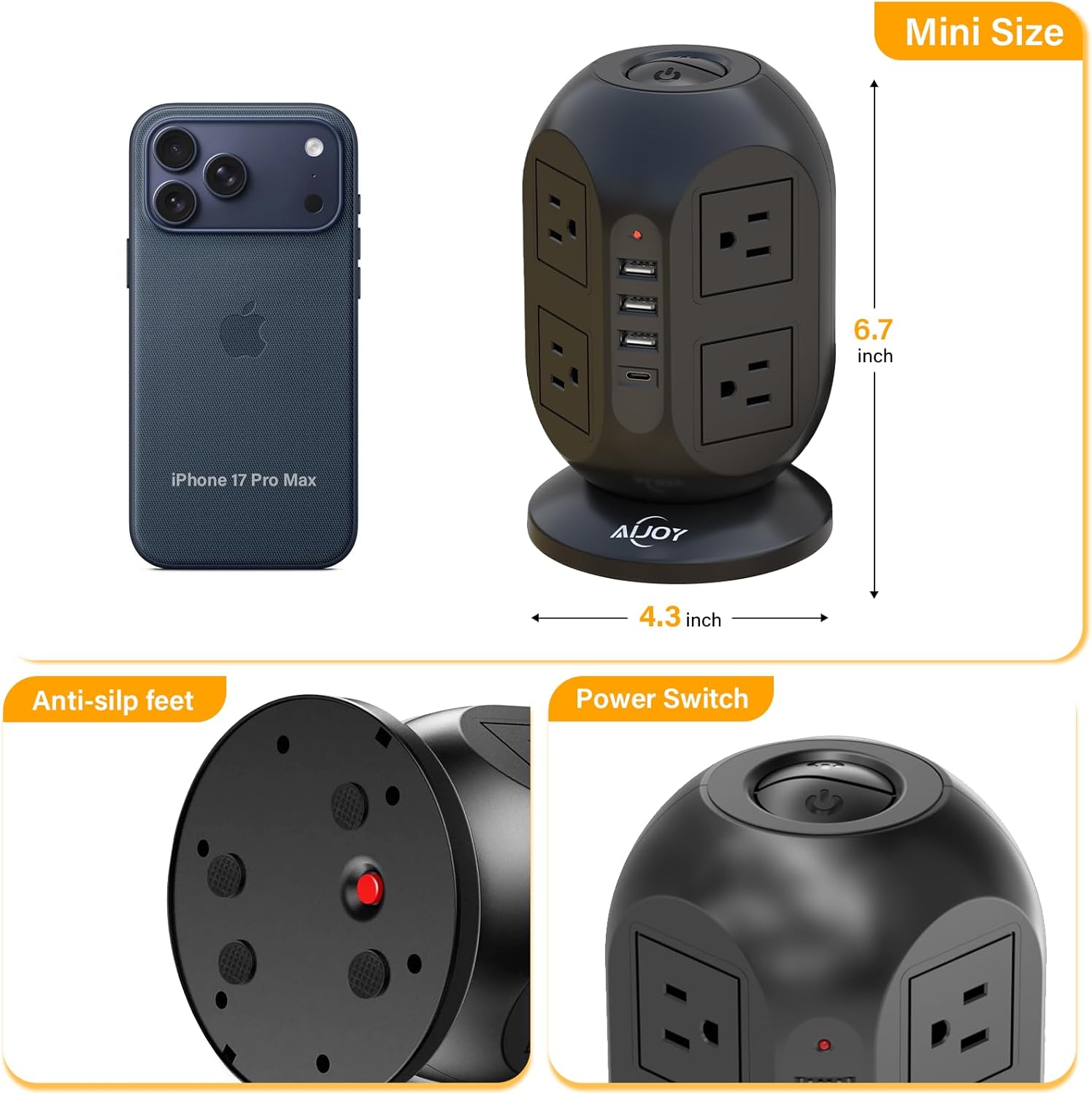
Image 8.1: Product dimensions (6.7 inches height, 4.3 inches width) and details of anti-slip feet and power switch.
9. Warranty and Support
This AiJoy Surge Protector Power Strip Tower comes with a 24-Month Warranty from the date of purchase. This warranty covers manufacturing defects and workmanship under normal use.
For warranty claims, technical support, or any questions regarding your product, please contact AiJoy customer service through the retailer's platform where the product was purchased or visit the official AiJoy website for contact information. Please have your model number (B0D62RS4V6) and proof of purchase ready when contacting support.