
Product Overview
The Mozzoom MPB01 Portable Blender is designed for convenient preparation of smoothies, shakes, and juices on the go. Featuring a vacuum-insulated stainless steel body, it maintains beverage temperature for extended periods. Its compact design, USB-rechargeable battery, and safety features make it suitable for various environments, including office, gym, travel, and outdoor activities.

Image: The Mozzoom MPB01 Portable Blender in green, shown with its lid open and surrounded by fruit slices and ice cubes, illustrating its blending capabilities.
Included Components:
- Portable Blender Unit
- Cup lid with built-in sipping spout
- Two flexible straws (different lengths)
- One rigid straw
- Straw brush
- Cup brush
- Charging cable (Type-C)
- Instruction Manual (this document)
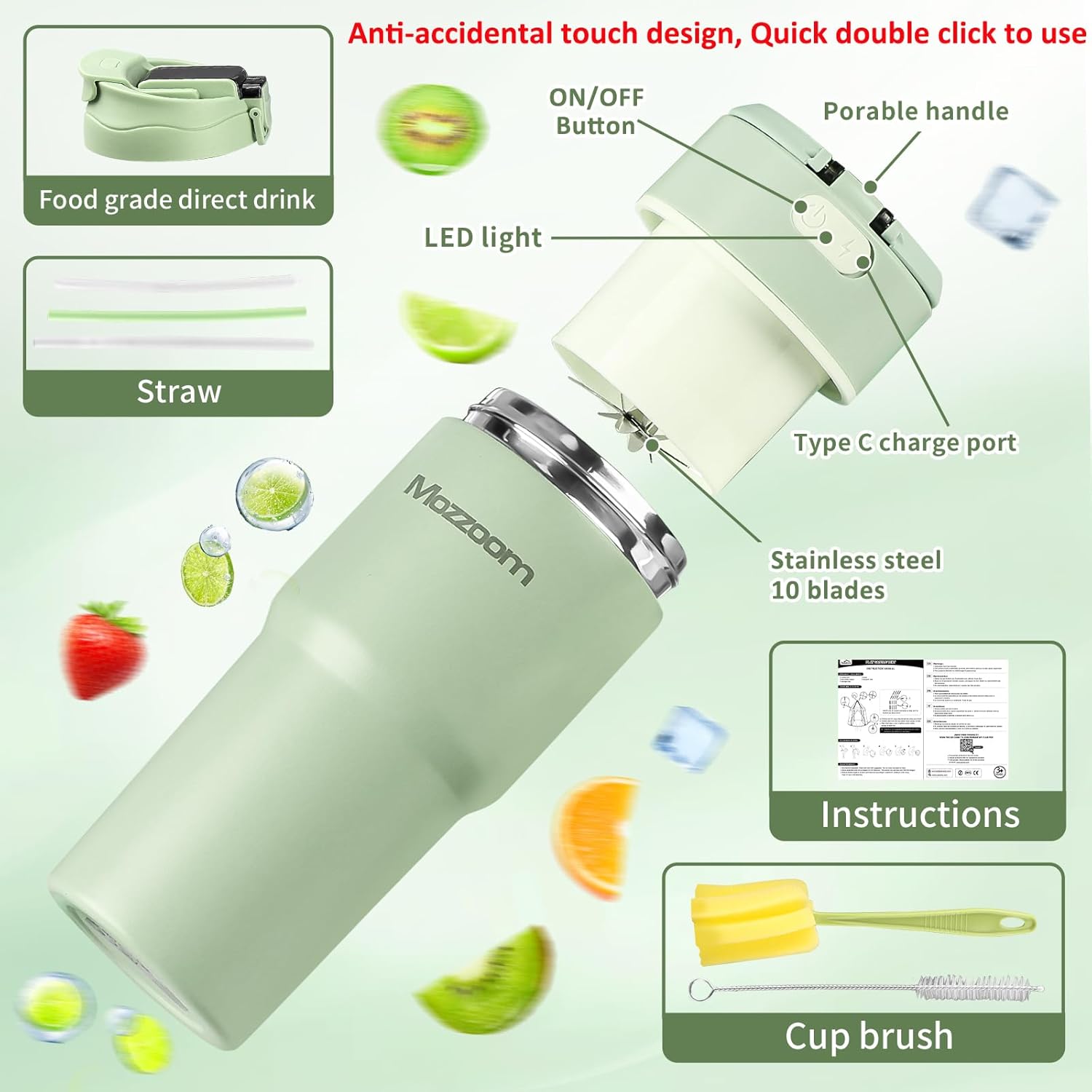
Image: An exploded view diagram of the Mozzoom MPB01 Portable Blender, highlighting its various parts including the ON/OFF button, LED light, portable handle, Type-C charge port, stainless steel blades, and included accessories like straws and cleaning brushes.
Safety Information
- Read all instructions before use.
- Keep out of reach of children.
- Ensure the lid is securely tightened before operating the blender. The blender features a magnetic sensor technology that prevents operation if the lid is not properly installed.
- Do not immerse the main motor unit in water. The blender cup is IP67 waterproof for washing, but the charging port area should be kept dry.
- Do not operate the blender when empty.
- Avoid placing hands or utensils inside the blender cup while the blades are active.
- Use only the provided charging cable.
- Do not exceed the maximum fill line indicated on the cup.
- Do not blend hot liquids that exceed 60°C (140°F) to prevent pressure buildup.
Setup and First Use
- Unpack and Inspect: Carefully remove all components from the packaging. Inspect for any damage.
- Initial Charge: Before first use, fully charge the blender using the provided Type-C charging cable. The LED indicator will show charging status.
- Clean Components: Wash the blender cup, lid, and straws with warm soapy water. Use the provided cup brush and straw brush for thorough cleaning. Rinse thoroughly and dry.
Operating Instructions
Preparing Ingredients:
- Cut fruits and vegetables into small pieces, approximately 0.6 x 0.6 inches (1.5 x 1.5 cm).
- Fill the blender with fruit up to 20% of its capacity.
- Add liquid (water, milk, juice, etc.) up to 60% of its capacity, ensuring not to exceed the maximum fill line.
- For best results, avoid overfilling.

Image: A visual guide showing how to prepare ingredients by cutting fruit into small pieces and adding liquid to the blender cup, ensuring not to overfill.
Blending Process:
- Secure the Lid: Place the lid onto the blender cup and twist it clockwise until it is securely tightened. The blender will not operate if the lid is not properly aligned and secured due to its safety sensor.
- Activate Blending: Due to the anti-accidental touch design, double-click the power button located on the lid to start the blending cycle.
- Blend: For optimal blending, turn the blender upside down after activation. This allows gravity to assist in mixing ingredients and ensures thorough blending. A typical blending cycle lasts approximately 40 seconds.
- Repeat if Necessary: If the desired consistency is not achieved after one cycle, gently shake the blender and double-click the power button again for another cycle.

Image: A hand demonstrating how to securely twist and lock the lid onto the Mozzoom portable blender, emphasizing the safety feature that requires proper lid placement for operation.

Image: A finger double-clicking the power button on the blender lid, illustrating the activation method for the anti-accidental touch design.

Image: The Mozzoom portable blender shown in an inverted position during operation, demonstrating the recommended method for effective blending.
Insulation Feature:
The vacuum-insulated stainless steel design allows the blender to keep beverages cold for up to 8 hours or hot for up to 8 hours. This feature is active when the blender is not in use for blending, functioning as an insulated travel mug.

Image: A split image illustrating the Mozzoom portable blender's ability to keep beverages cold for 8 hours (with ice and fruit) and hot for 8 hours (with coffee), suitable for various environments.
Charging the Blender
- Connect the provided Type-C charging cable to the charging port on the blender lid.
- Connect the other end of the cable to a standard USB power adapter (not included) or a USB port.
- The LED indicator will illuminate to show charging status.
- A full charge typically allows for 8-10 blending cycles.
Maintenance and Cleaning
- Daily Cleaning: After each use, rinse the blender cup and lid immediately. For a more thorough clean, add a small amount of water and a drop of dish soap to the cup, secure the lid, and double-click to run a short blending cycle. Rinse thoroughly.
- Deep Cleaning: The blender cup is IP67 waterproof, allowing for worry-free washing with water. Use the provided cup brush to clean the interior of the cup and the straw brush for the straws.
- Motor Unit: Wipe the motor unit (the base with the charging port and power button) with a damp cloth. Do not submerge the motor unit in water.
- Storage: Ensure all parts are completely dry before storing. Store in a cool, dry place.
Troubleshooting
| Problem | Possible Cause | Solution |
|---|---|---|
| Blender does not start. |
|
|
| Ingredients are not blending smoothly. |
|
|
| Blender stops unexpectedly. |
|
|
| Leakage from the lid. |
|
|
Specifications
| Brand | Mozzoom |
| Model Number | MPB01 |
| Color | Green |
| Capacity | 15 ounces (for smoothies/slushies), 25 ounces (for water/juice blending) |
| Product Dimensions | 8"D x 3.9"W x 3.9"H |
| Power Source | Battery Powered (1 Lithium Ion battery included) |
| Voltage | 7.4 Volts |
| Number of Speeds | 1 |
| Controls Type | Anti-accidental touch design, double-click to use |
| Material Type Free | BPA Free |
| Item Weight | 1.72 pounds |
| Special Feature | Portable, Vacuum Insulated (Keeps Cold/Hot) |
Warranty and Support
Warranty Information:
This Mozzoom MPB01 Portable Blender comes with a 1 Year Limited Warranty from the date of purchase. This warranty covers manufacturing defects under normal use. It does not cover damage resulting from misuse, accident, alteration, or unauthorized repair.
Customer Support:
For any questions, concerns, or warranty claims, please contact Mozzoom customer support. Our team is available 24/7 to assist you.
Please refer to your purchase documentation or the Mozzoom official website for the most current contact information.