Introduction
This manual provides essential information for the proper setup, operation, and maintenance of your new replacement infrared remote control. This remote is designed to be compatible with specific soundbar home theater systems, including I.Sound ISOUND-5378, Bush B-6609, and Craig CHT912 Raylan models. Please read this manual thoroughly before use to ensure optimal performance and longevity of your remote control.
Important Note: This remote control operates via infrared (IR) technology. Ensure there are no obstructions between the remote and the soundbar's IR receiver. This remote does not include batteries or a detailed instruction manual for the original soundbar system. Functionality may vary slightly from the original remote depending on the specific soundbar model.
Product Overview
The remote control features a standard layout for controlling various functions of compatible soundbar systems. Familiarize yourself with the button layout as shown below.
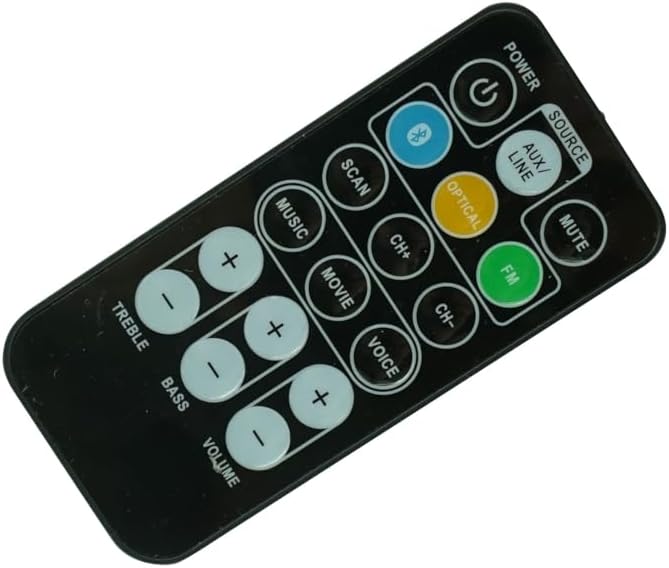
Figure 1: Front view of the remote control. This image displays the full button layout, including Power, Source, Mute, Bluetooth, Scan, Channel Up/Down, Music, Movie, Voice, FM, Optical, Aux/Line, Treble, Bass, and Volume controls.

Figure 2: Alternative front view of the remote control. This perspective provides a slightly different angle of the remote's face, highlighting the ergonomic design and button placement.
Button Functions:
- POWER: Turns the soundbar system on or off.
- SOURCE / AUX/LINE / OPTICAL / FM / BLUETOOTH: Selects the audio input source (e.g., Auxiliary, Line-in, Optical, FM Radio, Bluetooth).
- MUTE: Mutes or unmutes the sound.
- SCAN: Initiates a scan for FM radio stations.
- CH+ / CH-: Navigates through channels or tracks (functionality depends on source).
- MUSIC / MOVIE / VOICE: Selects preset equalizer modes optimized for different audio content.
- TREBLE (+/-): Adjusts the high-frequency audio level.
- BASS (+/-): Adjusts the low-frequency audio level.
- VOLUME (+/-): Increases or decreases the overall volume level.
Setup
Battery Installation:
The remote control requires two (2) CR2 batteries (not included) for operation. Follow these steps to install the batteries:
- Locate the battery compartment on the back of the remote control.
- Gently slide the battery compartment cover downwards or in the direction indicated by an arrow to open it.
- Insert two CR2 batteries, ensuring the positive (+) and negative (-) terminals align correctly with the markings inside the compartment.
- Slide the battery compartment cover back into place until it clicks securely.

Figure 3: Back view of the remote control with the battery compartment open. This image illustrates where the batteries are inserted and the orientation markings.
Note: Always use new batteries and replace both batteries at the same time. Do not mix old and new batteries or different types of batteries.
Compatibility Check:
Before attempting to use the remote, ensure your soundbar system's model number is one of the compatible models: I.Sound ISOUND-5378, Bush B-6609, or Craig CHT912 Raylan. While this remote is designed for these models, slight variations in soundbar firmware may affect the full functionality of every button. If your soundbar model is not listed, contact the seller for compatibility verification.
Operating Instructions
Point the remote control directly at the IR receiver on your soundbar system. Ensure there are no obstacles between the remote and the soundbar.
Basic Functions:
- Power On/Off: Press the POWER button once to turn the soundbar on or off.
- Source Selection: Press the SOURCE button repeatedly to cycle through available input sources (e.g., AUX/LINE, OPTICAL, FM, BLUETOOTH). Alternatively, some remotes may have dedicated buttons for each source.
- Mute/Unmute: Press the MUTE button to temporarily silence the audio. Press it again to restore the sound.
Audio Adjustments:
- Volume Control: Press VOLUME + to increase the volume and VOLUME - to decrease it.
- Treble Adjustment: Use the TREBLE + and TREBLE - buttons to fine-tune the high-frequency audio output.
- Bass Adjustment: Use the BASS + and BASS - buttons to adjust the low-frequency audio output.
Mode and Navigation:
- Sound Modes: Press MUSIC, MOVIE, or VOICE to switch between pre-configured audio equalization settings for different content types.
- Channel/Track Navigation: Use CH+ and CH- to navigate through radio stations in FM mode or tracks when playing media from certain sources.
- FM Scan: Press the SCAN button to automatically search for and save available FM radio stations.
Maintenance
Cleaning the Remote:
To clean the remote control, use a soft, dry cloth. For stubborn dirt, slightly dampen the cloth with water or a mild, non-abrasive cleaner. Do not use harsh chemicals, solvents, or abrasive cleaning pads, as these can damage the remote's surface or internal components.
Battery Replacement:
Replace batteries when the remote's range decreases significantly or if it stops responding. Refer to the "Battery Installation" section under "Setup" for detailed instructions. Always dispose of used batteries responsibly according to local regulations.
Storage:
When not in use for extended periods, it is recommended to remove the batteries from the remote control to prevent leakage, which can damage the device. Store the remote in a cool, dry place away from direct sunlight and extreme temperatures.
Troubleshooting
| Problem | Possible Cause | Solution |
|---|---|---|
| Remote not responding. | Dead or incorrectly installed batteries. | Replace batteries with new CR2 batteries, ensuring correct polarity. |
| Remote range is poor. | Low batteries; Obstruction between remote and soundbar. | Replace batteries. Ensure a clear line of sight to the soundbar's IR receiver. |
| Some buttons do not work. | Incompatibility with specific soundbar model features; Remote defect. | Verify soundbar model compatibility. Note that some advanced functions may not be supported by a replacement remote. If basic functions fail, contact seller. |
| Soundbar does not turn on. | Soundbar is unplugged or powered off; Remote issue. | Check soundbar's power connection. Ensure soundbar is not in standby mode. Test remote with new batteries. |
Specifications
- Product Type: Replacement Infrared (IR) Remote Control
- Compatibility: I.Sound ISOUND-5378, Bush B-6609, Craig CHT912 Raylan Bluetooth Soundbar Home Theater Systems
- Connectivity Technology: Infrared
- Power Source: 2 x CR2 Batteries (not included)
- Manufacturer: SZHKHXD
- Special Feature: Direct replacement for specified soundbar models
Support
For any questions, concerns, or troubleshooting assistance not covered in this manual, please contact the seller directly through the platform where the purchase was made. Provide your order details and a clear description of the issue for prompt support.
Seller Contact: Refer to your purchase history or order details for seller contact information.


